



Marketplace API Integration: How It Works and How to Do It Right
Marketplace API integration means connecting your APIs and gateways to an API marketplace so partners can find, subscribe to and pay for them. This guide covers publishing, gateway connections, onboarding, billing and catalog sync, with a checklist.

TL;DR:
What is marketplace API integration?
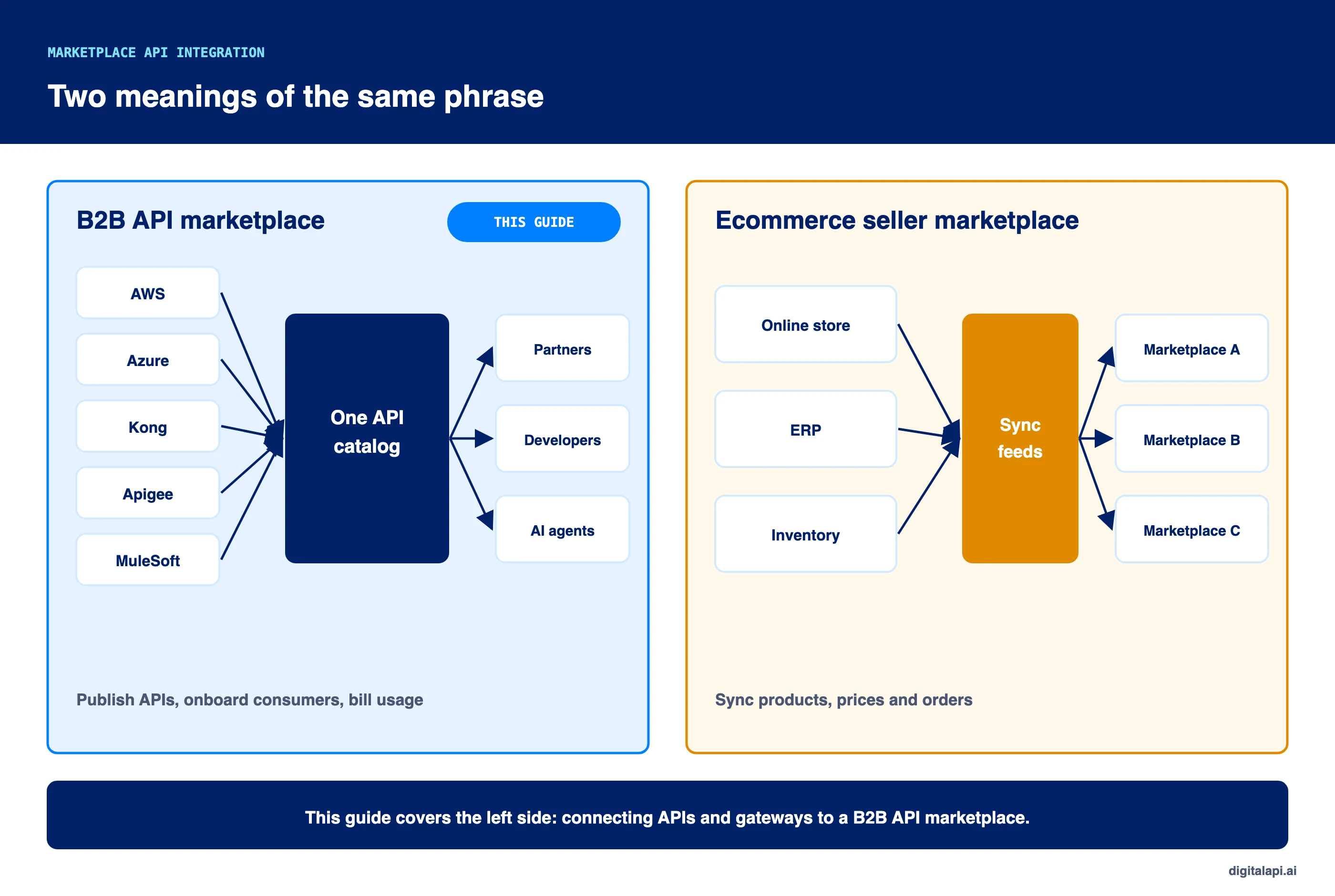
Marketplace API integration has two meanings. For API providers, it means connecting APIs and gateways to an API marketplace.
Partners can then find, subscribe to and pay for them. For online sellers, it means connecting store systems to selling platforms such as Amazon. This guide covers the first meaning.
Your payments APIs run on one gateway. Your partner APIs run on another. A third team shipped APIs last month on a cloud gateway nobody else uses. A partner asks for "your API catalog," and you send three links and a spreadsheet.
That is the problem marketplace API integration solves. It brings APIs from every gateway into one place where consumers can browse, test, subscribe and pay.
The business case is clear. Postman's 2025 State of the API report found 65% of organizations now generate revenue from their APIs. Revenue needs a storefront, and the storefront needs clean integrations behind it.
This guide covers publishing, gateway connections, onboarding, billing and catalog sync. It ends with a checklist you can use this quarter.
What does marketplace API integration mean?
Marketplace API integration is the work of connecting APIs to a marketplace so they can be discovered and consumed. In B2B, the marketplace is an API storefront for partners and developers. In ecommerce, it is a selling platform such as Amazon. The two share a name but solve different problems.
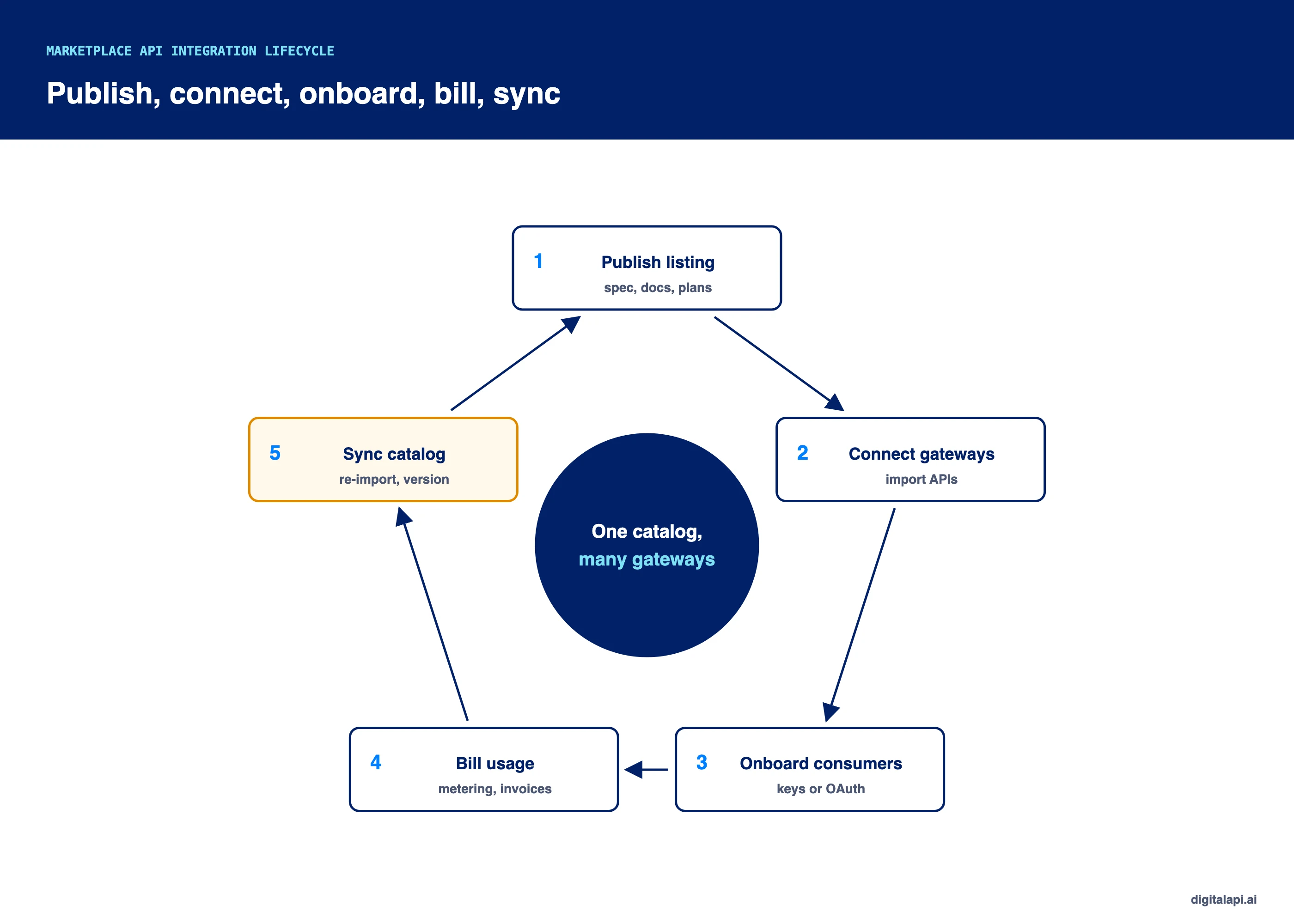
In the B2B sense, the integration covers five jobs:
- Publish API listings with specs, docs and plans.
- Connect the gateways that run the APIs.
- Onboard consumers with keys or OAuth clients.
- Bill for usage when APIs are paid.
- Sync the catalog when APIs change.
A marketplace API can also mean the marketplace's own API. Many marketplaces expose one so you can automate listings. Keep that in mind when you read vendor docs.
The rest of this guide follows those five jobs. For a ranked list of platforms, see the best API marketplaces.
How do you publish your APIs to a B2B API marketplace?
You publish an API by giving the marketplace a machine-readable contract, human-readable docs and at least one plan. The contract is usually an OpenAPI file. The plan defines who can call the API, how often and at what price.
A good listing has six parts:
- Contract. An OpenAPI Specification document, the standard format for describing HTTP APIs.
- Docs and examples. Guides, code samples and a "try it" console.
- Sandbox. A test environment with realistic responses, so developers can build before they pay.
- Plans. Rate limits, quotas and price per tier.
- Owner and support. A named team and a way to get help.
- Status and version. Which version is current, and what is deprecated.
Treat each listing as a product page. Developers judge an API by its docs before they read a line of its code.
Discovery is the reason this matters. The same Postman 2025 report found 93% of API teams struggle with collaboration. Teams named discovery problems and duplicate work among the common causes. A searchable catalog fixes the "we built it twice" problem.
How do you connect API gateways to an API marketplace?
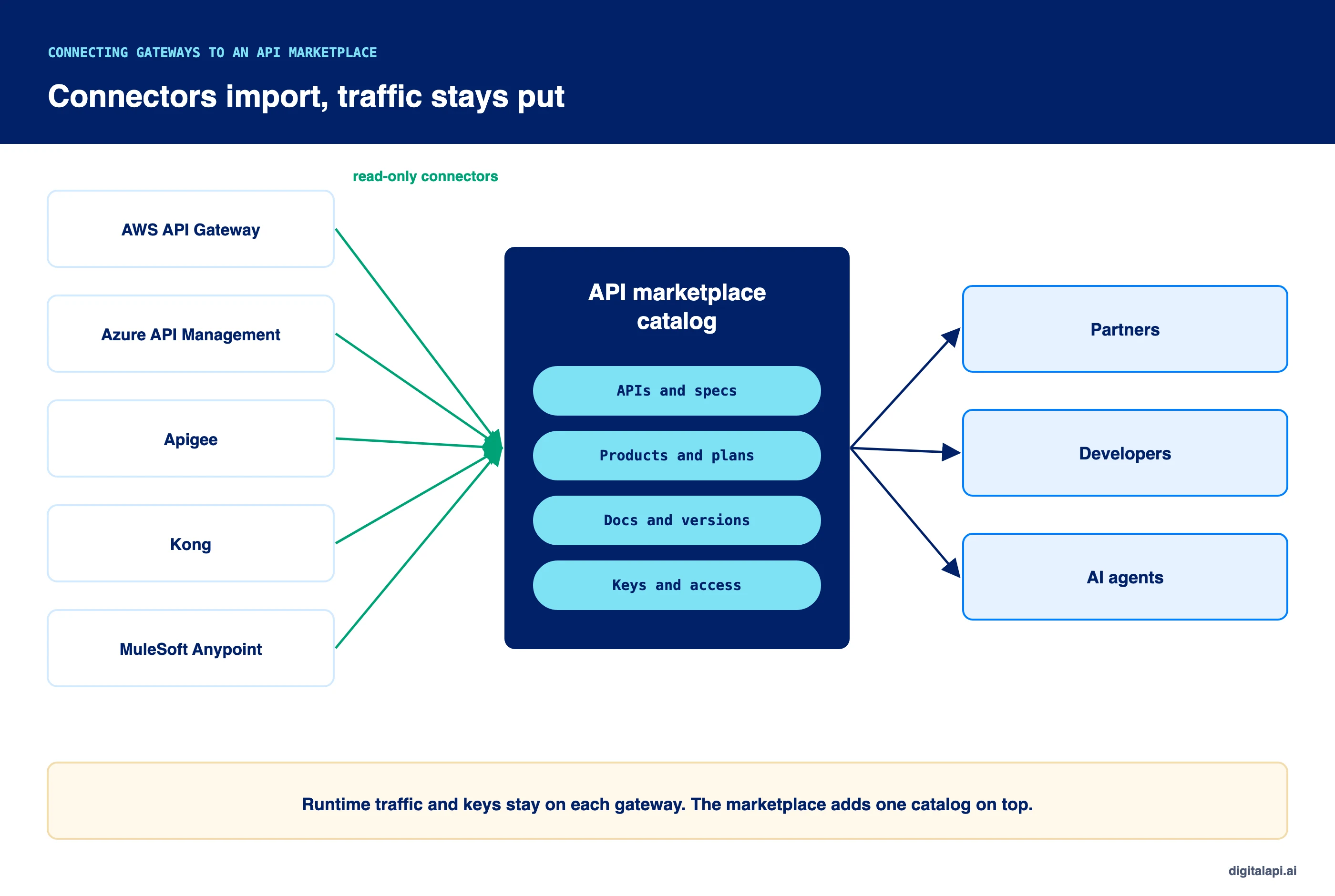
You connect a gateway by giving the marketplace read access to the gateway's management API, then importing APIs, products and specs. Traffic keeps flowing through the gateway. The marketplace only reads and lists what the gateway holds. This is the core of marketplace integration for enterprises that run more than one gateway.
There are four common integration methods. Most teams use two or three together.
Here are the steps to connect a gateway, in order:
- Create a read-only identity on the gateway. Use a dedicated service user or role. Never use admin credentials.
- Add the connection in the marketplace. Enter the account, region or organization and the credentials.
- Test the connection before you import anything.
- Import APIs and products. Bring across APIs, products, plans and quotas the gateway already holds.
- Map missing contracts. Some gateway routes carry no OpenAPI spec. Match them to specs from your repos.
- Review drafts, then publish. Check names, owners and docs before listings go live.
- Turn on usage collection so consumption shows in the marketplace.
Each gateway has its own fields and permissions. Follow the step-by-step guides for AWS API Gateway, Azure API Management and MuleSoft Anypoint.
This is where tooling saves the most time. DigitalAPI Gateway Connectors link 11 gateways, including Apigee, Kong, AWS, Azure and MuleSoft, to one catalog. Imports read each gateway in place, so nothing is migrated. Every import lands as a draft and goes live only after review.
How do consumers get access: keys, OAuth and plans?
Consumers get access by subscribing to a plan. The marketplace then issues credentials, either an API key or an OAuth 2.0 client, scoped to that plan. The gateway enforces the plan's limits on every call.
A clean onboarding flow looks like this:
- Sign up with an organization account, not a personal email alone.
- Create an app that groups the credentials for one project.
- Subscribe to a plan, with automatic or manual approval.
- Receive credentials in the portal, never by email.
- Call the sandbox, then switch to production when ready.
Where do the keys live? In a well-built integration, the gateway that runs the API creates them. The marketplace shows them to the consumer but does not become a second key store. For key design details, read how to implement API keys for an API marketplace.
How do you get API integration?
To get an API integration, find the API in a marketplace or developer portal and subscribe to a plan. Then get credentials and call it from your code. Start in the sandbox. Read the OpenAPI spec to generate a client in your language. Then move to production keys once your tests pass.
How does billing and monetization integration work?
Billing integration connects plan usage to invoices. The gateway meters calls, the marketplace rates them against the plan price, and a billing system charges the customer. Free plans still need metering, so you can see who uses what.
The common pricing models:
- Freemium. A free tier with limits, plus paid upgrades.
- Pre-paid. Customers buy a bundle of calls or credits up front.
- Post-paid. Usage is billed in arrears each month.
- Pay-per-use. A price per call or per transaction.
Three integration points keep money accurate:
- Usage feed. Pull call counts from each gateway's analytics, or receive them by webhook.
- Rating. Apply the plan's price, tiers and overage rules.
- Invoicing. Send rated usage to your billing or ERP system, and track payment status.
Teams that use the DigitalAPI API Marketplace can offer pre-paid, post-paid, pay-per-use and freemium plans from one portal. Usage tracking and billing integrations handle invoices and payment reminders.
How do you keep the marketplace catalog in sync?
Keep the catalog in sync by re-importing from the source of truth on a schedule. Version every change and review updates before they publish. A stale listing is worse than no listing. It sends developers to endpoints that no longer behave as documented.
Five habits prevent drift:
- Pick one source of truth per API. Either the gateway or the spec repo, not both.
- Re-import on a schedule or on every deploy, and update listings in place.
- Version with care. Publish v2 next to v1, and give consumers a deprecation date.
- Review changes as drafts. A breaking change should never reach the catalog unchecked.
- Alert on orphans. Flag listings whose API no longer exists on any gateway.
For the system design behind this, see how to design an API marketplace architecture.
What about ecommerce seller marketplaces like Amazon?
Ecommerce marketplace integration connects a seller's store, inventory and order systems to selling platforms. It moves products, prices, stock and orders, not API listings. It is a different job from a B2B API marketplace.
The main platforms publish their own seller APIs. The Amazon marketplace API for sellers is the Selling Partner API (SP-API). It is a set of REST APIs for listings, orders, inventory and reports. eBay and Walmart offer their own seller APIs.
Sellers usually connect through one of three routes:
- Direct integration with each platform's seller API.
- A unified ecommerce API that wraps several marketplaces behind one interface.
- An integration platform (iPaaS) with prebuilt connectors.
If that is your use case, the B2B steps above do not apply. Start with your platform's seller developer docs.
What should your marketplace API integration checklist include?
A complete marketplace API integration checklist covers listings, gateway connections, access, billing and sync. Use it before you invite your first external partner.
Listings
- Every API has an OpenAPI contract, docs, an owner and a version.
- Each API has a sandbox and at least one plan.
Gateway connections
- Each gateway uses a read-only, dedicated identity.
- Imports land as drafts and need approval.
Access
- Credentials are issued per app and per plan, never by email.
- OAuth 2.0 is used where consumers act for end users.
Billing
- Usage flows from every gateway into one place.
- Plans, overage rules and invoicing are tested end to end.
Sync
- Re-imports run on a schedule or on deploy.
- Deprecations have dates and consumer notices.
This approach is right for you if:
- You run two or more gateways and partners need one place to find APIs.
- You plan to charge for some APIs, now or within a year.
- Partner onboarding takes weeks because access is manual.
It is not right for you if:
- You expose a few internal APIs to one team. A developer portal on your single gateway is enough. See developer portal vs API marketplace.
- You sell physical goods and need ecommerce marketplace integration instead.
See how DigitalAPI brings APIs from every gateway into one marketplace, with plans, keys and billing built in → Book a Demo
Key takeaways
- Marketplace API integration has two meanings. B2B teams connect APIs and gateways to an API marketplace. Online sellers connect stores to platforms such as Amazon.
- Connect gateways, don't migrate them. Read-only connectors import APIs, products and specs while traffic stays put.
- Use more than one method. Combine gateway connectors with spec import and CI/CD pushes.
- Issue credentials per app and plan. Use API keys or OAuth 2.0, and never send keys by email.
- Meter everything, even free plans. Usage data drives billing, capacity planning and partner insight.
- Sync or lose trust. Re-import on a schedule, version changes and review drafts before publishing.
Frequently asked questions
1. What is marketplace API integration?
Marketplace API integration is the process of connecting APIs to a marketplace so consumers can find and use them. In B2B, it means publishing APIs and connecting gateways to an API marketplace, with onboarding, billing and catalog sync. In ecommerce, it means connecting a seller's store and order systems to platforms such as Amazon, eBay or Walmart.
2. How do I get API integration?
Find the API in a marketplace or the provider's developer portal. Create an account and an app, then subscribe to a plan. You receive an API key or OAuth 2.0 credentials. Test against the sandbox first, using the OpenAPI spec to generate a client. Switch to production credentials once your tests pass.
3. How do I connect an API gateway to an API marketplace?
Create a dedicated, read-only identity on the gateway. Add a connection in the marketplace with that identity and test it. Then import APIs, products and specs, map any missing contracts and review the drafts before publishing. Each gateway, such as AWS, Azure or MuleSoft, has its own fields and permissions.
4. What is the difference between an API marketplace and a developer portal?
A developer portal helps developers learn and use APIs, usually for one gateway or one team. An API marketplace adds a storefront model. It brings APIs from many sources into one catalog with plans, subscriptions, billing and analytics. Many enterprises start with a portal and grow into a marketplace as partner demand rises.
5. Can I get APIs for free from a marketplace?
Often, yes. Many API marketplaces list free APIs or offer freemium plans with limited calls each month. Paid tiers raise limits or add features and support. Free plans still require sign-up and credentials, so providers can track usage, prevent abuse and contact you about changes.
6. What is the Amazon marketplace API?
The Amazon marketplace API for sellers is the Selling Partner API, known as SP-API. It is a set of REST APIs that let sellers and their software partners manage listings, orders, inventory, shipping and reports. It is used for ecommerce marketplace integration, not for publishing your own APIs to partners.
7. How do you keep an API marketplace catalog in sync?
Choose one source of truth per API, either the gateway or the spec repo. Re-import on a schedule or on every deploy, and update listings in place. Publish new versions next to old ones with clear deprecation dates. Review changes as drafts so breaking changes never reach consumers unchecked.
Conclusion
Marketplace API integration turns scattered APIs into products partners can find, trust and pay for. In B2B, it means publishing listings, connecting gateways, onboarding consumers, billing usage and keeping the catalog in sync.
Start with one gateway and one partner-facing API. Connect it with read-only access, publish a complete listing and onboard one partner through self-service. Then add the next gateway.
Avoid moving APIs to make them visible. Connect each gateway where it is, and let the marketplace be the single front door.
Bring APIs from AWS, Azure, Apigee, Kong and MuleSoft into one governed catalog, with plans, keys and billing, using the DigitalAPI API Marketplace. Connect every gateway to one marketplace
Prefer a walkthrough? Book a Demo
Dhayalan Subramanian is Associate Director, Product Growth at DigitalAPI, where he leads go-to-market and product growth for the company’s multi-gateway API management platform. His work focuses on helping large enterprises and mid-market cloud companies consolidate APIs across AWS, Azure, Apigee, Kong, MuleSoft, and other gateways into a single control plane for governance, discovery, monetization, and agent consumption.
Dhayalan brings 14+ years of experience across product strategy, enterprise architecture, and engineering leadership. Earlier in his career, he held senior roles at Encora (as Associate Architect and Technical Manager), Mindtree (Technology Lead), Tech Mahindra (Technical Lead), and Primus Analytics, where he designed integration frameworks and delivered enterprise-grade digital platforms for global customers.
At DigitalAPI, he works directly with platform, integration, and developer experience leaders at Fortune 500 organizations to operationalize unified API catalogs, developer portals, and MCP-ready APIs. He writes regularly on API developer experience, API governance, and AI agent architectures.
One email a fortnight. Worth opening.
A short digest of what we're writing, what we're learning from customers, and the handful of links you'd actually want from us. No tracking pixels.