

How to Connect Azure API Management to an API Marketplace (2026 Guide)
Want your Azure API Management APIs listed alongside APIs from your other gateways? This guide shows you how to link an APIM instance to your API marketplace using OAuth or a SAS token. You will learn which values to collect, how to grant least-privilege access, and how to keep the connection working when secrets expire.


TL;DR: To connect Azure API Management to an API marketplace, you need four instance values: Service Name, Resource Group, Subscription ID and Management API URL. You also need credentials, either an App Registration (OAuth) or a SAS token. Give the App Registration the API Management Service Reader role on the instance. In DigitalAPI, open Manage API Sources, click the Azure tile, fill in the form, click Test connection, then Save.
Azure API Management was the second most used gateway in Postman’s 2024 State of the API Report, at 27% of respondents. The setup trips teams up in one place: permissions. Granting Contributor looks like a shortcut, but that role can also change and delete. This guide shows you the least-privilege path instead.
What does it mean to connect Azure API Management to an API marketplace?
A gateway connection is a saved, read-only link between your API marketplace and one Azure API Management instance. It lets the marketplace read your APIs, operations and configuration. It does not proxy traffic, and your APIs stay in Azure.
Here is what the connection does and does not do:
- It reads one API Management instance, named by Service Name, Resource Group and Subscription ID.
- It authenticates with OAuth (the default) or a SAS token.
- It stores your credentials encrypted at rest.
- It does not import APIs when you save it. You run the import as a separate step. See Importing APIs.
Is an Azure API Management connection right for you?
This is right for you if:
- Your APIs run on Azure API Management and you want them listed in one developer portal.
- You can create an App Registration, or your policy allows SAS tokens.
- You want Azure APIs to sit next to APIs from your other gateways.
This is not right for you if:
- Your API specs live only in Azure Repos or GitHub. Use a documentation source instead.
- Your APIs run on AWS API Gateway or MuleSoft. Use the AWS API Gateway connection guide or the MuleSoft Anypoint connection guide.
What do you need to connect Azure API Management to the API marketplace?
You need four instance values for every connection, plus credentials for the authentication type you pick. OAuth needs a Tenant ID, Client ID and Client Secret. SAS Token needs an Identifier and a Key.
How do you give the marketplace read-only access in Azure?
Assign the API Management Service Reader role to your App Registration on the instance. It is the least-privilege choice. It covers reading APIs, operations and configuration. You need this step only when you authenticate with OAuth.
- In the Azure portal, open API Management services and select your instance.
- Select Access control (IAM), then Add > Add role assignment.
- Search for the API Management Service Reader role, select it and click Next.
- Under Assign access to, choose User, group or service principal. Click Select members, find your App Registration by name, select its service principal and confirm.
- Click Review + assign.
Which scope should you pick? Scope the role to the instance, or its resource group, when you know which instance to import. If the portal should discover instances across a subscription, also assign Reader at the subscription scope.
Which roles should you avoid?
Avoid Contributor, because it can also change and delete. Use the broader Reader role only if the portal should discover other Azure resources too. Least privilege matters: stolen credentials were the top initial action in breaches, at 24%, according to the Verizon 2024 Data Breach Investigations Report.
One exception: developer self-subscription needs a contributor-level role. With it, the portal creates users and subscriptions in API Management. Grant it only if you use that feature.
Where do you find each Azure value?
Start at portal.azure.com, search for API Management services and select your instance. The four instance values sit on that instance. The credentials depend on the Authentication Type you choose.
Service Name and Resource Group: Open the instance’s Overview. The resource name is the Service Name. The Resource Group appears under Essentials.
Subscription ID: Find it on the same Overview page under Essentials, or on the Subscriptions blade.
Management API URL: This is usually https://management.azure.com.
Tenant ID, Client ID and Client Secret (OAuth):
- Tenant ID: go to Microsoft Entra ID > Overview, or your App Registration > Overview. Copy the Directory (tenant) ID.
- Client ID: go to App Registration > Overview and copy the Application (client) ID.
- Client Secret: go to App Registration > Certificates and secrets > New client secret. Copy the Value right away, because Azure hides it afterwards.
Identifier and Key (SAS Token): Go to API Management > Deployment + Infrastructure > Management API > Credentials. Copy the Identifier and the Primary Key.
How do you add the Azure connection, step by step?
Open Manage API Sources, click the Azure tile, fill in the form, test, then save. Once your values are ready, the form takes a few minutes.
- In the portal’s left sidebar, select Manage API Sources under API Management.
- Under API Gateways, click the Azure tile.
- Enter a Connection Name and an optional Description.
- Enter the Service Name, Resource Group and Subscription ID.
- Enter the Management API URL.
- Choose the Authentication Type. For OAuth, enter the Tenant ID, Client ID and Client Secret. For SAS Token, enter the Identifier and Key.
- Click Test connection and wait for the banner. Green means the marketplace authenticated.
- Click Save Connection. The connection appears under Existing API Sources with Import APIs, Edit and Delete Connection actions.
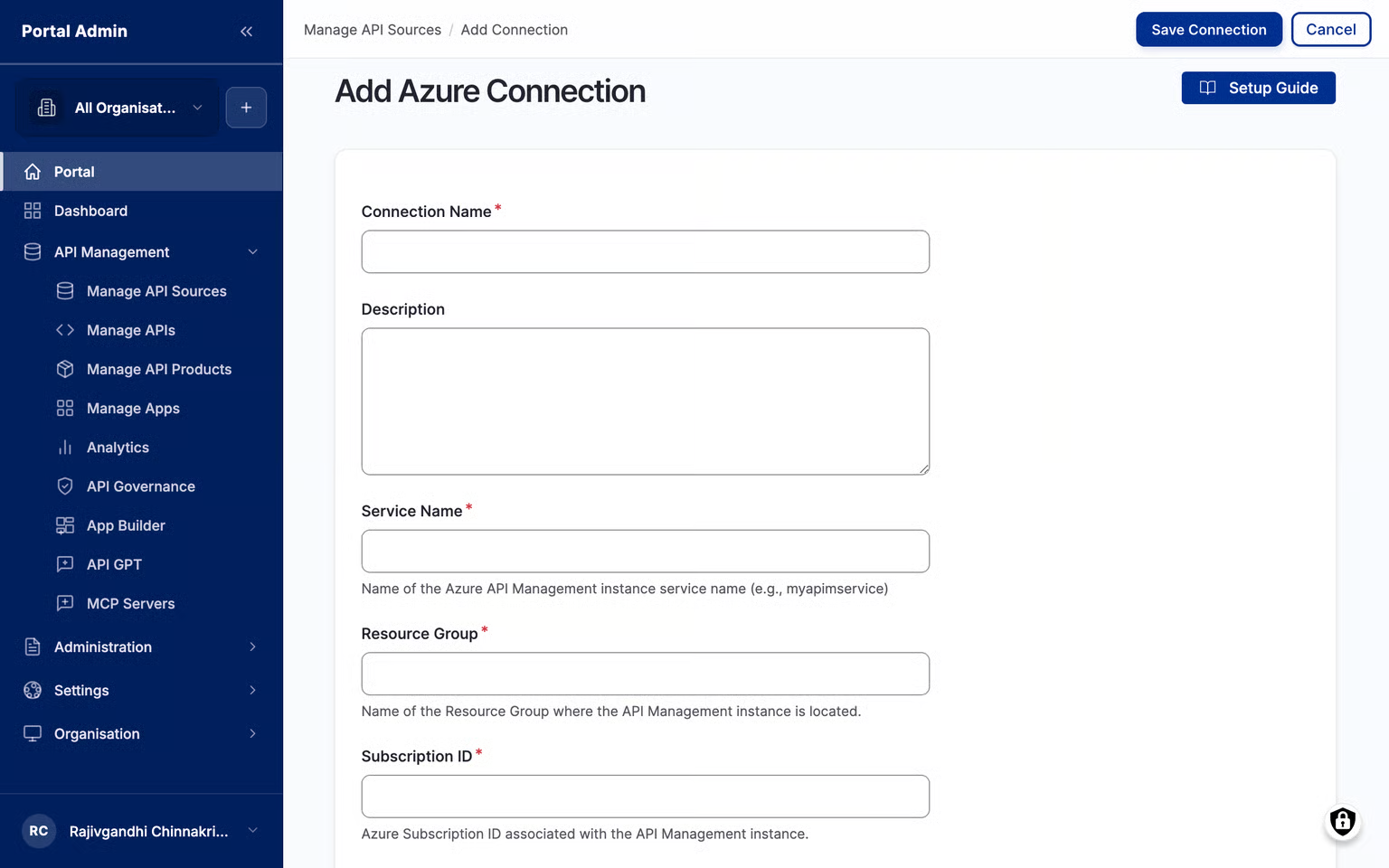
Saving does not import APIs. When you are ready, click Import APIs on the saved connection.
What should you do if Test connection fails?
A failed test usually means the role is not assigned on the instance, or the client secret has expired. Test connection checks the OAuth token, or the SAS token. It also checks that the service principal can read the instance. The red banner names the step that failed.
You can save a connection that fails the test, but it cannot import APIs. Fix the field the banner names and test again until it turns green.
How do you keep the connection working?
- Rotate secrets on time: client secrets expire. Set a reminder and rotate before the next scheduled import, or imports stop. Microsoft’s identity platform guidance recommends client secrets that expire in under 12 months, with a 24-month maximum.
- Update the connection: click Edit in Existing API Sources. Secret fields come back blank, so paste the new secret, test, then save. Imported APIs and subscriptions stay in place.
- Remove with care: Delete Connection unlinks every API imported from it. Apps subscribed to those APIs lose access on the next request.
Frequently asked questions
1. Which Azure role does an API marketplace need for API Management?
The API Management Service Reader role on the instance or its resource group. It is the least-privilege role for reading APIs, operations and configuration. Add Reader at subscription scope only if the portal should discover instances across a subscription.
2. Should I use OAuth or a SAS token for Azure API Management?
OAuth is the default and works with an App Registration and a role assignment. Use a SAS token when your environment does not allow OAuth. SAS needs the Identifier and Primary Key from Management API > Credentials.
3. Why did my Azure connection stop importing APIs?
The most common reason is an expired client secret. Create a new secret in your App Registration, edit the connection, paste the new Value, test and save. Then rerun the import.
4. Can developers subscribe to Azure APIs from the marketplace?
Yes, but developer self-subscription needs a contributor-level role, not a read-only one. With it, the portal creates users and subscriptions in API Management. Grant it only if you use that feature.
5. Can I connect Azure API Management and AWS to the same marketplace?
Yes. You can add any number of connections, including several Azure instances. IDC’s June 2024 survey found 33% of organizations use more than one API gateway provider.
What happens after you connect Azure API Management to the API marketplace?
Your Azure APIs join one catalog with APIs from every other gateway you run. Developers search one portal instead of several consoles. Your platform team reviews and publishes from one place.
That matters at scale. IDC’s June 2024 AI-Enhanced Connectivity Automation Survey found 40% of organizations run at least two API management tools. Postman’s 2024 report says the average application runs on 26 to 50 APIs.
Teams using DigitalAPI bring Azure APIs into a single catalog, then run API governance checks and publish them from the same portal.
Your next steps:
- Import your APIs: Importing APIs
- Connect your other gateways: AWS API Gateway connection guide and MuleSoft Anypoint connection guide
- Go deeper: How to catalog Azure APIs the right way
- Go Deeper: Why Azure teams go beyond the default developer portal
- See DigitalAPI's Product: DigitalAPI API Marketplace
- Learn the bigger picture: What is an API marketplace?
- See every supported gateway: Gateway connections reference
See how DigitalAPI turns APIs from Azure into one searchable marketplace. Request a demo
Dhayalan Subramanian is Associate Director, Product Growth at DigitalAPI, where he leads go-to-market and product growth for the company’s multi-gateway API management platform. His work focuses on helping large enterprises and mid-market cloud companies consolidate APIs across AWS, Azure, Apigee, Kong, MuleSoft, and other gateways into a single control plane for governance, discovery, monetization, and agent consumption.
Dhayalan brings 14+ years of experience across product strategy, enterprise architecture, and engineering leadership. Earlier in his career, he held senior roles at Encora (as Associate Architect and Technical Manager), Mindtree (Technology Lead), Tech Mahindra (Technical Lead), and Primus Analytics, where he designed integration frameworks and delivered enterprise-grade digital platforms for global customers.
At DigitalAPI, he works directly with platform, integration, and developer experience leaders at Fortune 500 organizations to operationalize unified API catalogs, developer portals, and MCP-ready APIs. He writes regularly on API developer experience, API governance, and AI agent architectures.


One email a fortnight. Worth opening.
A short digest of what we're writing, what we're learning from customers, and the handful of links you'd actually want from us. No tracking pixels.