











Convert Any API Into an MCP Server Your AI Agents Can Use
Paste an OpenAPI URL, connect GitHub or Postman, and MCP Studio analyses your endpoints, maps authentication, and publishes a secure Model Context Protocol server, no boilerplate, no hand-written wrappers.
Free trial · Live MCP server in five steps · Secured by MCP Gateway
The MCP Studio workflow
Secured by MCP Gateway

1. Import
From URL, file, GitHub or Postman

2. Analyze
Schema, auth & capabilities

3. Preview
Actions & agent workflows

4. Configure
Pick what to launch first
%20(1).svg)
5. Publish
Live, secure MCP server






Your APIs Already Work,
Your AI Agents Still Can’t Use Them!
The Model Context Protocol is how agents call real tools. Getting your API there usually means writing and maintaining a wrapper for every endpoint, slow, repetitive work that breaks the moment the API changes.
Every endpoint needs a hand-built MCP definition, inputs, outputs, descriptions, before an agent can touch it. Multiply that across a real API surface.
Mapping authentication, deciding which write actions are safe, and adding approval rules is fiddly, error-prone, and easy to get wrong in ways you notice too late.
Ship a new API version and the wrapper drifts. Someone has to notice, re-map, and re-test, so agent integrations quietly fall behind the API they depend on.
How it works
From Any API to Live MCP Server in Five Steps
MCP Studio handles the whole path, parsing, analysis, action generation, security, and hosting, so you go from an existing API to an agent-ready MCP server without writing wrapper code.

01
After you publish
Import Your API From Any Source
Start where your API already lives. MCP Studio reads an OpenAPI spec, an uploaded file, a GitHub repo, or a Postman collection, no reformatting required.

Paste an OpenAPI or Swagger URL
Upload a spec file directly
Connect a GitHub repo or Postman collection
Or try a sample API to explore first
02
Analyze
Let MCP Studio Analyse Your API
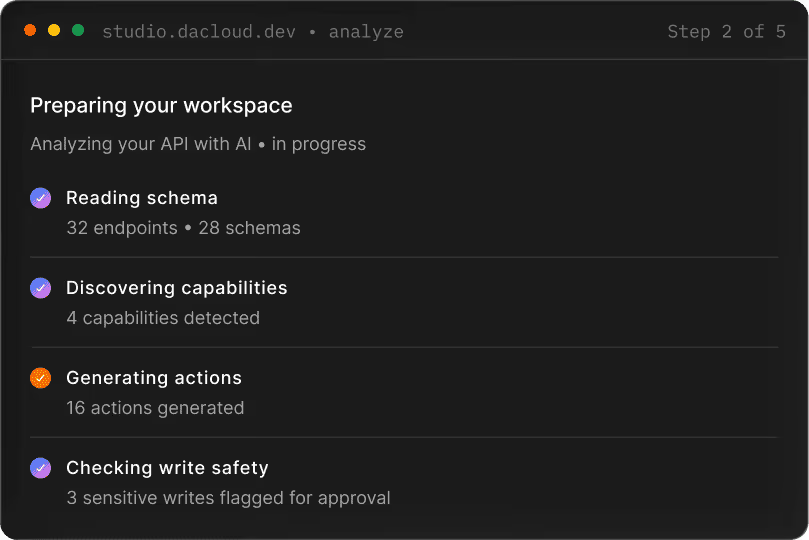
MCP Studio reads the whole API and builds a working picture, endpoints, schemas, authentication, and the actions an agent could safely take.

Reads every endpoint and schema
Maps authentication automatically
Discovers capabilities and generates actions
Flags sensitive write actions for approval
03
Preview
See the Capabilities & MCP Servers Studio Proposes
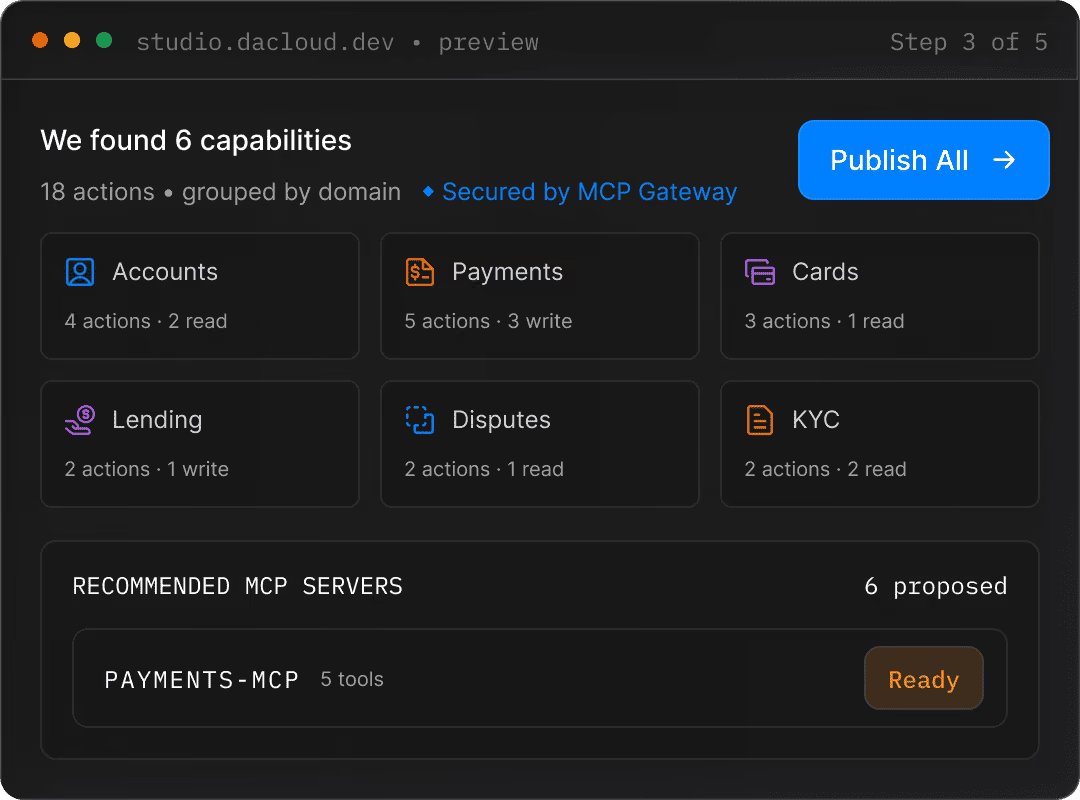
MCP Studio groups every action by business domain, names the MCP server it would publish per group, and shows you what's ready to ship,m before anything goes live.
.svg)
Capabilities grouped by domain, one MCP server each
Recommended servers, ranked by readiness
Tools tagged read · write · sensitive
One-click publish of the recommended set
04
Configure
Configure What to Publish First
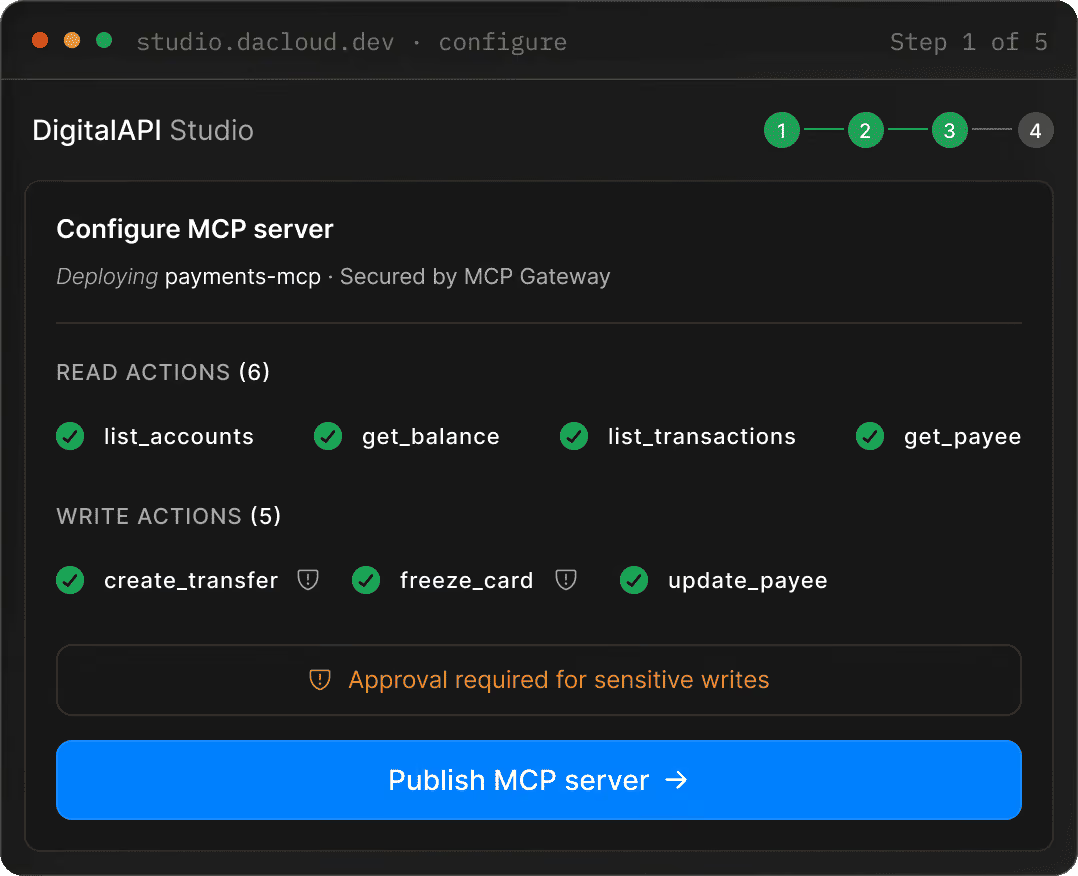
Your preview workspace is live. Choose what to ship, the MCP Toolset for any agent, a focused AI agent, or a multi-step workflow,m and set approval rules where needed.
.svg)
Publish the MCP Toolset as agent-ready infrastructure
Launch scoped agents for basic, batch or advanced operations
Compose reusable workflow automations
Add approval rules to any write action
05
Publish
Publish a Live, Secure MCP Server
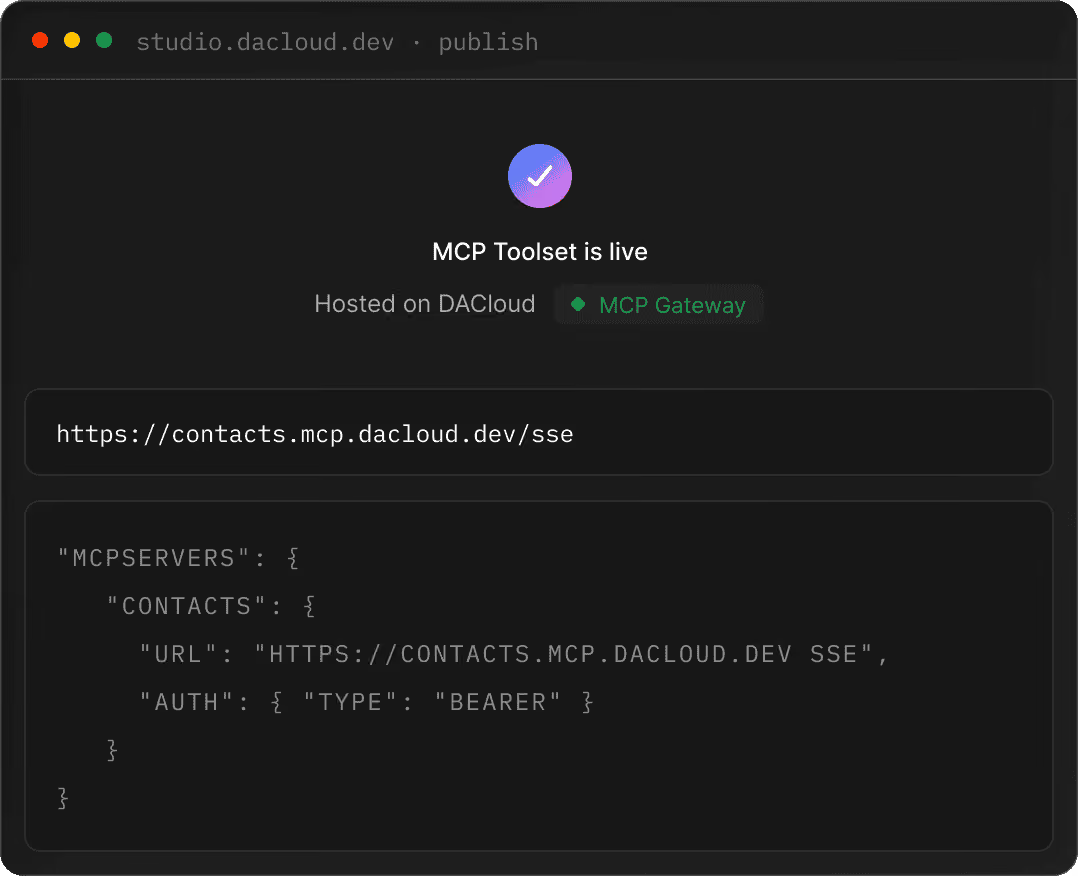
MCP Studio hosts your MCP server and hands you everything an agent needs to connect — a server URL and a ready-to-paste client configuration. Secured by MCP Gateway from the first request.
Hosted MCP server with a live endpoint URL
Drop-in config for Claude, Cursor & other clients
Secured by MCP Gateway with full request tracing
Launch more agents & automations any time
One Secure MCP Gateway, In Front of Every Server
Every MCP server published from Studio sits behind the MCP Gateway, a single, hardened endpoint that brokers every agent call.
Auth: OAuth, keys, mTLS, mapped from your origin API.
Limits: Rate, quota and burst control per agent and per tool.
Approvals: Human-in-the-loop gates for sensitive writes.
Routing: Blue/green deploys, versioning, per-region targets.

Everything You Need to Make APIs Agent-Ready
MCP Studio isn't a one-off script. It's a repeatable way to keep every API you own discoverable, safe, and usable by AI agents.
Multi-Source Import
Bring in APIs from an OpenAPI URL, a spec file, a GitHub repository, or a Postman collection, without reformatting anything first.
Automatic Auth Mapping
API keys, OAuth2, bearer tokens and JWT flows are detected and mapped so your MCP server inherits the security model your API already uses.
Write-Safety Guardrails
Sensitive write actions are flagged automatically and gated behind approval rules,. so agents can act without acting recklessly.
AI-Generated Workflows
MCP Studio drafts multi-step agent workflows from your own actions, ready for you to review, edit and approve before launch.
Secured by MCP Gateway
Every server runs behind MCP Gateway, DigitalAPI's lightweight gateway, with governance, rate control and full request tracing built in.
Works With Any MCP Client
Standard Model Context Protocol output means your server works with Claude, Cursor, Windsurf and any agent your team builds.
Built for the People Shipping Agent-Ready APIs!

Skip the MCP Plumbing Entirely
You already have the API. MCP Studio removes the part nobody wants to own, writing and maintaining wrapper code, mapping auth, and re-testing every release.

Make Agent-Readiness a Platform Capability
Turn "support AI agents" from a backlog item into something your platform does by default, governed, secure, and consistent across every team.
More Than a Converter, Part of a Complete API Platform!
MCP Studio sits inside DigitalAPI's unified control plane for APIs, events and agents. The same platform that discovers, governs and monetises your APIs also makes them agent-ready.
90+
Years of expertise
Backed by 90+ years of combined experience in enterprise API management.
ISO 27001
Enterprise certified
Partners' agents call your APIs as MCP tools, governed by partner-tier scopes.
MCP Gateway
Built-in security
Open developer agents. Self-serve keys, public tier metering, marketplace listings.
One
Unified platform
In-product copilots in your customers' apps. Per-customer agent identities.
Trusted in production
%20(1).avif)
Frequently asked questions
MCP Servers, Answered!
The questions developers and platform teams ask most when turning APIs into MCP servers.
What is an MCP server?
An MCP server is a service that exposes your API's actions as tools an AI agent can call directly, using the Model Context Protocol. Instead of an agent guessing how to use your REST endpoints, an MCP server gives it a structured, discoverable list of actions with clear inputs, outputs, and permissions.
How do I convert an API to an MCP server?
You can convert an API into an MCP server by mapping API endpoints to MCP tools. MCP Studio automates much of this process by importing OpenAPI specifications, generating tool definitions, configuring authentication, and publishing the resulting MCP server for AI agents to consume.
Which AI agents and clients work with MCP Studio?
MCP Studio works with MCP-compatible clients and agent frameworks, including Claude Desktop, Cursor, Windsurf, OpenAI-compatible agent frameworks, custom enterprise agents, and other tools that support the Model Context Protocol.
Do I need to write any code to use MCP Studio?
No, MCP Studio provides a low-code experience that allows you to import APIs, generate MCP tools, configure authentication, test agent interactions, and publish MCP servers without writing custom server code. Advanced users can still customize behavior when needed.
How do I manage MCP servers after they are published?
MCP Studio provides centralized management for published MCP servers, including version control, access policies, authentication settings, monitoring, usage analytics, audit logs, and lifecycle management. Updates can be deployed without rebuilding the entire server.
What is the Model Context Protocol (MCP)?
The Model Context Protocol (MCP) is an open standard that enables AI agents and applications to securely connect with external tools, APIs, databases, and enterprise systems. It provides a consistent way for AI models to discover capabilities, access resources, and execute actions.
Can I turn an OpenAPI spec into an MCP server?
Yes, MCP Studio can import OpenAPI specifications and automatically generate MCP tools from the available endpoints. This significantly reduces development effort and allows organizations to make existing APIs accessible to AI agents quickly.
How does MCP Studio keep my API secure?
MCP Studio supports enterprise-grade security controls, including OAuth, API key management, role-based access control, credential isolation, audit logging, encrypted communications, and policy-based access management. This ensures agents can only access approved tools and resources.
How is MCP Studio different from building an MCP server by hand?
Building an MCP server manually requires implementing protocol support, tool definitions, authentication, testing, monitoring, and deployment infrastructure. MCP Studio automates these tasks through a visual platform, allowing teams to create, govern, and manage MCP servers much faster while maintaining enterprise-grade controls.

.avif)
