

How to Connect AWS API Gateway to an API Marketplace (2026 Guide)
Running APIs on AWS API Gateway but struggling to get them in front of developers? This guide walks you through linking AWS to your API marketplace using a read-only IAM user or role. You will see exactly which values to collect, where to find them in the AWS console, and how to fix the most common connection errors.


TL;DR: To connect AWS API Gateway to an API marketplace, you need three things. First, an IAM user or role with a read-only apigateway:GET policy. Second, its Access Key ID and Secret Access Key. Third, the AWS Region your APIs run in. In DigitalAPI, open Manage API Sources, click the AWS API Gateway tile, fill in the form, click Test connection, then Save. One connection reads one AWS account and one region.AWS API Gateway was the most widely used gateway in Postman’s 2024 State of the API Report, cited by 46% of respondents. Yet the most common setup mistake is easy to make: pasting admin keys into a third-party tool. That hands the tool far more power than it needs. This guide shows you the read-only path, field by field.
What does it mean to connect AWS API Gateway to an API marketplace?
A gateway connection is a saved, read-only link between your API marketplace and your AWS account. It lets the marketplace list and read the APIs you run on AWS API Gateway. It does not proxy traffic, and your APIs stay on AWS.
Here is what the connection does and does not do:
- It reads API metadata through the
apigateway:GETaction. - It covers one AWS account and one region by default.
- It stores your credentials encrypted at rest.
- It does not import APIs when you save it. You run the import as a separate step. See Importing APIs.
Is an AWS API Gateway connection right for you?
This is right for you if:
- Your APIs run on AWS API Gateway and you want them listed in one developer portal.
- You can create a dedicated IAM user or role with read-only access.
- You want AWS APIs to sit next to APIs from your other gateways.
This is not right for you if:
- Your APIs exist only as OpenAPI files in GitHub, Postman or SwaggerHub. Use a documentation source instead.
- Your APIs run on Azure API Management or MuleSoft. Use the Azure API Management connection guide or the MuleSoft Anypoint connection guide.
What do you need to connect AWS API Gateway to the API marketplace?
You need a connection name, a region and an access key pair, plus two optional settings. Gather these values before you open the form, so you can finish in one pass.
Tip: Put the region in the Connection Name. Your team will see it on every imported API row.
How do you give the marketplace read-only access in AWS?
Create an IAM policy that allows only apigateway:GET, then attach it to a dedicated IAM user or role. That single action is all the connection needs to list and read your APIs. Never use root or administrator credentials.
Scoping matters. Stolen credentials were the top initial action in breaches, at 24%, according to the Verizon 2024 Data Breach Investigations Report. The IBM Cost of a Data Breach Report 2024 puts the average breach at $4.88 million. A read-only key limits what a leaked secret can do.
- Sign in to the AWS console and open the IAM dashboard.
- Go to Access management > Policies > Create policy.
- Choose the JSON tab and paste the policy below.
- Attach the policy to the IAM user whose keys you will use, or to the role you will assume.
{
  "Version": "2012-10-17",
  "Statement": [
    {
      "Effect": "Allow",
      "Action": ["apigateway:GET"],
      "Resource": "*"
    }
  ]
}
Can’t use long-lived access keys? Turn on Use Assume Role and pair it with temporary SSO credentials.
Do you need any extra AWS permissions?
Only if you turn on developer subscriptions or Cognito authentication. Read-only access is enough to discover and import APIs.
- Developer subscriptions: letting developers subscribe to these APIs needs write access on API Gateway.
- AWS Cognito authentication: also needs
cognito-idp:CreateUserPoolClient,DescribeUserPoolClientandDeleteUserPoolClient.
Where do you find each AWS value?
Every value comes from the IAM console or the AWS navigation bar. Here is the exact path for each one.
Access Key ID and Secret Access Key: Open IAM > Users > your user > Security credentials > Create access key. AWS shows the secret only once, so copy it then. The Download .csv option saves both values to a file. Keep that file somewhere only you can reach.
AWS Region: Use the region selector in the top navigation bar and note its code, for example us-east-1. A connection reads one region. Add a separate connection for each region you use.
Role ARN for Use Assume Role: Open IAM > Roles > your role. Copy the Role ARN from the top of the summary page.
How do you add the AWS connection, step by step?
Open Manage API Sources, click the AWS API Gateway tile, fill in the form, test, then save. Once your values are ready, the form takes a few minutes.
- In the portal’s left sidebar, select Manage API Sources under API Management.
- Under API Gateways, click the AWS API Gateway tile.
- Enter a Connection Name and an optional Description.
- Select your AWS Region from the dropdown.
- Paste the Access Key ID and Secret Access Key.
- Optional: turn on Use Assume Role and enter the Role ARN. Turn on Enable AWS Cognito Authentication and enter the User Pool ID if you need it.
- Click Test connection and wait for the banner. Green means the marketplace authenticated.
- Click Save. The connection appears under Existing API Sources with Import APIs, Edit and Delete Connection actions.
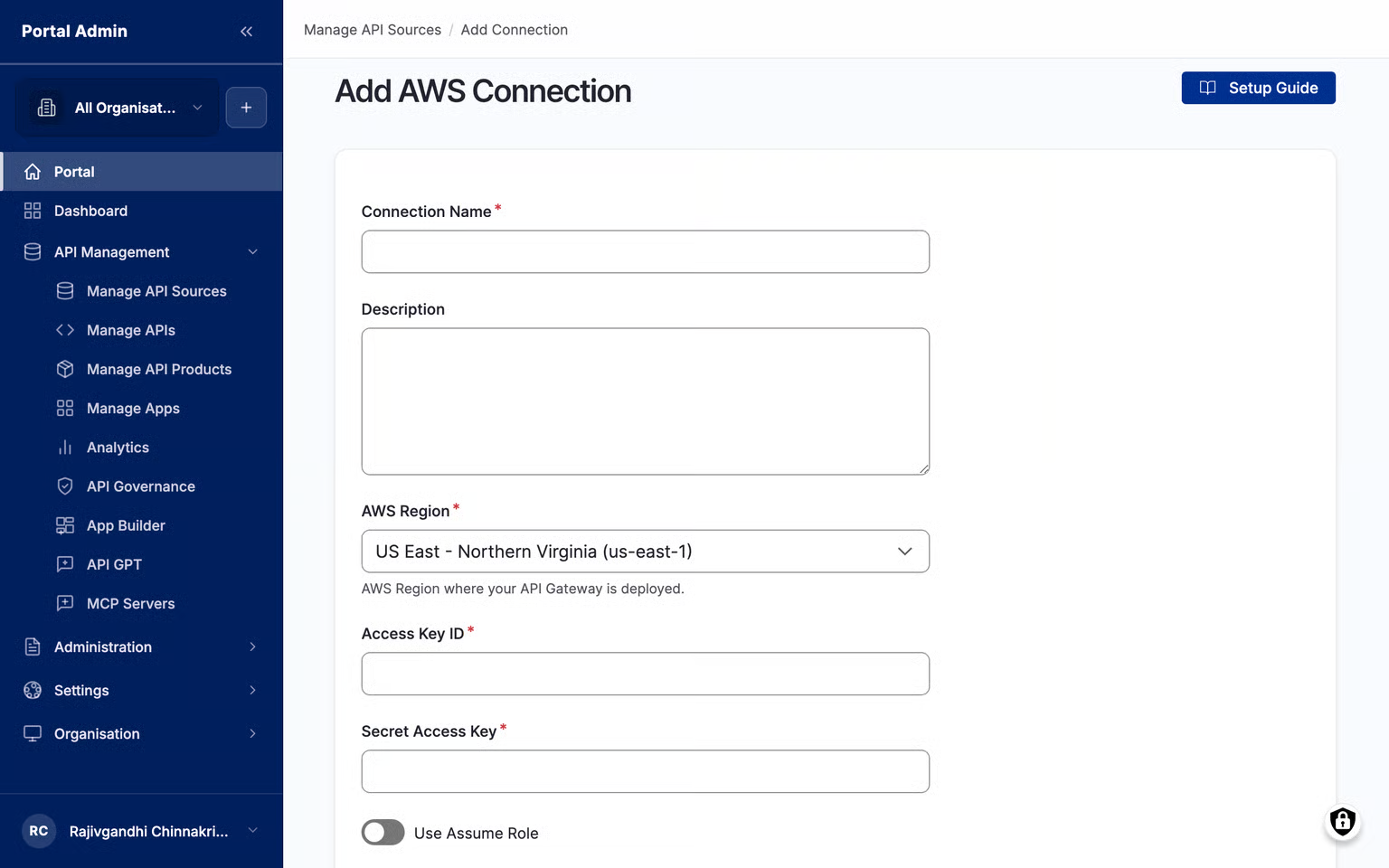
Saving does not import APIs. When you are ready, click Import APIs on the saved connection.
What should you do if Test connection fails?
A failed test almost always means a missing read policy or the wrong region. Test connection checks that the region and credentials are valid. It also checks that the identity can call apigateway:GET. The red banner names the step that failed.
You can save a connection that fails the test, but it cannot import APIs. Fix the field the banner names and test again until it turns green.
How do you rotate keys or remove the connection later?
- Rotate: click Edit in Existing API Sources. Secret fields come back blank, so paste the new secret, test, then save. Imported APIs and subscriptions stay in place. A 90-day rotation cycle is a sensible default.
- Remove: Delete Connection unlinks every API imported from it. Apps subscribed to those APIs lose access on the next request. Check Manage APIs for live subscriptions first.
Frequently asked questions
1. Can one connection read APIs from several AWS regions?
No. A connection reads one AWS account and one region by default. AWS API Gateway is regional, so a us-east-1 connection does not see eu-west-1 APIs. Add one connection per region and put the region in each Connection Name.
2. What IAM permissions does an API marketplace need for AWS API Gateway?
Read-only discovery needs only apigateway:GET on all resources. Developer subscriptions need write access on API Gateway. AWS Cognito authentication also needs cognito-idp:CreateUserPoolClient, DescribeUserPoolClient and DeleteUserPoolClient.
3. Can I connect AWS API Gateway without long-lived access keys?
Yes. Turn on Use Assume Role and enter the Role ARN of an IAM role that has the read-only policy. Pair it with temporary SSO credentials if your organization blocks long-lived keys.
4. Is it safe to give an API marketplace AWS credentials?
It is safe when you scope them. Use a dedicated IAM user or role with only apigateway:GET, never root or admin keys. The marketplace stores credentials encrypted at rest and blanks secrets on the edit form.
5. Can I connect AWS API Gateway and other gateways to the same marketplace?
Yes. You can add any number of connections, including several for the same gateway. Nearly a third of API teams run multiple gateways, according to Postman’s 2024 State of the API Report.
What happens after you connect AWS API Gateway to the API marketplace?
Your AWS APIs join one catalog with APIs from every other gateway you run. Developers search one portal instead of several consoles. Your platform team reviews and publishes from one place.
That matters at scale. IDC’s June 2024 AI-Enhanced Connectivity Automation Survey found 33% of organizations use more than one API gateway provider. Postman’s 2024 report says the average application runs on 26 to 50 APIs.
Teams using DigitalAPI bring AWS APIs into a single catalog, then run API governance checks and publish them from the same portal.
Your next steps:
- Import your APIs: Importing APIs
- Connect your other gateways: Azure API Management connection guide and MuleSoft Anypoint connection guide
- Go deeper: How to catalog AWS APIs in one developer portal
- Go deeper: Why AWS teams upgrade their developer portal
- See DigitalAPI's Product: DigitalAPI API Marketplace
- Learn the bigger picture: What is an API marketplace?
- See every supported gateway: Gateway connections reference
See how DigitalAPI turns APIs from AWS into one searchable marketplace. Request a demo
Dhayalan Subramanian is Associate Director, Product Growth at DigitalAPI, where he leads go-to-market and product growth for the company’s multi-gateway API management platform. His work focuses on helping large enterprises and mid-market cloud companies consolidate APIs across AWS, Azure, Apigee, Kong, MuleSoft, and other gateways into a single control plane for governance, discovery, monetization, and agent consumption.
Dhayalan brings 14+ years of experience across product strategy, enterprise architecture, and engineering leadership. Earlier in his career, he held senior roles at Encora (as Associate Architect and Technical Manager), Mindtree (Technology Lead), Tech Mahindra (Technical Lead), and Primus Analytics, where he designed integration frameworks and delivered enterprise-grade digital platforms for global customers.
At DigitalAPI, he works directly with platform, integration, and developer experience leaders at Fortune 500 organizations to operationalize unified API catalogs, developer portals, and MCP-ready APIs. He writes regularly on API developer experience, API governance, and AI agent architectures.


One email a fortnight. Worth opening.
A short digest of what we're writing, what we're learning from customers, and the handful of links you'd actually want from us. No tracking pixels.