


How to Grant API Access: Request, Approve, Issue, and Revoke
Granting API access is six steps: request, approve, issue, scope, review and revoke. This guide walks through each one, compares manual and self-service access, helps you choose between API keys, OAuth and mTLS, and shows how to govern and audit every grant, with tested code and links to a deeper guide for every step.

TL;DR:
How do you grant API access?
To grant API access, take a structured request naming the app, APIs, scopes and reason; approve it by policy or by the right person; issue a credential, such as an API key, OAuth client or mTLS certificate, limited to the approved scopes and with an expiry; enforce that scope at the gateway; review the grant regularly; and revoke it when it expires, goes unused or its owner leaves.
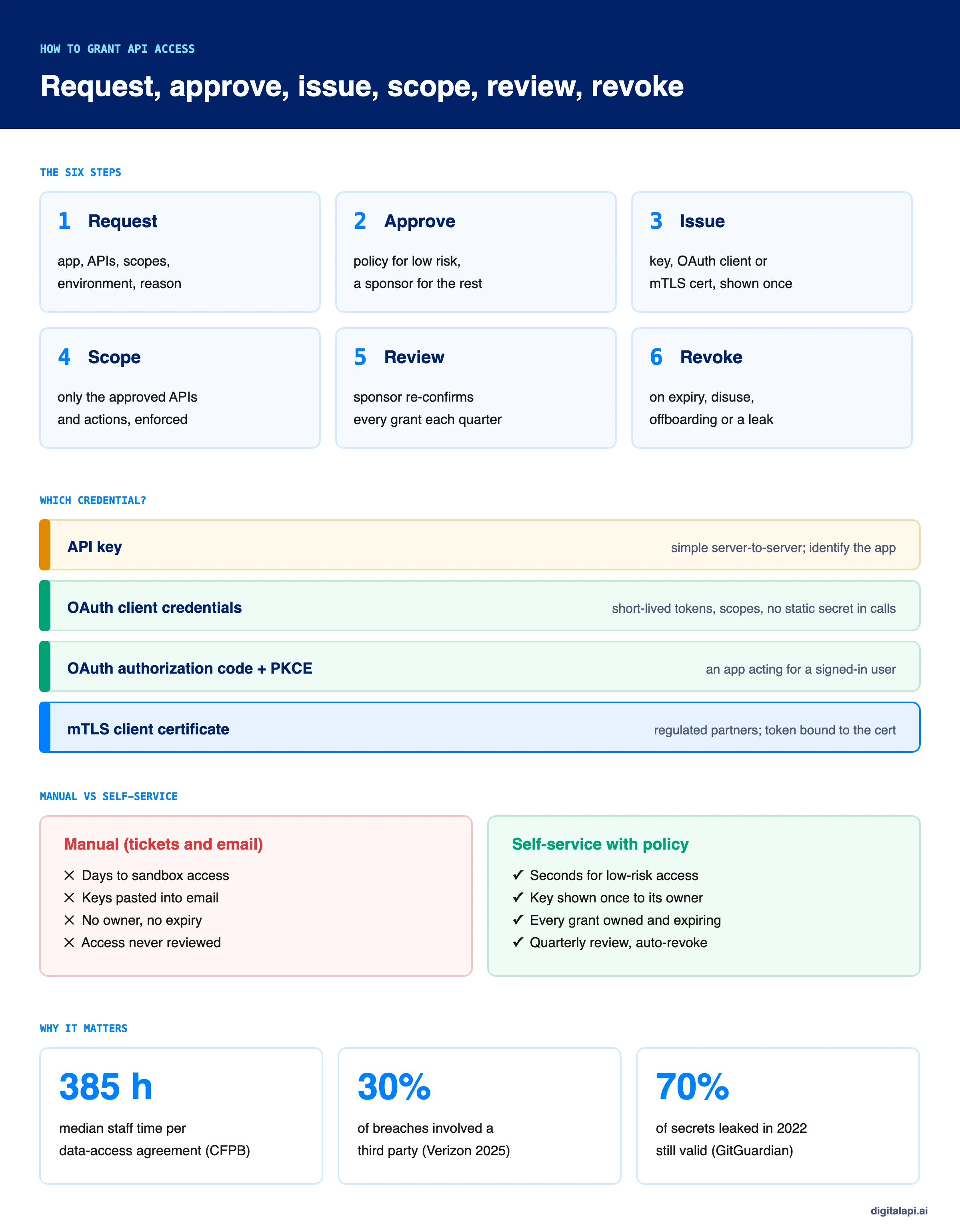
Setting up one data-access agreement with a partner takes a median of 385 staff hours, according to the US Consumer Financial Protection Bureau's 2024 open-banking rule. Much of that is the work of deciding who gets which API, sending them credentials and chasing approvals.
And once access is granted, it rarely shrinks. In Omada's State of IGA 2025 survey of 502 organisations, 73.9% agreed that people have more access than they need. Knowing how to grant API access well means fixing both: getting the right access out fast, and making sure it doesn't outlive its purpose.
This guide covers the whole lifecycle in six steps, compares manual and self-service access, helps you choose a credential type, and shows how to govern and audit every grant, with code we tested. Each step links to a deeper guide.
What does it mean to grant API access?
Granting API access means deciding that a specific app, team or AI agent may call specific API operations, issuing it a credential that proves this, and keeping that decision current until the access ends. It's an ongoing responsibility, not a one-time handover.
A grant has three parts, and all three need managing:
- The decision: who may do what, recorded with a reason and an approver.
- The credential: the key, token or certificate that proves the decision on each call.
- The enforcement: the gateway check that turns the decision into an allowed or denied request.
For what API access is in the first place, see what is API access. For the wider set of controls, read our guide to API access management.
What are the steps to grant API access?
The six steps to grant API access are request, approve, issue, scope, review and revoke. The first four put access in place; the last two make sure it stays right and ends on time.
Step 1: Take a structured API access request
An API access request should name the app, the APIs, the exact scopes, the environment, how long access is needed and why. A structured request lets policy decide most cases; a free-text ticket forces a person to chase details.
Ask for a named owner, too: the person accountable for the app, not a shared mailbox. Our guide to API access provisioning shows a full request schema and tested request handling.
Step 2: Approve by policy, then by people
Approve low-risk access automatically, such as sandbox or read-only production scopes, and route anything that writes data, moves money or reads personal data to a named sponsor. Never let the requester approve their own request.
Approval is where most delay lives. Tiering by scope keeps the human queue small, so the requests that reach a person get real attention. The approver becomes the grant's sponsor: the internal person accountable for it until it ends.
Step 3: Issue the credential, once
Issue the credential the moment approval completes, limited to the approved scopes, with an expiry, shown once to its owner and stored only as a hash. Never send it by email or chat.
The safest handover is no handover: the partner generates their own credential in a portal. See why you should stop sharing API keys over email and the credential comparison below.
Step 4: Scope access and enforce it on every call
Limit each grant to the APIs and operations it was approved for, and enforce that at the gateway on every request, not only when the credential is issued. A credential that can call everything turns a small leak into a big one.
Use OAuth scopes or per-key permissions to express what's allowed, and apply least privilege: start narrow and add only what's needed. For how the decision is made on each request, see API authorization and RBAC vs ABAC.
Step 5: Review every grant on a schedule
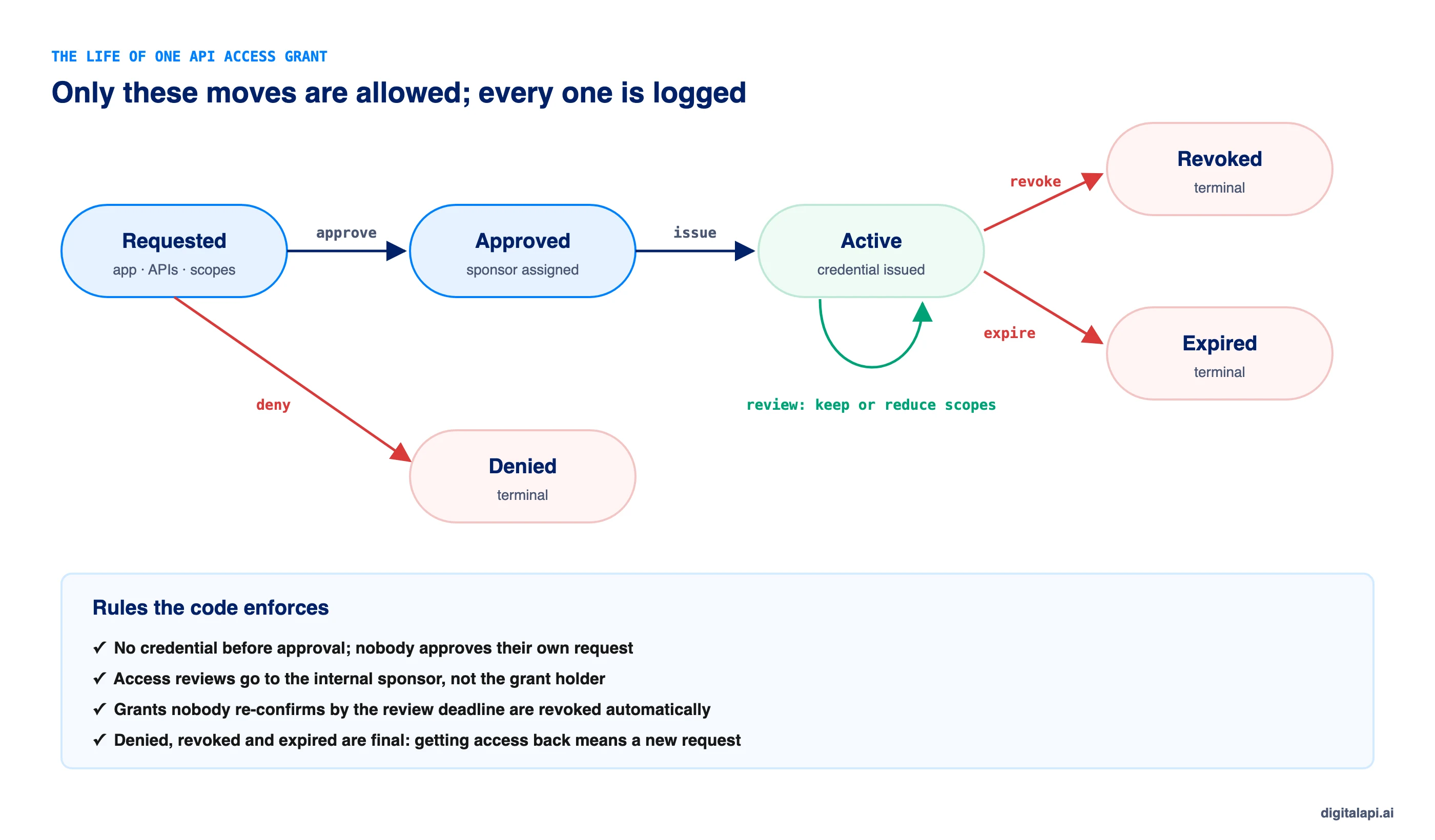
Run an access review at least quarterly: each grant's sponsor confirms it's still needed, reduces its scopes, or revokes it, and anything nobody confirms by the deadline is revoked automatically. This is often called access recertification.
Reviews are the step most API programmes skip, and the one auditors ask about. NIST SP 800-53 Rev. 5 control AC-2(j) requires organisations to "review accounts for compliance with account management requirements" at a set frequency. In SOC 2, periodic review of access and credentials appears in the points of focus for criteria CC6.2 and CC6.3.
Three rules make reviews work:
- The sponsor reviews, not the holder. A partner can't vouch for its own access.
- Silence means revoke. Grants that nobody confirms by the deadline are removed, not carried forward.
- Reduce, don't only keep or kill. Most grants are still needed but with fewer scopes than they started with.
Step 6: Revoke when access should end
Revoke access when it expires, goes unused, loses its owner, or may be compromised, and make sure the revocation reaches every gateway on the next request. To revoke an API key or token safely, revoke first and investigate second.
Revocation has its own traps, such as gateway caches that keep revoked keys working and JWTs that stay valid until they expire. Our guide on how to revoke API access covers them with tested code.
Should API access be manual or self-service?
Make API access self-service with policy: low-risk requests are approved and issued in seconds, and only risky ones wait for a person. Fully manual access is slow and loose; fully automatic access is fast and risky.
Self-service doesn't mean no control. It means the control is written as policy, so it's applied the same way every time. See what a self-service API portal needs and the real cost of partner onboarding.
Which API credentials should you issue?
Issue OAuth client credentials for server-to-server access, OAuth authorization code with PKCE when an app acts for a user, mTLS certificates for high-assurance partners, and API keys only where simplicity matters more than strength. Choosing API credentials by use case beats one type for everything.
RFC 8705 defines OAuth with mutual TLS: the client authenticates with a certificate, and access tokens are bound to it, so a stolen token is useless without the private key.
For more on each API authentication method, see the client credentials flow, OAuth grant types, what is mTLS, API keys and OAuth vs API keys. For how tokens work and how long they should last, read token-based authentication and access token vs refresh token.
How do you govern and audit API access?
Govern API access by writing the rules as policy, enforcing separation of duties, logging every step of every grant, and reviewing grants on a schedule. Audit is then a report, not a project.
What auditors and incident responders need from every grant:
- Who asked, who approved and why, with the approver not being the requester.
- What was granted: APIs, scopes, environment and expiry.
- How it was used: calls per credential, so unused access can be found.
- How it ended: expiry, review, offboarding or revocation, with the reason.
These controls map to common frameworks. SOC 2 criterion CC6.2 requires registering and authorising users before issuing credentials, and CC6.3 requires authorising, modifying or removing access with least privilege and segregation of duties in mind. The OWASP API Security Top 10 (2023) lists Broken Authentication (API2) and Broken Function Level Authorization (API5), both of which loose grants make worse.
For the wider governance picture, see API governance and the ultimate guide to API access control.
What happened when we tested the grant lifecycle?
Our grant lifecycle code passed 12 checks. It refused to issue credentials before approval, blocked self-approval and self-review, enforced scopes, and in a quarterly review revoked the one grant nobody re-confirmed. Testing also changed our design.
What we changed: our first version sent each review to the grant's holder, so a partner would have confirmed its own access. That's a self-review, and it defeats the point. Reviews now go to the sponsor: the internal person who approved the grant.
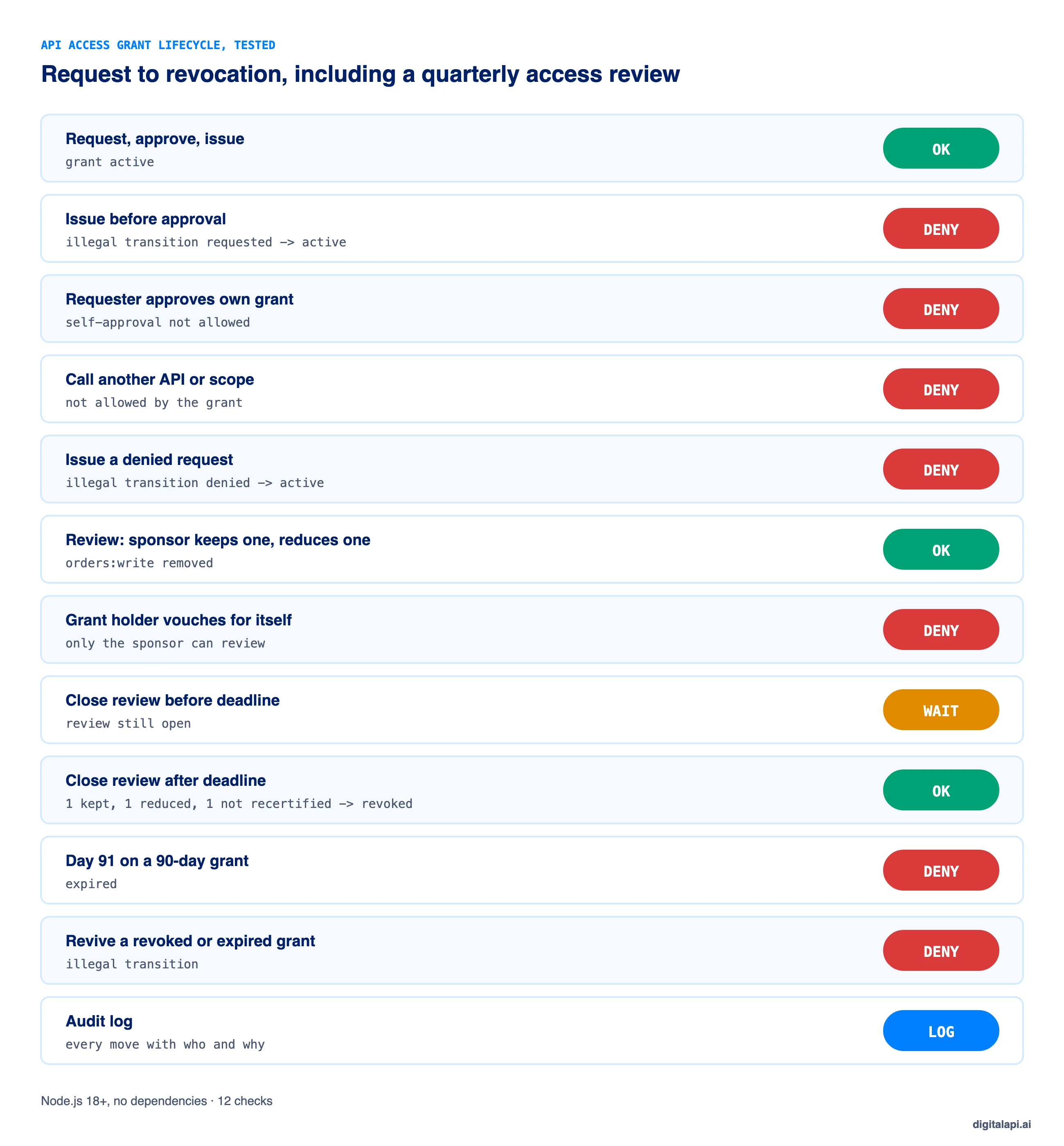
This is the code we tested. It models one grant as a state machine: only legal moves are allowed, and every move is logged.
How do you grant API access to AI agents?
Grant AI agents access like any other app, with tighter limits: each agent gets its own credential, a named human owner and sponsor, the narrowest scopes it needs, a short lifetime, and a sponsor's approval for anything that writes or reads sensitive data.
- One credential per agent, so you can revoke one without stopping the others.
- Short-lived tokens through the client credentials flow, rather than long-lived keys.
- Token exchange when an agent acts for a user, so it gets a narrow token rather than the user's own.
- Review agent grants more often than human ones, because agents can be given new tasks without a new request.
What are the best practices for granting API access?
Make every grant requested, approved, scoped, expiring, reviewed and revocable, and make the safe path the fast one. These ten practices cover most of it:
- Use structured requests, not free-text tickets.
- Tier approvals by scope risk, and block self-approval.
- Give every grant an owner and a sponsor.
- Issue credentials once, through self-service, never by email.
- Prefer short-lived tokens to static keys for servers and agents.
- Scope narrowly and enforce at the gateway on every call.
- Set an expiry on every grant.
- Review grants quarterly, with auto-revoke for anything unconfirmed.
- Revoke on disuse, offboarding and incidents, everywhere at once.
- Log every step, so audit is a report. See best practices for onboarding external developers for the developer side.
How does DigitalAPI handle API access end to end?
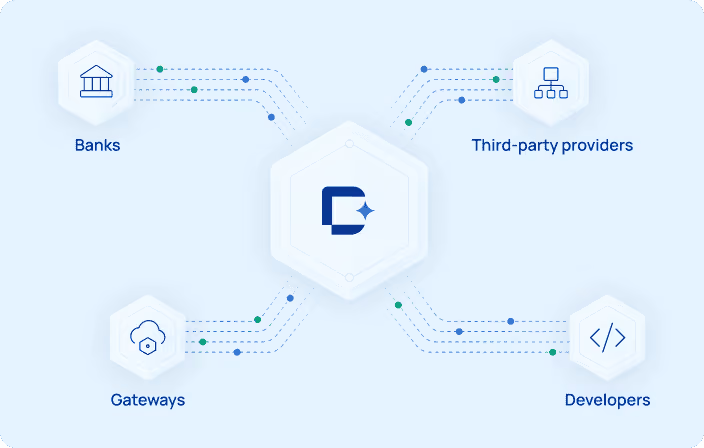
Granting API access end to end needs the portal, where requests start, and the gateways, where access is enforced, to share one set of grants. When they don't, access approved in one place isn't enforced, reviewed or revoked in another.
Teams using the DigitalAPI API Developer Portal let partners and developers request access to specific APIs and scopes, get low-risk access approved automatically, and receive credentials once, each tied to an owner, sponsor and expiry. The DigitalAPI API Gateway layer enforces, reviews and revokes those grants across the gateways you already run, so one decision applies everywhere.
See how DigitalAPI grants, reviews and revokes API access from one place → Book a Demo
Key takeaways
- To grant API access, follow six steps: request, approve, issue, scope, review and revoke.
- Self-service with policy beats both manual tickets and approve-everything automation.
- Choose the credential by use case: OAuth client credentials for servers and agents, authorization code with PKCE for user-facing apps, mTLS for high-assurance partners, keys for simple cases.
- Review every grant on a schedule; the sponsor reviews, and anything unconfirmed is revoked.
- Revoke everywhere at once, and log every step so audit is a report.
Frequently asked questions
1. How do you grant API access?
Grant API access in six steps: take a structured request naming the app, APIs, scopes and reason; approve it by policy or a sponsor; issue a credential limited to the approved scopes with an expiry; enforce those scopes at the gateway; review the grant on a schedule; and revoke it when it's no longer needed.
2. What should an API access request include?
An API access request should include the app, its owner, the APIs and exact scopes needed, the environment (sandbox or production), how long access is needed and the business reason. Each field lets policy decide automatically or gives an approver what they need without chasing the requester.
3. Who should approve API access?
Low-risk access, such as sandbox or read-only production scopes, can be approved automatically by policy. Access that writes data, moves money or reads personal data should be approved by a sponsor, usually the API owner, with security added for sensitive data. The requester should never approve their own request.
4. Should I use API keys or OAuth to grant API access?
Use OAuth client credentials for server-to-server and AI agent access, because it issues short-lived, scoped tokens instead of a static secret on every call. Use OAuth authorization code with PKCE when an app acts for a user. API keys suit simple, low-risk integrations where ease matters more than strength.
5. What is an access review for APIs?
An access review, or access recertification, is a scheduled check where each API grant's sponsor confirms it's still needed, reduces its scopes or revokes it. Grants nobody confirms by the deadline are revoked automatically. Reviews catch access that has outlived its purpose and are expected by frameworks such as NIST SP 800-53 and SOC 2.
6. How often should API access be reviewed?
Review API access at least quarterly, and more often for high-risk access such as payments, personal data or AI agents with broad permissions. Between reviews, revoke credentials automatically when they expire or go unused for a set period, such as 30 days, so reviews deal only with access that's still in use.
7. How do you revoke API access?
Revoke API access by invalidating the key or token at its issuer and pushing the revocation to every gateway so it's rejected on the next request. For OAuth, revoke the refresh token and deny any JWT access tokens until they expire. Confirm with a test call, and keep the record for audit.
8. What is the difference between self-service and manual API access?
Manual API access relies on tickets, emails and people to approve requests and send credentials, which is slow and leaves keys in inboxes. Self-service lets consumers request access in a portal, where policy approves low-risk requests instantly, sponsors approve the rest, and credentials are shown once to their owner.
9. How do you grant API access to partners securely?
Give each partner its own app and credentials per environment, issued through a portal rather than email. Scope each grant to the APIs in the partner's agreement, set an expiry, assign an internal sponsor to review it each quarter, and revoke everything the partner holds in one action when the relationship ends.
10. How do you grant API access to AI agents?
Give each AI agent its own credential with a named owner and sponsor, the narrowest scopes it needs and a short lifetime. Use short-lived tokens through the client credentials flow, or token exchange when it acts for a user, and require a sponsor's approval for any scope that writes data or reads sensitive data.
Conclusion
Learning how to grant API access isn't about one approval or one key. It's a lifecycle: request, approve, issue, scope, review and revoke. Programmes that handle only the first three end up with fast onboarding and a growing pile of access nobody can explain.
Write the rules as policy, make self-service the fast path, choose credentials by use case, review every grant on a schedule with auto-revoke, and make revocation reach every gateway at once. Each step has its own guide: start with API access provisioning and how to revoke API access, and see the ultimate guide to API access control for the controls behind them.
How safely do you grant API access to partners and AI agents? Get your free readiness score: Check Your API Access Readiness
Prefer a walkthrough? Book a Demo
Dhayalan Subramanian is Associate Director, Product Growth at DigitalAPI, where he leads go-to-market and product growth for the company’s multi-gateway API management platform. His work focuses on helping large enterprises and mid-market cloud companies consolidate APIs across AWS, Azure, Apigee, Kong, MuleSoft, and other gateways into a single control plane for governance, discovery, monetization, and agent consumption.
Dhayalan brings 14+ years of experience across product strategy, enterprise architecture, and engineering leadership. Earlier in his career, he held senior roles at Encora (as Associate Architect and Technical Manager), Mindtree (Technology Lead), Tech Mahindra (Technical Lead), and Primus Analytics, where he designed integration frameworks and delivered enterprise-grade digital platforms for global customers.
At DigitalAPI, he works directly with platform, integration, and developer experience leaders at Fortune 500 organizations to operationalize unified API catalogs, developer portals, and MCP-ready APIs. He writes regularly on API developer experience, API governance, and AI agent architectures.
One email a fortnight. Worth opening.
A short digest of what we're writing, what we're learning from customers, and the handful of links you'd actually want from us. No tracking pixels.