

Access Token vs Refresh Token: What's the Difference?
Access tokens and refresh tokens work as a pair, but they're used, stored and attacked differently. This guide explains the difference, how long each should last, how refresh works, why rotation can log users out by mistake and how to fix it, and how to revoke and store both, with tested code.

TL;DR:
What is the difference between an access token and a refresh token?
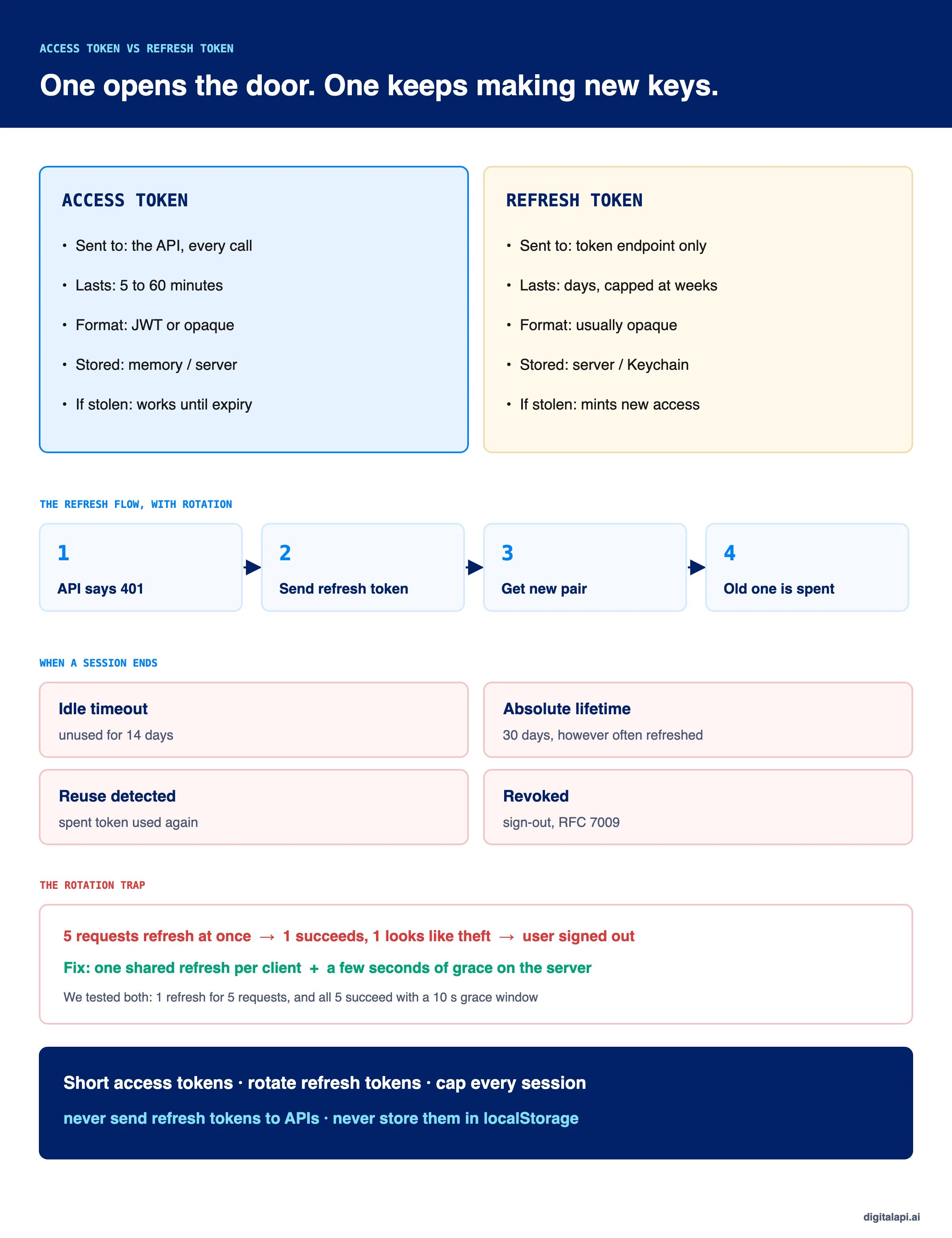
An access token is a short-lived credential a client sends to an API on every call to prove it's allowed in.
.A refresh token is a longer-lived credential the client sends only to the authorization server, to get a new access token when the old one expires, without the user signing in again.
Access tokens last minutes; refresh tokens last days and should be rotated on every use.
On 20 August 2025, Salesloft and Salesforce revoked every active access and refresh token issued to the Salesloft Drift integration, according to Google's Threat Intelligence Group. Attackers had been using stolen OAuth tokens to pull data from hundreds of companies' Salesforce instances.
Revoking access tokens alone wouldn't have been enough. As long as a refresh token works, it can mint new access tokens, so stopping the attack meant killing both. That's the core of access token vs refresh token: one opens the door for a few minutes, the other keeps handing out new keys.
This guide explains the difference, how long each should last, how the refresh flow works, why rotation sometimes logs users out by mistake, and how to revoke and store both, with code we ran and tested.
What is an access token?
An access token is the credential a client presents to an API to prove it's authorized to make a request. It carries, or points to, who the request is for, what it may do (its scopes) and which API it's meant for (its audience).
Access tokens are deliberately short-lived. If one leaks from a log, a proxy or a browser extension, it stops working within minutes. Most are sent as bearer tokens, so whoever holds one can use it. When they're JWTs, the API can verify them locally; see what is a JWT for how that works.
What is a refresh token?
A refresh token is a credential the client uses only to get new access tokens from the authorization server, so the user doesn't have to sign in again when an access token expires. It's never sent to an API.
So what is a refresh token in practice? It's what keeps a mobile app signed in for weeks while every individual access token lasts ten minutes. A few rules from the standards matter:
- A refresh token can't widen access. RFC 6749 says new access tokens can't have more scope than the original grant.
- You often have to ask for one. In OpenID Connect, clients request the
offline_accessscope to get a refresh token that works while the user is away. See OpenID Connect explained. - Machine clients don't get one. The client credentials flow issues no refresh token, because the service can request a new access token at any time.
- Public clients must protect them. The OAuth 2.0 Security Best Current Practice (RFC 9700) says refresh tokens for public clients, such as browser and mobile apps, "MUST be sender-constrained or use refresh token rotation".
How long should access tokens and refresh tokens last?
Access tokens should last 5 to 60 minutes, and refresh tokens should have both an idle timeout of days and an absolute lifetime of weeks. Shorter is safer; the right number depends on how sensitive the API is and what kind of client holds the token.
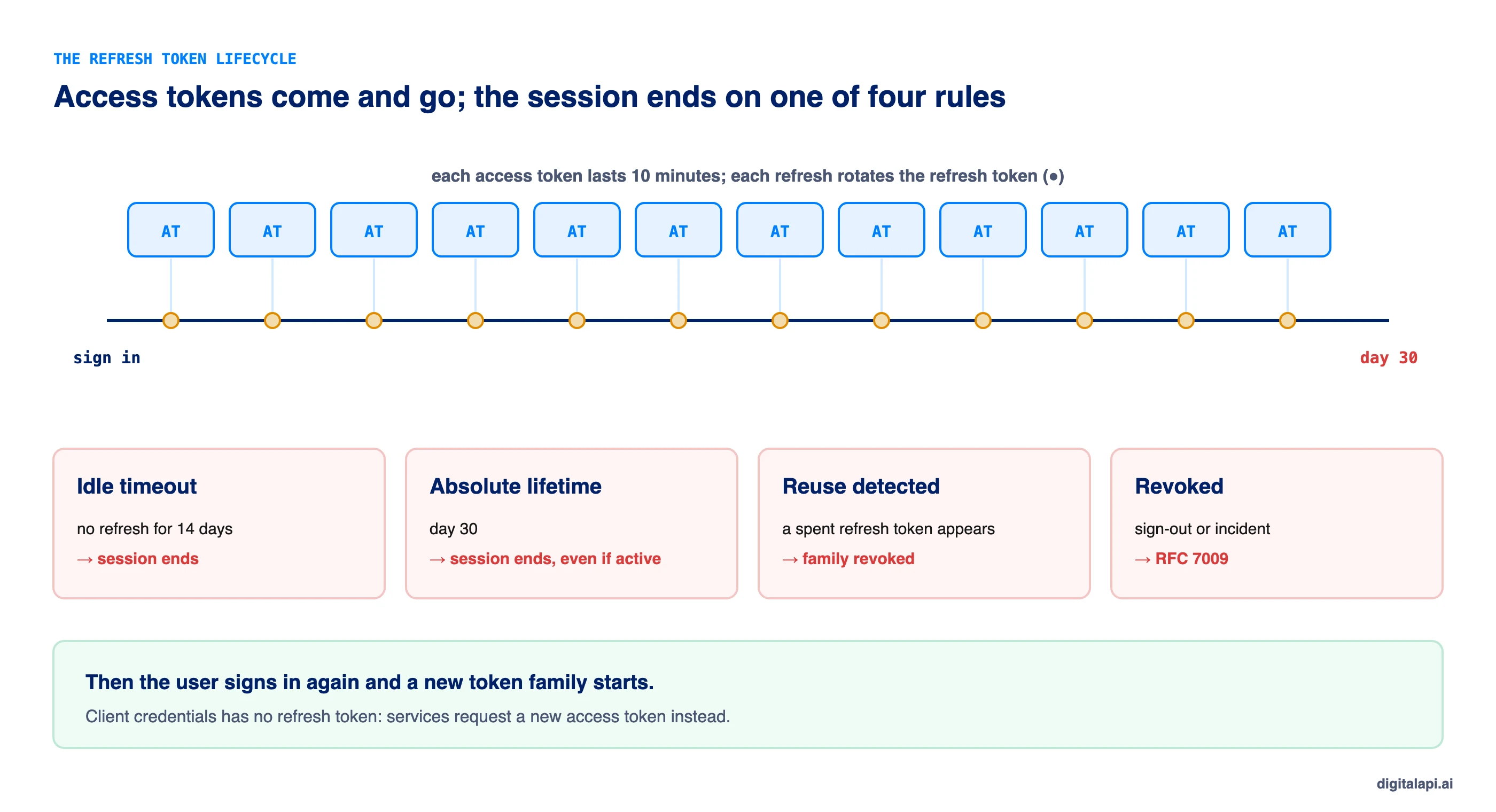
Two expiry rules work together for refresh tokens:
- Idle timeout (sliding expiry): the refresh token dies if it isn't used for a set period, such as 14 days. A user who stops opening the app gets signed out.
- Absolute lifetime: the session ends after a fixed period, such as 30 days, no matter how often it's refreshed. Without this, rotation alone would let a session last forever.
Access token expiration is set by the authorization server and returned as expires_in. Refresh token expiration is usually a server-side policy, so clients should be ready for a refresh to fail at any time and send the user back to sign in.
How does the refresh token flow work?
When the access token expires, the client sends its refresh token to the token endpoint, receives a new access token and, with rotation, a new refresh token, then retries the request. The user sees nothing.
- The API returns
401 Unauthorized, or the client notices the access token is about to expire. - The client sends
grant_type=refresh_tokenwith its refresh token to the token endpoint. - The authorization server checks that the refresh token is valid, unexpired, unrevoked and belongs to this client.
- It returns a new access token and, with rotation, a new refresh token. The old refresh token stops working.
- The client stores the new refresh token immediately and retries the original request.
Here's the OAuth refresh token request and response:
Note the new refresh_token in the response. With rotation, the one the client sent is now spent.
Why should you rotate refresh tokens?
Refresh token rotation means each refresh token works exactly once and is replaced on every refresh, so a stolen copy is either already dead or gets caught the moment it's used. If a spent refresh token ever comes back, the server knows two parties hold it and revokes the whole session.
That's reuse detection, and it's why rotation is one of the two options RFC 9700 allows for public clients. We show the basic rotation logic in our guide to token-based authentication. This guide covers the part most implementations get wrong: what happens when the legitimate client refreshes twice at once.
Why does refresh token rotation log users out?
Strict rotation logs users out when several requests from the same client refresh at the same moment. The first refresh succeeds; the others present the now-spent token, the server sees reuse, and revokes the session.
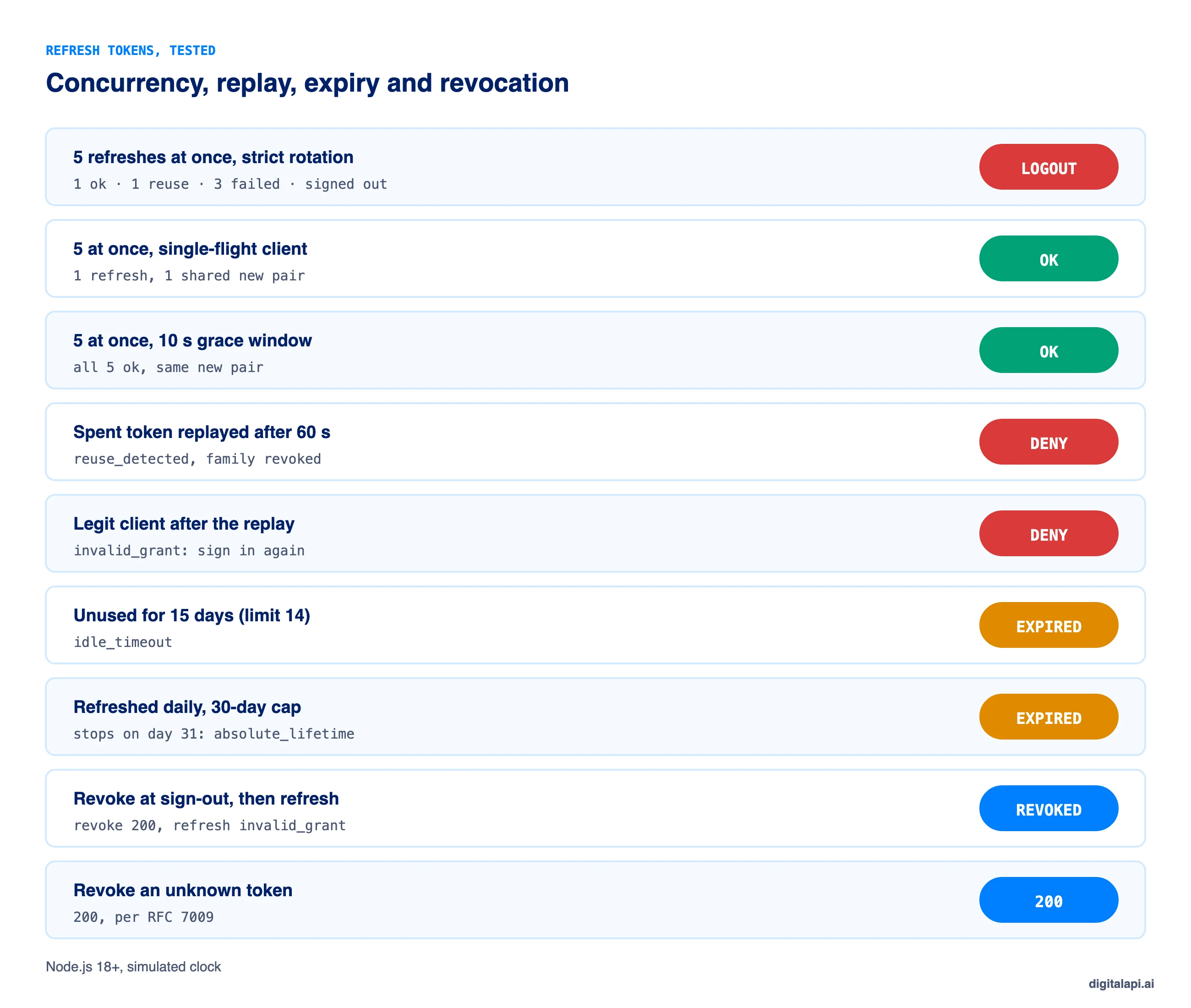
This happens all the time in real apps: a dashboard fires five API calls on load, all five get 401 because the access token expired a second ago, and all five try to refresh. In our test, one refresh succeeded, one triggered reuse detection, the other three failed, and the user was signed out.
There are two fixes, and you should use both:
- On the client, refresh once. Share a single in-flight refresh between all requests that need it.
- On the server, allow a short grace window. If the same spent refresh token arrives again within a few seconds, return the same new pair instead of treating it as theft.
Here's the client side. Every caller that needs a fresh token awaits the same promise:
In a browser with several tabs, the same idea applies across tabs: use the Web Locks API or a BroadcastChannel so only one tab refreshes, or keep tokens on a backend-for-frontend where one server-side session handles it.
And here's the server side, with rotation, reuse detection, a grace window, idle and absolute expiry, and revocation:
Keep the grace window short, a few seconds. It's a trade-off: inside the window, an attacker who replays a stolen refresh token gets the same new pair the client got, instead of being caught. A client-side single refresh is the cleaner fix; the grace window is the safety net for clients you don't control.
How do you revoke access tokens and refresh tokens?
Revoke the refresh token at the authorization server to end the session; the current access token then dies when it expires. To revoke an access token immediately, the API has to check with the issuer or a denylist, because a self-contained JWT stays valid until its expiry.
- Revoke on sign-out using the standard revocation endpoint from RFC 7009. Revoking a refresh token should revoke its whole token family.
- The endpoint always returns
200, even for an unknown token, so it can't be used to test which tokens exist. - Keep access tokens short, so the gap between revoking the session and the last access token expiring is minutes.
- For instant cut-off, use opaque access tokens with introspection, or check a denylist of revoked token IDs (
jti) at the gateway for high-risk APIs. - Revoke at scale after an incident, as Salesloft and Salesforce did: every active refresh token for the affected client, not only the access tokens.
Where should you store access tokens and refresh tokens?
Store tokens where the client's own code can't leak them: on a server, in the platform's secure storage, or in memory, never in browser localStorage. The refresh token needs more protection than the access token because it lives longer and can mint new ones.
That answers where to store refresh token for each kind of client. The common thread: if JavaScript running in the page can read a refresh token, so can any script injected into the page. Where a refresh token must live on the client, bind it to a key with DPoP (RFC 9449) so a copied token is useless without that key.
What happened when we tested refresh token rotation?
We ran the client and server above with Node.js 18+, using an injectable clock to simulate days passing. Every result matched the design:
When should you use refresh tokens?
Use refresh tokens when a user should stay signed in longer than one access token lifetime, and skip them when the client can get a new token on its own.
What are the best practices for access tokens and refresh tokens?
Keep access tokens short and scoped, rotate refresh tokens with reuse detection, cap sessions with idle and absolute expiry, and keep both out of reach of scripts. These ten practices cover most of it:
- Access tokens: minutes, not hours. 5 to 15 minutes for user-facing apps; up to 60 for machines.
- Rotate refresh tokens on every use and revoke the family when an old one reappears.
- Refresh once per client, not once per failing request; add a grace window of a few seconds on the server.
- Set an idle timeout and an absolute lifetime for every refresh token.
- Never send a refresh token to an API. It goes only to the token endpoint.
- Never put tokens in URLs or logs. Use the
Authorizationheader and redact tokens in logging. - Keep tokens out of localStorage. Use a backend-for-frontend for web apps and platform secure storage for mobile.
- Bind tokens to the client with DPoP or mTLS where you can.
- Revoke on sign-out, password change and incident, using RFC 7009, and make revocation cover the whole token family.
- Scope access tokens narrowly with OAuth scopes and an audience, so a leaked one can do little.
How should AI agents handle access and refresh tokens?
Give AI agents short-lived access tokens and avoid long-lived refresh tokens in the agent's own environment. An agent acting for itself should use client credentials, which needs no refresh token. An agent acting for a user should get tokens through a backend that holds the refresh token, or through token exchange, so the agent never stores a credential that can mint access for weeks. See OAuth grant types for which flow fits each case.
Where should access tokens be checked?
Check access tokens at the API gateway on every call, consistently across every API, and keep refresh tokens away from the gateway entirely. The gateway verifies signature, issuer, audience, expiry and scope; for high-risk APIs, it can also check a revocation denylist or introspect the token.
When an organisation runs several gateways, those checks drift: one accepts expired tokens with a long clock skew, another skips the audience. The DigitalAPI API Gateway applies one token validation and revocation policy across the gateways you already run. Teams using the DigitalAPI API Developer Portal give each app type the right token lifetimes and refresh rules from registration.
See how DigitalAPI enforces one token policy across every gateway you run → Book a Demo
Key takeaways
- Access token vs refresh token: the access token calls the API for minutes; the refresh token gets new access tokens from the authorization server.
- Lifetimes: access tokens 5 to 60 minutes; refresh tokens with an idle timeout of days and an absolute cap of weeks.
- Rotate refresh tokens with reuse detection, and refresh once per client to avoid logging users out.
- Revoke the refresh token to end a session; short access tokens close the gap.
- Store refresh tokens on the server or in platform secure storage, never in localStorage.
Frequently asked questions
1. What is the difference between an access token and a refresh token?
An access token is a short-lived credential the client sends to an API on every request. A refresh token is a longer-lived credential the client sends only to the authorization server to get a new access token when the old one expires. Access tokens grant access; refresh tokens renew it without a new sign-in.
2. How long should an access token last?
Most access tokens should last 5 to 15 minutes for user-facing apps and up to 60 minutes for machine-to-machine clients. Shorter lifetimes limit how long a stolen token works and make permission changes take effect sooner. High-risk APIs, such as payments, often use 5 to 10 minutes.
3. How long should a refresh token last?
A refresh token should have an idle timeout of days, such as 7 to 30, and an absolute lifetime of weeks, such as 30 to 90, depending on the app and risk. Rotate it on every use. Browser apps that hold refresh tokens directly should use much shorter limits, such as one day idle and seven days absolute.
4. Is a refresh token a JWT?
Not necessarily. Refresh tokens are usually opaque random strings stored by the authorization server, because only that server ever reads them. Access tokens are often JWTs so APIs can verify them locally, but either token can be a JWT or opaque depending on the provider.
5. What is refresh token rotation?
Refresh token rotation means the authorization server issues a new refresh token every time one is used and invalidates the old one. If a used refresh token is presented again, the server treats it as theft and revokes the whole session. RFC 9700 requires rotation or sender-constraining for refresh tokens held by public clients.
6. Why does refresh token rotation log users out?
Rotation logs users out when several requests from the same client refresh at the same moment. The first succeeds; the rest present the now-used refresh token, the server sees reuse, and revokes the session. Fix it by sharing one refresh across all requests on the client and allowing a few seconds of grace on the server.
7. Where should I store a refresh token?
Store refresh tokens on a server for web apps, using a backend-for-frontend, and in the iOS Keychain or Android Keystore for mobile apps. Never store them in browser localStorage or sessionStorage, where any injected script can read them. Back-end services using client credentials don't need refresh tokens at all.
8. How do you revoke an access token?
Revoke the refresh token at the authorization server, using the RFC 7009 revocation endpoint, so no new access tokens can be issued. A JWT access token stays valid until it expires unless the API also checks a revocation list or introspects opaque tokens. Keeping access tokens short makes revocation take effect within minutes.
9. Does the client credentials flow use refresh tokens?
No. RFC 6749 says a refresh token should not be issued for the client credentials grant, because the client can request a new access token at any time using its own credentials. Services should cache the access token and request a new one shortly before it expires.
10. What is the offline_access scope?
offline_access is an OpenID Connect scope a client requests to receive a refresh token that keeps working when the user isn't present, such as for background sync. Authorization servers usually ask for user consent before granting it. Only request it when the app needs access while the user is away.
Conclusion
Access token vs refresh token comes down to one split: the access token does the work, the refresh token keeps the session going. Keep access tokens short and scoped so a leak expires quickly, and treat refresh tokens as the more dangerous credential, because they can keep minting new access until someone stops them.
Rotate refresh tokens, detect reuse, refresh once per client so rotation doesn't sign people out, cap every session with idle and absolute limits, revoke on sign-out and incidents, and keep tokens out of browser storage. For the bigger picture of how tokens work, read our guide to token-based authentication and the ultimate guide to API access control.
How safely do you grant API access to partners and AI agents? Get your free readiness score: Check Your API Access Readiness
Prefer a walkthrough? Book a Demo
Dhayalan Subramanian is Associate Director, Product Growth at DigitalAPI, where he leads go-to-market and product growth for the company’s multi-gateway API management platform. His work focuses on helping large enterprises and mid-market cloud companies consolidate APIs across AWS, Azure, Apigee, Kong, MuleSoft, and other gateways into a single control plane for governance, discovery, monetization, and agent consumption.
Dhayalan brings 14+ years of experience across product strategy, enterprise architecture, and engineering leadership. Earlier in his career, he held senior roles at Encora (as Associate Architect and Technical Manager), Mindtree (Technology Lead), Tech Mahindra (Technical Lead), and Primus Analytics, where he designed integration frameworks and delivered enterprise-grade digital platforms for global customers.
At DigitalAPI, he works directly with platform, integration, and developer experience leaders at Fortune 500 organizations to operationalize unified API catalogs, developer portals, and MCP-ready APIs. He writes regularly on API developer experience, API governance, and AI agent architectures.
One email a fortnight. Worth opening.
A short digest of what we're writing, what we're learning from customers, and the handful of links you'd actually want from us. No tracking pixels.