

OAuth Grant Types Explained (and When to Use Each)
Pick the wrong OAuth grant type and you hand tokens to the wrong place. This guide explains the main OAuth grant types, from authorization code with PKCE to device code, client credentials, refresh and token exchange, which ones are deprecated, and how to choose for web apps, mobile apps, services and AI agents, with tested code.

TL;DR:
What are OAuth grant types?
OAuth grant types are the different ways a client application gets an access token from an authorization server.
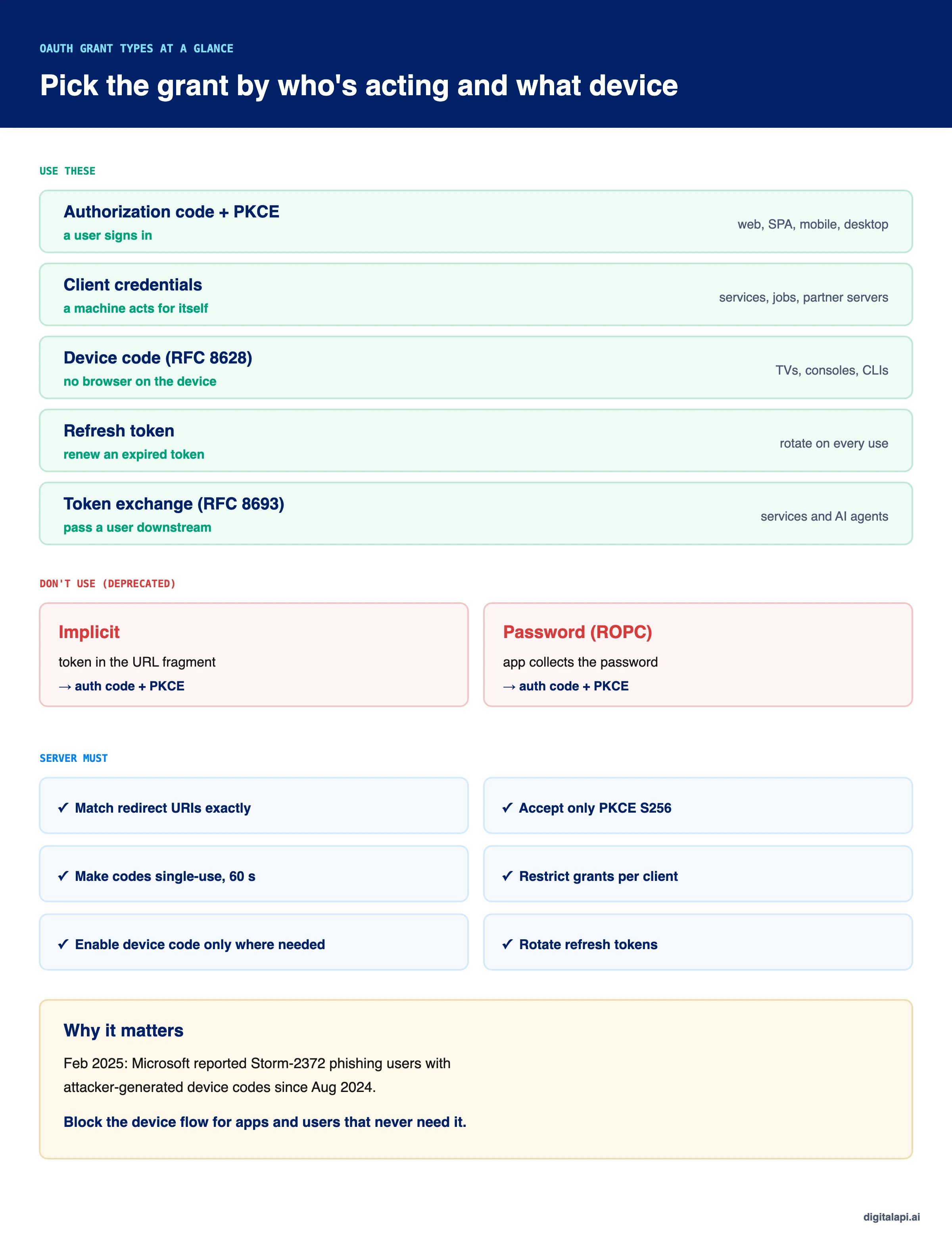
Use authorization code with PKCE when a user signs in, client credentials when a service acts on its own behalf, the device grant for TVs and command-line tools, and the refresh token grant to renew access.
The implicit and password grants are deprecated and shouldn't be used.
In February 2025, Microsoft warned that a group it tracks as Storm-2372 had been running a phishing campaign since August 2024 that abused the OAuth device code flow. According to Microsoft Threat Intelligence, victims received fake Microsoft Teams invitations, typed an attacker-generated code into a genuine sign-in page, and handed over tokens to their own mailboxes.
Nothing was wrong with the device flow itself. It was being used where it wasn't needed. That's the real decision behind OAuth grant types: each one is safe for a specific kind of client and risky everywhere else.
This guide explains every grant type, which ones are deprecated, how to choose one for web apps, mobile apps, devices, services and AI agents, and how to implement the two you're most likely to need, with code we ran and tested.
What is an OAuth grant type?
An OAuth grant type is the method a client uses to obtain an access token from the authorization server. Each grant type defines what the client sends, how the user (if any) is involved, and what comes back. The client names the grant in the grant_type parameter of the token request.
These steps are also called OAuth flows, and the two terms are used interchangeably. If you're new to OAuth itself, start with what is OAuth.
Here are all the OAuth 2.0 grant types you're likely to meet:
Which OAuth grant type should you use?
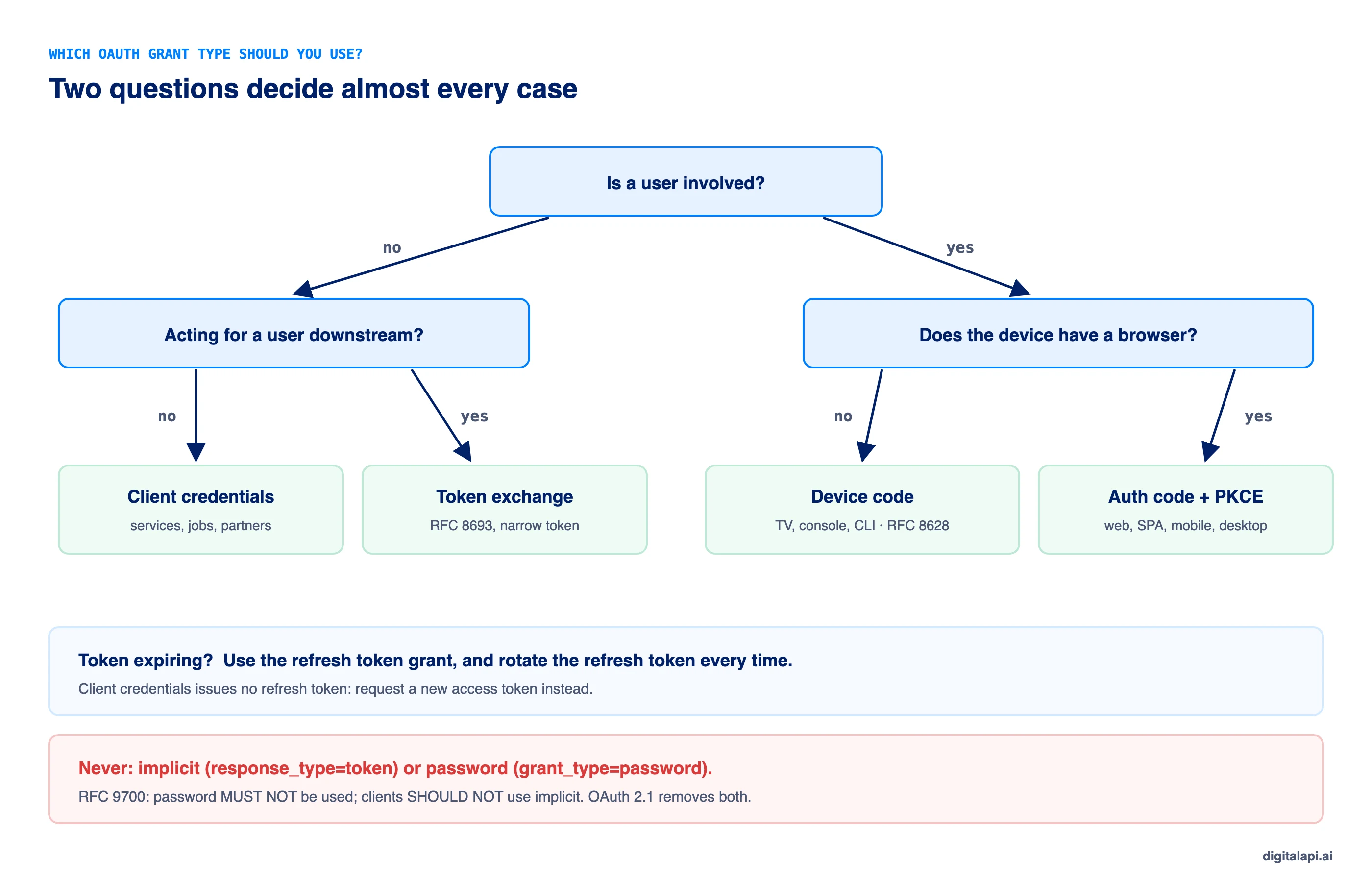
Choose the grant type by asking two questions: is a user involved, and can the client keep a secret? A user signing in needs authorization code with PKCE. A machine acting for itself needs client credentials. A user on a device without a browser needs the device grant.
How does the authorization code flow with PKCE work?
In the authorization code flow, the app sends the user to the authorization server to sign in, receives a one-time code on its redirect URI, and exchanges that code for tokens at the token endpoint. PKCE adds a secret the app creates for each sign-in, so a stolen code is useless to anyone else.
- The app creates a
code_verifier, a random string, and its SHA-256 hash, thecode_challenge. - The app redirects the user to the authorization endpoint with
response_type=code, itsclient_id, a registeredredirect_uri, astatevalue and thecode_challenge. - The user signs in and consents at the authorization server, not in the app.
- The authorization server redirects back to the exact registered
redirect_uriwith a short-lived, single-usecodeand the samestate. - The app checks
state, then exchanges the code at the token endpoint, sending the originalcode_verifier. - The server hashes the verifier, compares it with the stored challenge, and only then issues tokens.
PKCE, short for Proof Key for Code Exchange, is defined in RFC 7636. The OAuth 2.0 Security Best Current Practice (RFC 9700) says public clients, such as single-page and mobile apps, MUST use it, and recommends it for confidential clients too. The draft OAuth 2.1 makes it the default for every client. That's why authorization code flow with PKCE is now the default for any sign-in.
Here's the client side:
Always use the S256 method. RFC 7636 allows plain only for clients that can't compute SHA-256, and with plain the challenge is the verifier itself, so anyone who sees the request can redeem the code.
What must the authorization server check?
The server must match the redirect URI exactly, accept only S256, make every code single-use and short-lived, and bind the code to the client and the PKCE challenge. Most real-world OAuth attacks exploit a server that skips one of these. Here's the server side, including the device grant covered below:
Two details matter. An unregistered redirect URI gets an error page, never a redirect, because redirecting to an attacker's URL is the attack. And the code is marked used before the PKCE check, so an attacker who guesses wrong also burns the code. RFC 9700 requires exact string matching of redirect URIs for exactly this reason.
When should you use the client credentials grant?
Use the client credentials grant when a service, job or agent calls an API on its own behalf and can keep a credential secret. There's no user, no redirect and no refresh token: the client authenticates directly to the token endpoint.
It's the right grant for back-end services, scheduled jobs and partner servers, and the wrong one for anything running on a user's device or acting for a specific person. How the client authenticates, how it caches tokens and how to avoid shared secrets are covered in our guide to the client credentials flow.
How does the device code flow work?
The device code flow, formally the device authorization grant (RFC 8628), lets a device without a browser or keyboard get tokens by showing the user a short code to enter on their phone or computer. The device polls the token endpoint until the user approves.
- The device asks for codes at the device authorization endpoint.
- It shows the user a URL and a short code, such as
FZTN-XCPP, often as a QR code. - The user opens the URL on another device, signs in, checks the code and approves.
- Meanwhile the device polls the token endpoint at the interval it was given.
- Once approved, the next poll returns the tokens.
Here's what the exchange looks like:
The polling responses follow the standard. authorization_pending means keep waiting, slow_down means add five seconds to the interval, access_denied means the user refused, and expired_token means start again.
Is the device code flow safe?
The device code flow is safe for devices that need it, and risky when it's enabled for clients that don't. Because the user types a code on a genuine sign-in page, phishing defences that check the URL don't help. That's what the Storm-2372 campaign exploited.
- Enable the device grant only for clients that need it, such as TV and CLI apps, never by default.
- Keep device codes short-lived, 10 to 15 minutes at most.
- Show the client name and requested scopes on the approval screen, so users can spot an unexpected request.
- Block the device flow by policy for users and apps that never use it. Microsoft recommends exactly this.
- Use user codes without vowels or look-alike characters, as RFC 8628 suggests, so codes are easy to read and hard to mistype.
What is the refresh token grant?
The refresh token grant lets a client exchange a refresh token for a new access token, without asking the user to sign in again. It's how apps keep sessions alive while access tokens stay short-lived.
Refresh tokens are valuable, so treat them carefully. Rotate them on every use, detect reuse and revoke the token family when an old one appears, and keep them away from browser JavaScript. RFC 9700 requires refresh tokens for public clients to be either rotated or sender-constrained. The client credentials grant doesn't use refresh tokens at all. We test rotation with reuse detection in our guide to token-based authentication.
What are the extension grant types?
Extension grant types are grants defined outside the core OAuth 2.0 spec for specific situations, such as exchanging tokens between services or using a signed assertion from a trusted issuer. You won't need most of them, but you should recognise them.
Token exchange matters most for modern architectures. It lets a gateway, service or agent turn a user's broad token into a narrow one for the next API, recording both the user and the acting party, instead of forwarding the original token everywhere.
Which OAuth grant types are deprecated?
The implicit grant and the resource owner password credentials grant are deprecated. RFC 9700 says the password grant "MUST NOT be used" and that clients should not use the implicit grant. The draft OAuth 2.1 removes both.
Some documentation still suggests implicit for single-page apps. That advice predates PKCE and is out of date: a browser app can do the authorization code flow with PKCE, ideally behind a backend-for-frontend that keeps tokens out of JavaScript.
What changes in OAuth 2.1?
OAuth 2.1 consolidates a decade of security fixes into one specification. It's still an IETF draft as of November 2026, but most identity providers already follow it. The main changes:
- PKCE is required for the authorization code grant.
- Redirect URIs must match exactly, with no wildcards.
- The implicit and password grants are removed.
- Bearer tokens can't be sent in query strings.
- Refresh tokens for public clients must be sender-constrained or one-time use.
What happened when we tested the grant types?
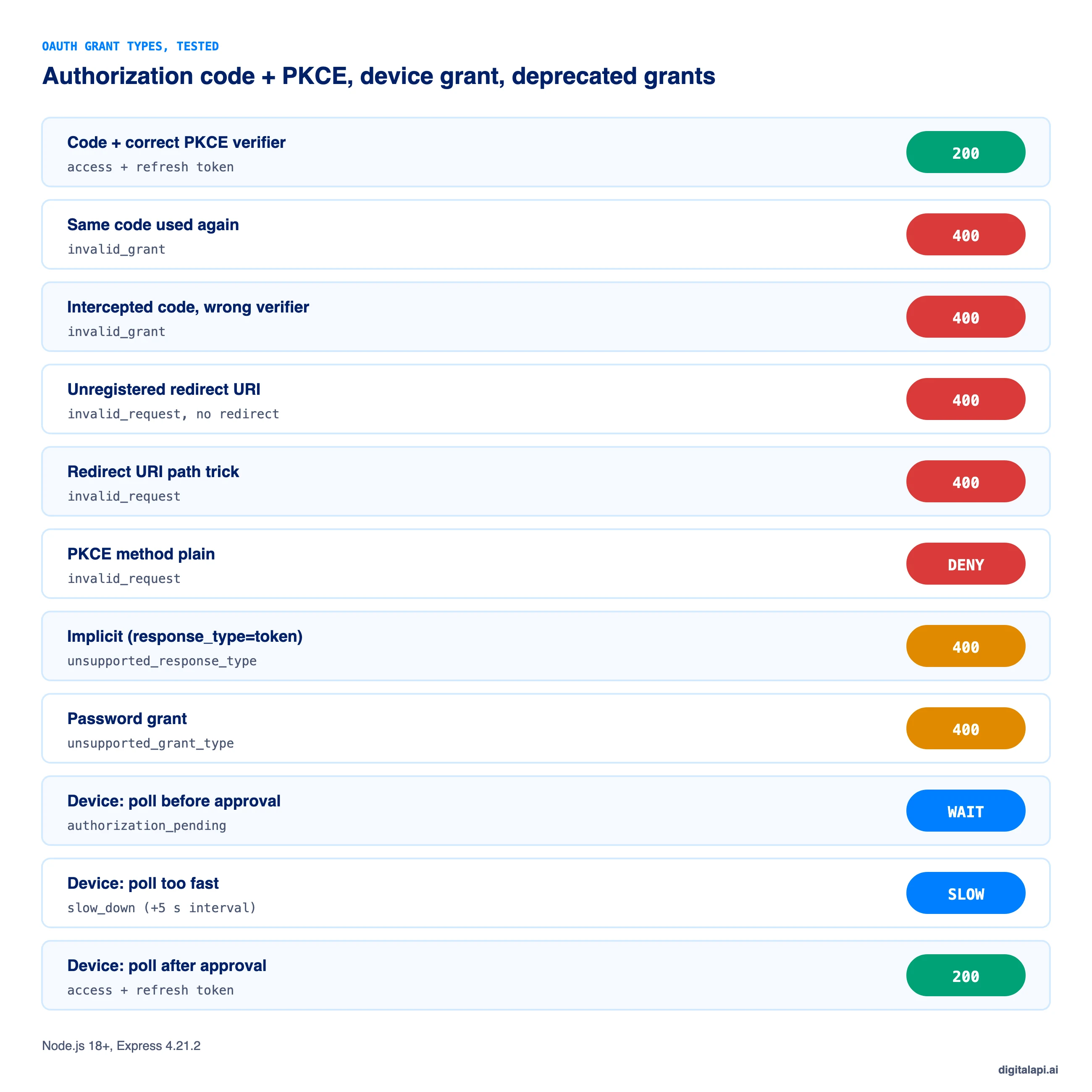
We ran the authorization server and PKCE client above with Node.js 18+ and Express 4.21.2. Every result matched what the specifications require:
Which grant types should AI agents and MCP clients use?
AI agents should use the same grant types as any other client, chosen by whose behalf they act on. An agent acting for a signed-in user uses authorization code with PKCE. An agent acting for itself uses client credentials. A command-line agent on a developer's machine can use the device grant. An agent calling a downstream API for a user should use token exchange.
The MCP authorization specification builds on OAuth 2.1, so MCP clients that act for users follow the authorization code flow with PKCE, and MCP servers must reject tokens that weren't issued for them. Never give an agent a user's password or a long-lived token copied from a browser. For setup, see securing MCP endpoints.
How do you enforce grant type rules across your APIs?
Restrict grant types per client at the authorization server, and validate the resulting tokens consistently at the API gateway. A partner's server registered for client credentials shouldn't be able to use the device grant, and a mobile app shouldn't hold a client secret at all.
The gateway's job is to check the token, whichever grant produced it: signature, issuer, audience, expiry and scope. In organisations with several gateways, that check drifts from one to the next. The DigitalAPI API Gateway applies one token and scope policy across the gateways you already run. Teams using the DigitalAPI API Developer Portal let developers register apps with only the grant types their app type allows, so a single-page app never receives a client secret and a partner server never gets the device grant.
See how DigitalAPI enforces the right OAuth grants and token policy across every gateway you run → Book a Demo
Key takeaways
- OAuth grant types are the ways a client gets an access token; choose one by whether a user is involved and whether the client can keep a secret.
- Authorization code with PKCE is the default for any user sign-in, including single-page and mobile apps.
- Client credentials is for machines acting on their own behalf; device code is for devices without a browser.
- Implicit and password are deprecated; OAuth 2.1 removes them.
- Servers must match redirect URIs exactly, accept only S256, and make codes single-use.
Frequently asked questions
1. What are OAuth grant types?
OAuth grant types are the defined methods a client application uses to obtain an access token from an authorization server. The main ones are authorization code with PKCE, client credentials, device authorization, refresh token and token exchange. Each suits a different situation, such as a user signing in, a service acting for itself, or a device without a browser.
2. How many OAuth 2.0 grant types are there?
RFC 6749 defined four grant types: authorization code, implicit, resource owner password credentials and client credentials, plus the refresh token grant. Extensions added the device authorization grant, token exchange, JWT bearer and SAML bearer grants. Of these, implicit and password are now deprecated.
3. Which OAuth grant type is the most secure?
For user sign-in, authorization code with PKCE is the most secure grant type, because the user signs in at the authorization server, the code is single-use, and PKCE stops stolen codes from being redeemed. For machine-to-machine access, client credentials with private_key_jwt or mTLS authentication is the most secure option.
4. What is the difference between authorization code and client credentials?
Authorization code issues a token for a user who signs in and consents through a browser redirect. Client credentials issues a token for the application itself, with no user involved. Use authorization code with PKCE for apps that act for people and client credentials for services that act on their own behalf.
5. What is PKCE?
PKCE (Proof Key for Code Exchange, RFC 7636) protects the authorization code flow. The client creates a random code verifier, sends its SHA-256 hash with the authorization request, and sends the verifier itself when exchanging the code. The server only issues tokens if they match, so an intercepted code is useless without the verifier.
6. Why is the implicit grant deprecated?
The implicit grant returned access tokens directly in the redirect URL, where they could leak through browser history, referrer headers and malicious scripts. It also couldn't use PKCE or refresh tokens safely. RFC 9700 says clients should not use it, and OAuth 2.1 removes it. Browser apps should use authorization code with PKCE instead.
7. Why shouldn't I use the password grant?
The resource owner password credentials grant makes the user type their password into your app, which then sends it to the token endpoint. That exposes the password to the app and breaks MFA, single sign-on and phishing protection. RFC 9700 says it must not be used. Use authorization code with PKCE instead.
8. What is the device code flow used for?
The device code flow, or device authorization grant (RFC 8628), lets devices without a browser or keyboard, such as smart TVs, consoles and command-line tools, get tokens. The device shows a short code, the user enters it on their phone or computer and approves, and the device polls until it receives tokens.
9. What is OAuth 2.1?
OAuth 2.1 is an IETF draft that consolidates OAuth 2.0 and its security best practices into one specification. It requires PKCE for the authorization code grant, requires exact redirect URI matching, removes the implicit and password grants, and bans bearer tokens in query strings. As of November 2026 it's still a draft, but most providers already follow it.
10. Which OAuth grant type should a single-page app use?
A single-page app should use the authorization code flow with PKCE, not the implicit grant. The most secure pattern adds a backend-for-frontend that performs the token exchange and keeps tokens on the server, giving the browser only an HttpOnly session cookie. This keeps access and refresh tokens out of reach of malicious scripts.
Conclusion
There are many OAuth grant types, but the decision is short. Users signing in get authorization code with PKCE. Services acting for themselves get client credentials. Devices without a browser get the device grant, enabled only where it's needed. Refresh tokens renew access, and token exchange carries identity downstream. Implicit and password belong in the past.
Get the server side right too: exact redirect URIs, S256 only, single-use codes, and grant types restricted per client. That turns a protocol with a reputation for complexity into a small set of safe defaults. For how the resulting tokens work, read our guides to token-based authentication and OAuth scopes.
How safely do you grant API access to partners and AI agents? Get your free readiness score: Check Your API Access Readiness
Prefer a walkthrough? Book a Demo
Dhayalan Subramanian is Associate Director, Product Growth at DigitalAPI, where he leads go-to-market and product growth for the company’s multi-gateway API management platform. His work focuses on helping large enterprises and mid-market cloud companies consolidate APIs across AWS, Azure, Apigee, Kong, MuleSoft, and other gateways into a single control plane for governance, discovery, monetization, and agent consumption.
Dhayalan brings 14+ years of experience across product strategy, enterprise architecture, and engineering leadership. Earlier in his career, he held senior roles at Encora (as Associate Architect and Technical Manager), Mindtree (Technology Lead), Tech Mahindra (Technical Lead), and Primus Analytics, where he designed integration frameworks and delivered enterprise-grade digital platforms for global customers.
At DigitalAPI, he works directly with platform, integration, and developer experience leaders at Fortune 500 organizations to operationalize unified API catalogs, developer portals, and MCP-ready APIs. He writes regularly on API developer experience, API governance, and AI agent architectures.
One email a fortnight. Worth opening.
A short digest of what we're writing, what we're learning from customers, and the handful of links you'd actually want from us. No tracking pixels.