



API Access Provisioning: Automating Request-to-Approval
Many teams still grant API access through tickets, emails and spreadsheets, and forget to take it back. This guide shows how to automate API access provisioning from request to approval to credentials, which requests a person should still review, how SCIM fits in, and how to remove access automatically, with tested code.

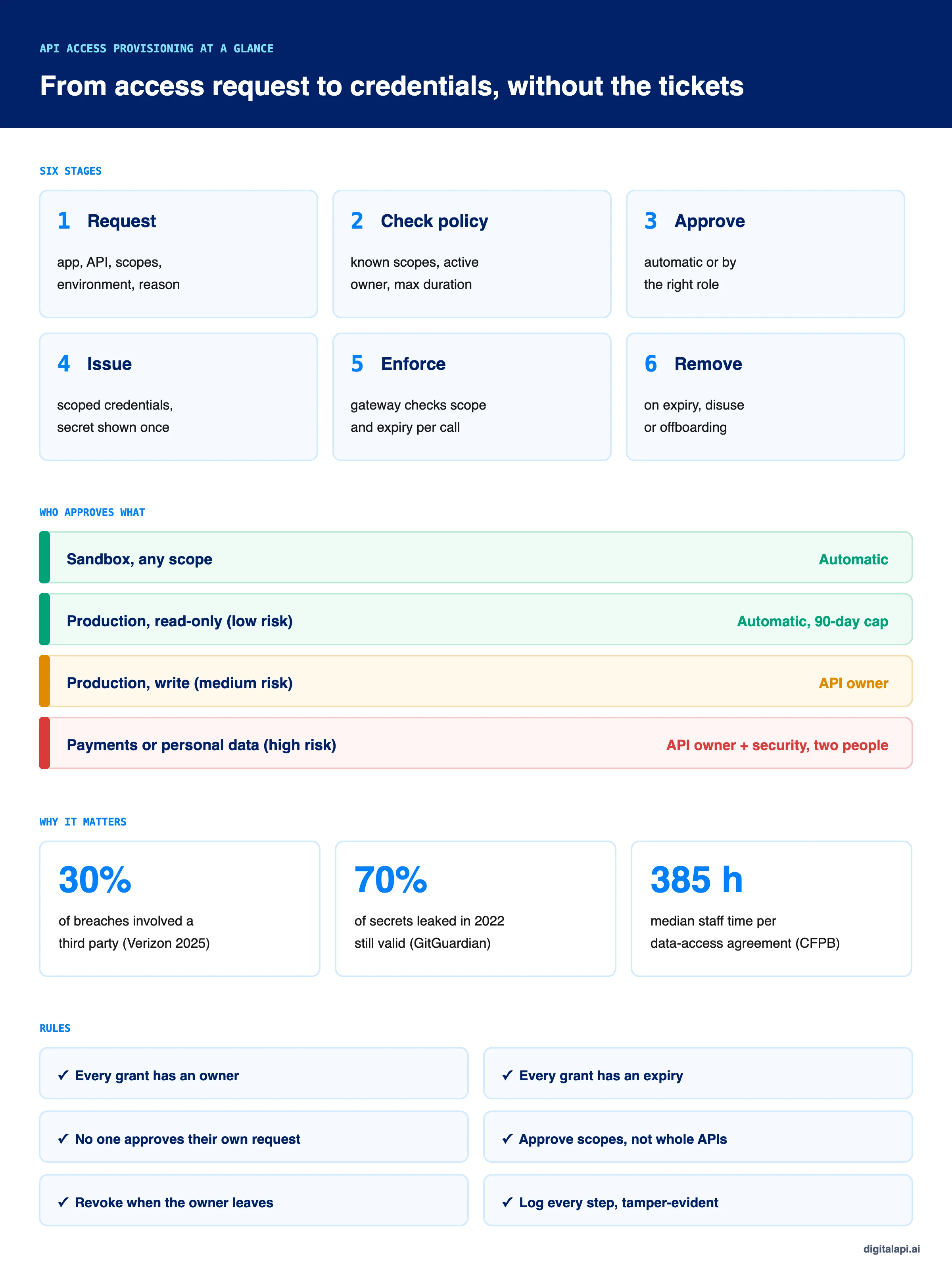
TL;DR:
What is API access provisioning?
API access provisioning is the process of granting an app, team or AI agent access to an API: taking the request, checking it against policy, getting approval, issuing scoped credentials and removing them when they're no longer needed.
Automating it means low-risk requests, such as sandbox or read-only access, are approved by policy in seconds, while risky ones go to the right approver.
Every grant gets an owner, an expiry and an audit trail.
In November 2023, an attacker used credentials stolen in an earlier breach to get into Cloudflare's internal Atlassian systems. Cloudflare had rotated thousands of leaked credentials. It missed one service token and three service accounts, because, in its own words, "mistakenly it was believed they were unused."
That's the problem API access provisioning has to solve. Giving access is easy; the hard parts are knowing who holds it, what it allows, and taking it back when nobody needs it. When access is granted by tickets and emails, nobody owns the answer to those questions.
This guide shows how to automate the path from access request to approval to credentials, which requests a person should still review, how SCIM fits in, and how to remove access automatically, with code we ran and tested.
What is API access provisioning?
API access provisioning is how an organization decides who can call an API, with what permissions, for how long, and then issues and later removes the credentials to match. It covers partner apps, internal services, developers and, more and more, AI agents.
It's related to user provisioning, which creates and removes employee accounts across applications, but it isn't the same thing:
- User provisioning answers "which apps does this employee get?" The account belongs to a person, and the trigger is usually an HR event: joining, moving or leaving.
- API access provisioning answers "which API calls can this app make?" The credential belongs to an app or agent, but it still needs a human owner, and the trigger is a request.
The two meet at offboarding. When an employee leaves, user provisioning disables their accounts. API access provisioning has to revoke the API credentials they own too, or those keep working. For the wider set of controls around API access, see our guide to API access management.
Why does manual API access provisioning break down?
Manual API access provisioning is slow when granting and unreliable when revoking. Tickets queue for days, approvers grant broad access to avoid a second round, and credentials outlive the projects and people they were issued for.
The numbers show both sides of the problem:
- Granting is expensive. The US Consumer Financial Protection Bureau's 2024 open-banking rule cites a median of 385 staff hours to set up one data-access agreement. We break down where those hours go in the real cost of partner onboarding.
- Third parties are now a common way in. Verizon's 2025 Data Breach Investigations Report found third-party involvement in 30% of breaches, double the previous year.
- Leaked credentials stay live. GitGuardian's State of Secrets Sprawl 2025 found that 70% of secrets leaked in 2022 were still valid when the report was written.
Slow granting pushes teams to share one key across projects or to grant more than needed. Unreliable revocation leaves those keys working for years. Automated provisioning fixes both, because the same system that issues access also tracks who owns it and when it ends.
How does an automated API access request workflow work?
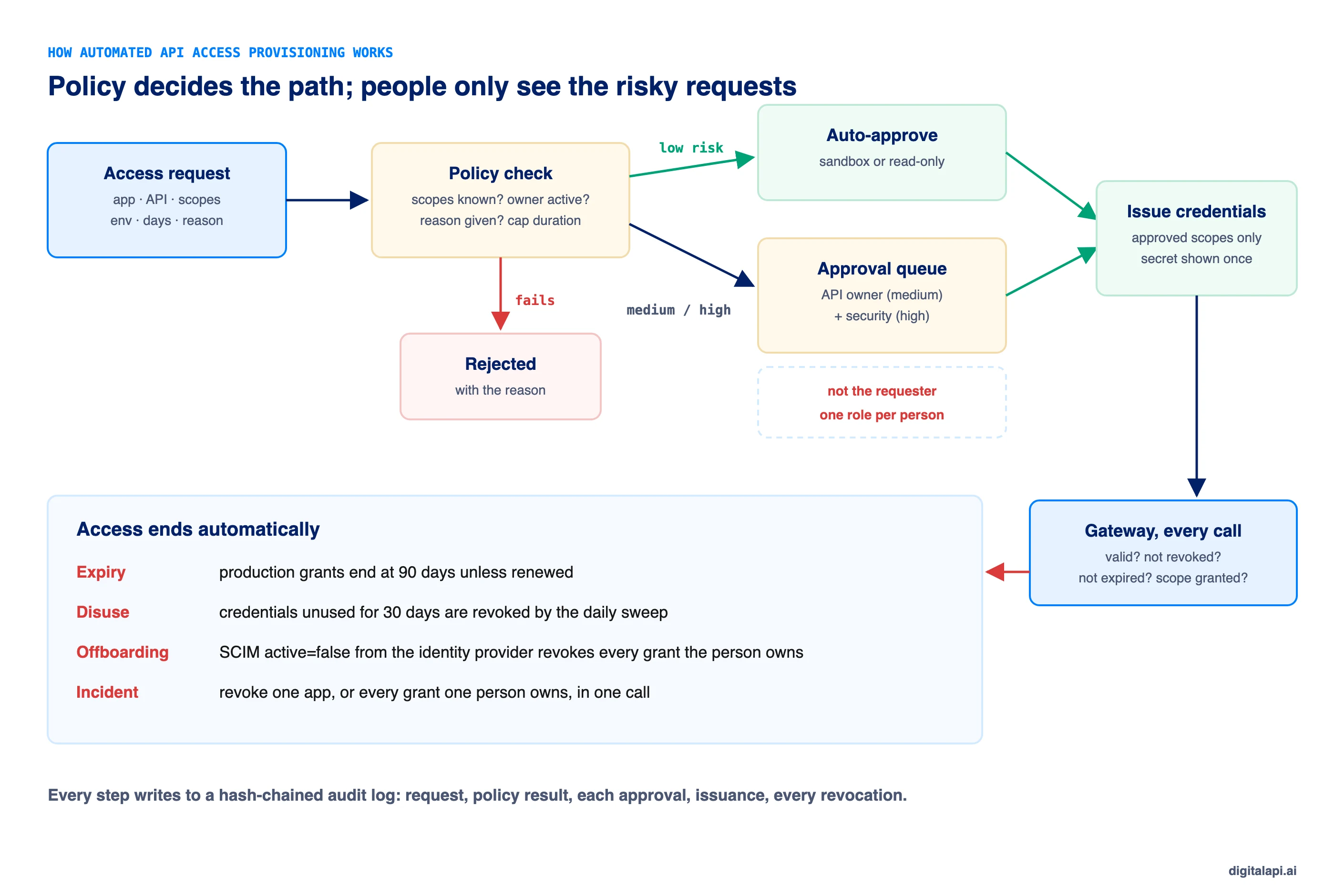
An automated access request workflow runs every request through the same six steps: request, policy check, approval, issuance, enforcement and removal. Policy settles most requests without a person; the rest go to an approver with the context they need.
- Request. The requester names the app, the API, the exact scopes, the environment (sandbox or production), how long they need it and why.
- Policy check. The system rejects unknown scopes, inactive requesters and production requests with no reason, and caps the duration.
- Approval. Low-risk requests are approved automatically. The rest go to the roles the policy names: the API owner, and security for sensitive data.
- Issuance. Credentials are created with only the approved scopes and an expiry date. The secret is shown once.
- Enforcement. The API gateway checks every call against the grant: valid credential, not revoked, not expired, scope granted.
- Removal. Access ends on expiry, after a period of disuse, when the owner leaves, or on demand during an incident.
What should an API access request include?
A good access request names the app, the API, the exact scopes, the environment, the duration and the business reason. Each field feeds a policy decision, so leaving one out means a person has to chase it.
- App and owner: the app the credential is for, and the named person accountable for it. Never a shared mailbox.
- Scopes: the specific permissions, such as
orders:read, not "full access". See OAuth scopes for how to design them. - Environment: sandbox and production carry different risk and different rules.
- Duration: how long the access is needed, capped by policy.
- Reason: one sentence an approver, or an auditor a year later, can understand.
This is access request management in practice: a structured request, not a free-text ticket, is what makes automation possible.
Which API access requests should be approved automatically?
Approve sandbox access and low-risk read-only production access automatically, and route anything that writes data, moves money or touches personal data to a person. Base the decision on the scopes requested, not on the API as a whole.
Many API management tools offer only an on/off approval switch for each product or plan. That forces a choice between approving everything by hand and approving everything automatically. Tiering by scope removes that trade-off: the request for orders:read goes through in seconds, while payments:write on the same API waits for two people.
How do you stop approvals from becoming a rubber stamp?
Enforce separation of duties in the workflow itself: the requester can never approve their own request, each required role must be a different person, and approvers only see requests they're qualified to judge. Then keep the queue small so each approval gets real attention.
- No self-approval. Even an API owner requesting access to their own API needs someone else to approve.
- One role per person. If a request needs the API owner and security, one person holding both roles can't satisfy both.
- Approvers need the role. A security reviewer can't approve on behalf of the API owner.
- Small queues. Every request that policy can decide is one fewer for a person. Approvers who see five requests a week read them; approvers who see fifty click "approve".
For approvals on API changes rather than access, see role-based approvals for risky API changes.
How should API credentials be issued automatically?
Issue credentials the moment the last approval lands, limited to the approved scopes, with an expiry date, a named owner and a secret the requester sees exactly once. Store only a hash of the secret, so nobody, including your own admins, can read it back later.
- Approved scopes only. The credential carries exactly what was approved, not the API's full scope list. This is least privilege applied at issuance.
- Show the secret once. Return it in the approval response and never again. If it's lost, rotate it; don't email it.
- Hash at rest. Store a hash, like a password. A database leak then exposes no usable secrets.
- Always set an expiry. Production grants in our policy last 90 days at most. Renewal is a new, lighter request.
- Make requests idempotent. A retried request with the same idempotency key returns the original request, so a double-click never issues two credentials.
- Prefer short-lived tokens for services. For machine clients, issue client credentials and let the service exchange them for access tokens that last minutes. See the client credentials flow and access token vs refresh token.
If you issue API keys, the same rules apply. Our guides to API key management and rotating API keys automatically cover storage and rotation in more depth.
This is the provisioning engine we tested. It handles requests, policy tiers, approvals with separation of duties, issuance, gateway checks, the expiry and disuse sweep, offboarding and a hash-chained audit log, with no dependencies:
How do SCIM and provisioning APIs fit into API access provisioning?
SCIM tells your API platform when a person joins, changes or leaves; your provisioning workflow decides what that means for the API credentials they own. Use SCIM to keep owners in sync with your identity provider, not to issue API credentials.
SCIM (System for Cross-domain Identity Management) is the standard identity providers use to create, update and deactivate users in other systems. It's defined in RFC 7643 (the schema) and RFC 7644 (the protocol). A provisioning API is any endpoint that accepts those changes; a SCIM endpoint is the standard kind.
For API access, the event that matters most is deactivation. When someone leaves, the identity provider sends a PATCH that sets active to false:
Your handler should then revoke every API credential that person owns and cancel their pending requests. One detail catches teams out: identity providers don't all send this the same way. Microsoft documents, in its SCIM compliance known issues, that Entra ID can send "Replace" with a capital R and the string "False" instead of a boolean, unless a compatibility flag is set. A handler that checks if (value) treats the string "False" as true and deactivates nobody, while still returning 200. Ours accepts both forms:
Automated user provisioning through SCIM is a large topic of its own, including groups, attribute mapping and the joiner and mover events. Here it plays one role: making sure API access never outlives its owner.
How does deprovisioning work for API access?
API access should end automatically in four situations: when it expires, when it goes unused, when its owner leaves, and when security revokes it during an incident. Relying on someone to remember is how credentials stay valid for years.
Provisioning and deprovisioning need equal weight. Most teams automate the first and leave the second to tickets.
- Expiry. Every grant has an end date. When it passes, the gateway rejects the credential and a scheduled sweep marks it revoked.
- Disuse. Credentials with no calls for 30 days are revoked. Cloudflare's breach came through credentials believed to be unused; a usage-based sweep finds out instead of believing.
- Owner leaves. A SCIM deactivation, or an HR event, revokes everything the person owns. Credentials with no owner are a finding, not a normal state.
- Incident. One call revokes one app, or every grant one person owns.
This matches the standards auditors check against. NIST SP 800-53 Rev. 5 control AC-2(3) requires disabling accounts when they've expired, are no longer associated with a user, violate policy or have been inactive for a set period. AC-2(4) requires automatic auditing of account creation, changes and removal. ISO/IEC 27001:2022 control 5.18 asks for access rights to be provisioned, reviewed, modified and removed according to policy.
Forgotten, over-privileged apps are a real attack path. In January 2024, Microsoft reported that the Midnight Blizzard group got into a legacy, non-production test tenant account and used a legacy test OAuth app with elevated access to its corporate environment to read email. The app was a leftover from testing, yet it still held elevated access to production.
What happened when we tested automated API access provisioning?
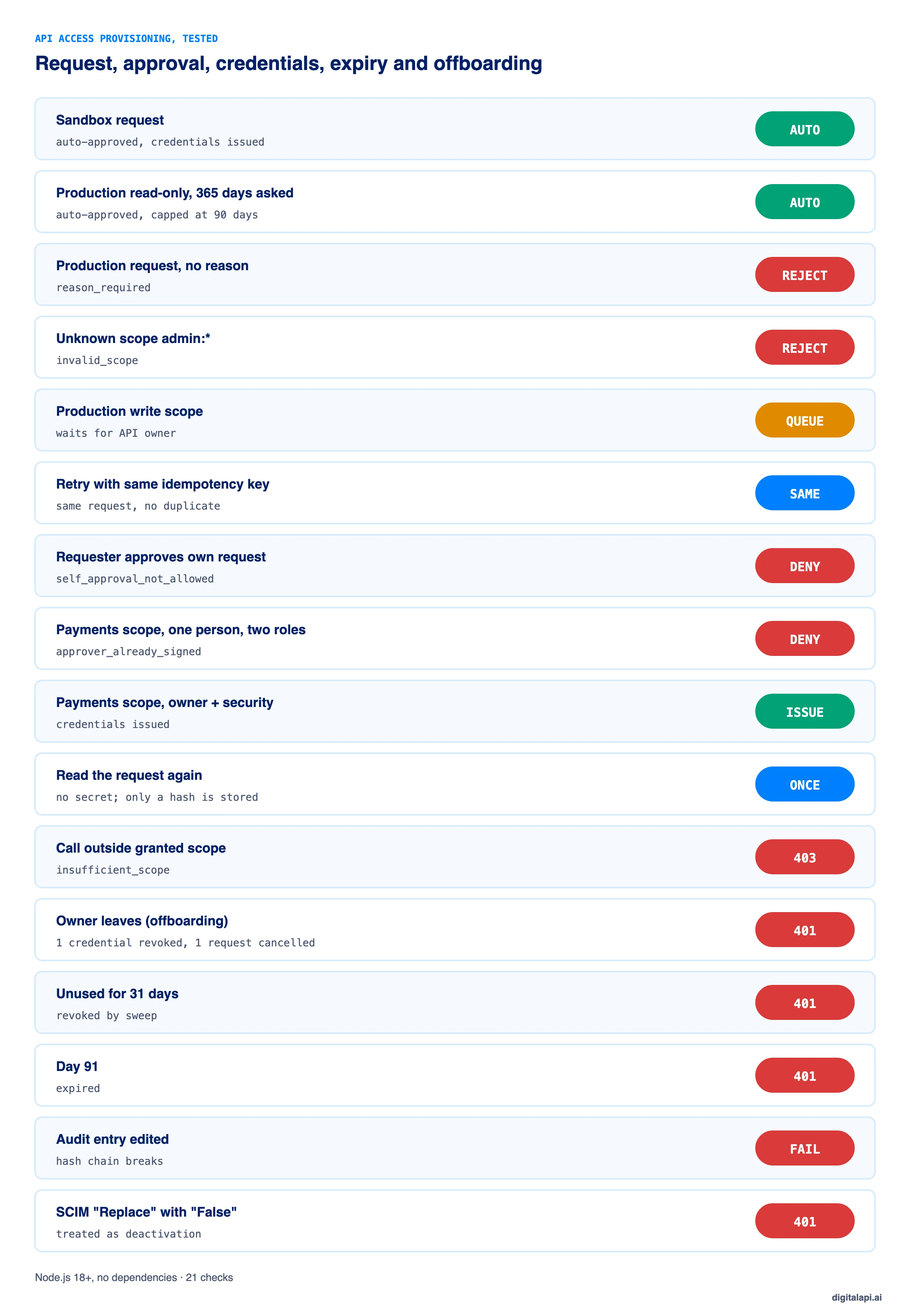
Our provisioning engine passed 21 checks across the full lifecycle. The tests covered automatic and manual approval, separation of duties, show-once secrets, scope enforcement, expiry, disuse, offboarding through SCIM and audit tampering. They also caught a bug in our first version.
The bug: our first version built the approval response before issuing the credentials. The credentials were created, but the response still said "pending". A client polling for status would have shown a request as stuck when it was done. The tests caught it, and the code above issues credentials first.
When should you automate API access approvals?
Automate approvals when the risk is low and the rules are clear, and keep a person in the loop when the access writes data, moves money or exposes personal data. Most organizations need both, decided per scope.
What are the best practices for API access provisioning?
Treat every grant as temporary, owned and scoped, decide it by policy where you can, and make removal as automatic as issuance. These ten practices cover most of it:
- Request scopes, not APIs. Approve
orders:read, not "the Orders API". - Tier approvals by risk. Automatic for low risk, one approver for medium, two for high.
- Never let requesters approve themselves, and require different people for different roles.
- Give every grant a named owner. Teams change; a person can be offboarded.
- Give every grant an expiry. 90 days for production is a sensible default.
- Show secrets once and store hashes. Never send credentials over email or chat.
- Revoke unused credentials after 30 days without calls.
- Connect offboarding to SCIM so leaving revokes API access the same day.
- Enforce at the gateway on every call, not only at issuance. See the ultimate guide to API access control.
- Log every step in a tamper-evident audit trail: request, policy result, each approval, issuance and revocation.
How should AI agents get API access?
Provision AI agents like any other app: a named human owner, narrow scopes, a short expiry and a human approver for anything that writes or reads sensitive data. Give each agent its own credentials so you can revoke one agent without breaking the others.
Agents call APIs faster and more often than people, and can be pointed at new tasks without anyone filing a request. Two extra rules help. First, never auto-approve broad or write scopes for an agent, even in production read paths that look harmless. Second, prefer short-lived tokens issued through the client credentials flow over long-lived keys, so a leaked agent credential stops working within minutes.
How does DigitalAPI automate API access provisioning?
Automated provisioning works best when the developer portal, where requests start, and the gateways, where access is enforced, share one policy. When they don't, the portal approves access the gateway doesn't know about, and revocation reaches one gateway but not the next.
Teams using the DigitalAPI API Developer Portal let consumers request access to specific scopes, get low-risk access approved automatically and send the rest to the right approver, with every grant tied to an owner and an expiry. The DigitalAPI API Gateway layer applies the same grants and revocations across the gateways you already run, so removing access takes effect everywhere at once. For what developers should be able to do on their own, see what a self-service API portal needs.
See how DigitalAPI automates API access from request to revocation → Book a Demo
Key takeaways
- API access provisioning covers the whole life of API access: request, policy, approval, issuance, enforcement and removal.
- Let policy decide low-risk requests and route write, payment and personal-data scopes to people, with separation of duties.
- Issue only approved scopes, with an owner and an expiry, and show the secret once.
- Automate deprovisioning on expiry, disuse and offboarding; SCIM connects your identity provider to API access.
- Test the workflow, including the odd inputs identity providers send.
Frequently asked questions
1. What is API access provisioning?
API access provisioning is the process of granting, changing and revoking an app's or person's access to an API. It covers the access request, the policy check and approval, issuing credentials limited to approved scopes and a lifetime, enforcing them at the gateway, and removing access when it expires, goes unused or loses its owner.
2. What is the difference between user provisioning and API provisioning?
User provisioning creates, changes and removes employee accounts across applications, usually triggered by HR events. API provisioning grants apps, services and AI agents permission to call specific APIs, triggered by an access request. They connect at offboarding: when a user is deprovisioned, the API credentials they own should be revoked too.
3. How do you automate API access approvals?
Assign each API scope a risk tier and define who must approve each tier. Approve sandbox and low-risk read-only requests automatically, send write scopes to the API owner, and require two different people for payments or personal data. Block self-approval, cap durations and issue credentials as soon as the last approval lands.
4. Should API access requests ever be approved automatically?
Yes. Sandbox access and read-only production access to non-sensitive data are good candidates for automatic approval, as long as the credential is scoped, expires and is enforced at the gateway. Requests that write data, move money or expose personal data should still go to a person.
5. What is the role of SCIM in API access provisioning?
SCIM is the standard identity providers use to tell other systems when users are created, changed or deactivated. In API access provisioning, SCIM keeps credential owners in sync with your directory. When a user is deactivated, the SCIM event should trigger revocation of every API credential that person owns.
6. What is a provisioning API?
A provisioning API is an endpoint that lets another system create, update or remove accounts or access automatically. SCIM endpoints are the standard type, used by identity providers to sync users and groups. API platforms can also expose provisioning APIs so partners or internal tools can request and manage API access programmatically.
7. How long should API access last?
Production API access should expire within a set period, such as 90 days, and renew through a lighter request. Sandbox access can last longer, such as a year. Credentials that see no calls for 30 days should be revoked regardless of their expiry date, because unused credentials are a common entry point.
8. What is deprovisioning in API access management?
Deprovisioning is removing API access that is no longer needed. It should happen automatically when a grant expires, when credentials go unused for a set period, when the owner leaves the organization, and on demand during an incident. Deprovisioned credentials must be rejected at the gateway on the next call.
9. Who should approve API access requests?
The API owner should approve access that changes data in their API, because they understand the impact. Security, privacy or compliance should also approve access to payments or personal data. The requester must never approve their own request, and one person shouldn't fill two required roles.
10. How do you provision API access for AI agents?
Give each AI agent its own credentials, owned by a named person, limited to the narrowest scopes it needs and set to expire. Use short-lived tokens through the client credentials flow instead of long-lived keys, and require human approval for any scope that writes data or reads sensitive data.
Conclusion
API access provisioning decides two things: how fast the right people get access, and how reliably it's taken away. Manual processes fail at both. They're slow enough that teams over-grant to avoid waiting, and loose enough that credentials outlive their owners.
Automate the path from request to approval to credentials with policy tiers, separation of duties, scoped and expiring grants, and show-once secrets. Then automate the other half: expiry, disuse sweeps and SCIM-driven offboarding. For the wider picture of who can do what with your APIs, read our guide to API access management and our best practices for onboarding external developers.
How safely do you grant API access to partners and AI agents? Get your free readiness score: Check Your API Access Readiness
Prefer a walkthrough? Book a Demo
Dhayalan Subramanian is Associate Director, Product Growth at DigitalAPI, where he leads go-to-market and product growth for the company’s multi-gateway API management platform. His work focuses on helping large enterprises and mid-market cloud companies consolidate APIs across AWS, Azure, Apigee, Kong, MuleSoft, and other gateways into a single control plane for governance, discovery, monetization, and agent consumption.
Dhayalan brings 14+ years of experience across product strategy, enterprise architecture, and engineering leadership. Earlier in his career, he held senior roles at Encora (as Associate Architect and Technical Manager), Mindtree (Technology Lead), Tech Mahindra (Technical Lead), and Primus Analytics, where he designed integration frameworks and delivered enterprise-grade digital platforms for global customers.
At DigitalAPI, he works directly with platform, integration, and developer experience leaders at Fortune 500 organizations to operationalize unified API catalogs, developer portals, and MCP-ready APIs. He writes regularly on API developer experience, API governance, and AI agent architectures.
One email a fortnight. Worth opening.
A short digest of what we're writing, what we're learning from customers, and the handful of links you'd actually want from us. No tracking pixels.