



How to Revoke API Access and Kill Compromised Keys
A revoked API key that still works on one of your gateways isn't revoked. This guide shows how to revoke API keys, OAuth tokens and JWTs so they stop on the next request everywhere, when to revoke immediately or on a schedule, how to offboard a partner, and what to do in the first hour after a key leaks, with tested code.

TL;DR:
How do you revoke API access?
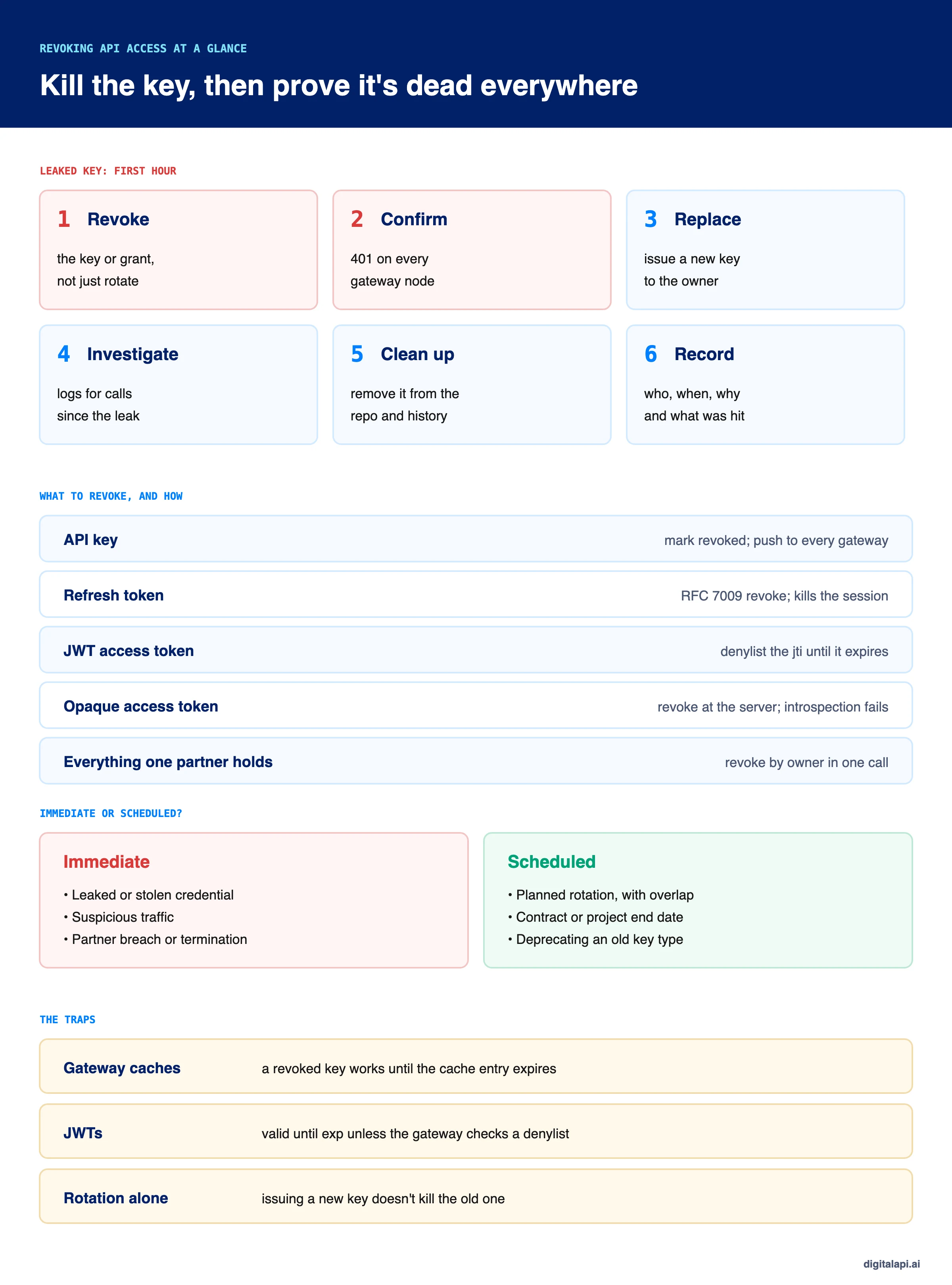
To revoke API access, mark the API key or token as revoked at the source that issued it, push that revocation to every API gateway so it's rejected on the next request, and confirm with a test call.
For OAuth, revoke the refresh token through the RFC 7009 endpoint, and deny any JWT access tokens by ID until they expire.
If the key leaked, revoke first, then replace it, check the logs for misuse and record what happened.
On 5 December 2024, BeyondTrust found that an API key for its Remote Support SaaS service had been compromised. The key could reset passwords on customer instances. BeyondTrust revoked the key and suspended the affected instances; one of the 17 affected customers was the US Treasury Department.
When a key is stolen, revoking it is the one action that stops the damage. But revocation has to be fast, complete and provable: the key must stop working on every gateway, every token it minted must stop too, and you need a record of what it did before you caught it. This guide shows how to revoke API access for keys, OAuth tokens and JWTs, why revoked credentials sometimes keep working, and what to do in the first hour after a leaked API key, with code we ran and tested.
What does it mean to revoke API access?
Revoking API access means permanently invalidating a credential before its natural expiry, so any request that presents it is rejected. It's different from rotating a key, letting a token expire or deleting an app.
The terms get mixed up, and the difference matters during an incident:
- Revoke: the credential stops working now, everywhere. This is the only action that stops an attacker who holds it.
- Rotate: a new credential is issued and the old one is retired, usually after an overlap period. Rotation without revocation leaves the old key working.
- Expire: the credential stops at a time set when it was issued. Short expiry limits damage; it doesn't stop a theft in progress.
- Delete: the record is removed. Delete only after revoking, and keep the audit record, or you lose the evidence of what the key did.
For how keys and tokens are issued in the first place, see API access provisioning.
When should you revoke API access?
Revoke immediately when a credential may be in the wrong hands, and on a schedule when access is ending as planned. If you're unsure whether a key leaked, treat it as leaked: the cost of a replaced key is small; the cost of a live stolen one isn't.
Revoke immediately when:
- A key or token appears in a public repository, a log, a ticket, a chat message or a client-side bundle.
- Traffic from a credential looks wrong: new IP ranges, new endpoints, unusual volume or calls at odd hours.
- A partner reports a breach, or you terminate a partner for cause.
- A device or laptop holding credentials is lost or compromised.
- An upstream provider tells you credentials were exposed, as Okta's customers were in 2023.
Revoke on a schedule when:
- A partner contract or project has a known end date.
- You're rotating a key and the new one is deployed.
- An employee who owns credentials is leaving on a known date.
Leaked secrets don't get fixed fast on their own. The Verizon 2025 Data Breach Investigations Report found a median of 94 days to remediate leaked secrets found in GitHub repositories. GitGuardian's State of Secrets Sprawl 2025 counted 23.8 million new secrets leaked on public GitHub in 2024, and found that 70% of secrets leaked in 2022 were still valid.
How do you revoke an API key?
To revoke an API key, mark it revoked at the system that issued it, push the revocation to every gateway that checks keys, confirm it's rejected, then give the owner a replacement if they still need access. Revoke first and replace second when the key is compromised.
- Find the key's record. Look it up by key ID or by a hash of the leaked value, never by pasting the secret into a search tool. Note the owner, the app and the scopes.
- Revoke it at the issuer. Set it as revoked with who, when and why. Don't delete it; you need the record.
- Push the revocation to every gateway. Each node must evict any cached copy of the key. Otherwise the key keeps working until the cache expires (see below).
- Confirm with a test call. Send a request with the revoked key to each gateway or region and expect a 401.
- Issue a replacement to the owner through your normal process, with the narrowest scopes they need.
- Watch for attempts. Calls that still arrive with the revoked key tell you someone is trying to use it.
For planned key changes, use API key rotation with an overlap window instead. Our guide to API key management covers storage and lifecycle.
How do you revoke access tokens, refresh tokens and JWTs?
Revoke the refresh token at the authorization server using the RFC 7009 revocation endpoint, which ends the session, and stop any JWT access tokens already issued by denying their IDs at the gateway until they expire. Opaque access tokens stop as soon as introspection reports them inactive.
RFC 7009 defines OAuth token revocation. The client sends the token to the revocation endpoint and authenticates itself:
Three rules from the RFC matter in practice:
- It always returns 200, even for a token that's unknown or already revoked, so the endpoint doesn't reveal which tokens exist.
- Revoking a refresh token SHOULD also invalidate the access tokens issued under the same grant, if the server can revoke access tokens.
token_type_hintis only a hint. If the token isn't found under that type, the server must search the other types.
To revoke a refresh token for a user who signs out, changes their password or loses a device, use this endpoint. To revoke an access token that's an opaque string, revoke it at the authorization server; the next introspection call (RFC 7662) returns active: false.
How do you revoke a JWT?
JWT revocation needs a denylist: store each revoked token's ID (the jti claim) until the token's own expiry, and have every gateway reject tokens on that list. Without one, a JWT stays valid until it expires, because the gateway checks it locally and never asks the issuer.
So, how to revoke a JWT token in practice:
- Keep access tokens short. Five to fifteen minutes limits how long a revoked token could work. See access token vs refresh token for lifetimes.
- Denylist by
jti, with a TTL equal to the token's remaining life. A fixed TTL that's shorter than the token's lifetime lets a revoked token come back to life. - Revoke by grant, not only by token. Revoking a grant should deny every token issued under it.
- Prune the list. Once a token would have expired anyway, its entry can go. The list stays small.
It's a common claim that JWTs "can't be revoked". They can; it costs one lookup per request. For how JWTs are checked, see what is a JWT and token-based authentication.
Why does a revoked API key keep working?
A revoked API key keeps working when gateways cache key lookups and don't hear about the revocation, so each node accepts the key until its cache entry expires. JWTs have the same problem for their whole lifetime when no denylist is checked.
Most gateways cache key and token lookups so they don't call the issuer on every request. That's sensible for performance. But it means revocation lag: the time between "revoked" in your console and "rejected" on every node. RFC 7009 itself acknowledges this kind of propagation delay.
In our test, with three gateway nodes and a 60-second cache:
- Cache only: the revoked key was still accepted 30 seconds after revocation, and rejected only after the cache expired.
- Push plus cache: each node evicted the key when the revocation was published, and rejected it on the next request.
- JWT without a denylist: the revoked token was accepted until its 10-minute expiry.
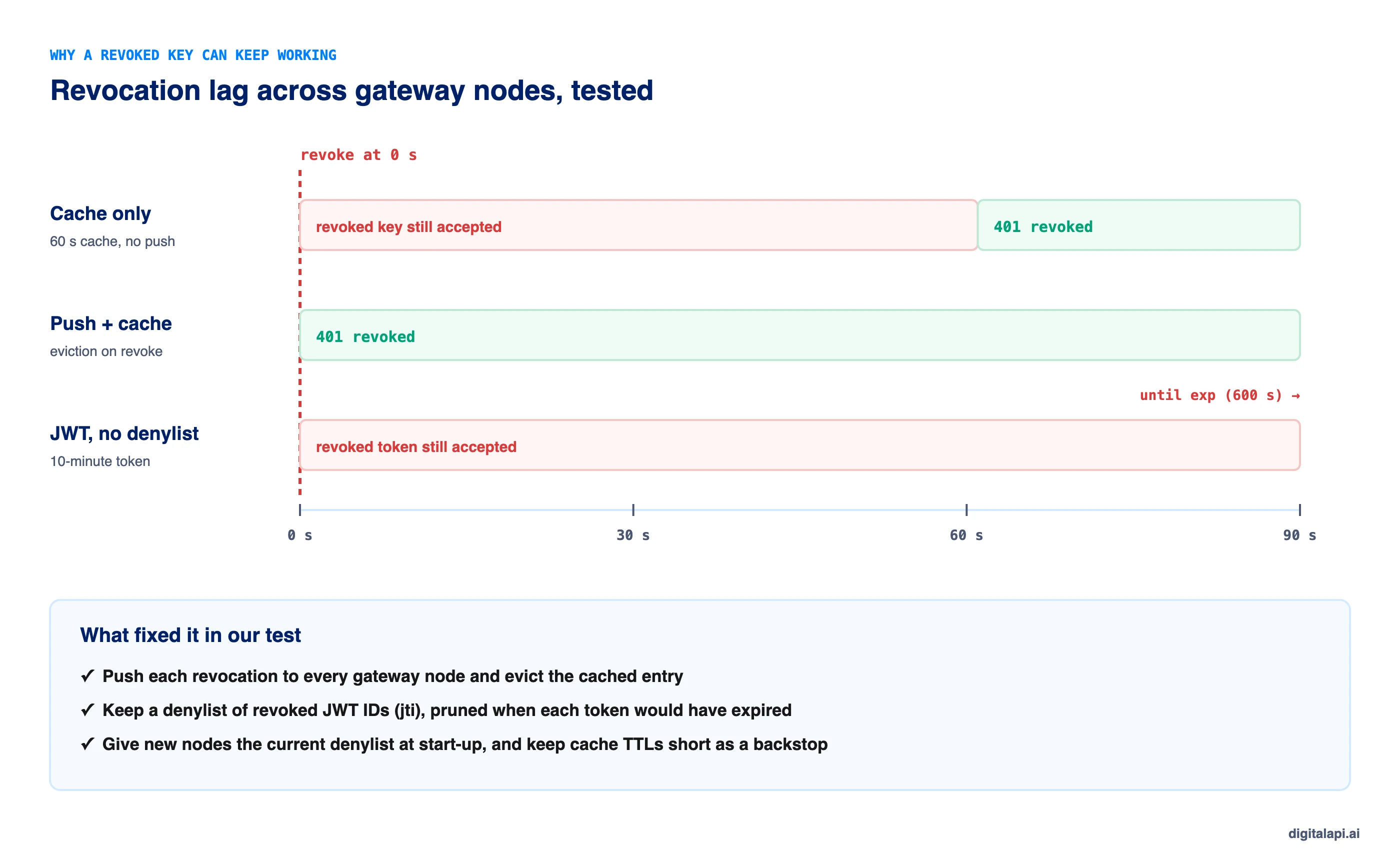
The fix is to push each revocation to every node, keep cache TTLs short as a backstop if a message is missed, and give new nodes the current denylist when they start. If you run several gateways from different vendors, check each one: they cache differently.
Should you revoke API access immediately or on a schedule?
Revoke immediately when there's any chance a credential is compromised, and schedule revocation when access is ending as planned, so it happens on time without anyone having to remember. Planned rotation sits between the two: issue the new key, keep both working for an overlap window, then revoke the old one automatically.
Scheduled revocation removes the most common failure: access that should have ended but didn't, because nobody remembered on the day. The access stops at the set time on its own.
What should you do when an API key leaks?
When an API key leaks, revoke it first, confirm it's dead on every gateway, replace it for the owner, then investigate what it was used for and clean up where it leaked. Do these in order; investigating before revoking gives an attacker more time.
- Revoke the key. Don't wait to understand the scope. A replaced key costs minutes; a live stolen key costs data.
- Confirm it's rejected everywhere. Test each gateway and region for a 401.
- Revoke anything it could mint or reach. Tokens issued with it, keys it could create, and sessions it opened.
- Issue a replacement to the owner, with narrower scopes if the old key had more than it needed.
- Investigate. Search gateway logs for every call made with the key since the earliest time it could have leaked. Note IPs, endpoints, data returned and any changes made.
- Clean up the source. Remove the key from the code, the repository history, the ticket or the chat. A revoked key in history is harmless; the habit that put it there isn't.
- Record it. Who found it, when it was revoked, what it accessed, and what you changed.
Some providers act before you do. GitHub's secret scanning partner program sends partner-format secrets found in public repositories straight to the provider, who may revoke them. AWS attaches a quarantine policy, AWSCompromisedKeyQuarantine, to exposed access keys. That policy denies selected high-risk actions; it doesn't deactivate the key, so you still have to revoke it yourself.
How do you offboard a partner's API access?
Offboard a partner by revoking every credential they hold in one action, on the date the relationship ends, and confirming nothing still authenticates as them. Partner keys are often spread across several apps, environments and gateways, which is why offboarding one key at a time misses some.
- Revoke by owner, not by key. One call should revoke every key and grant tied to the partner.
- Schedule it on the contract end date for planned exits, and do it immediately for termination for cause.
- Check for credentials created outside your portal, such as keys added directly on one gateway.
- Revoke the partner's webhooks and callback URLs too, so you stop sending them data.
- Keep the records. Auditors and the partner may ask what access existed and when it ended.
For employees and internal app owners, connect your identity provider so a deactivated user's API credentials are revoked the same day. API access provisioning shows how SCIM deactivation can trigger this.
How do you audit API access revocations?
Log every revocation with who did it, when, why and what it covered, and log every request that still arrives with a revoked credential. The first proves revocation happened; the second tells you whether someone is still trying.
Each revocation record should hold:
- What: key ID, token ID or grant, and the owner.
- Who: the person or automated rule that revoked it.
- When: the exact time, and the time it took effect on each gateway.
- Why: leak, rotation, offboarding, contract end or incident number.
Requests that present a revoked credential are worth alerting on. In our test, each attempt was logged with the node and owner; three attempts across three nodes in quick succession look like a script, not a forgetful developer. Revocations should also show up in your access reviews: a key revoked and replaced five times in a year is a sign of a deeper storage problem.
What happened when we tested API key and token revocation?
Our revocation code passed 14 checks across three gateway nodes. It reproduced revocation lag with cache-only gateways and showed push-based eviction and a JWT denylist closing it. It also tested rotation with overlap, scheduled revocation, partner offboarding and RFC 7009 behaviour.
What we changed: our first version estimated each token's expiry when adding it to the denylist instead of storing the real one. That would have pruned entries too early for longer-lived tokens and let them work again. The code below stores each token's actual expiry.
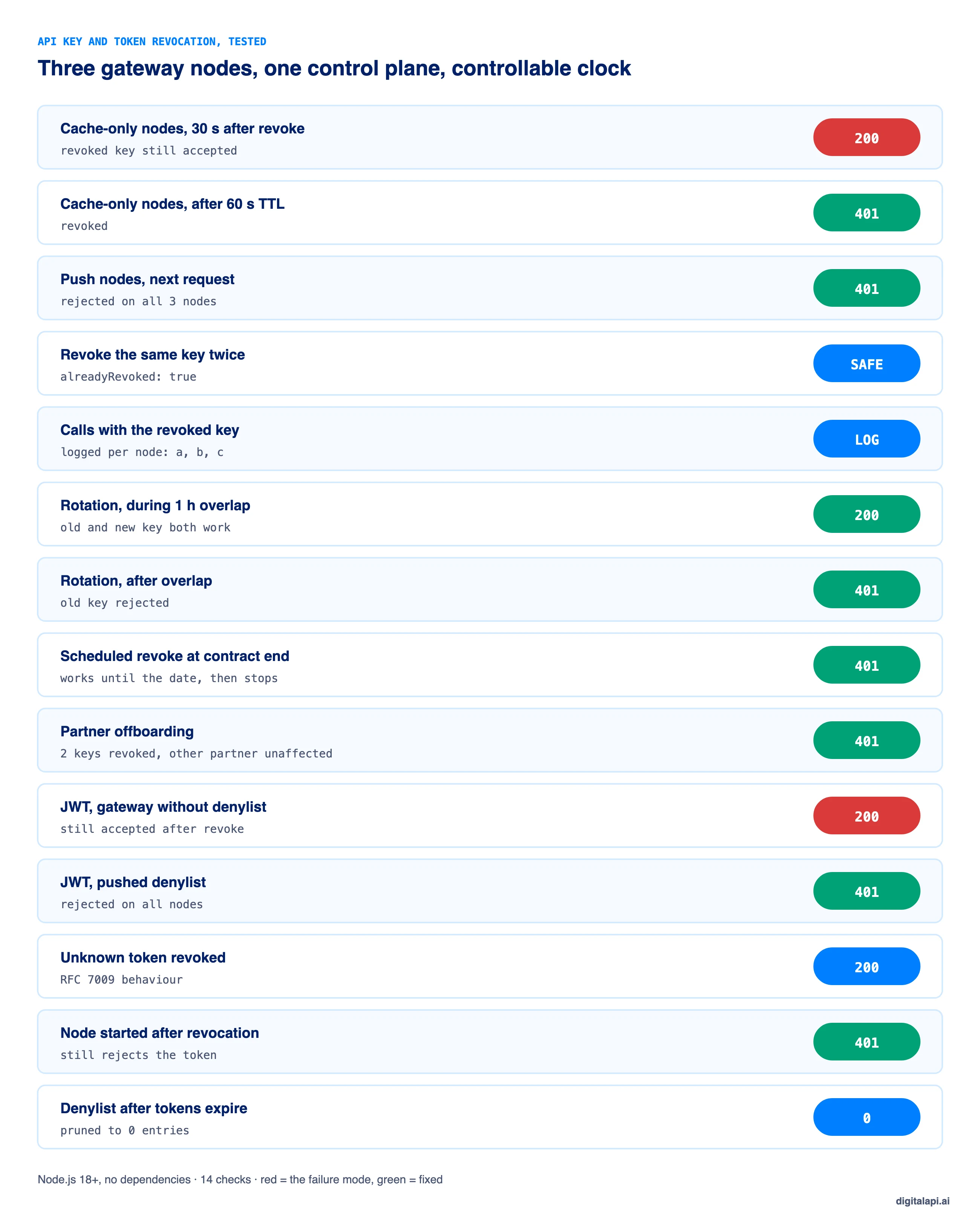
This is the code we tested: a control plane that issues and revokes keys and JWTs, and gateway nodes that cache lookups and listen for revocations:
What are the best practices for revoking API access?
Make revocation fast, complete and provable: one action that reaches every gateway on the next request, covers everything the credential could mint, and leaves a record. These ten practices cover most of it:
- Revoke first, investigate second when a key may be compromised.
- Push revocations to every gateway and evict cached entries; keep cache TTLs short as a backstop.
- Denylist JWT IDs until they expire, with the real expiry, not a fixed TTL.
- Keep access tokens short-lived, so the worst case is minutes.
- Revoke refresh tokens through RFC 7009, and invalidate the access tokens issued under the same grant.
- Revoke by owner for partner and employee offboarding.
- Schedule revocation for contract ends and rotations, so it never depends on memory.
- Never delete before revoking, and keep the audit record.
- Alert on use of revoked credentials; it's a strong signal of an attack.
- Test revocation regularly: revoke a test key and time how long until every gateway returns 401. The essential API security best practices cover the wider controls.
How should you revoke an AI agent's API access?
Revoke an AI agent's access the same way as any app, but make it faster to do and narrower in effect: each agent should have its own credentials, so one agent can be cut off without stopping the others. Agents can make thousands of calls in the minutes before anyone notices a problem.
Give agents short-lived tokens rather than long-lived keys, so revocation and expiry overlap. If an agent acts for a user, revoke the grant the agent holds, not the user's whole account. And keep an emergency switch that revokes every credential issued to agents in one action, for when a prompt injection or a bad deployment needs stopping now.
How does DigitalAPI handle API access revocation?
Revocation is only as fast as the slowest gateway, so it has to be applied from one place to every gateway you run. When each gateway keeps its own key store, a revoked key can stay live on the one nobody checked.
Teams using the DigitalAPI API Gateway layer revoke a key, a token grant or everything a partner holds in one click, and the credential stops authorizing on the next request across the gateways they already run. The DigitalAPI API Developer Portal keeps every key tied to an owner and an expiry, so offboarding and scheduled revocation happen without a ticket.
See how DigitalAPI revokes API access across every gateway at once → Book a Demo
Key takeaways
- To revoke API access, invalidate the credential at the issuer and push the revocation to every gateway, then confirm with a 401.
- Revocation lag is real: cached keys and unchecked JWTs keep working after revocation unless gateways are told.
- For OAuth, revoke the refresh token through RFC 7009 and denylist JWT access tokens until they expire.
- When a key leaks, revoke first, then replace, investigate and clean up.
- Offboard partners by owner and schedule planned revocations, so nothing depends on memory.
Frequently asked questions
1. How do you revoke API access?
Revoke API access by invalidating the API key or token at the system that issued it, then pushing that revocation to every API gateway so the credential is rejected on its next use. Confirm with a test call that returns 401, issue a replacement if the owner still needs access, and record who revoked it and why.
2. How do I revoke an API key?
Find the key by its ID, mark it as revoked at the issuer, and make sure every gateway evicts any cached copy so it's rejected on the next request. Then send a test call to confirm a 401, give the owner a new key if needed, and keep the revoked key's record for the audit trail.
3. What should I do if my API key is leaked?
Revoke the leaked key immediately, before investigating. Confirm it's rejected on every gateway, revoke anything it could mint, and issue a replacement. Then search your logs for calls made with the key since it could have leaked, remove it from where it was exposed, and record the incident.
4. Can you revoke a JWT?
Yes. A JWT can be revoked by adding its ID, the jti claim, to a denylist that every gateway checks, and keeping it there until the token's own expiry. Without a denylist, a JWT stays valid until it expires, because gateways verify it locally. Short token lifetimes keep the denylist small.
5. What is OAuth token revocation?
OAuth token revocation is defined in RFC 7009. A client sends a refresh or access token to the authorization server's revocation endpoint, and the server invalidates it. The endpoint returns HTTP 200 even for unknown tokens, and revoking a refresh token should also invalidate access tokens issued under the same grant.
6. How do you revoke an access token?
For an opaque access token, revoke it at the authorization server, and the next introspection check reports it inactive. For a JWT access token, add its ID to a denylist the gateway checks until the token expires. Revoking the refresh token through RFC 7009 stops new access tokens being issued.
7. Why does a revoked API key still work?
A revoked API key keeps working when gateways cache key lookups and aren't told about the revocation, so each node accepts the key until its cache entry expires. Fix it by pushing revocations to every gateway node, evicting the cached key, and keeping cache lifetimes short as a backstop.
8. What is the difference between revoking and rotating an API key?
Revoking invalidates a key immediately and permanently. Rotating issues a new key and retires the old one, usually after an overlap period so applications can switch. Rotation alone doesn't stop an attacker who holds the old key; when a key is compromised, revoke it first and then issue a replacement.
9. How long does it take to revoke API access?
Revocation should take effect on the next request, within seconds, on every gateway. In practice, it can take as long as the longest gateway cache lifetime, or a JWT's full lifetime if no denylist is checked. Test it: revoke a test key and time how long until every gateway returns 401.
10. How do you revoke a partner's API access?
Revoke every key and token the partner holds in one action by owner, rather than key by key, on the date the relationship ends. Check for credentials created directly on individual gateways, remove the partner's webhooks, and keep the records of what access existed and when it ended.
Conclusion
Revoking API access sounds like one click, and in your console it is. The work is making that click true everywhere: every gateway, every cached copy, every token the credential could mint, and a record of what happened. A key that's revoked in the console and live on one gateway isn't revoked.
Push revocations to every node, denylist JWTs until they expire, revoke refresh tokens through RFC 7009, offboard partners by owner, and schedule planned revocations. When a key leaks, revoke first and investigate second. To revoke API access well, you also need to know who holds what, which starts with API access provisioning and the ultimate guide to API access control.
How safely do you grant API access to partners and AI agents? Get your free readiness score: Check Your API Access Readiness
Prefer a walkthrough? Book a Demo
Dhayalan Subramanian is Associate Director, Product Growth at DigitalAPI, where he leads go-to-market and product growth for the company’s multi-gateway API management platform. His work focuses on helping large enterprises and mid-market cloud companies consolidate APIs across AWS, Azure, Apigee, Kong, MuleSoft, and other gateways into a single control plane for governance, discovery, monetization, and agent consumption.
Dhayalan brings 14+ years of experience across product strategy, enterprise architecture, and engineering leadership. Earlier in his career, he held senior roles at Encora (as Associate Architect and Technical Manager), Mindtree (Technology Lead), Tech Mahindra (Technical Lead), and Primus Analytics, where he designed integration frameworks and delivered enterprise-grade digital platforms for global customers.
At DigitalAPI, he works directly with platform, integration, and developer experience leaders at Fortune 500 organizations to operationalize unified API catalogs, developer portals, and MCP-ready APIs. He writes regularly on API developer experience, API governance, and AI agent architectures.
One email a fortnight. Worth opening.
A short digest of what we're writing, what we're learning from customers, and the handful of links you'd actually want from us. No tracking pixels.