



Stop Sharing API Keys Over Email: Secure Alternatives
An API key sent by email stays in inboxes, backups and archives long after the partner has it. This guide explains what goes wrong, the secure alternatives (self-service issuance, short-lived tokens, secrets managers and one-time encrypted links), how to catch keys before they're sent, and how to move partners off emailed keys, with tested code.

TL;DR:
How do you stop sharing API keys over email?
To stop sharing API keys over email, let partners and developers generate their own keys in a developer portal, where each key is shown once and never sent to anyone.
Where a key can't be self-served, use short-lived tokens, a secrets manager or a one-time encrypted link that expires after one view.
Then block keys in outgoing mail with data loss prevention, and revoke any key that has ever been emailed.
In April 2024, the US Cybersecurity and Infrastructure Security Agency (CISA) issued Emergency Directive 24-02. Russian state hackers had stolen email between Microsoft and US federal agencies, "including authentication details shared between Microsoft customers and Microsoft by email." CISA ordered agencies to find "tokens, passwords, API keys, or other authentication credentials" in those emails and reset them.
Those keys weren't stolen from a server. They were stolen from inboxes, where someone had sent them as a convenience months or years earlier. That's the case for learning how to stop sharing API keys over email: an emailed key lives on in places neither you nor the partner controls. This guide shows what goes wrong, the alternatives that work, how to catch keys before they're sent, and how to move partners off email, with code we tested.
Why is sharing API keys over email risky?
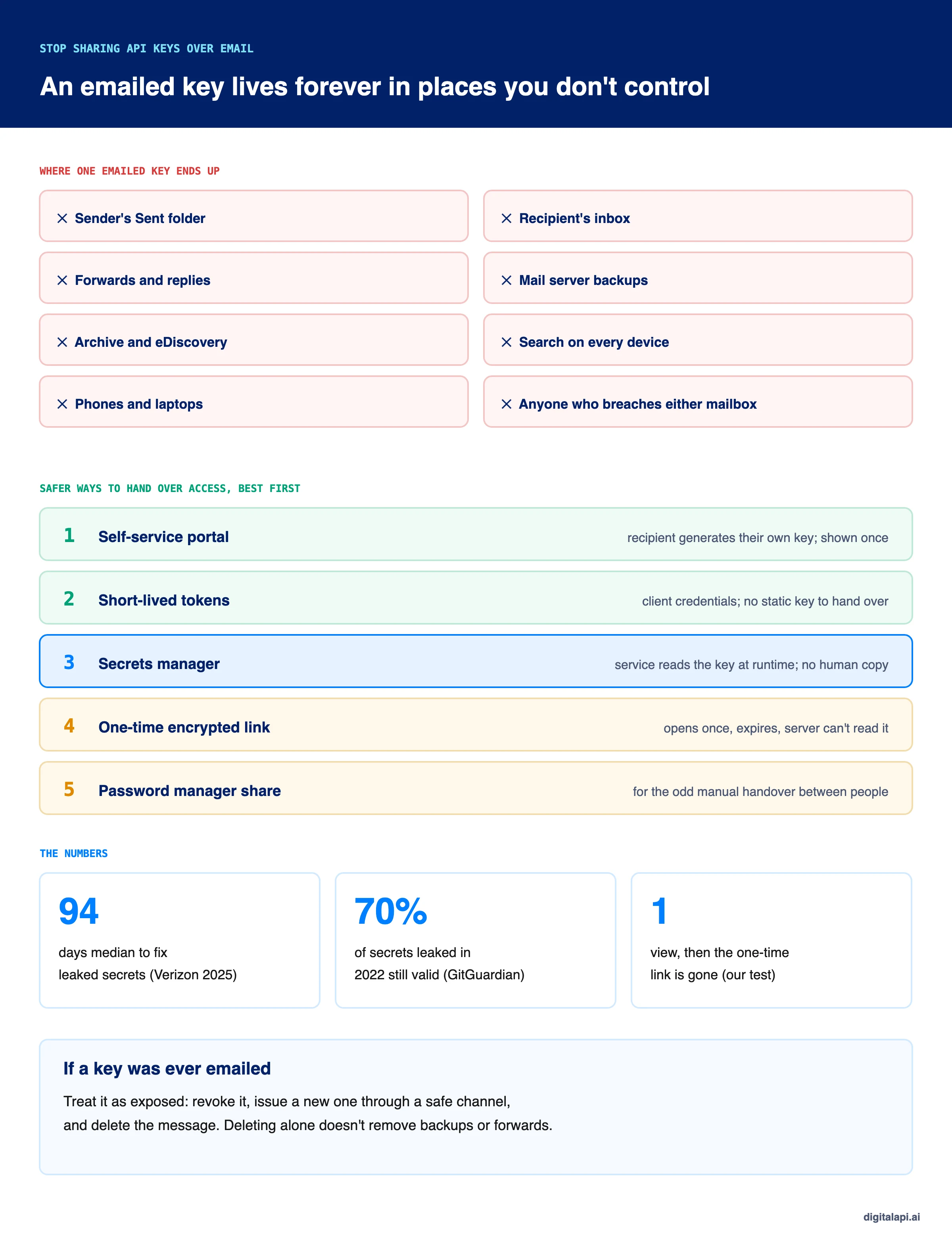
Sharing API keys over email is risky because every send creates copies you can't track or delete: in both mailboxes, in replies and forwards, in backups and archives, and on every synced device. Anyone who later gets into any of those places gets a working key.
Email feels private, but it's built for keeping things:
- Retention: mailboxes keep messages for years, and compliance archives keep them even when users delete them.
- Search: a key in an email is one search away for anyone in the mailbox, including an attacker with a stolen session.
- Forwarding: keys travel on in replies, forwards and "can you send me that again?" threads.
- Breaches: a mailbox breach at your company or the partner's hands over every key ever sent. The FBI's IC3 2024 report counted $2.77 billion in business email compromise losses in 2024 alone.
Chat isn't better. GitGuardian's State of Secrets Sprawl 2025 found secrets in 2.4% of Slack channels and 6.1% of Jira tickets, and rated 38% of incidents in collaboration tools highly critical or urgent, against 31% in source code.
What goes wrong when API keys are emailed?
Emailed API keys cause four problems: they leak, they get shared beyond the person they were sent to, nobody can tell who used them, and they never expire. Each one makes the others worse.
- They leak. A key in an inbox is exposed to every phishing attack, compromised laptop and mailbox breach on either side, for as long as the email exists.
- They get shared. The partner's developer forwards the key to a contractor, who pastes it into a test script. One key now has three users and one owner on paper.
- There's no audit. When the key misbehaves, you can't tell which person or system used it, because they all used the same one.
- They don't expire. Emailed keys are usually long-lived, because sending a new one is a chore. GitGuardian found 70% of secrets leaked in 2022 were still valid in 2025.
The process is also slow. Emailing keys means someone on your team has to create each key, find the right contact and send it, which is part of why partner onboarding takes a median of 385 staff hours per agreement, as we covered in the real cost of partner onboarding.
What are the secure alternatives to emailing API keys?
The secure alternatives, best first, are self-service issuance in a developer portal, short-lived tokens instead of static keys, a secrets manager for your own services, one-time encrypted links for rare manual handovers, and password-manager sharing between people. The best option removes the handover entirely.
Let partners generate their own keys in a portal
Self-service issuance is the best alternative, because no one has to send the key at all: the partner signs in, creates an app, and sees the key once. Your team never handles it, and the portal records who created it.
- The key is shown once and stored only as a hash. Lost keys are rotated, not resent.
- Each partner, app and environment gets its own key, so one leak doesn't expose others.
- Every key has an owner and an expiry, so revocation and offboarding work.
See what a self-service API portal needs and API access provisioning for how requests and approvals fit in.
Replace static keys with short-lived tokens
Short-lived tokens remove the static secret that people end up emailing. A partner's server uses its client credentials to get an access token that lasts minutes, so even a leaked token stops working on its own.
The client credentials flow still needs one credential to be handed over, but it can be a private key the partner generates themselves, so the secret never leaves their side. See OAuth vs API keys for when each makes sense.
Store keys in a secrets manager, not in messages
For your own services, the answer to where to store API keys is a secrets manager: the service reads the key at runtime, so no person needs a copy. That covers keys your systems use to call partners' APIs, too.
This is also how to store API keys on the developer side: environment variables or a secrets manager, never source code, tickets or chat. Our guide to API key management covers storage and rotation.
Use a one-time encrypted link for rare manual handovers
When a key must be handed to a person and there's no portal, send a one-time encrypted link: it opens once, expires within hours, and the server storing it can't read it. This is the safe way to share secrets securely for the odd exception.
The trick is the URL fragment. The sender's browser encrypts the key with a random key of its own, uploads only the ciphertext, and puts the decryption key after the # in the link. Browsers don't send the part after # to the server, so the server only ever holds ciphertext, and deletes it on the first read.
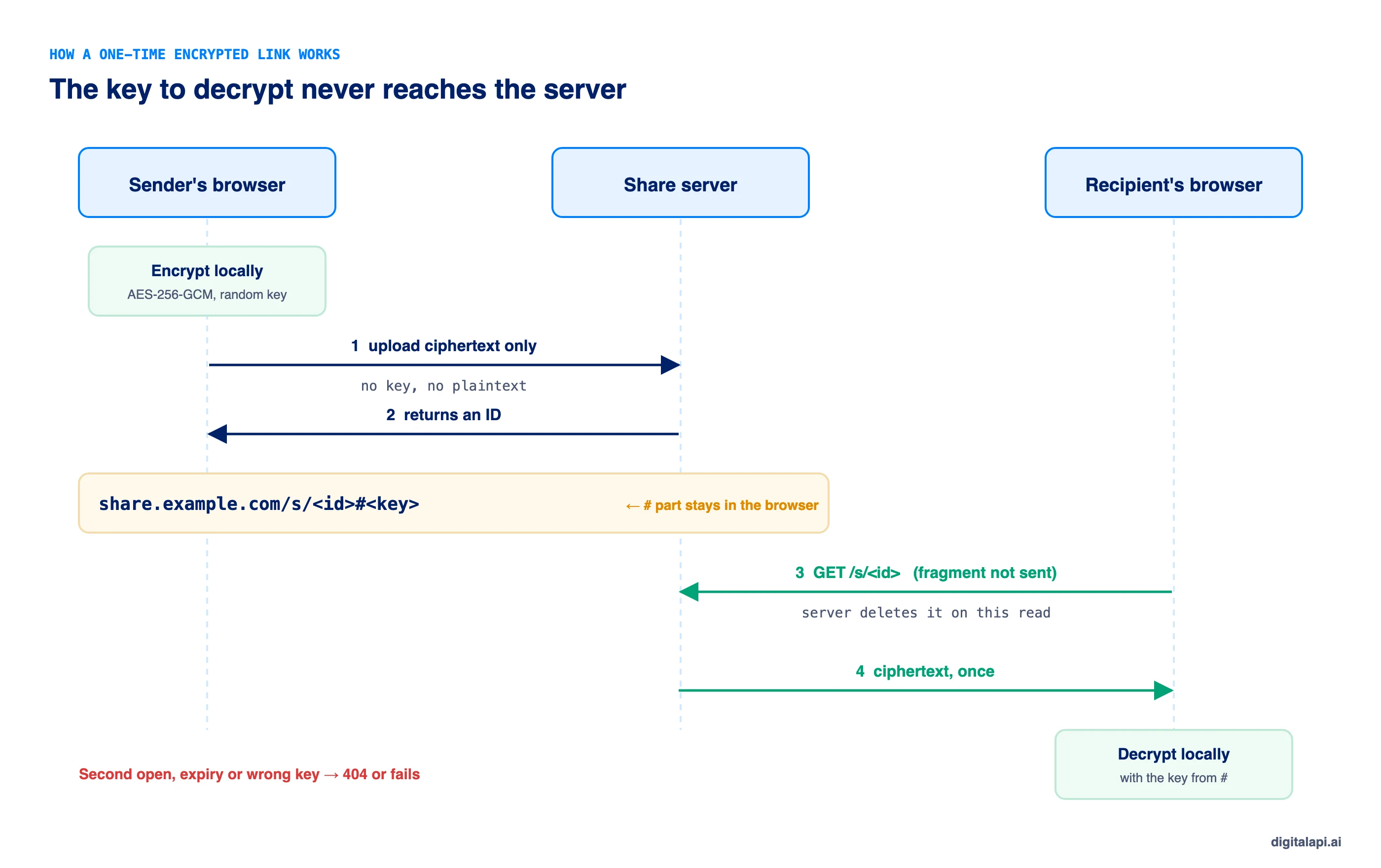
This is the version we built and tested:
Two limits are worth knowing. The link itself is the secret until it's opened, so send it over a different channel from the one that says what it's for. And a web-based share tool serves its own encryption code, so you're trusting that the code hasn't been changed; run your own or use a vendor you trust.
Share through a password manager between people
For handovers between people inside your company, a business password manager's sharing feature keeps the key encrypted, limited to named people and logged. It suits internal admin credentials better than partner keys, since partners rarely share your password manager.
How do you stop API keys being sent by email?
Turn on data loss prevention rules that detect credentials in outgoing mail and chat, and block or warn before the message is sent. Both major email suites include detectors for this.
- Google Workspace has predefined credential detectors, including authentication tokens, AWS credentials, Google Cloud API keys and JSON Web Tokens.
- Microsoft Purview has an "All credentials" type covering client secrets and API keys, GitHub tokens, Slack tokens and authorization headers.
For your own tools, such as a support desk or an internal chat bot, a small scanner works as a backstop. Ours checks known key formats, then any high-entropy value labelled as a key, token or secret, and masks what it finds in the alert:
A scanner is a seatbelt, not a fix. It misses keys in unknown formats with no label, and it can't remove copies that already exist. The fix is removing the reason to email keys at all.
How do you move partners off emailed API keys?
Move partners off emailed keys in six steps: find every key that was ever emailed, set up self-service issuance, issue new keys there, give partners an overlap window, revoke the old keys, and block keys in outgoing mail. Treat every emailed key as exposed.
- Find them. Search sent mail, tickets and chat for key prefixes and labels, or run your DLP tool's discovery over past mail. List each key, its owner and where it was sent.
- Set up self-service. Give partners a portal where they create their own apps and keys, one per environment.
- Issue replacements there. Ask each partner to create a new key in the portal. Don't send it; they'll see it once.
- Overlap, then cut over. Keep the old key working for a short, announced window, such as two weeks, while partners switch.
- Revoke the old keys. Revoke every emailed key at the end of the window, and confirm on every gateway. See how to revoke API access.
- Block it from happening again. Turn on outbound DLP for credentials, and change your process so support staff can't create or see partner keys.
What happened when we tested one-time links and the key scanner?
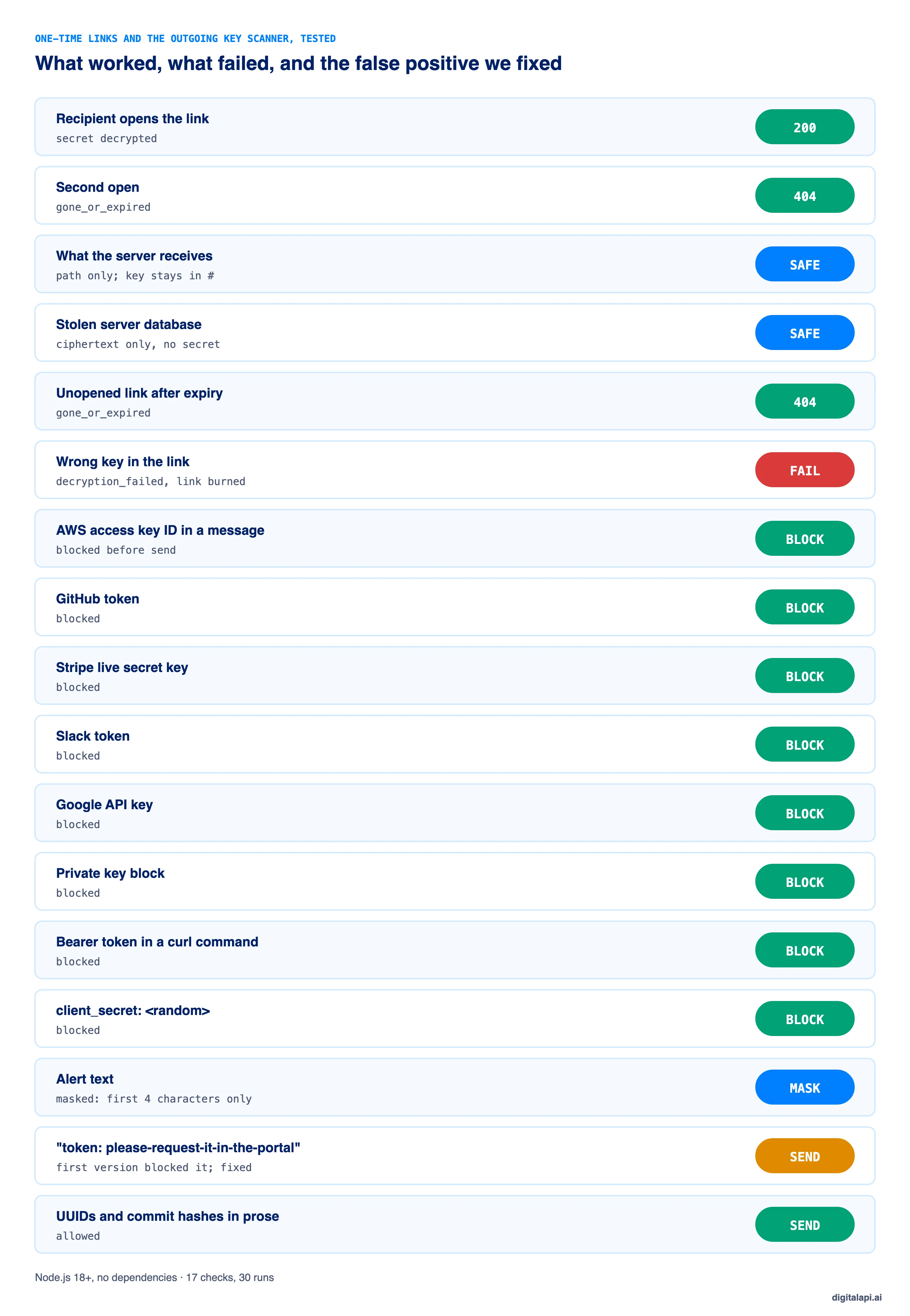
Our one-time link and outgoing key scanner passed 17 checks, stable over 30 runs. The link opened once, expired on time, and never exposed the secret to the server. The scanner blocked eight credential types and let ordinary messages through, after we fixed one false positive.
The false positive: our first scanner blocked the sentence "token: please-request-it-in-the-portal", because hyphenated words score as high-entropy text. We added a rule that skips values made only of words joined by hyphens, dots or underscores. Real random keys don't look like that.
What are the API key best practices for sharing?
The core API key best practices for sharing: don't hand keys over at all if you can avoid it, give each partner and environment its own key, make every key expire, and treat any key that travelled by email or chat as exposed.
- Self-serve first. The best key handover is the one that never happens.
- One key per partner, app and environment. Never share one key between teams.
- Show once, store hashed. If a key is lost, rotate it; never resend it.
- Prefer short-lived tokens for server-to-server access.
- Set an expiry on every key. Rotate with automatic key rotation.
- Use one-time links only for rare manual handovers.
- Block credentials in outgoing mail and chat with DLP.
- Revoke any key that was emailed, even if nothing seems wrong.
- Scope keys narrowly, following least privilege, so a leaked key can do little.
Good API key security is mostly process: the cryptography is easy; the habit of pasting a key into a reply is what you're replacing.
How does DigitalAPI remove the need to email API keys?
The only reliable way to stop emailed keys is to make self-service the easiest path, for partners and for your own team. If getting a key through the portal is slower than asking someone on support, people will keep asking.
Teams using the DigitalAPI API Developer Portal let partners create their own apps and keys, shown once and tied to an owner, environment and expiry, so nobody on the API team handles a partner's key. The DigitalAPI API Gateway layer enforces and revokes those keys across the gateways you already run.
See how DigitalAPI replaces emailed keys with self-service access → Book a Demo
Key takeaways
- Emailed API keys live on in inboxes, forwards, backups and archives, out of your control.
- Self-service issuance is the best alternative: the partner sees the key once and nobody sends it.
- Short-lived tokens and secrets managers remove static keys that people end up emailing.
- One-time encrypted links are fine for rare handovers; the key stays in the URL fragment, away from the server.
- Treat any emailed key as exposed: revoke it, reissue it safely, and block keys in outgoing mail.
Frequently asked questions
1. Is it safe to send an API key by email?
No. An API key sent by email is copied into both mailboxes, any forwards and replies, mail server backups and compliance archives, and stays there for years. Anyone who later gets into any of those places can use the key. Use self-service issuance or a one-time encrypted link instead, and revoke any key that has been emailed.
2. How do you share API keys securely?
Share API keys securely by not handing them over at all: let the partner generate their own key in a developer portal, where it's shown once. For your own services, use a secrets manager. For a rare manual handover, use a one-time encrypted link that expires after one view, sent over a separate channel.
3. What should I do if I emailed an API key?
Treat the key as exposed. Revoke it, issue a replacement through a safe channel such as a developer portal, and confirm the old key is rejected on every gateway. Then check your logs for calls with the old key and delete the email, knowing that deleting it doesn't remove backups or forwarded copies.
4. Where should API keys be stored?
API keys used by your own services should be stored in a secrets manager or injected as environment variables at runtime, never in source code, tickets, email or chat. Keys you issue to partners should be stored only as hashes on your side, so nobody, including your own staff, can read them back.
5. What is a one-time secret link?
A one-time secret link is a URL that reveals a secret once and then stops working. In the secure version, the sender's browser encrypts the secret and puts the decryption key after the # in the URL, which browsers never send to the server. The server holds only ciphertext and deletes it on first read or at expiry.
6. Is Slack or Teams safer than email for sharing API keys?
No. Chat tools also keep messages, index them for search, sync them to every device and include them in exports and archives. GitGuardian found secrets in 2.4% of Slack channels and rated 38% of incidents in collaboration tools highly critical or urgent. Use the same alternatives as for email.
7. Can email security tools detect API keys?
Yes. Google Workspace and Microsoft Purview both include data loss prevention detectors for credentials such as authentication tokens, cloud provider keys and client secrets. They can warn or block before a message is sent. Treat them as a backstop: they miss unfamiliar key formats and can't remove keys already sent.
8. Should each partner get its own API key?
Yes. Give each partner, app and environment its own API key, so one leak doesn't expose the others, usage can be traced to a single holder, and you can revoke one partner's access without affecting anyone else. Shared keys make auditing and offboarding close to impossible.
Conclusion
Every emailed API key is a copy you can't track, expire or take back. The fix isn't better email etiquette; it's removing the handover. Let partners generate their own keys in a portal, use short-lived tokens where you can, keep your own keys in a secrets manager, and save one-time encrypted links for the rare exception.
Then clean up: find the keys that were emailed, reissue them through self-service, revoke the old ones and block credentials in outgoing mail. That's how to stop sharing API keys over email for good. For the next step, read how to set up API access provisioning and how to revoke API access when a key does leak.
How safely do you grant API access to partners and AI agents? Get your free readiness score: Check Your API Access Readiness
Prefer a walkthrough? Book a Demo
Dhayalan Subramanian is Associate Director, Product Growth at DigitalAPI, where he leads go-to-market and product growth for the company’s multi-gateway API management platform. His work focuses on helping large enterprises and mid-market cloud companies consolidate APIs across AWS, Azure, Apigee, Kong, MuleSoft, and other gateways into a single control plane for governance, discovery, monetization, and agent consumption.
Dhayalan brings 14+ years of experience across product strategy, enterprise architecture, and engineering leadership. Earlier in his career, he held senior roles at Encora (as Associate Architect and Technical Manager), Mindtree (Technology Lead), Tech Mahindra (Technical Lead), and Primus Analytics, where he designed integration frameworks and delivered enterprise-grade digital platforms for global customers.
At DigitalAPI, he works directly with platform, integration, and developer experience leaders at Fortune 500 organizations to operationalize unified API catalogs, developer portals, and MCP-ready APIs. He writes regularly on API developer experience, API governance, and AI agent architectures.
One email a fortnight. Worth opening.
A short digest of what we're writing, what we're learning from customers, and the handful of links you'd actually want from us. No tracking pixels.