

Machine-to-Machine API Authentication with Client Credentials
Machine identities now outnumber people 82 to 1, and every one needs to prove who it is. This guide explains machine-to-machine authentication with the OAuth client credentials flow: how it works, how clients should authenticate, cache and scope tokens, how to rotate secrets or drop them entirely, and how it applies to AI agents, with tested code.

TL;DR:
What is the client credentials flow?
The client credentials flow is the OAuth 2.0 grant that lets a machine, such as a back-end service, batch job or AI agent, get an access token using its own identity, with no user involved.
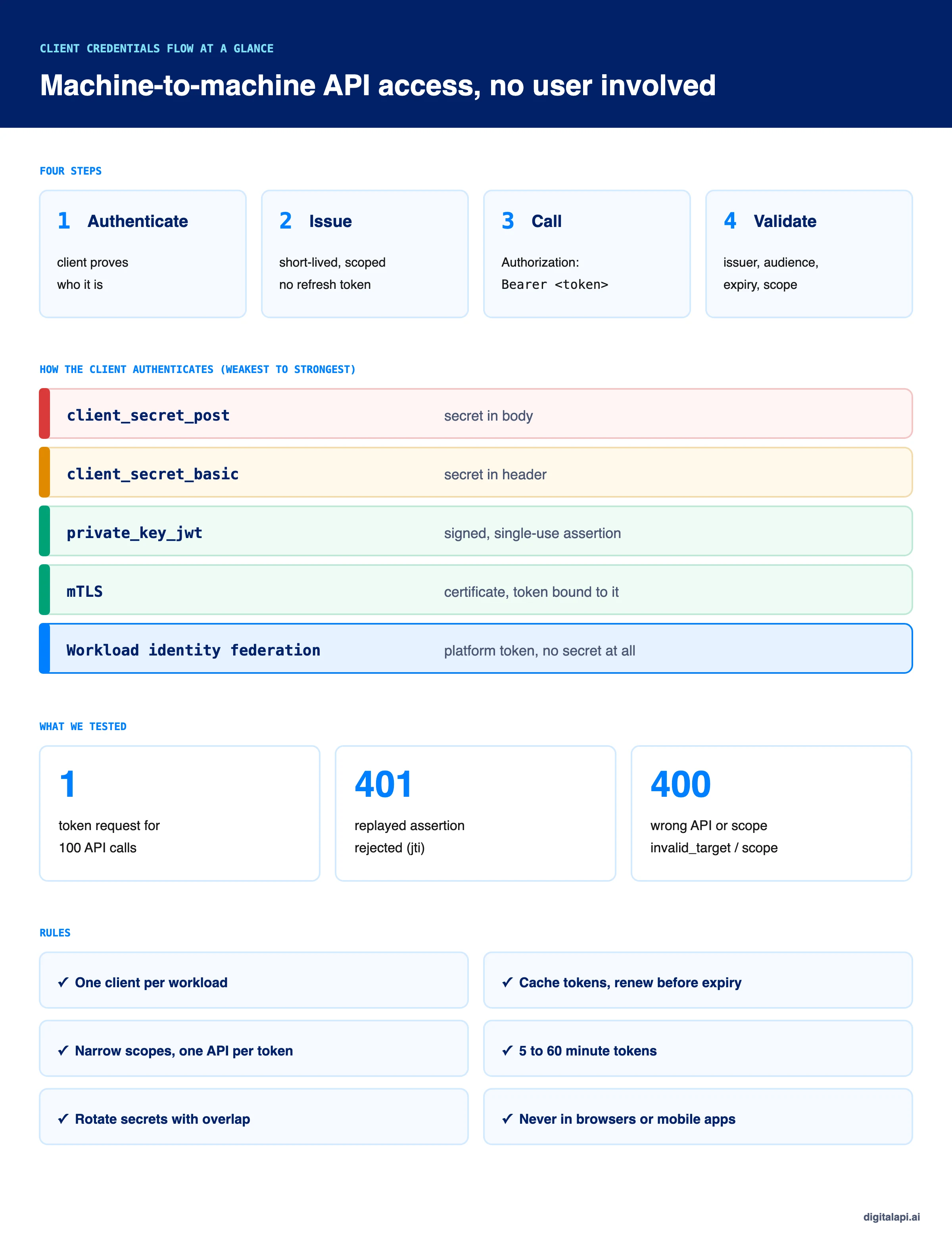
The client authenticates to the authorization server with a secret, a signed JWT or a certificate, receives a short-lived token for one API, and sends it with each call.
No refresh token is issued.
Machine identities now outnumber human identities 82 to 1, according to CyberArk's 2025 Identity Security Landscape report. The same research found 42% of those machine identities have privileged or sensitive access.
Every one of those services, scripts and agents needs to prove who it is before it calls an API. For most of them, the answer is the client credentials flow. It's simple to set up and easy to get wrong: a shared secret pasted into a config file, a token requested on every call, a scope that covers everything.
This guide explains how machine to machine authentication with client credentials works, how clients should authenticate, cache and scope their tokens, how to rotate secrets or get rid of them, and how it applies to AI agents, with code we ran and tested.
What is machine-to-machine (M2M) authentication?
Machine-to-machine authentication is how one piece of software proves its identity to another, with no person involved. A billing service calling an invoices API, a nightly export job, a partner's back end and an AI agent all need M2M authentication.
The main options are:
The last four all use OAuth. They differ only in how the client authenticates to the authorization server, which turns out to be the most important decision in service to service authentication.
What is the client credentials flow?
The client credentials flow is an OAuth 2.0 grant type in which a client requests an access token for itself, using only its own credentials, to call APIs it has been allowed to use. There's no user, no browser redirect and no consent screen.
Three rules from the standard shape everything else:
- Only confidential clients may use it. The client must be able to keep a credential secret, which rules out browser apps and mobile apps.
- The token represents the client, not a user. Permissions come from what the client is registered for, not from anyone's consent.
- No refresh token. RFC 6749 says a refresh token should not be issued, because the client can request a new access token whenever it needs one.
What is the difference between client credentials and authorization code?
Use the authorization code flow when a user signs in and grants access; use the client credentials flow when a machine acts on its own behalf. That's the whole of client credentials flow vs authorization code in one line.
If you're new to OAuth itself, start with what is OAuth.
How does the client credentials flow work?
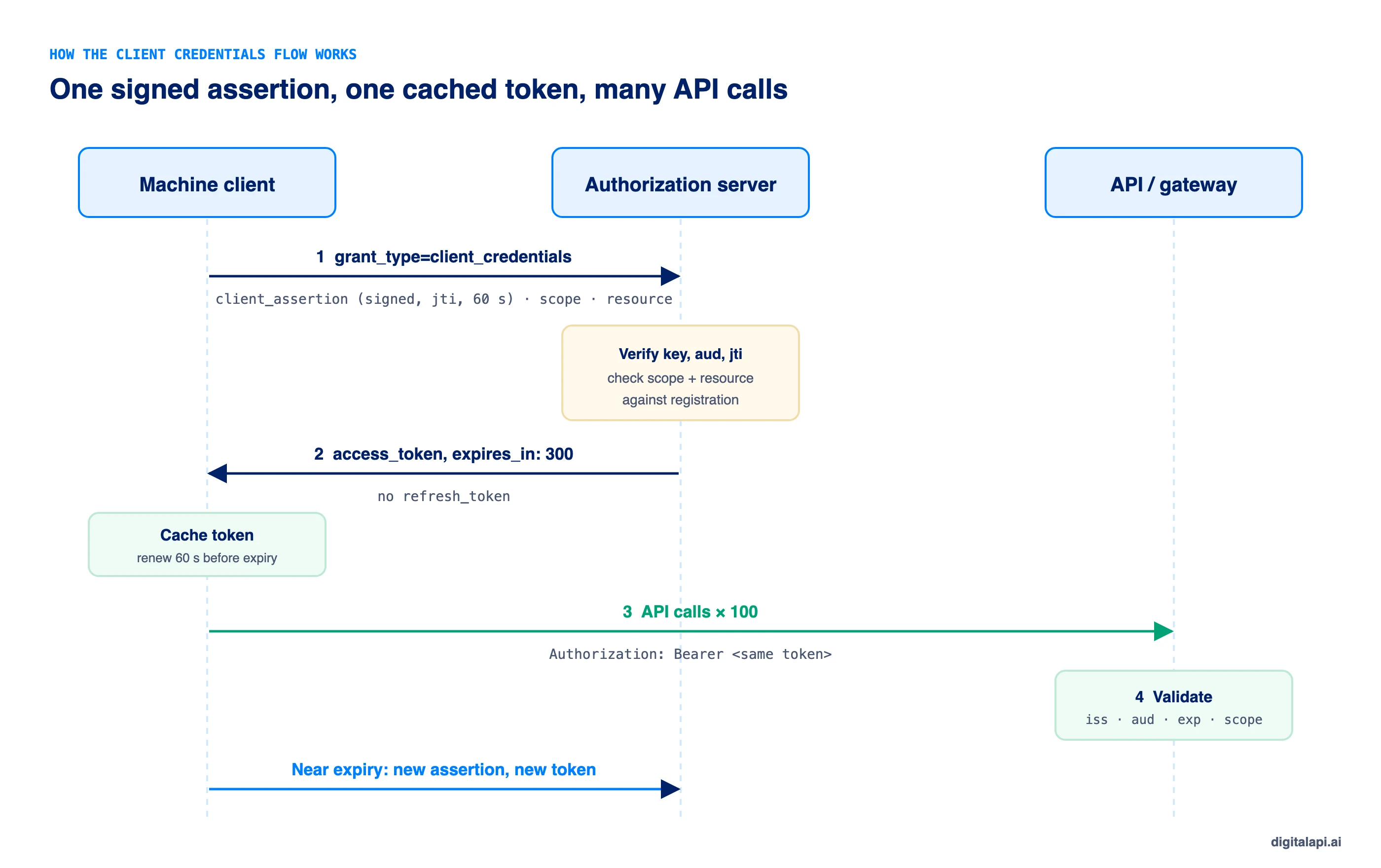
The client credentials flow has four steps: the client authenticates to the token endpoint, the authorization server checks it and issues a scoped token, the client calls the API with the token, and the API validates it. When the token expires, the client repeats step one.
- Request a token. The client sends
grant_type=client_credentialsto the token endpoint, with the scopes and API (resource) it needs, and authenticates itself. - Issue the token. The authorization server verifies the client, checks the requested scopes and API against what the client is registered for, and returns a short-lived access token.
- Call the API. The client sends the token in the
Authorization: Bearerheader. - Validate. The API, or the API gateway in front of it, checks the token's signature, issuer, audience, expiry and scope.
Here's the token request with a client secret, sent in the Authorization header (client_secret_basic):
Note what's missing: there's no refresh_token. The resource parameter (RFC 8707) names the one API the token is for, so the token can't be replayed against another API.
How should a machine client authenticate to the token endpoint?
Prefer authentication that doesn't rely on a shared secret: private_key_jwt, mTLS, or workload identity federation. A client secret works, but it's a static password that has to be stored, shared with the authorization server and rotated by hand.
With private_key_jwt, the authorization server never holds anything a thief could use to impersonate the client. It stores only the client's public key, and each signed assertion works once. Here's how the token endpoint verifies both a secret and a signed assertion:
Four checks matter: the assertion is signed by the key the client registered, its audience is this token endpoint, it's no more than five minutes old, and its jti hasn't been seen before. The secret path stores only a hash of the secret and compares it in constant time.
What is workload identity federation?
Workload identity federation lets a workload authenticate with a token its platform already gives it, such as a Kubernetes service account token or a GitHub Actions OIDC token, instead of a stored secret. The authorization server trusts the platform's issuer and exchanges that token for an access token.
It's the end state for machine authentication because there's nothing to leak, store or rotate. The platform issues short-lived identity tokens automatically. Google Cloud, Microsoft Entra, AWS and most identity providers support it, using the JWT bearer pattern from RFC 7523 or OAuth token exchange (RFC 8693). Use it for cloud workloads and CI/CD pipelines; use private_key_jwt or mTLS where federation isn't available, such as partner back ends.
How should a client cache and reuse its access token?
Request a token once, reuse it until shortly before it expires, and make sure many simultaneous calls trigger only one token request. Requesting a token per API call is the most common client credentials mistake. It slows every call, loads the authorization server, and hits token endpoint rate limits.
Here's a client that authenticates with private_key_jwt and caches its token:
The skewSeconds margin renews the token a minute before it expires, so a call never leaves with a token that dies in flight. The inflight promise means 50 calls arriving at once share one token request instead of making 50.
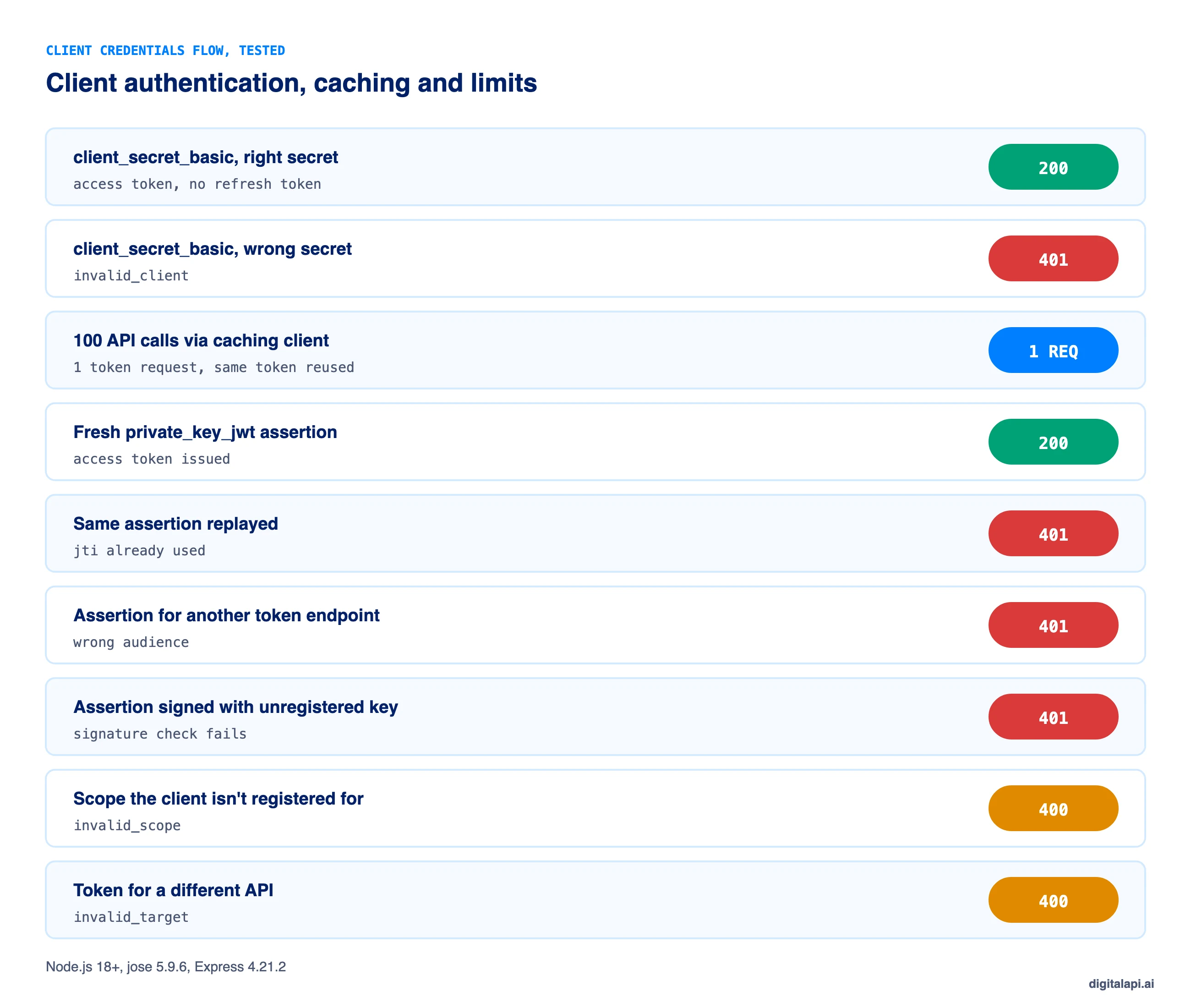
What happened when we tested the client credentials flow?
We ran the token endpoint and client above with Node.js 18+ and jose 5.9.6. Every result matched what the flow should do:
How do you scope machine-to-machine tokens?
Give every workload its own client, register only the scopes and APIs it needs, and request one API per token. A client credentials token acts with the client's full registered access every time, with no user to limit it, so the registration is the only boundary.
- One client per workload. Never share a client ID between the billing service, the export job and an agent. You can't revoke one without breaking the others, and logs can't tell them apart.
- Narrow scopes. Register
invoices:read, notinvoices:*. See OAuth scopes explained for scope design. - One audience per token. Use the
resourceparameter so a token for the invoices API fails on the payroll API. - Short lifetimes. Five to 60 minutes. There's no refresh token to protect, so there's no reason to issue long-lived access tokens.
- Object-level checks still apply. A token with
invoices:readshould still only read the tenant's own invoices. See API authorization.
These are the machine side of the principle of least privilege: every client should be able to do one job and nothing else.
How do you secure and rotate client secrets?
Store client secrets in a secrets manager, never in code or config files, and rotate them with an overlap period so nothing breaks. Better still, replace them with private_key_jwt, mTLS or workload identity federation.
Secrets leak constantly. GitGuardian's State of Secrets Sprawl 2025 found 23.8 million new secrets pushed to public GitHub repositories in 2024, and 70% of secrets leaked in 2022 were still valid two years later. A client secret that never rotates is a credential that never expires.
- Generate secrets with high entropy, at least 32 random bytes, and show them only once.
- Store them in a secrets manager such as HashiCorp Vault, AWS Secrets Manager or Azure Key Vault, injected at runtime.
- Store only a hash on the authorization server, as our test server does.
- Rotate with overlap: issue a second secret, deploy it, confirm traffic has moved, then revoke the first. Two active secrets per client make zero-downtime rotation possible.
- Rotate on a schedule, every 90 days or less, and immediately after any suspected leak or staff change.
- Never send secrets in URLs or query strings, where they end up in logs.
- Scan repositories and logs for leaked secrets and revoke anything found.
For the rotation mechanics, see how to rotate API keys automatically; the same approach works for client secrets.
How does the client credentials flow work for AI agents and MCP?
Use client credentials when an AI agent acts on its own behalf, such as a scheduled reporting agent; use a user flow plus token exchange when it acts for a person. An agent using client credentials to do a user's bidding gets the client's full access instead of the user's, which breaks least privilege.
- One client per agent, so each can be monitored, limited and revoked on its own.
- Narrow scopes per tool, with write, export and delete behind separate scopes.
- Short-lived tokens and, where possible,
private_key_jwtor federation instead of a secret in the agent's environment. - Token exchange for delegation: when the agent acts for a user, exchange the user's token for one scoped to the API, recording both the user and the agent (RFC 8693).
The MCP authorization specification builds on OAuth, so the same rules apply to MCP servers: tokens must be issued for the specific server, and servers must reject tokens issued for anyone else. For setup, see securing MCP endpoints.
When should you use the client credentials flow?
Use the client credentials flow for any back-end workload that calls an API on its own behalf and can keep a credential secret. Don't use it for anything that runs on a user's device or acts for a specific person.
Where should client credentials tokens be enforced?
Validate client credentials tokens at the API gateway, so every API checks issuer, audience, expiry and scope the same way, and keep object-level checks in the service. Gateways also apply per-client rate limits, which matter more for machines than for people, because a misbehaving job can send thousands of calls a minute.
Large organisations often run several gateways, each with its own way of registering clients and validating tokens. The DigitalAPI API Gateway applies one token validation, scope and rate-limit policy for machine clients across the gateways you already run. Teams using the DigitalAPI API Developer Portal let partners register their own machine clients, upload public keys for private_key_jwt, and request only the scopes their plan allows.
See how DigitalAPI manages machine-to-machine access across every gateway you run → Book a Demo
What are the most common client credentials mistakes?
Most client credentials problems come from treating the client secret like a permanent API key: shared, never rotated, and able to do everything. These are the ones to check for:
Key takeaways
- The client credentials flow gets a token for a machine acting on its own behalf, with no user and no refresh token.
- How the client authenticates matters most: prefer
private_key_jwt, mTLS or workload identity federation over shared secrets. - Cache tokens and renew shortly before expiry; one request should serve many calls.
- One client per workload, narrow scopes, one API per token, and short lifetimes.
- Never use client credentials in browser or mobile apps, or to act for a user.
Frequently asked questions
1. What is the client credentials flow?
The client credentials flow is an OAuth 2.0 grant type that lets an application get an access token using its own credentials, with no user involved. The client authenticates to the authorization server's token endpoint, receives a short-lived token for the APIs it's registered to use, and sends it with each API call. It's defined in RFC 6749 section 4.4.
2. When should I use the client credentials flow?
Use the client credentials flow when a back-end service, batch job, partner server or AI agent calls an API on its own behalf and runs somewhere it can keep a credential secret. Don't use it in browser or mobile apps, or when the call should act with a specific user's permissions.
3. Does the client credentials flow return a refresh token?
No. RFC 6749 says a refresh token should not be issued for the client credentials grant, because the client can request a new access token at any time using its own credentials. Clients should cache the access token and request a new one shortly before it expires.
4. What is the difference between client credentials and authorization code?
The client credentials flow issues a token that represents the application itself, with no user involved. The authorization code flow issues a token for a user who signs in and consents, through a browser redirect. Use client credentials for machine-to-machine calls and authorization code with PKCE when a user is present.
5. What is machine-to-machine authentication?
Machine-to-machine (M2M) authentication is how software proves its identity to other software without a person involved, such as a service calling an API. Common methods are API keys, OAuth client credentials with a secret, signed JWT assertions or certificates, and workload identity federation, which uses a token from the platform instead of a stored secret.
6. What is private_key_jwt?
private_key_jwt is a client authentication method, defined in RFC 7523 and OpenID Connect, where the client signs a short-lived JWT with its private key and sends it to the token endpoint instead of a client secret. The authorization server verifies it with the client's registered public key. Nothing reusable is exposed if the request is intercepted.
7. How long should a client credentials access token last?
Most client credentials access tokens should last between 5 and 60 minutes. Shorter lifetimes limit the damage of a leaked token and make permission changes take effect sooner. Because the client can get a new token at any time, there's no need for long-lived access tokens.
8. How do I rotate a client secret without downtime?
Give the client a second active secret, deploy it to the workload, confirm all token requests use it, then revoke the old secret. Supporting two secrets per client at once makes zero-downtime rotation possible. Rotate on a schedule, such as every 90 days, and immediately after any suspected leak.
9. What is workload identity federation?
Workload identity federation lets a workload authenticate with a short-lived token its platform already issues, such as a Kubernetes service account token or a GitHub Actions OIDC token, instead of a stored client secret. The authorization server trusts the platform's issuer and exchanges that token for an access token, so there's no secret to store, leak or rotate.
10. Can AI agents use the client credentials flow?
Yes, when the agent acts on its own behalf, such as a scheduled reporting or monitoring agent. Give each agent its own client, narrow scopes and short-lived tokens. When an agent acts for a specific user, use the authorization code flow or token exchange instead, so the user's own permissions limit what the agent can do.
Conclusion
The client credentials flow is how most machines get into APIs: a service proves who it is, gets a short-lived token, and uses it until it expires. The flow itself is four steps. What decides whether it's safe is everything around it.
Authenticate clients with keys, certificates or federation instead of shared secrets where you can. Give every workload its own client and narrow scopes, cache tokens instead of requesting them per call, rotate whatever secrets remain, and keep client credentials out of browsers, phones and user-facing actions. For the wider picture of how tokens work, read our guide to token-based authentication and the ultimate guide to API access control.
How safely do you grant API access to partners and AI agents? Get your free readiness score: Check Your API Access Readiness
Prefer a walkthrough? Book a Demo
Dhayalan Subramanian is Associate Director, Product Growth at DigitalAPI, where he leads go-to-market and product growth for the company’s multi-gateway API management platform. His work focuses on helping large enterprises and mid-market cloud companies consolidate APIs across AWS, Azure, Apigee, Kong, MuleSoft, and other gateways into a single control plane for governance, discovery, monetization, and agent consumption.
Dhayalan brings 14+ years of experience across product strategy, enterprise architecture, and engineering leadership. Earlier in his career, he held senior roles at Encora (as Associate Architect and Technical Manager), Mindtree (Technology Lead), Tech Mahindra (Technical Lead), and Primus Analytics, where he designed integration frameworks and delivered enterprise-grade digital platforms for global customers.
At DigitalAPI, he works directly with platform, integration, and developer experience leaders at Fortune 500 organizations to operationalize unified API catalogs, developer portals, and MCP-ready APIs. He writes regularly on API developer experience, API governance, and AI agent architectures.
One email a fortnight. Worth opening.
A short digest of what we're writing, what we're learning from customers, and the handful of links you'd actually want from us. No tracking pixels.