

Agent Skills vs MCP Tools: What's the Difference?
Agent skills teach an AI agent how to do a task, while MCP tools give it secure access to your systems. Compare both across 12 dimensions and learn when to use each.

Agent skills teach an AI agent how to do a task, using a SKILL.md file of instructions and optional scripts. MCP tools give the agent typed, authenticated access to the systems where the task happens. A skill is know-how. An MCP tool is reach. Most production agents need both, and the two work best when the skill calls the tool instead of calling your APIs directly.
The question comes up often because both are new and both "add capabilities" to an agent. Anthropic launched Agent Skills in October 2025 and published them as an open standard in December 2025. More than 40 agent tools now list support, including Claude Code, Codex, Cursor, GitHub Copilot and Gemini CLI. The Model Context Protocol (MCP) is a year older and is the default way agents reach external systems.
This guide covers what each one is, how they differ across 12 dimensions, when to use which, the security and cost trade-offs, and what changes when hundreds of skills and tools run across an enterprise.
TL;DR
• Agent skills: folders with a SKILL.md file that tell an agent how to do a specific job. They load on demand and run inside the agent's environment.
• MCP tools: functions exposed by an MCP server, each with a name, description and JSON schema. They reach live systems with proper auth.
• Use both: let the skill describe the procedure and call MCP tools for every live action.
• At scale: the hard part is governance. You need one catalog of approved tools, scoped credentials and no API keys inside skill scripts.
What are agent skills?
Agent skills are defined as packaged instructions, scripts and reference files that teach an AI agent how to perform a specific task. Each skill lives in its own folder with a SKILL.md file at the root. The agent reads the skill only when a task matches it, so you can install many skills without filling the context window.
Think of a skill as a runbook written for a model. It captures how your team does something: the steps, the checks, the format of the output and the edge cases.
[fs-toc-omit]What's inside a skill folder?
A skill folder has one required file and three optional ones:
- SKILL.md (required): YAML frontmatter with a
name(up to 64 characters) and adescription(up to 1,024 characters), followed by Markdown instructions. - scripts/ (optional): code the agent can run, such as Python or Bash.
- references/ (optional): longer docs the agent reads when needed.
- assets/ (optional): templates and other files.
Here is a short SKILL.md for a refund procedure:
name: process-refund
description: Process a customer refund for a damaged or missing order. Use when a support ticket asks for a refund on a specific order ID.

# Process a refund

1. Look up the order with the get_order tool. Confirm it shipped.
2. Check the damage policy in references/refund-policy.md.
3. If the amount is under $200, call create_refund with an idempotency key.
4. If it is $200 or more, request approval before calling create_refund.
5. Reply to the customer with the refund ID and expected timeline.
Notice that the skill names tools (get_order, create_refund) but holds no endpoint URLs or keys. That detail matters later.
[fs-toc-omit]How do agents load skills (progressive disclosure)?
Progressive disclosure means the agent loads a skill in stages, so unused skills cost almost nothing. The specification defines three levels:
| Stage | What loads | When | Approximate cost |
|---|---|---|---|
| 1. Metadata | name and description | At startup, for every installed skill | ~100 tokens per skill |
| 2. Instructions | The full SKILL.md body | When a task matches the description | Under 5,000 tokens recommended |
| 3. Resources | Files in scripts/, references/, assets/ | Only when the instructions need them | Varies |
Because of this, an agent can carry dozens of skills while paying only for their one-line descriptions.
[fs-toc-omit]Which agents support skills?
Skills started in Claude Code and the Claude apps. Since the open standard, the agentskills.io client showcase lists more than 40 tools, including ChatGPT and Codex, Cursor, GitHub Copilot, VS Code, Gemini CLI, Goose, OpenHands and Spring AI. A skill written once can run in most modern coding agents.
What are MCP tools?
MCP tools are functions an MCP server exposes to AI agents, each defined by a name, a description and a JSON input schema. The agent's client discovers them with tools/list and runs them with tools/call. The server holds the connection to the real system and handles authentication.
For a deeper primer, see our guide to MCP tools and how they differ from MCP resources and prompts.
[fs-toc-omit]What does an MCP tool definition look like?
{
  "name": "create_refund",
  "description": "Create a refund for an order. Use only after the order is confirmed as shipped and eligible.",
  "inputSchema": {
    "type": "object",
    "properties": {
      "order_id": { "type": "string" },
      "amount": { "type": "number", "description": "Refund amount in USD" },
      "reason": { "type": "string", "enum": ["damaged", "missing", "late"] }
    },
    "required": ["order_id", "amount", "reason"]
  }
}
The schema gives the model exact parameter names, types and allowed values. That structure is why MCP tool calls are more reliable than an agent guessing an HTTP request from prose.
[fs-toc-omit]How do MCP tools handle auth and permissions?
MCP uses OAuth 2.1 for remote servers. The user or agent gets a scoped token, and the server checks it on every call. Credentials stay on the server side, never in the prompt. You can restrict which tools each agent sees and what each token can do. Our guide to managing AI agent permissions with MCP authorization covers the setup.
Agent skills vs MCP tools: what are the key differences?
The core difference is that a skill describes how to do work, while an MCP tool performs one action against a live system. Skills are text and local scripts. MCP tools are typed functions behind a server with auth. The table compares them across 12 dimensions.
| Dimension | Agent skills | MCP tools |
|---|---|---|
| What it gives the agent | Procedural knowledge: steps, rules, formats | Access: read or write live data |
| Format | Folder with SKILL.md plus optional files | JSON schema served by an MCP server |
| Where it runs | Inside the agent's environment | On the MCP server, local or remote |
| Reaching live data | Only through scripts or other tools | Built in, that's its job |
| Auth model | None of its own; scripts use whatever keys they hold | OAuth 2.1, scoped tokens, server-held credentials |
| Context cost before use | ~100 tokens per skill | Full schema per tool, unless tool search is used |
| Latency | No network hop for instructions | One network round trip per call |
| Who writes it | Domain experts, often in plain English | Developers or generated from API specs |
| Versioning | Files in a repo | Server and API versions |
| Discovery | Agent matches task to description | tools/list, registries, catalogs |
| Portability | Open standard across 40+ agents | Open protocol across most agent clients |
| Typical failure | Instructions drift out of date | Tool breaks when the API schema changes |
How do skills and MCP tools work together?
Skills and MCP tools work together as layers: the skill decides what to do next, and the MCP tool does it. The API underneath runs the actual system. Keeping these layers separate means each one can change without breaking the others.
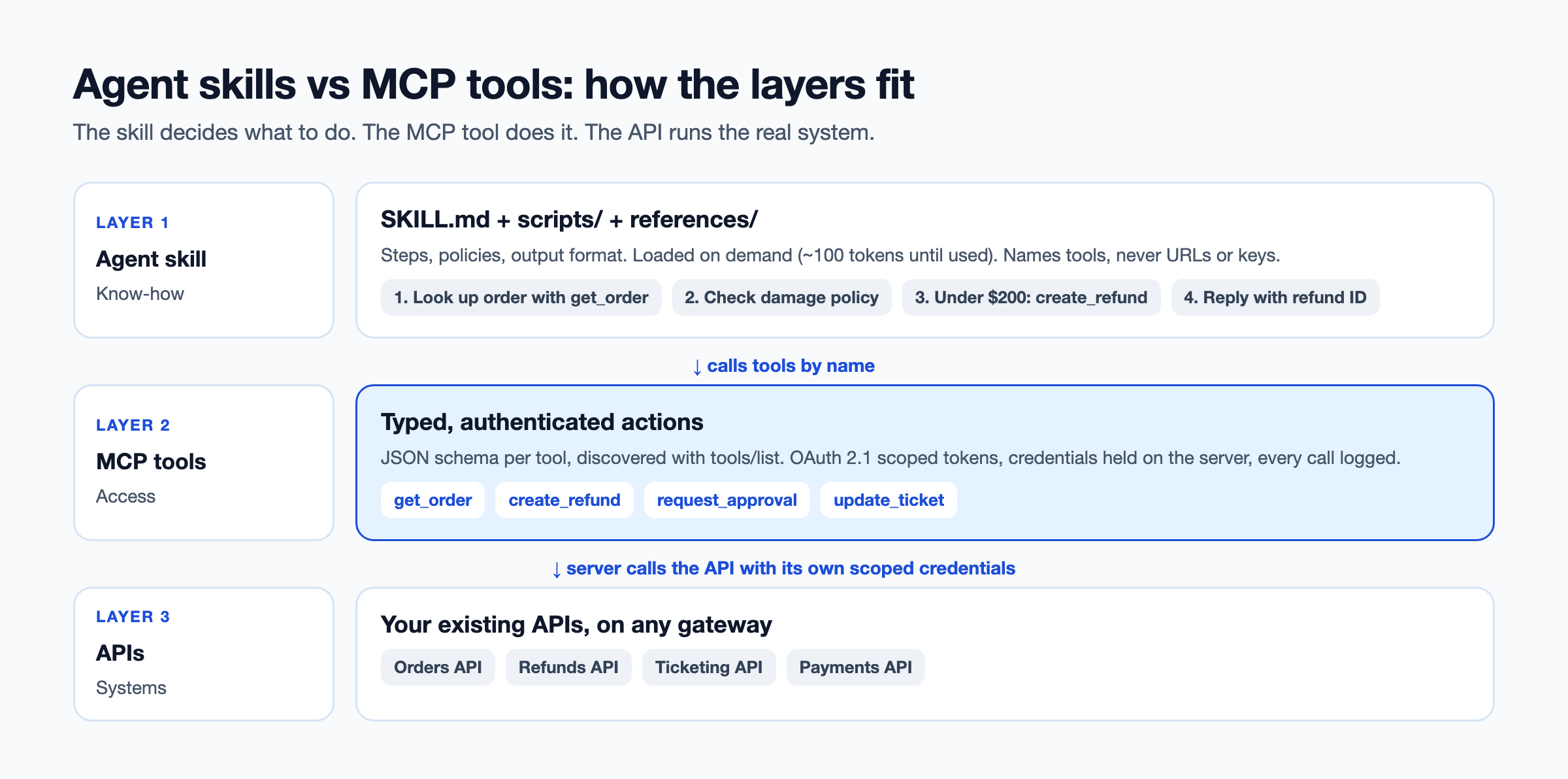
Here's how one request moves through the layers. A support ticket says "Order 4471 arrived broken, please refund."
- The skill matches: the agent sees the
process-refunddescription fits and loads the full SKILL.md. - The skill directs a lookup: step 1 says to call
get_order. The agent calls the MCP tool. - The MCP tool reaches the API: the server calls the orders API with its own scoped credentials and returns the order.
- The skill applies the policy: the agent reads the refund policy from references/ and sees the amount is $140.
- The skill directs the write: under $200, so the agent calls
create_refundwith an idempotency key. - The skill shapes the reply: the agent replies in the format the skill specifies.
The skill never touched a URL or a key. If the orders API moves from v1 to v2, the MCP server changes and the skill keeps working.
When should you use a skill, an MCP tool, or both?
Use a skill for know-how, an MCP tool for access, and both whenever a procedure touches a real system. In enterprise work that's most of the time. These rules of thumb help you decide.
[fs-toc-omit]Use a skill when...
- The task is a repeatable procedure your team already follows.
- You need a specific output format, style or checklist.
- The work runs on local files or deterministic scripts.
- No live data or write actions are needed.
[fs-toc-omit]Use an MCP tool when...
- The agent needs live data from a system of record.
- The agent takes write actions such as refunds, tickets or payments.
- Each user's permissions must apply to what the agent can do.
- Many agents and teams need the same capability.
- You need an audit trail of every call.
[fs-toc-omit]Use both when...
- The procedure has steps and those steps touch real systems.
- You want domain experts to own the "how" and platform teams to own the "access".
[fs-toc-omit]Where do subagents fit?
A subagent is a separate agent with its own context, often exposed to the main agent as a tool. Use one when a job needs isolation, a different model or a long sub-task that would clutter the main context.
| Skill | MCP tool | Subagent | |
|---|---|---|---|
| Gives the agent | Instructions | An action | A delegate that reasons on its own |
| Best for | Procedures | Live systems | Large or isolated sub-tasks |
Do agent skills replace MCP?
No. Skills can't replace MCP for live, authenticated access, although they reduce how many tools you need. The "MCP is dead" argument says an agent with a skill and a command-line tool can call any API directly from a script. That works for one developer on a laptop. It breaks in a company.
When a skill script calls an API directly, you get:
- Keys in files: someone's API key sits in the skill folder or an environment variable.
- One identity for everyone: every user of the skill acts with the same permissions.
- No audit trail: the API sees a script, not which agent or user made the call.
- Brittle code: every API change breaks the script. We cover this failure in why hardcoded API calls break your AI agents.
The fair middle ground: skills replace many prompt-only "tools" that were only instructions. MCP stays for anything that needs live data, writes or permissions.
What are the security risks of skills and MCP tools?
Skills and MCP tools carry different risks: skills run code locally that you may not have read, and MCP tools can grant agents too much access. Postman's 2025 State of the API found 51% of developers now cite unauthorized agent access as a top security risk.
| Risk | Agent skills | MCP tools | Mitigation |
|---|---|---|---|
| Untrusted code | Third-party scripts run in your environment | Community servers run with your tokens | Review before install; allow only approved sources |
| Prompt injection | Malicious instructions inside SKILL.md | Poisoned tool descriptions | Vet descriptions; pin versions |
| Credential exposure | Keys stored in skill folders | Over-broad OAuth scopes | No keys in skills; least-privilege scopes |
| Excess access | Scripts can do anything the key allows | Agents see more tools than needed | Scope tools per agent |
| No audit | Script calls look anonymous | Covered if the gateway logs calls | Route all live calls through MCP and a gateway |
For a full control list, see our guide to AI agent API guardrails.
How do context cost and latency compare?
Skills are cheaper in context until they're used, while MCP tools cost context up front for every connected tool. Anthropic's advanced tool use write-up shows 58 tools from five MCP servers consuming about 55,000 tokens before a conversation starts. Anthropic has seen tool definitions reach 134,000 tokens before optimization.
| Installed | Skills (metadata only) | MCP tools (all schemas loaded) |
|---|---|---|
| 5 | ~500 tokens | ~5,000 tokens |
| 50 | ~5,000 tokens | ~50,000 tokens |
| 500 | ~50,000 tokens | Doesn't fit without tool search |
MCP figures assume roughly 1,000 tokens per tool, in line with Anthropic's examples. Real sizes vary by schema.
Two points balance the table. First, tool search lets an agent load MCP tool definitions on demand, which Anthropic reports cuts tool-definition tokens by 85%. Second, a skill that calls MCP tools still pays for those tools when it runs. On latency, skill instructions load locally, while each MCP call adds a network round trip. For most business tasks that round trip is small next to the model's own response time.
What changes when skills and MCP tools run across an enterprise?
At enterprise scale the problem moves from "skill or tool?" to "who owns them, who approved them, and which ones can each agent use?" Postman found 70% of developers know about MCP, yet only 10% use it regularly. That gap is mostly governance, not interest.
The scale problems look like this:
- Duplicate skills: six teams write six versions of the same refund skill.
- Personal keys: skills call APIs with whoever's key was handy.
- No approved list: nobody knows which community MCP servers are in use.
- No owner on change: an API changes and nobody knows which skills and tools depend on it.
- No reuse: each new agent rebuilds integrations that already exist.
One pattern from a device protection and after-sales services platform shows the shift. Its agents call APIs directly today. It is moving to MCP servers so tools are faster to discover and reusable across agents, instead of being rebuilt per agent. Teams in that position often start with DigitalAPI's catalog, because it lists every existing API before anyone builds a single tool.
How do you run skills and MCP tools together at scale?
Run them at scale by putting every live capability behind governed MCP tools, and letting skills reference those tools by name. This keeps know-how portable and access controlled.
- Build one catalog of APIs: inventory every API across your gateways with an accurate spec. See how to build an API catalog.
- Generate MCP tools from specs: convert OpenAPI specs into MCP servers instead of hand-writing tools.
- Publish an approved list: keep an MCP registry of servers agents may use.
- Ban keys in skills: skills name tools, never endpoints or credentials.
- Scope access per agent: each agent gets only the tools and scopes its job needs.
- Version skills like code: store them in a repo with owners and reviews.
- Log every call: keep an audit trail of agent, user, tool, token and result.
Teams using DigitalAPI cover steps 1 to 3 and 5 from one place. MCP Studio turns existing OpenAPI, Postman or GitHub specs into MCP servers grouped by domain, with tools tagged as read, write or sensitive. Every team's skills then call the same governed tools, and DigitalAPI enforces OAuth 2.1, API keys or mTLS with deny-by-default scopes per agent.
How do you move from scripts-in-skills to skills plus MCP?
Move live calls out of skill scripts and into MCP tools, one skill at a time. The skill's instructions stay. Only the access path changes.
- List the API calls inside each skill's scripts.
- Check the catalog for an existing MCP tool for each call.
- Generate missing tools from the API's spec.
- Rewrite the skill to name the tool instead of running the script.
- Delete the keys from the skill folder and rotate them.
Start with skills that write data or touch customer records. They carry the most risk.
FAQs
[fs-toc-omit]Do I need MCP if I have skills?
Yes, if your agent needs live data or takes actions in real systems. Skills hold instructions and local scripts, while MCP gives typed, authenticated access to external systems. For purely local tasks like formatting documents or following a checklist, skills alone can be enough.
[fs-toc-omit]Can a skill call an MCP tool?
Yes. A skill's instructions can tell the agent which MCP tool to call at each step, for example "look up the order with get_order." This is the recommended pattern, because the skill holds the procedure while the MCP server holds the credentials and the connection.
[fs-toc-omit]Are agent skills only for Claude?
No. Anthropic created Agent Skills and published them as an open standard in December 2025. The agentskills.io client showcase lists more than 40 supporting tools, including ChatGPT and Codex, Cursor, GitHub Copilot, VS Code and Gemini CLI.
[fs-toc-omit]What is a SKILL.md file?
A SKILL.md file is the required file in every agent skill. It starts with YAML frontmatter containing a name and a description, followed by Markdown instructions. The agent reads the name and description at startup and loads the full file only when a task matches.
[fs-toc-omit]Do skills use fewer tokens than MCP?
Before use, yes. Each installed skill costs about 100 tokens of metadata, while each MCP tool loads its full schema, often around 1,000 tokens. Once a skill runs, it loads its instructions and any MCP tools it calls, so the totals get closer.
[fs-toc-omit]Are agent skills secure?
Agent skills are as secure as the code and instructions inside them. Third-party skills can run scripts in your environment and may carry hidden prompt injection. Review skills before installing them, allow only approved sources and keep API keys out of skill folders.
[fs-toc-omit]What's the difference between skills, MCP and subagents?
Skills give an agent instructions, MCP tools give it actions on live systems, and subagents give it a separate agent to delegate work to. A support agent might use a refund skill, call refund MCP tools, and hand fraud checks to a subagent.
[fs-toc-omit]Can I turn my APIs into skills or MCP tools?
You can turn APIs into MCP tools by generating them from OpenAPI specs, which is the better path for live access. You can then write skills that describe how to use those tools for specific procedures. Avoid skills that call your APIs directly from scripts.
Final word
Skills and MCP tools answer different questions. Skills answer "how should this be done?" MCP tools answer "what can the agent reach, and as whom?" Treating them as rivals leads to skills full of keys or tool lists with no procedure.
Start with one procedure that touches a live system. Write the skill, back each step with a governed MCP tool, and count how many existing APIs you could expose the same way. That count usually shapes your agent roadmap.
Want skills and agents on governed MCP tools?
See how DigitalAPI turns your existing APIs into MCP tools every agent can use.
Dhayalan Subramanian is Associate Director, Product Growth at DigitalAPI, where he leads go-to-market and product growth for the company’s multi-gateway API management platform. His work focuses on helping large enterprises and mid-market cloud companies consolidate APIs across AWS, Azure, Apigee, Kong, MuleSoft, and other gateways into a single control plane for governance, discovery, monetization, and agent consumption.
Dhayalan brings 14+ years of experience across product strategy, enterprise architecture, and engineering leadership. Earlier in his career, he held senior roles at Encora (as Associate Architect and Technical Manager), Mindtree (Technology Lead), Tech Mahindra (Technical Lead), and Primus Analytics, where he designed integration frameworks and delivered enterprise-grade digital platforms for global customers.
At DigitalAPI, he works directly with platform, integration, and developer experience leaders at Fortune 500 organizations to operationalize unified API catalogs, developer portals, and MCP-ready APIs. He writes regularly on API developer experience, API governance, and AI agent architectures.
One email a fortnight. Worth opening.
A short digest of what we're writing, what we're learning from customers, and the handful of links you'd actually want from us. No tracking pixels.