



Azure AI Gateway: Pricing and APIM LLM Token Limits (2026)
What the Azure AI Gateway costs, how the APIM LLM token limit works, and how to stop one app burning your AI budget.

.png)
TL;DR:
The Azure AI Gateway is the set of AI features inside Azure API Management (APIM). It sits between your apps and your AI models and controls who can call them and how many tokens they use.
Its main cost control is thellm-token-limitpolicy, which caps tokens per minute or per period for each app, team or user.
There is no separate price for most teams: you pay for the APIM tier (about $150 to $2,800 a month on v2 tiers in East US) plus your model tokens.
In August 2026, a platform team splitting Azure OpenAI costs across internal clients hit a wall. Their GPT-5.6 models cost more per token for long prompts. Their Azure AI Gateway could count tokens, but it couldn't tell short prompts from long ones. If you are using Azure AI Gateway, it's important to understand its capabilities and how it works.
In this blog, we cover what the Azure AI Gateway is, what it costs in 2026, and how the APIM LLM token limit policy controls token use. You'll also see why token limits sometimes fail, and how to track and charge back AI costs across your teams.
What is the Azure AI Gateway?
The Azure AI Gateway is defined as a set of AI-specific features in Azure API Management that secure, limit, route and monitor traffic to AI models, agents and tools. It is not a separate product. Microsoft states that the AI gateway "extends API Management's existing API gateway; it's not a separate offering." For the vendor-neutral basics, see what an AI gateway is.
In practice, your apps call the gateway instead of calling the model directly. The gateway checks who is calling, counts their tokens, picks a model backend and logs what happened.
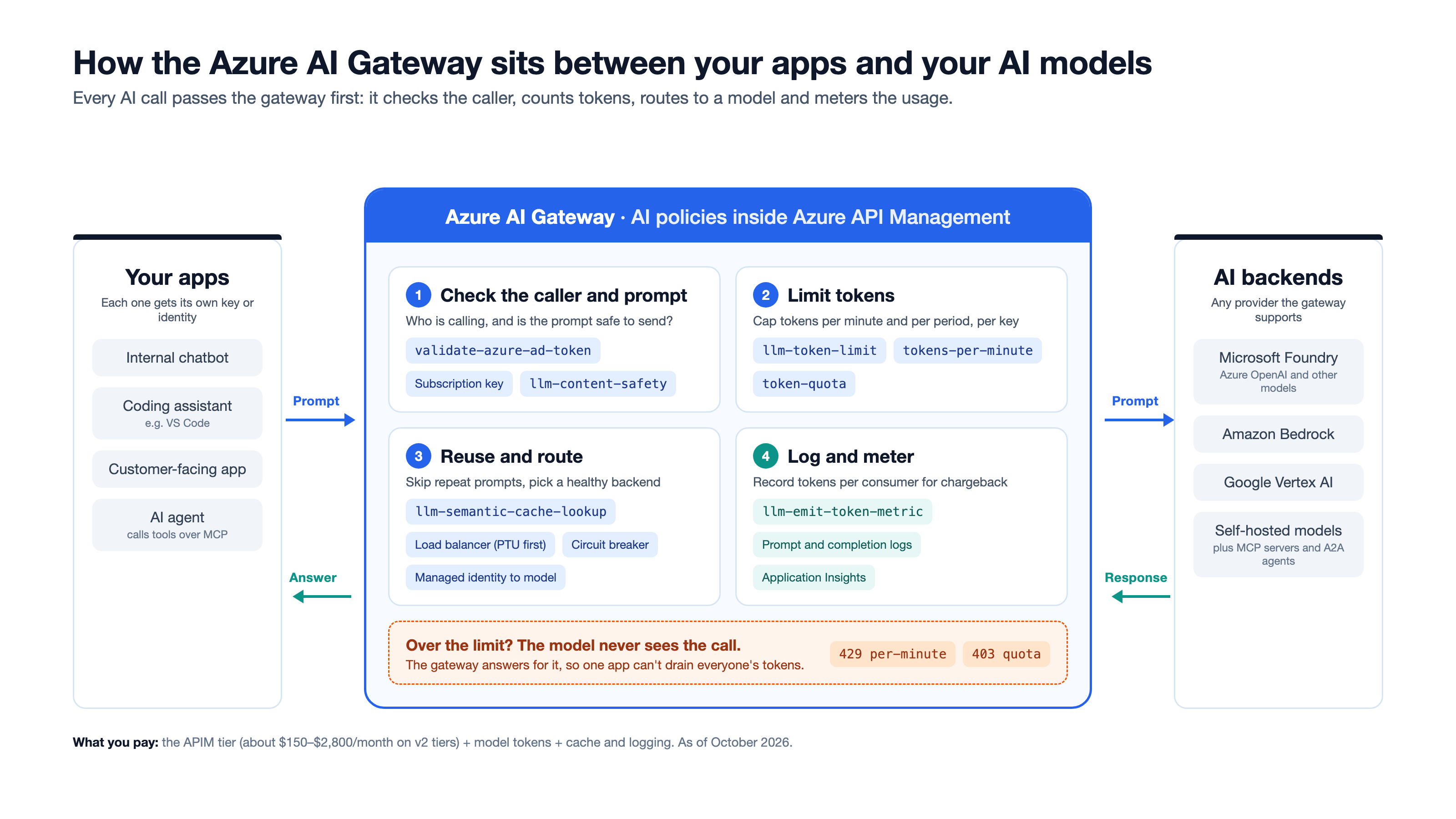
What can the Azure AI Gateway manage?
As of October 2026, Microsoft lists these backends:
- Language model APIs that use the OpenAI Chat Completions or Responses format, the Anthropic Messages format (v2 tiers only) or the Google Vertex AI format.
- Models from other providers, such as Amazon Bedrock, alongside models in Microsoft Foundry.
- Remote MCP servers (Model Context Protocol servers that give AI agents tools) and A2A agent APIs (agent-to-agent interfaces).
- Self-hosted models and endpoints.
A unified model API (in preview) puts several model providers behind one OpenAI-compatible endpoint. You set policies once, and they apply to every model behind it.
Which policy does each Azure AI Gateway feature use?
You can now also switch on the AI gateway from inside Microsoft Foundry (in preview). There, you set token quotas and rate limits for model deployments without opening APIM.
What is Azure AI Gateway pricing in 2026?
Azure AI Gateway pricing is the price of the Azure API Management tier it runs on, plus the AI model tokens you consume. Microsoft charges nothing extra for the AI policies on today's tiers. For a production gateway, that means about $150 to $2,800 a month for the gateway, before model costs.
The table uses Azure's retail price list for East US, checked on 7 October 2026. Monthly figures assume 730 hours.
Prices vary by region and change over time. Check the Azure API Management pricing page before you budget.
Is there a separate Azure AI Gateway tier?
Not yet. As of October 2026, Azure's pricing page lists an "API Management (AI Gateway tier)" with the note "Pricing details are coming soon." The same page says Basic v2 is free for up to 100,000 requests when you create it as an AI gateway in Microsoft Foundry. That makes Foundry the cheapest way to try the Azure AI Gateway.
What costs sit outside the gateway price?
The gateway fee is the small part of the bill. Plan for these as well:
- Model tokens: You pay your model provider per token, or per reserved unit for Provisioned Throughput Units (PTU, capacity you reserve in advance).
- A cache for semantic caching: It needs Azure Managed Redis or another RediSearch-compatible cache.
- Logging: Prompts, completions and token metrics go to Application Insights and Azure Monitor, which charge by data volume.
- Extra gateway units: You pay for these when you scale out or add regions.
Worked example: one gateway, three apps
Say you put 3 internal apps behind one Standard v2 gateway, sending 20M requests a month. The gateway costs about $700, and all 20M requests fall inside the 50M included. Your model tokens, cache and logs come on top. The token limits you set in the next section decide how big that top-up gets.
How does the APIM LLM token limit policy work?
The APIM LLM token limit policy (llm-token-limit) counts the tokens each caller uses and blocks them when they go over a limit. You can set a per-minute rate limit, a longer quota, or both. Each limit is counted against a key you choose, such as a subscription, a team or a user.
The policy counts prompt tokens plus completion tokens. It runs in the inbound section and works at every scope, from global down to a single operation. It works on every tier except Consumption.
What do the main attributes do?
counter-key: what you count against, such as a subscription ID or user ID. Every unique value gets its own counter.estimate-prompt-tokens: whentrue, APIM estimates the prompt size before sending it. Over-limit calls get blocked before they reach the model, at some cost to performance.remaining-tokens-header-nameandremaining-quota-tokens-header-name: return the tokens left to the caller, so apps can slow down before they hit the limit.tokens-consumed-header-name: returns how many tokens the call used.
What does an APIM LLM token limit look like?
Rate limit per subscription. This caps each subscription at 5,000 tokens a minute:
Monthly quota per subscription. This gives each subscription 2 million tokens a month:
Both together. Add both attributes to one policy to stop bursts and cap the monthly total.
What happened to azure-openai-token-limit?
Microsoft folded it into llm-token-limit. The old azure-openai-token-limit documentation page now redirects to the llm-token-limit page. The new policy also covers Anthropic and Google Vertex model formats, so use it for new work. For every other APIM policy, see all 67 Azure APIM policies explained.
How do you set an APIM LLM token limit per app, team or user?
To set an APIM LLM token limit per app, team or user, choose a counter key that identifies them, then add llm-token-limit at the right scope. Most teams start per subscription, then move to per-user limits as AI use grows.
- Import your model API: In APIM, add your Foundry or other model API. The import wizard can add a token limit for you.
- Pick your scope: Use the product scope for a whole team, the API scope for one model, or global for everything.
- Choose the counter key: Use the table below.
- Set the limits: Add
tokens-per-minute, atoken-quota, or both. - Return the remaining-token headers: Apps can then back off before they get blocked.
- Test with a trace: Send calls until you hit the limit, and confirm you get a 429 or 403.
Which counter key should you use?
For the signed-in user key, first run validate-azure-ad-token with output-token-variable-name="token". The policy then stores the validated token for the counter key to read.
How do you keep separate counters at different scopes?
APIM uses one counter per key value across every scope that uses that key. To count separately, add a scope label to the key. For example, @("api-chat-" + context.Subscription.Id) gives the chat API its own counter.
What if AI tools send the key as a Bearer token?
Some AI coding tools, such as Visual Studio Code, send the key in an Authorization: Bearer header. A June 2026 Microsoft Q&A thread showed APIM can't read that as a subscription key, so context.Subscription stays empty. Rewriting the header inside a policy doesn't fix it. Sign users in with Entra ID instead, and key the limit on the user claim shown above.
Why isn't my APIM LLM token limit working?
Most APIM LLM token limit problems come from how tokens are counted, not from broken policy XML. Tokens are only known after the model responds, and counters live on each gateway separately. Both facts let usage go past the limit you set.
- Counters are per gateway: The policy tracks usage separately on each gateway, including each region in a multi-region setup. Two regions with a 10,000-token limit can serve 20,000 tokens between them.
- Parallel calls overshoot: Calls that arrive at the same time can all pass before the first response reports its tokens. Short-term overruns are expected.
- Without estimation, the first over-limit call still goes through: With
estimate-prompt-tokens="false", the policy learns about the overrun from the response. It blocks the next calls, not the one that broke the limit. - Streaming uses estimates: With
stream: true, prompt and completion tokens are estimated, not counted exactly. - Images get overcounted: With streaming or estimation on, each image counts as up to 1,200 tokens.
- V2 and classic tiers count differently: V2 tiers use a token bucket, while classic tiers use a sliding window. On v2, keep
tokens-per-minutethe same everywhere you reuse a counter key. - The remaining quota is an estimate: The remaining-quota header can show more tokens left than you have. It gets more accurate as you near the limit.
One more case to know: in July 2025, a developer reported a rate limit and an hourly quota on the same key both resetting every minute. A Microsoft moderator said that behaviour is not expected. If you see it, test each limit alone, then raise a support ticket.
How do you track and charge back AI token costs?
Use llm-emit-token-metric to send token counts per consumer to Application Insights, then turn tokens into money outside the gateway. The gateway counts tokens well. It doesn't price them.
<llm-emit-token-metric namespace="ai-usage">
    <dimension name="Subscription ID" />
    <dimension name="API ID" />
    <dimension name="Team" value="@(context.Request.Headers.GetValueOrDefault("x-team-id", "unknown"))" />
</llm-emit-token-metric>
What limits apply to token metrics?
Microsoft documents hard caps on custom metrics. When you pass them, APIM discards the extra data silently.
A per-user dimension breaks at 100 users. The 101st user's tokens never reach your charts. For per-user billing, log each request instead, and add up the totals in Log Analytics.
Why don't token counts equal dollars?
Token limits treat every token the same. Your model bill doesn't. A June 2026 Q&A thread confirmed that llm-token-limit can't price input, output and cached tokens differently. In August 2026, Microsoft confirmed APIM can't log context size either, which matters for models priced by prompt length.
The workable pattern:
- Log per request: Turn on LLM logging to capture prompt tokens, completion tokens and the model per call.
- Price it downstream: Apply each model's price list in your reporting layer, not in a policy.
- Use the gateway to stop runaways: Set token quotas high enough to never block normal use, but low enough to stop a bad loop.
How do you lower token spend at the gateway?
- Semantic caching returns stored answers for prompts that mean the same thing, so you skip the model call.
- Priority load balancing sends traffic to your PTU capacity first and spills over to pay-as-you-go only when PTU is full.
- Circuit breakers stop sending traffic to a failing backend, using the backend's own
Retry-Aftervalue.
How do you govern Azure AI Gateway costs across more than one gateway?
The Azure AI Gateway only sees traffic that passes through Azure API Management. If your AI calls also go through Kong, Apigee, AWS or an MCP gateway, each one keeps its own token counts and limits. That leaves no single view of who spent what.
Most enterprises are already in this position. Postman's 2025 State of the API report found that 31% of organizations run more than one API gateway, and 11% run three or more. The same report found that 51% of developers worry about AI agents making unauthorized or excessive API calls. Gartner's 2025 Market Guide for AI Gateways predicts that 70% of software engineering teams building multimodel applications will use AI gateways by 2028, up from 25% in 2025.
Agent traffic makes this harder. When an agent calls your APIs through MCP tools, that usage has to land in the same audit and billing records as your normal API calls. Our comparison of AI gateways, MCP gateways and API gateways explains where each one fits.
Teams using DigitalAPI send every MCP call through the same audit and metering pipeline as their HTTP API traffic, so finance bills from one pipeline. DigitalAPI also connects to Azure APIM, Apigee, Kong and AWS, and applies one set of governance rules across all of them. Usage-based plans then work the same way whichever gateway serves the call.
Want to see where your AI and API usage goes across gateways? Get an assessment of your API landscape → Talk to our experts
FAQs
Is Azure AI Gateway a separate product?
No. The Azure AI Gateway is a set of AI features inside Azure API Management, not a separate service. Microsoft describes it as an extension of APIM's existing API gateway. You get it by creating or using an APIM instance, or by switching on the AI gateway from Microsoft Foundry.
How much does Azure AI Gateway cost?
Azure AI Gateway costs the price of the Azure API Management tier it runs on, plus your AI model tokens. As of October 2026, in East US, v2 tiers cost about $150 (Basic v2), $700 (Standard v2) and $2,800 (Premium v2) a month. Basic v2 is free for up to 100,000 requests when created as an AI gateway in Microsoft Foundry. A dedicated AI Gateway tier is listed with pricing "coming soon."
What is the difference between tokens-per-minute and token-quota in the APIM LLM token limit?
In the APIM llm-token-limit policy, tokens-per-minute caps tokens used per minute and returns a 429 error when exceeded. token-quota caps total tokens over an hour, day, week, month or year and returns a 403 error. You can set one or both on the same policy.
Does the APIM LLM token limit work in the Consumption tier?
No. As of October 2026, the llm-token-limit policy works in the Developer, Basic, Basic v2, Standard, Standard v2, Premium and Premium v2 tiers. It is not available in the Consumption tier. It also works on self-hosted and workspace gateways.
Can I limit AI tokens per user in Azure APIM?
Yes. Set the counter-key of the llm-token-limit policy to a value that identifies the user. The most reliable option is the oid claim from a Microsoft Entra ID token, read after validate-azure-ad-token stores the token in a variable. Avoid IP addresses for per-user limits, because users can share an IP.
Why do requests go over my APIM LLM token limit?
Requests go over an APIM LLM token limit because tokens are only known after the model responds. Parallel calls can all pass before the first response reports its tokens. Counters are also kept separately on each gateway and region. Turn on estimate-prompt-tokens to block more over-limit calls before they reach the model.
Can Azure API Management calculate AI costs in dollars?
No. As of October 2026, Azure API Management counts AI tokens but does not convert them into costs. It can't price input, output and cached tokens differently, and it can't log context size. Log token usage per request, then apply each model's price list in your reporting tools.
Is azure-openai-token-limit deprecated?
Microsoft has folded azure-openai-token-limit into the llm-token-limit policy. The old documentation page now redirects to llm-token-limit, which also supports Anthropic and Google Vertex model formats. Use llm-token-limit for new configurations.
Final word
- The Azure AI Gateway is APIM with AI policies. You pay for the APIM tier plus model tokens, not for a separate product.
- The APIM LLM token limit stops runaway usage, but counts per gateway and can overshoot, so set limits with headroom.
- Tokens aren't dollars. Log usage per request, and calculate costs outside the gateway.
Start with a monthly quota per subscription, return the remaining-token headers to every app, and log each request. When your AI traffic spans more than one gateway or reaches agents through MCP, track it in one place.
Want one view of AI and API usage across every gateway? Get an assessment of your API landscape from DigitalAPI → Talk to our experts
Dhayalan Subramanian is Associate Director, Product Growth at DigitalAPI, where he leads go-to-market and product growth for the company’s multi-gateway API management platform. His work focuses on helping large enterprises and mid-market cloud companies consolidate APIs across AWS, Azure, Apigee, Kong, MuleSoft, and other gateways into a single control plane for governance, discovery, monetization, and agent consumption.
Dhayalan brings 14+ years of experience across product strategy, enterprise architecture, and engineering leadership. Earlier in his career, he held senior roles at Encora (as Associate Architect and Technical Manager), Mindtree (Technology Lead), Tech Mahindra (Technical Lead), and Primus Analytics, where he designed integration frameworks and delivered enterprise-grade digital platforms for global customers.
At DigitalAPI, he works directly with platform, integration, and developer experience leaders at Fortune 500 organizations to operationalize unified API catalogs, developer portals, and MCP-ready APIs. He writes regularly on API developer experience, API governance, and AI agent architectures.
One email a fortnight. Worth opening.
A short digest of what we're writing, what we're learning from customers, and the handful of links you'd actually want from us. No tracking pixels.

.avif)