











OpenAPI to MCP: 3 Ways to Convert Your API (2026 Guide)
APIs power modern software, but AI tools can’t use them natively. OpenAPI specs describe endpoints and data, but they lack the execution context LLMs need to reason and act.

TL;DR
OpenAPI to MCP conversion turns your existing API spec into an MCP server that AI agents can discover and call directly. You have three ways to do it:
1. No-code online converter
2. Open-source generator you run yourself
3. Hybrid of the two.
The fastest is DigitalAPI MCP Studio, a free-to-start, no-code tool. Paste an OpenAPI URL (or connect GitHub or Postman), and it maps your endpoints, wires up authentication, and publishes a secure, hosted MCP server in five steps. No wrapper code.
Every server sits behind the DigitalAPI MCP Gateway for auth, rate limits, and audit logging.
Convert your first API to MCP free with MCP Studio →
APIs run modern software, yet AI agents cannot use them out of the box. Your OpenAPI spec documents every endpoint and schema, but it has no execution layer that a language model can act through. So teams write plugins, prompt chains, and brittle wrappers, and every new agent means more glue code.
Converting OpenAPI to MCP removes that glue. This guide walks through what the conversion is, the three ways to do it, the traps that break real conversions, and how to pick the right path for your stack.
What Does “OpenAPI to MCP” Actually Mean?
OpenAPI to MCP is the process of converting an OpenAPI (or Swagger) specification into a Model Context Protocol server so that AI agents can call your API as a set of structured tools. The spec stays your source of truth. The MCP server is the runtime that exposes it to agents.
Two definitions make the rest of this guide easier to follow:
- What is OpenAPI? The OpenAPI Specification (OAS) is a language-independent standard for describing HTTP APIs. It defines endpoints, parameters, responses, authentication, and data formats in JSON or YAML that both humans and machines can read.
- What is MCP? The Model Context Protocol (MCP) is an open standard, open-sourced by Anthropic in November 2024, that lets AI models discover and call external tools through one consistent interface. It has since become the default way agents use tools.
One quick note on naming: Swagger and OpenAPI describe the same file. Swagger was the original spec that became the OpenAPI Specification, so "Swagger to MCP" and "OpenAPI to MCP" are one workflow. If you want the full history, here is our breakdown of Swagger vs OpenAPI.
Put simply: OpenAPI describes what your API can do. MCP lets an AI agent actually do it. Converting between them is the bridge. For a deeper primer, see our MCP server guide.
Why Convert OpenAPI to MCP?
You convert OpenAPI to MCP so AI agents can call your API without custom integration code. MCP replaces per-model wrappers with one protocol that handles tool discovery, schema validation, and secure authentication.
Without MCP, connecting an agent to an API means function-calling wrappers and prompt engineering that break the moment the API changes. MCP solves this with a single layer that gives you:
- Tool discovery. Agents learn what operations exist on their own.
- Schema validation. Inputs and outputs are type-checked before a call runs.
- Transport flexibility. Works over stdio (local), HTTP, and streamable HTTP (remote).
- Auth forwarding. OAuth tokens, API keys, and JWTs pass through securely.
Your OpenAPI document already holds the endpoints, parameters, and schemas. An MCP server wraps that same information in a form agents can execute, so any AI agent can act on it. In short, the conversion turns documentation into action.
What Do You Need Before You Convert penAPI to MCP?
Before you convert OpenAPI to MCP, you need a valid OpenAPI 3.x spec, a runtime for your chosen tool, and a plan for authentication. Get these right and the conversion is smooth. Skip them and most failures trace back here.
Your checklist:
- A clean OpenAPI 3.x spec. Every operation needs a unique operationId, typed parameters, and response schemas. This becomes your MCP tool list.
- Resolved references. Inline or dereference $ref pointers so MCP clients get self-contained tool definitions.
- Defined securitySchemes. Declare API keys, OAuth2, or JWT in the spec, and confirm your generator actually forwards them at runtime.
- A runtime, if you self-host. Node.js 18+ for TypeScript generators, Go 1.20+ for Go tools, Python 3.10+ for FastMCP.
- A validator. Redocly CLI or Swagger CLI catch missing IDs and broken references before you generate anything.
Validate first, always. A spec that renders fine in Swagger UI can still hide broken $ref pointers or circular schemas that MCP clients cannot resolve. Run a linter before you convert:
# Lint and validate your OpenAPI spec before conversion
npx @redocly/cli lint openapi.yaml

# or
swagger-cli validate openapi.yaml
A self-contained, validated spec produces cleaner MCP tools and far fewer runtime surprises.
How Do You Convert OpenAPI to MCP? (3 Options)
There are three practical ways to convert OpenAPI to MCP in 2026: a no-code online converter, a self-hosted open-source generator, or a hybrid of the two. They differ mostly in who runs and secures the server. Pick by how much control and governance you need.
The infographic below shows the pipeline and the three paths at a glance.
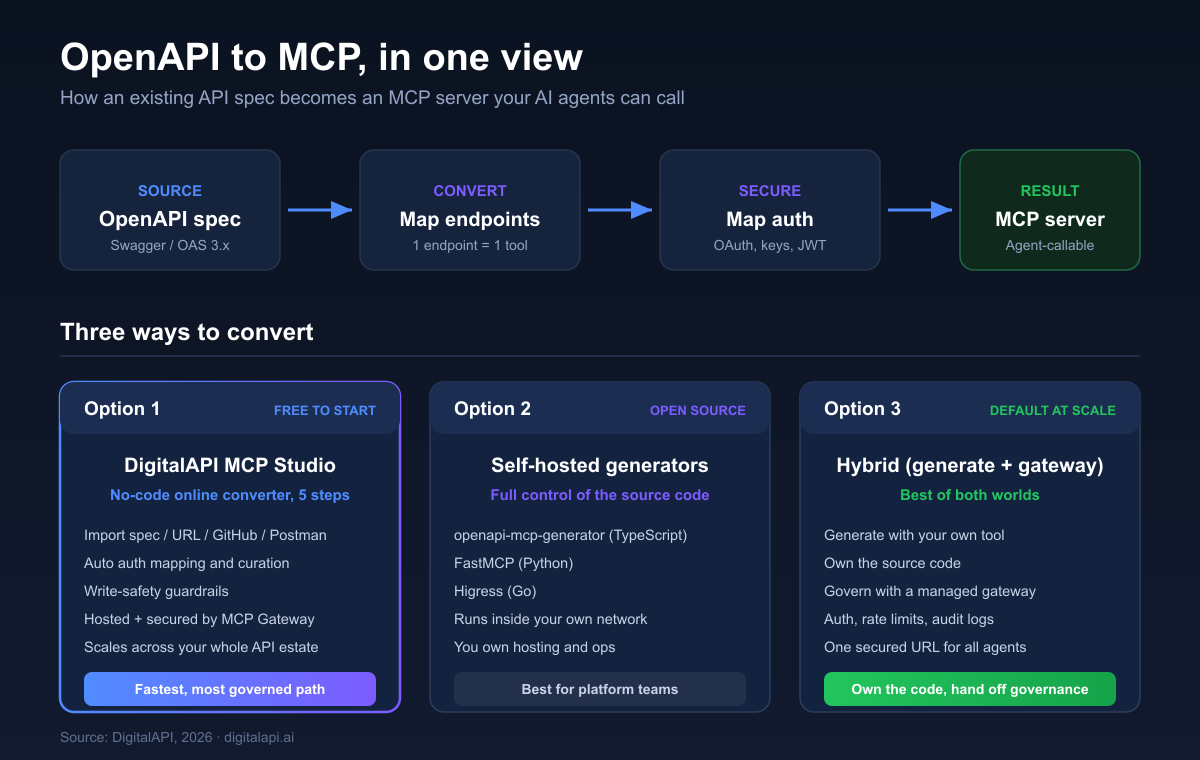
Option 1: DigitalAPI MCP Studio (Free, No-Code, Just a Few Easy Steps)
DigitalAPI MCP Studio is a free-to-start, no-code online converter that turns any API into an MCP server in five guided steps. You paste an OpenAPI URL (or connect GitHub or Postman), and MCP Studio reads your endpoints, maps authentication, flags risky write actions, and publishes a live, hosted MCP server secured by the DigitalAPI MCP Gateway.
Most "free online OpenAPI to MCP converter" tools stop at a config file: you still have to add auth, host the server, and secure it yourself. MCP Studio does the full job. It converts, curates, hosts, and secures, so what you get back is production-ready, not a throwaway scaffold. You convert your first API free. MCP Studio does the full job. It converts, curates, hosts, and secures, so what you get back is production-ready, not a throwaway scaffold. You convert your first API free.
Prefer to see it before you read it? This short walkthrough shows MCP Studio converting a live OpenAPI spec into a secured MCP server, from import to published endpoint.
Here is the same flow, step by step.
Step 1: Import Your API From Any Source
Start where your API already lives. MCP Studio reads an OpenAPI or Swagger URL, an uploaded spec file, a GitHub repo, or a Postman collection, with no reformatting.
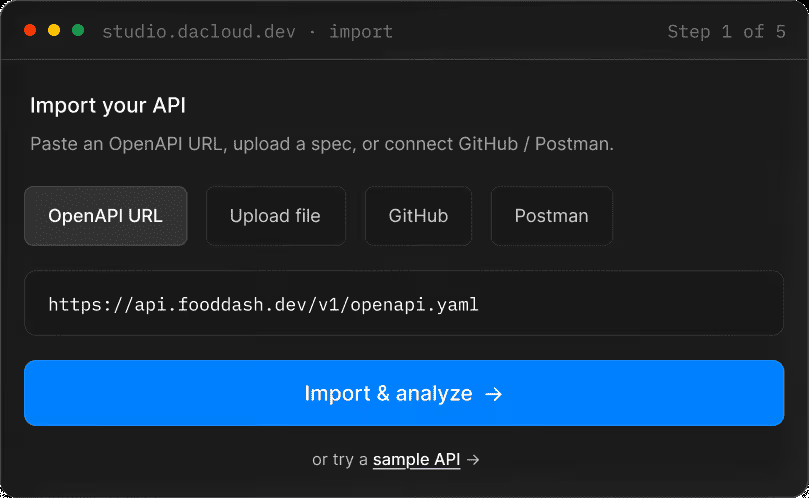
You can also try a sample API first if you just want to see the flow.
Step 2: Let MCP Studio Analyze Your API
MCP Studio reads the whole API and builds a working picture: every endpoint, every schema, the authentication, and the actions an agent could safely take.
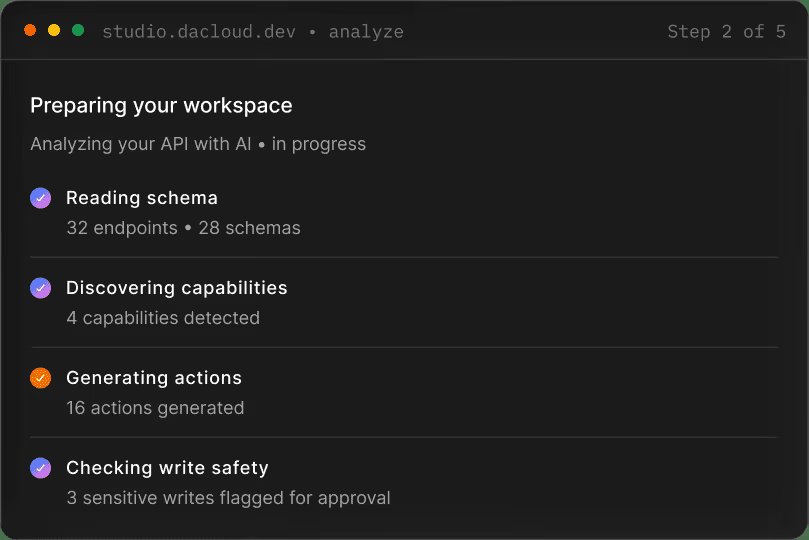
It maps auth automatically (API keys, OAuth2, bearer tokens, JWT) and flags sensitive write actions for approval, so nothing risky ships by accident.
Step 3: Preview the MCP Servers Studio Proposes
MCP Studio groups actions by business domain, names an MCP server per group, and shows you what is ready to ship before anything goes live. Tools are tagged read, write, or sensitive.
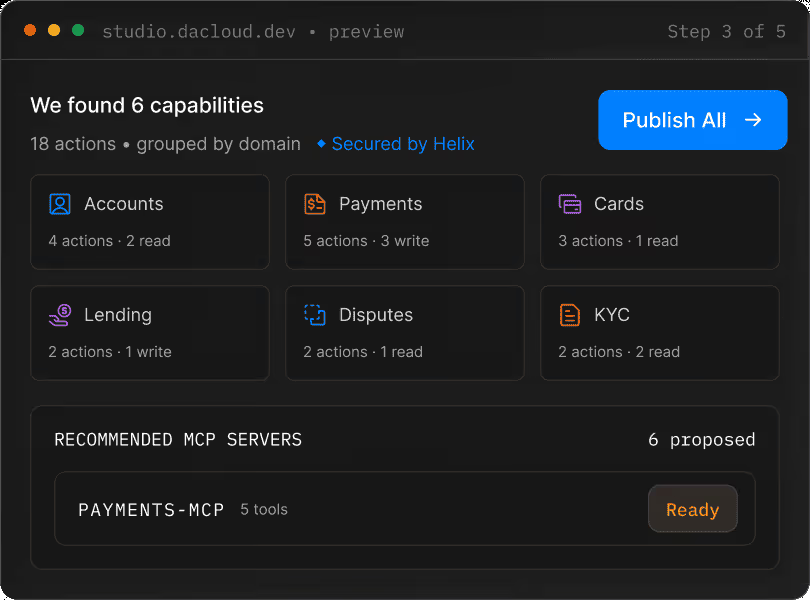
This is the curation step that raw generators skip. Instead of dumping every endpoint into one bloated server, you see a clean, grouped tool surface.
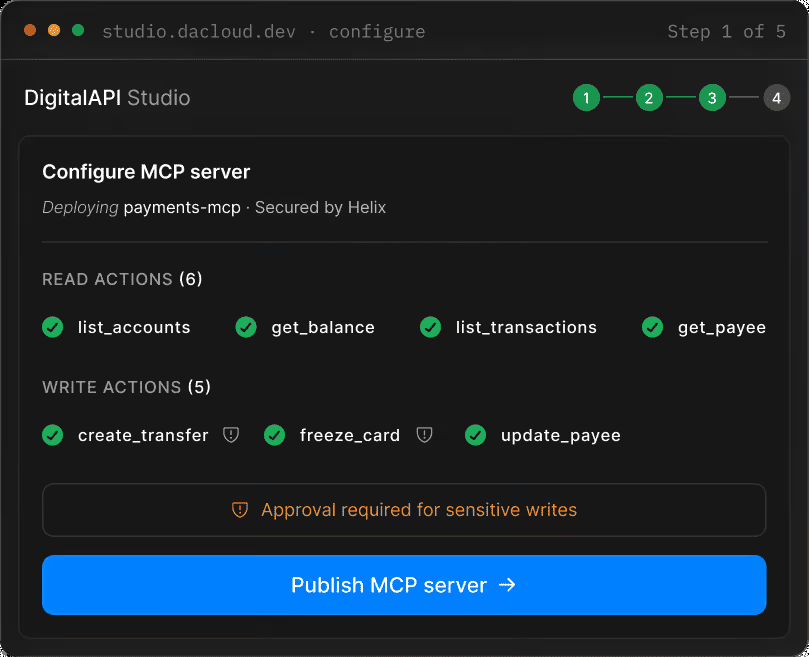
Step 4: Configure What to Publish First
Choose what to ship: the full MCP Toolset for any agent, a focused agent, or a multi-step workflow. Add approval rules to any write action.
Step 5: Publish a Live, Secure MCP Server
MCP Studio hosts the server and hands you everything an agent needs: a live endpoint URL and a ready-to-paste client configuration for Claude, Cursor, and other clients. It is secured by the MCP Gateway from the first request.
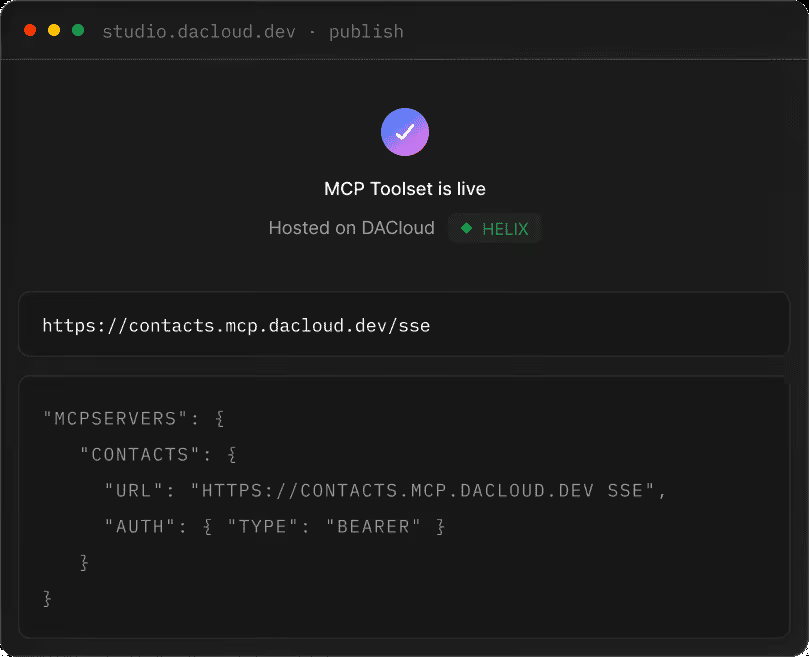
A published config looks like this in your MCP client:
{
  "mcpServers": {
    "digitalapi-invoices": {
      "url": "https://mcp.yourcompany.digitalapi.ai/invoices",
      "transport": "streamable-http",
      "headers": { "Authorization": "Bearer ${DIGITALAPI_TOKEN}" }
    }
  }
}Why DigitalAPI is the option to consider first:
- Free to start, no code, no wrappers. Convert your first API at no cost, and skip hand-written tool definitions entirely.
- More than a converter. A throwaway online tool gives you a config file. MCP Studio gives you a hosted, secured, running server.
- Auth inherited, not rebuilt. Your MCP server reuses the security model your API already has, mapped from your origin.
- Governance from day one. Every server sits behind the MCP Gateway with OAuth, rate limits, per-agent scopes, and full request tracing.
- It scales past one API. When you have dozens of APIs, one-click conversion beats operating a fleet of hand-built servers. These APIs are also ready for API-GPT, the AI agent built on your own APIs.
- Enterprise-proven. MCP Studio is trusted by API teams at HSBC, Fiserv, Zurich, and Canara Bank, and it is ISO 27001 certified.
Convert your first API to MCP free with MCP Studio →
Option 2: Self-Hosted Open-Source Generators (Full Code Control)
Self-hosted generators read your spec, scaffold an MCP server in your language, and hand you the source code to deploy yourself. You own the runtime, the monitoring, and the governance. This is the right call when your security model requires the server to run inside your own network.
The leading open-source OpenAPI to MCP generators:
- openapi-mcp-generator (TypeScript/Node.js). Converts OpenAPI 3.x specs into MCP servers with typed Zod validation and stdio, SSE, or streamable HTTP transports.
- FastMCP (Python). Generates an MCP server from an OpenAPI spec or a FastAPI app in a few lines, with route mapping to include or exclude endpoints.
- openapi-to-mcpserver / Higress (Go). Produces config-driven MCP servers for cloud-native, Kubernetes-based stacks.
A typical TypeScript flow looks like this:
# 1. Install the generator
npm install --save-dev openapi-mcp-generator

# 2. Generate the server from your spec
npx openapi-mcp-generator \
  --input openapi.yaml \
  --output ./mcp-server \
  --transport=streamable-http

# 3. Install and run
cd mcp-server
npm install
npm run start:http
For Python teams using FastMCP:
from fastmcp import FastMCP
import httpx

# Load your OpenAPI spec and point a client at the live API
client = httpx.AsyncClient(base_url="https://api.yourcompany.com")
mcp = FastMCP.from_openapi(openapi_spec=spec, client=client)

if __name__ == "__main__":
    mcp.run(transport="http", host="0.0.0.0", port=8000)
The trade-off: you get total control, but you also own deployment, auth hardening, observability, and every future spec change. That is fine for one or two servers. It gets heavy fast across a real API portfolio. Worth noting: FastMCP's own docs (2026) recommend auto-generation for bootstrapping and prototyping, not for mirroring a large API straight to agents, because auto-converted servers underperform curated ones.
Option 3: The Hybrid Pattern (Generate Yourself, Govern With a Gateway)
The hybrid pattern is becoming the default at scale in 2026: generate the MCP server with a self-hosted tool, then run it behind a managed gateway. You keep control of the source code, and the gateway handles auth, governance, and observability across your whole fleet.
The workflow most teams converge on:
- Validate the spec, then auto-generate the full server as a baseline.
- Filter aggressively. Remove admin, internal, and deprecated routes.
- Rewrite the remaining tool descriptions for the model, not for humans.
- Test with a real agent (Claude Desktop, Cursor) and watch which tools it picks badly.
- Iterate on the worst descriptions.
- Put the whole thing behind a MCP gateway with auth, rate limits, and audit logging.
This gives you self-hosted control on the conversion and managed-grade governance on the runtime. You own the conversion logic; the gateway owns the perimeter. See our roundup of the best MCP gateways in 2026 for how to choose one.
Which OpenAPI to MCP Option Is Right for You?
Pick by control, governance, and how many APIs you need to convert. Here is the side-by-side.
Quick read: regulated teams (finance, insurance, healthcare) that need OAuth 2.1, audit trails, and per-agent scopes from day one should start with Option 1. Teams that must run everything in their own VPC should look at Option 2 or Option 3.
What Breaks When You Convert OpenAPI to MCP?
OpenAPI to MCP conversion is lossy: some OpenAPI features have no clean MCP equivalent, so a naive one-to-one conversion produces broken or misleading tools. Knowing where the gaps are is what separates a server that "exists" from one agents use well.
The common mismatches, as of 2026:
- Pagination. OpenAPI describes page and offset parameters, but the agent has to understand it should keep fetching. Auto-generated tools rarely convey that.
- Auth flows. OAuth redirect flows do not translate into a single tool call. Token handling has to be wired in, not just declared.
- Webhooks and callbacks. These are server-to-client. MCP tools are agent-initiated, so they have no direct equivalent.
- Streaming responses. Long-poll and server-sent events do not map to a single request-response tool.
The honest rule: when an OpenAPI feature has no MCP equivalent, the conversion should skip that endpoint, not silently ship a broken tool. Good converters flag these at conversion time and ask you to decide. MCP Studio does this by tagging sensitive and unmappable actions for approval instead of publishing them blindly.
There is a second failure mode worth naming: hallucination from thin specs. When an endpoint has a vague description, an agent can invent a plausible but wrong tool call rather than admitting it does not know. The fix is the same discipline that improves any API: clear summaries, real descriptions, and example payloads.
How Do You Handle a Large API With 100+ Endpoints?
A large API needs curation, not a raw one-to-one conversion, because every tool definition is loaded into the model's context on every turn. A clean 15-endpoint spec converts cleanly. A 200-endpoint enterprise spec does not.
The math is unforgiving. Each tool definition runs roughly 200 to 1,000 tokens. Convert 200 endpoints at ~400 tokens each and you push about 80,000 tokens of schema into context before the agent reads a single user message. That degrades reasoning, raises cost on every turn, and makes tool selection less reliable as the catalog grows.
What to do instead:
- Curate by relevance. Ship only the 10 to 30 operations agents actually need. Keep the rest behind the API, off the MCP surface.
- Filter with extensions. Use x-mcp: false per operation, or tag and path-prefix excludes.
- Group by use case. Ship several small servers (billing-agent, support-agent, sales-agent) instead of one 200-tool monster.
- Use a gateway that filters per agent. DigitalAPI exposes only the tools an agent is currently allowed to call, so the context stays small and scoped.
Rule of thumb: if your spec has more than 50 operations and you want agents to use all of them, you need a gateway, not a single bare MCP server.
Best OpenAPI to MCP Tools Compared (2026)
The OpenAPI to MCP generator landscape splits into managed converters and self-hosted tools. Here is how the main options compare.
Quick guidance:
- Fastest path with no ops: DigitalAPI MCP Studio. Upload the spec, get a hosted, secured MCP server back.
- Most control, your code: openapi-mcp-generator (TypeScript) or FastMCP (Python).
- Cloud-native, Go-based: Higress fits if you already run it as your gateway.
- Large API with curation and governance needs: MCP Studio handles curation in the preview step and governance through the gateway.
Common Mistakes When Converting OpenAPI to MCP
Most OpenAPI to MCP failures are spec or curation problems, not protocol problems. Avoid these six.
- Missing or duplicate operationId values. MCP uses the operationId as the tool name. Missing ones become confusing auto-names like get_api_v1_users_id. Lint first: redocly lint openapi.yaml --rule operation-operationId-unique.
- Exposing too many endpoints. A 100-plus tool list makes models pick badly. Curate to what agents need.
- Vague descriptions. "Get data" tells the model nothing. Write what the tool does, when to call it, and what it returns.
- Ignoring auth mapping. Not all generators forward tokens automatically. Test with an expired token and confirm you get a clean 401.
- Not testing with a real agent. Unit tests check schemas. Only a real client (Claude Desktop, Cursor, a LangChain agent) shows how the model actually uses the tools.
- Skipping validation before generation. A spec that renders in Swagger UI can still have broken $ref pointers. Validate every time.
Best Practices for OpenAPI to MCP Conversion
Secure, curate, and version your MCP server the way you would any production service. Three practices carry most of the weight.
- Security. Use OAuth2 or API keys, encrypt all traffic, and keep detailed audit logs. For regulated industries, add HIPAA, SOC 2, or PCI DSS controls. See our guide to MCP compliance.
- Curation and descriptions. Expose only the tools agents need, and write descriptions for the model. This is the single biggest lever on tool-selection accuracy.
- Versioning. Use semantic versioning, keep backward compatibility where you can, and re-test with downstream agents after each spec change.
Best Practices for Mapping API Endpoints and Schemas Into MCP Definitions
How you map API endpoints and schemas into MCP tool and resource definitions decides how well agents actually use your server. A clean one-to-one dump rarely works. Follow these rules:
- One clear action per tool. Map each meaningful operation to a single, well-named tool, and use the operationId as the tool name so it stays stable and readable.
- Turn schemas into typed inputs. Your OpenAPI request and response schemas become the tool's input and output types. Keep them typed and validated so the model gets structured, predictable results.
- Split reads from writes. Expose safe read operations freely, and gate write or destructive actions behind approval, so an agent cannot cause damage by guessing.
- Model collections as resources, actions as tools. Where MCP supports resources, map list-style GET endpoints to resources and state-changing endpoints to tools, so agents fetch context cheaply and act deliberately.
- Write descriptions for the model. Every mapped definition needs a plain-language description of what it does, when to call it, and what it returns.
How Do You Convert Existing APIs to MCP Servers With Unified Authentication?
When you convert existing APIs to MCP servers with unified authentication, the auth layer is the part that gets messy fastest. Each API may use a different scheme: API keys here, OAuth2 there, JWT somewhere else. Wiring each one separately per server is where teams lose weeks.
Unified authentication solves this by putting one identity and access layer in front of every MCP server, so agents authenticate once and the gateway maps each call to the right origin credentials behind the scenes. Instead of hard-coding tokens into each generated server, you inherit the auth model your APIs already have and enforce it centrally. This is exactly what the DigitalAPI MCP Gateway does: OAuth 2.1, per-agent scopes, and token forwarding across your whole fleet, from one control point.
For a full build-from-scratch walkthrough, read how to build an MCP server, and to understand the clients that consume it, see what is an MCP client.
FAQ
1. What does it mean to convert OpenAPI to MCP?
Converting OpenAPI to MCP means taking your OpenAPI specification, which describes your API's endpoints, parameters, and schemas, and turning it into an MCP server AI agents can call. The server registers each operation as a tool and handles execution, validation, and responses over the Model Context Protocol.
2. Is there a free way to convert OpenAPI to MCP?
Yes. DigitalAPI MCP Studio is a free-to-start, no-code online converter: you convert your first API at no cost and get a live, hosted server back, not just a config file. Open-source generators like openapi-mcp-generator and FastMCP are also free, but you host and secure the server yourself.
3. Can I convert OpenAPI to MCP without writing code?
Yes. DigitalAPI MCP Studio lets you paste an OpenAPI URL and publish a fully configured, hosted MCP server with no code, in five steps. It maps authentication and flags sensitive actions automatically. Open-source generators exist too, but they require configuration and self-hosting.
4. What is the difference between MCP and a REST API?
A REST API exposes endpoints that humans or code call over HTTP. An MCP server wraps those same operations in a protocol AI models understand natively, with tool discovery, schema validation, and structured errors. MCP does not replace your API. It makes your API callable by agents without custom integration code.
5. Which AI assistants and tools support MCP?
As of 2026, MCP is supported by Claude, ChatGPT, GitHub Copilot, Cursor, VS Code, and Windsurf, plus agent frameworks including LangChain, LangGraph, CrewAI, and AutoGen. The ecosystem keeps growing.
6. Is "Swagger to MCP" the same as "OpenAPI to MCP"?
Yes. Swagger became the OpenAPI Specification, so the two describe the same conversion. The steps are identical: validate the spec, map operations to tools, handle auth, and generate the server.
7. How do I convert a large OpenAPI spec with hundreds of endpoints?
Curate it. Expose only the 10 to 30 operations agents need, filter the rest with x-mcp extensions or tags, and split into several small servers by use case. For full coverage of a large API, run it behind a gateway that filters tools per agent, rather than a single bare MCP server.
8. Is an MCP server generated from OpenAPI secure enough for enterprises?
It can be. MCP servers support OAuth2, JWT, API keys, TLS, and audit logging. For regulated industries you can add HIPAA, SOC 2, or PCI DSS controls. Security depends on your configuration and, in practice, on the gateway you put in front of the server.
9. Is converting OpenAPI to MCP the same as function calling?
No. Function calling is a model feature where the LLM outputs a structured call. MCP is a server-side protocol that standardizes how those calls are discovered, routed, and executed. They work together: the model uses function calling to invoke MCP tools.
10. What is the easiest way to convert OpenAPI to MCP?
The easiest way is a free, no-code online converter. With DigitalAPI MCP Studio you paste your OpenAPI URL, let it analyze and curate your endpoints, and publish a live, secured MCP server in five steps, with no wrapper code and the MCP Gateway in front of it from the first request.
11. How do I create an MCP server for my API?
You create an MCP server for an API by converting its OpenAPI or Swagger spec into MCP tools, then hosting the result. The fastest route is a no-code tool: with DigitalAPI MCP Studio you import the spec, let it map endpoints and authentication, and publish a live server in five steps. If you prefer to own the code, a generator like openapi-mcp-generator or FastMCP scaffolds the server for you to deploy. Both turn your existing API into something AI agents can call, without hand-writing tool definitions.
12. OpenAPI vs MCP: what is the difference?
OpenAPI and MCP solve different problems. OpenAPI is a specification that describes what your API does: its endpoints, parameters, and schemas. MCP is a protocol that lets AI agents call those operations as tools. OpenAPI is documentation; MCP is execution. You do not choose between them. You convert your OpenAPI spec into an MCP server (sometimes called an OpenAPI tool server) so the two work together, with OpenAPI as the source of truth and MCP as the runtime agents talk to.
13. What platforms can generate MCP servers from OpenAPI specs?
Several platforms can generate MCP servers from OpenAPI specs. Managed, no-code options like DigitalAPI MCP Studio import your spec (or a GitHub repo or Postman collection) and publish a hosted, secured server. Open-source generators cover the self-hosted route: openapi-mcp-generator for TypeScript, FastMCP for Python, and Higress for Go. The right platform depends on whether you want to own and run the code yourself or hand hosting and governance to a managed service.
14. What is the MCP server manifest format?
The MCP server manifest usually refers to one of two things. The first is the client-side configuration that tells an AI client how to reach your server: a JSON block under mcpServers with the server's URL, transport, and auth headers. The second is the server's own capability descriptor, which it advertises to clients over the protocol so they can discover its available tools, resources, and prompts. In all cases the manifest is JSON, and a good converter generates it for you rather than making you write it by hand.
Turn Any API Into an MCP Server, Without the Plumbing
Converting OpenAPI to MCP is no longer a research project. The pieces are settled: validate the spec, map operations to tools, handle auth, curate for the model, and put a gateway in front. The only real decision is how much of that you want to own yourself.
If you want the fastest, most governed path, DigitalAPI MCP Studio does the whole thing in five steps with no code and a free start, and every server it ships is secured by the MCP Gateway from the first call. Teams at HSBC, Fiserv, and Zurich already use it to make their APIs agent-ready.
See how DigitalAPI converts OpenAPI to MCP in minutes
Book a demo and Try MCP Studio free
Rajanish GJ is Chief Technology Officer at DigitalAPI, the multi-gateway API management platform that helps large enterprises consolidate API discovery, governance, monetization, and AI agent enablement across heterogeneous gateway environments, including Apigee, AWS API Gateway, Azure API Management, Kong, and MuleSoft.
Rajanish brings 20+ years of engineering leadership to the role. He spent formative years at Apigee, the API management platform now part of Google Cloud and widely regarded as the category’s foundational product, and at Google itself, where he worked on developer-facing infrastructure at scale. That operator background informs DigitalAPI’s architectural bets around gateway abstraction, MCP-ready APIs, and agent-native developer experience.
He writes regularly on API architecture, developer infrastructure, and AI-native API management, with particular focus on how engineering teams can future-proof their API platforms for the agent era.
One email a fortnight. Worth opening.
A short digest of what we're writing, what we're learning from customers, and the handful of links you'd actually want from us. No tracking pixels.

.avif)
