

Agentic Workflows: How AI Agents Use Your APIs Step by Step
Agentic workflows explained step by step: how AI agents plan, call your APIs, handle errors and hand off to humans, plus 7 patterns, 8 examples and an API readiness checklist.

An agentic workflow is a process where an AI agent breaks a goal into steps, calls APIs and tools to act on each step, checks every result, and changes its plan until the goal is met. Unlike a fixed automation, the agent decides the next step at runtime. Your APIs are where every one of those steps lands.
That puts APIs at the center of agentic AI, and most aren't ready. Postman's 2025 State of the API, a survey of more than 5,700 developers, found that 89% of developers use AI but only 24% design APIs with AI agents in mind.
This guide covers what an agentic workflow is, how one uses your APIs call by call, the seven common patterns, eight examples, when to use multiple agents, when not to use agents at all, the risks, and what your APIs need first.
TL;DR
• What it is: an AI agent that plans, acts through APIs, checks results and adapts until a goal is done.
• How it runs: goal, plan, discover tools, authenticate, call APIs, decide, handle errors, ask a human when needed, and log everything.
• Patterns: chaining, routing, parallelization, orchestrator-workers, evaluator-optimizer, planning and tool use.
• What breaks it: vague API specs, shared keys, non-idempotent writes, hardcoded tool lists and no audit trail.
• First step: make your APIs discoverable and safe for agents before you build the agent.
What is an agentic workflow?
An agentic workflow is defined as a goal-driven process in which an AI agent plans its own steps, uses tools and APIs to act, and loops until the goal is reached or a human takes over. Four traits separate it from other automation: it works toward a goal, uses tools, adapts to results, and repeats until done.
A normal workflow follows a fixed path, for example "if the ticket says refund, call the refunds API." An agentic workflow gets the goal, "resolve this ticket," and works out the path itself.
[fs-toc-omit]What are the core components of an agentic workflow?
| Component | What it does | What fails without it |
|---|---|---|
| Model (LLM) | Reasons, plans and picks the next action | No decisions, only fixed steps |
| Tools and APIs | Let the agent read and change real systems | The agent can only talk, not act |
| Memory | Holds conversation state and past results | The agent repeats steps or loses context |
| Planner | Breaks the goal into sub-tasks | The agent wanders or stops early |
| Guardrails | Limit actions, spend and access | Runaway loops and risky writes |
| Human checkpoint | Approves high-risk actions | Irreversible mistakes go live |
[fs-toc-omit]What's the difference between an agentic workflow and an AI agent?
The AI agent is the actor. The agentic workflow is the process it runs. One workflow can use a single agent or several agents that hand work to each other. When people say "we built an agent for refunds," they usually mean an agentic workflow with one agent and a set of refund tools.
How do agentic workflows differ from traditional automation?
Traditional automation follows rules a person wrote in advance, while an agentic workflow decides each step at runtime based on what it finds. Fixed LLM pipelines sit in between: they use a model but run the same sequence every time.
| Traditional automation (Zapier, n8n rules, RPA) | Fixed LLM pipeline | Agentic workflow | |
|---|---|---|---|
| Who picks the next step | The rule author | The pipeline design | The agent, at runtime |
| Handles new kinds of input | No, needs a new rule | Partly | Yes, within its tools |
| Error handling | Pre-defined branches | Fails or retries blindly | Re-plans or escalates |
| Cost per run | Lowest | Low | Higher, varies by steps |
| Predictability | High | High | Lower, needs guardrails |
| Best for | Fixed, high-volume tasks | Summaries, extraction | Investigation, triage, multi-system tasks |
Most companies need all three. The skill is knowing which task gets which.
How does an agentic workflow use your APIs, step by step?
An agentic workflow uses your APIs in a loop: it plans, finds the right tools, authenticates, calls an API, reads the result, decides what's next, and repeats until the goal is met. The example below follows one real-world workflow, refunding a damaged order, at the level of individual API calls.
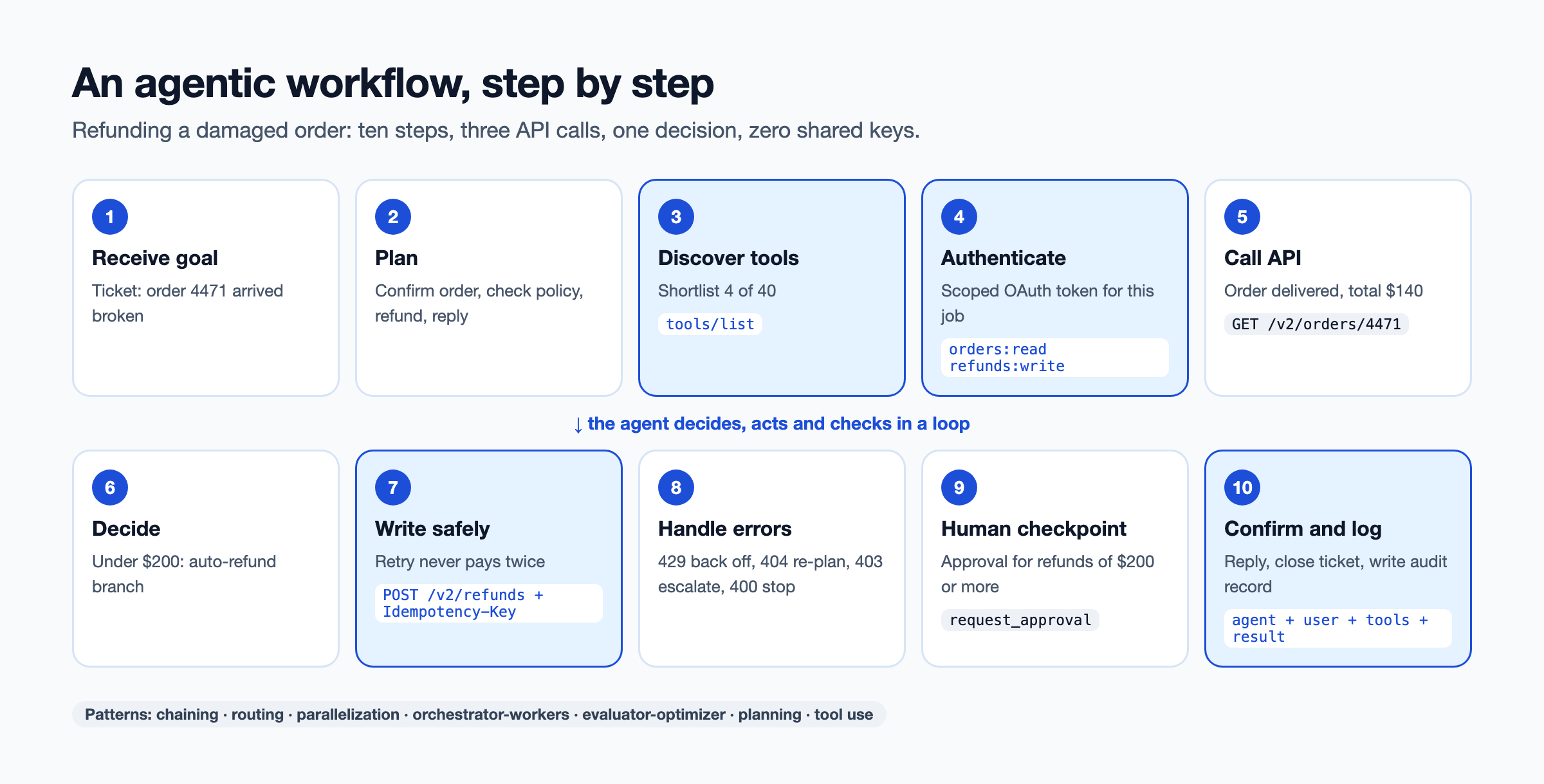
[fs-toc-omit]1. Receive the goal
A support ticket arrives: "Order 4471 arrived smashed. I want a refund." The workflow starts with the ticket text, the customer ID and the support policy as context.
[fs-toc-omit]2. Plan
The agent breaks the goal into sub-tasks:
1. Confirm order 4471 belongs to this customer and has shipped.
2. Check refund eligibility under the damage policy.
3. Issue the refund, or request approval if over the limit.
4. Reply to the customer and close the ticket.
[fs-toc-omit]3. Discover tools
The agent asks its MCP server or tool catalog what it can use, then keeps only what the plan needs:
{ "method": "tools/list" }
→ get_order, get_customer, create_refund, request_approval, update_ticket, ... (40 tools)
→ shortlisted: get_order, create_refund, request_approval, update_ticket
If tools are hardcoded instead of discovered, this step doesn't exist, and every API change means redeploying the agent. We cover that in why hardcoded API calls break your AI agents.
[fs-toc-omit]4. Authenticate
The agent gets a scoped OAuth token for this job, acting for this support rep, with access to orders (read) and refunds (write up to a limit). It does not use a shared admin key.
[fs-toc-omit]5. Call the first API
GET /v2/orders/4471
Authorization: Bearer eyJ...scoped

200 OK
{ "id": "4471", "customer_id": "c_982", "status": "delivered", "total": 140.00, "currency": "USD" }
[fs-toc-omit]6. Decide using the result
The order belongs to the customer, was delivered and costs $140. The policy says damaged items under $200 can be refunded without approval. The agent picks the auto-refund branch. Had the total been $350, it would take the approval branch in step 9.
[fs-toc-omit]7. Call the write API safely
POST /v2/refunds
Idempotency-Key: ticket-88213-refund-4471
{ "order_id": "4471", "amount": 140.00, "reason": "damaged" }

201 Created
{ "refund_id": "rf_5521", "status": "pending" }
The idempotency key matters. If the network drops and the agent retries, the API returns the same refund instead of paying the customer twice.
[fs-toc-omit]8. Handle errors
Agents meet errors constantly. Good workflows treat each one differently:
- 429 Too Many Requests: wait for the
Retry-Aftertime and try again. See how to handle "API rate limit exceeded". - 404 Not Found: re-check the order ID with the customer, then re-plan.
- 403 Forbidden: stop and escalate. The agent lacks permission, and it shouldn't look for a workaround.
- 400 with a schema error: stop. The API changed or the tool definition is stale.
[fs-toc-omit]9. Bring in a human when needed
For a $350 refund, the agent calls request_approval with a summary and waits. A person approves or rejects, and the workflow resumes. Human checkpoints belong on any action that is expensive, irreversible or regulated.
[fs-toc-omit]10. Confirm and log
The agent updates the ticket, replies to the customer with the refund ID, and writes an audit record:
{ "workflow": "refund", "agent": "support-agent-3", "on_behalf_of": "rep_114",
  "calls": ["get_order", "create_refund", "update_ticket"],
  "result": "refunded", "amount": 140.00, "duration_ms": 8400 }
Ten steps, three API calls, one decision and zero shared keys. Every agentic workflow you build will be some variation of this loop.
What are the common agentic workflow patterns?
The seven common agentic workflow patterns are prompt chaining, routing, parallelization, orchestrator-workers, evaluator-optimizer, planning, and tool use. The first five come from Anthropic's widely cited guide, Building effective agents. Most real workflows combine two or three.
[fs-toc-omit]Prompt chaining
The task runs as a fixed sequence, and each step's output feeds the next. API example: fetch an invoice, extract line items, then post them to the ERP. Use it when the steps are known and stable.
[fs-toc-omit]Routing
A first step classifies the input and sends it down the right path. API example: a ticket is classified as billing, shipping or technical, and each route has its own tools. Use it when inputs fall into clear categories that need different handling.
[fs-toc-omit]Parallelization
Independent sub-tasks run at the same time, and the results are combined. API example: check credit, fraud score and inventory in three calls at once before approving an order. Use it when sub-tasks don't depend on each other and speed matters.
[fs-toc-omit]Orchestrator-workers
A lead agent splits the job at runtime and hands parts to worker agents. API example: an onboarding orchestrator sends KYC checks to one worker and account setup to another. Use it when you can't predict the sub-tasks in advance.
[fs-toc-omit]Evaluator-optimizer (reflection)
One step produces a result, and another checks it against criteria and sends it back if it falls short. API example: an agent drafts a partner integration config, a checker validates it against the API spec, and the loop repeats until it passes. Use it when you have clear success criteria.
[fs-toc-omit]Planning (plan-and-execute)
The agent writes a full plan first, then executes it, re-planning only when a step fails. API example: the refund workflow above. Use it when tasks have several dependent steps.
[fs-toc-omit]Tool use (ReAct loop)
The agent alternates between reasoning and calling a tool, one step at a time. API example: "find why order 4471 is late" leads to a call for the order, then the shipment, then the carrier status, each choice based on the last result. Use it when the path depends on what the agent discovers.
What are some agentic workflow examples?
Common agentic workflow examples include support refunds, partner onboarding, invoice reconciliation, incident response and claims processing. Each one combines a trigger, several API calls and a human checkpoint where the risk is high.
| Workflow | Trigger | APIs called | Human checkpoint | Outcome |
|---|---|---|---|---|
| Support refunds | Support ticket | Orders, refunds, ticketing | Refunds over a limit | Ticket resolved in minutes |
| Partner onboarding | Signed contract | KYC, accounts, API keys, sandbox | KYC exceptions | Partner makes a first call the same day |
| Invoice reconciliation | Month-end | ERP, bank, payments | Mismatches above a threshold | Fewer manual matches |
| IT incident response | Monitoring alert | Monitoring, logs, runbooks, ticketing | Production changes | Faster diagnosis |
| Sales research | New lead | CRM, enrichment, email | Before outreach | Qualified leads with context |
| Insurance claims | New claim | Policy, claims, document, payments | Payouts above a limit | Shorter claim cycle |
| CI triage | Failed build | Source control, CI, issue tracker | Merging fixes | Failures labeled and routed |
| Network diagnostics | Customer fault report | Network status, device, ticketing | Field dispatch | Faster fault isolation |
The last row comes from a real pattern. A maritime connectivity provider runs an n8n agent with three API methods predefined. The team wants that list to be dynamic, with method metadata coming from their API platform, so they don't have to re-teach the agent every time an API is added or changed.
When do you need a multi-agent system?
You need a multi-agent system when one agent would need conflicting permissions, too many tools, or work that should run in parallel. Otherwise, one agent with good tools is simpler, cheaper and easier to debug.
[fs-toc-omit]Single agent vs multi-agent: how to choose
Split into several agents when:
- Permissions differ: the agent that reads customer data shouldn't be the one that moves money.
- Domains differ: billing, shipping and fraud each have their own tools and rules.
- Tool counts grow: one agent with 200 tools picks worse than four agents with 50 each. See how AI agents choose which API to call.
- Work runs in parallel: independent sub-tasks finish faster on separate agents.
- Failures must stay contained: a fault in one agent shouldn't stop the whole workflow.
[fs-toc-omit]How do agents hand work to each other?
Agents hand off in three common ways:
- An orchestrator calls worker agents as tools.
- Agents exchange tasks over the Agent2Agent (A2A) protocol.
- Agents share state through a common store.
Our comparison of MCP vs RAG vs A2A vs function calling explains where each protocol fits.
When should you not use an agentic workflow?
Don't use an agentic workflow for fixed, high-volume tasks with no variation, or for irreversible actions without a human checkpoint. In those cases a rule or a script is cheaper, faster and more predictable.
Avoid or constrain agents when:
- The task never varies, such as a nightly data export.
- Each run must finish in milliseconds.
- An action can't be undone and has no approval step.
- Nobody can define what "done" or "correct" means.
- The APIs involved have no specs, no auth scopes or no sandbox.
Before building one, ask five questions:
- Does the task vary enough that rules keep breaking?
- Can you list the tools it needs?
- Can you define success in a way a checker could test?
- Is every risky action behind a human or a limit?
- Can you afford a higher, variable cost per run?
Three or more "no" answers mean you should start with traditional automation.
What are the risks and limitations of agentic workflows?
The main risks of agentic workflows are compounding errors, runaway cost, over-broad access, missing audit trails and brittle tool connections. Each one has a known fix.
[fs-toc-omit]Error propagation
A wrong result in step 2 becomes a wrong action in step 7. Fix: validate key results before acting on them, and stop on schema errors instead of guessing.
[fs-toc-omit]Runaway cost and loops
An agent that keeps retrying or re-planning burns tokens and API quota. Fix: cap steps, tokens and spend per run, and alert on loops.
[fs-toc-omit]Security and over-broad access
A shared key gives every agent every permission. Postman found 51% of developers now rank unauthorized agent access as a top security risk. Fix: scoped tokens per agent and per user, with least privilege. Our AI agent API guardrails guide lists the controls.
[fs-toc-omit]Governance and audit gaps
If calls aren't logged with the agent's identity, you can't answer "who refunded this?" Fix: log every tool call with agent, user, token, inputs and outcome.
[fs-toc-omit]Hardcoded tools that break on API change
Workflows built on a fixed list of endpoints fail when an API changes or a new one ships. Fix: discover tools at runtime from a catalog or MCP server.
What do your APIs need before agents can run workflows on them?
Your APIs need accurate specs, model-friendly descriptions, safe writes, structured errors and scoped auth before agents can use them reliably. Agents read your API contract literally. Gaps a human developer would work around become failures.
Use this 10-point checklist:
- An OpenAPI spec for every API: current and matching what's deployed.
- Descriptions written for models: what each operation does and when to use it.
- Idempotent writes: support idempotency keys on every create or payment call.
- Structured errors: clear codes and messages the agent can act on.
- Scoped OAuth: tokens limited to the operations a workflow needs.
- Rate limits per agent: so one runaway agent can't starve others.
- Pagination: predictable, documented and bounded.
- Versioning: deprecations announced in the spec, not only in release notes.
- A sandbox: where agents can be tested without touching real data.
- An audit log: every call tied to an identity.
For the details, see how to make your APIs ready for AI agents and our guide to API contracts for AI agent workflows. Teams running APIs across several gateways often use DigitalAPI to score every API against checks like these before exposing it to agents.
How do you monitor and audit an agentic workflow?
Monitor an agentic workflow by tracing every step: which tool it called, with which identity, what it returned, how long it took and what it cost. Without traces, a failed run is a black box.
Track these metrics per workflow:
| Metric | What it tells you |
|---|---|
| Success rate | Share of runs that reach the goal without a human fixing them |
| Steps per run | Whether the agent is wandering or looping |
| Retries and error codes | Which APIs or tools cause trouble |
| Human escalations | Where the agent lacks confidence or permission |
| Cost per run | Tokens plus API costs, compared with the manual cost |
| Time to complete | Whether the workflow is faster than the old process |
Keep the audit log separate from debugging logs and keep it immutable. Regulated teams will need it.
Which tools and frameworks are used to build agentic workflows?
Agentic workflows are built with agent frameworks for reasoning, protocols for tool access, and an API layer for the systems underneath. You'll usually pick one from each layer.
| Layer | Common options | What it handles |
|---|---|---|
| Agent frameworks | LangGraph, CrewAI, AutoGen, OpenAI Agents SDK, Google ADK | Planning, state, loops, multi-agent coordination |
| Low-code builders | n8n and similar tools | Visual workflows with AI steps |
| Tool protocol | Model Context Protocol (MCP) | Discovering and calling tools |
| Agent-to-agent | A2A protocol | Handing tasks between agents |
| Instructions | Agent skills | Reusable procedures. See agent skills vs MCP tools |
| API layer | Gateways, catalog, auth, analytics | Secure, governed access to real systems |
The framework you choose matters less than the API layer. A strong framework on top of undocumented, unscoped APIs still fails.
How does an API platform help agentic workflows run on enterprise APIs?
An API platform helps by giving agents one place to discover every API as a tool, with access scoped per agent and every call logged. In large companies, APIs sit across several gateways and teams, so agents can't find them, and nobody can govern them.
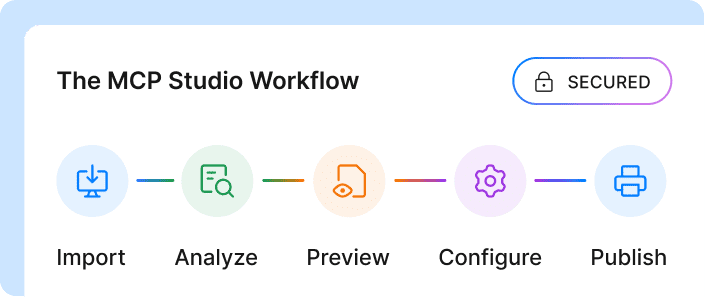
Teams using DigitalAPI connect their existing gateways into one catalog, then turn those APIs into MCP tools with MCP Studio. Agents discover tools at runtime instead of carrying a hardcoded list. Access is deny-by-default with per-agent scopes, rate limits and quotas, and DigitalAPI keeps one audit trail across every gateway, whichever one served the call. The same catalog also powers a human API marketplace, so people and agents use the same governed APIs.
FAQs
[fs-toc-omit]What is an agentic workflow in simple terms?
An agentic workflow is a task an AI agent completes on its own by planning steps, using tools and APIs, checking results and adjusting as it goes. Instead of following a fixed script, the agent decides each next step based on what it finds, and asks a human when a step is risky.
[fs-toc-omit]What is the difference between an agentic workflow and an AI agent?
An AI agent is the actor, and an agentic workflow is the process it runs. One workflow can involve a single agent or several agents handing work to each other. The workflow also includes the tools, guardrails and human checkpoints around the agent.
[fs-toc-omit]What are examples of agentic workflows?
Common examples include processing support refunds, onboarding partners, reconciling invoices, responding to IT incidents, researching sales leads and handling insurance claims. Each one uses several APIs, makes decisions based on results and escalates high-risk actions to a person.
[fs-toc-omit]Are agentic workflows the same as automation?
No. Traditional automation follows rules written in advance and does the same thing every time. An agentic workflow decides its steps at runtime and can handle inputs nobody planned for. It costs more per run and needs guardrails, so fixed, high-volume tasks are still better served by rules.
[fs-toc-omit]What are the steps of an agentic workflow?
A typical agentic workflow receives a goal, plans sub-tasks, discovers tools, authenticates, calls APIs, decides based on results, handles errors, brings in a human when needed, and logs the outcome. The agent repeats the act-and-check part of the loop until the goal is met.
[fs-toc-omit]What tools are used to build agentic workflows?
Teams build agentic workflows with agent frameworks such as LangGraph, CrewAI, AutoGen, the OpenAI Agents SDK or Google ADK, often with MCP for tool access and A2A for agent-to-agent handoffs. Underneath, an API platform supplies the catalog, auth and audit trail for the systems the agent touches.
[fs-toc-omit]Do agentic workflows need MCP?
Agentic workflows don't strictly need MCP, but it makes them easier to maintain. MCP lets agents discover tools at runtime and keeps credentials on the server side. Without it, tool definitions and keys are usually hardcoded into the agent, which breaks when APIs change.
[fs-toc-omit]How do you keep agentic workflows safe?
Give each agent a scoped token with least-privilege access, put human approval on expensive or irreversible actions, cap steps and spend per run, use idempotency keys on writes and log every call with the agent's identity. Test workflows in a sandbox before production.
[fs-toc-omit]What is a multi-agent workflow?
A multi-agent workflow splits a job across several specialized agents, each with its own tools and permissions, coordinated by an orchestrator or through a protocol such as A2A. It suits work that spans domains, needs different access levels or benefits from parallel execution.
Final word
An agentic workflow is only as good as the APIs it calls. The model plans and decides, but every real outcome, whether a refund, a ticket or a payment, happens through an API call that must be discoverable, documented, scoped and logged.
Pick one workflow your team handles by hand today. Trace it the way we traced the refund above, and list every API it would touch. The gaps on that list are your real agent roadmap.
Building agentic workflows on enterprise APIs?
See how DigitalAPI gives your agents one governed catalog of every API.
Dhayalan Subramanian is Associate Director, Product Growth at DigitalAPI, where he leads go-to-market and product growth for the company’s multi-gateway API management platform. His work focuses on helping large enterprises and mid-market cloud companies consolidate APIs across AWS, Azure, Apigee, Kong, MuleSoft, and other gateways into a single control plane for governance, discovery, monetization, and agent consumption.
Dhayalan brings 14+ years of experience across product strategy, enterprise architecture, and engineering leadership. Earlier in his career, he held senior roles at Encora (as Associate Architect and Technical Manager), Mindtree (Technology Lead), Tech Mahindra (Technical Lead), and Primus Analytics, where he designed integration frameworks and delivered enterprise-grade digital platforms for global customers.
At DigitalAPI, he works directly with platform, integration, and developer experience leaders at Fortune 500 organizations to operationalize unified API catalogs, developer portals, and MCP-ready APIs. He writes regularly on API developer experience, API governance, and AI agent architectures.
One email a fortnight. Worth opening.
A short digest of what we're writing, what we're learning from customers, and the handful of links you'd actually want from us. No tracking pixels.