

What Are MCP Tools? 10 MCP Tools and Servers to Try in 2026
MCP tools are actions an MCP server exposes so AI agents can act in other software. Learn how they work, 10 MCP tools and servers worth trying in 2026, and how to vet them.


MCP tools are actions an MCP server exposes so AI agents can do things in other software, such as creating a GitHub issue, querying a database or sending a Slack message. Each tool has a name, a description and an input schema, and the AI model decides when to call it.
The ecosystem has grown fast. Directories like mcpservers.org now list more than 9,800 MCP servers, so choosing the right MCP tools matters as much as connecting them.
This guide explains what MCP tools are and how they work, compares tools with resources and prompts, and lists 10 MCP tools and servers worth trying in 2026, with a checklist for vetting each one.
TL;DR
Ten MCP tools and servers worth trying in 2026 are GitHub, Playwright, Context7, Supabase, Atlassian, Linear, Notion, Slack, Sentry and Stripe. Before you connect any of them, check who maintains it, how it signs in and whether it can write data. Once you run several, manage them in one place.
What are MCP tools?
MCP tools are defined as executable actions that an MCP server exposes to AI applications, so a language model can do things in other systems. A tool might create a GitHub issue, run a database query or send a Slack message. The model decides when to use it, and the server carries it out.
MCP stands for Model Context Protocol, an open standard Anthropic introduced in November 2024 for connecting AI applications to tools and data. Our guide to what the Model Context Protocol is covers the protocol itself.
Under the current MCP specification, dated 28 July 2026, every tool is described with a few fields:
- Name: A unique identifier, such as
create_issue. - Title: An optional human-readable name for display.
- Description: What the tool does, in plain language. The model reads this to decide when to call it.
- Input schema: The parameters the tool expects, written as JSON Schema.
- Output schema: An optional description of what the tool returns.
- Annotations: Optional hints about the tool's behavior, such as whether it changes data.
The description and input schema matter most. A model can only choose a tool well if it understands what the tool does and what it needs.
[fs-toc-omit]What's the difference between an MCP server and an MCP tool?
An MCP server is the program. A tool is one action the server offers. A GitHub MCP server, for example, offers dozens of tools for repositories, issues and pull requests. When people say "MCP tools", they often mean the servers too, so this guide covers both.
How do MCP tools work?
MCP tools work in a five-step loop: the server offers tools, the client lists them, the model picks one, the client calls it and the server returns a result. The model never talks to the server directly. The MCP client inside the AI application does that on its behalf.
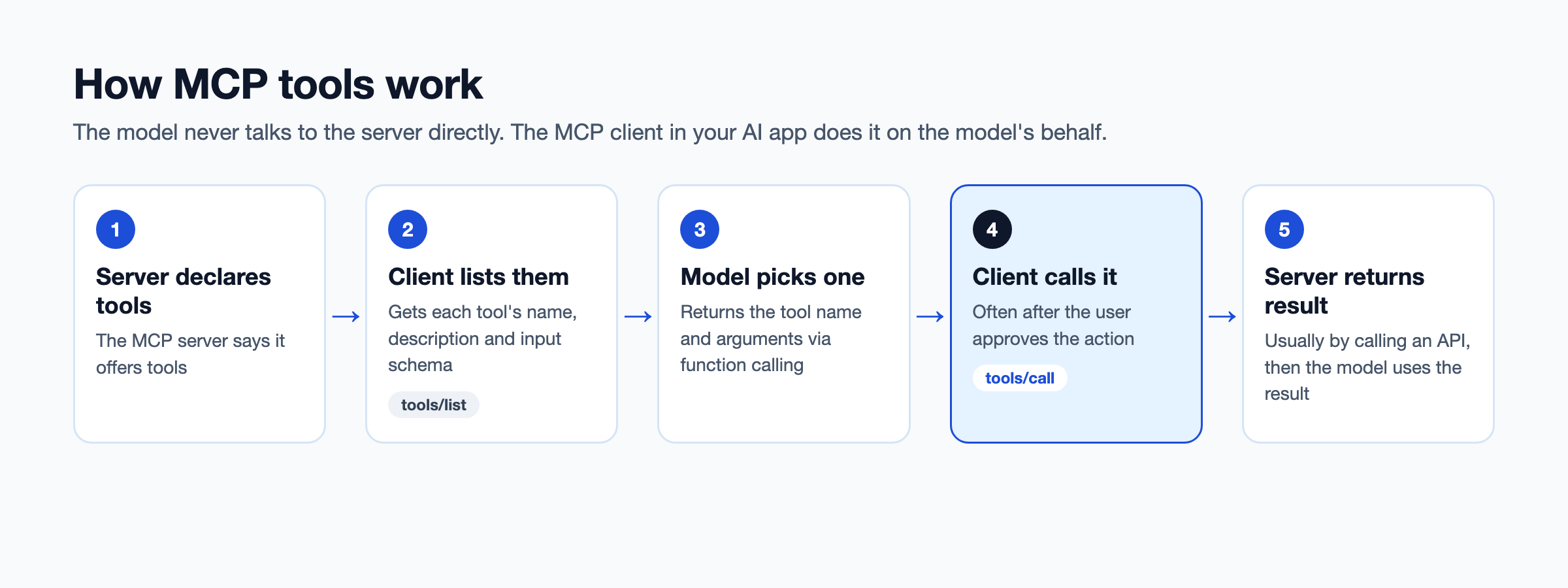
- The server declares tools: An MCP server says it supports tools and can tell clients when its tool list changes.
- The client lists them: The AI application sends a
tools/listrequest and gets back each tool's name, description and schema. - The model picks one: The application passes the tool list to the model. When a tool would help, the model returns a request to call it, with arguments. This step uses the model's function calling. Our comparison of MCP vs function calling explains how the two fit together.
- The client calls the tool: The application sends a
tools/callrequest to the server. Many applications ask the user to approve the call first. - The server returns a result: The server does the work, often by calling an API, and sends the result back for the model to use.
The specification says applications should keep a human in the loop who can deny tool calls. That's why your IDE or chat app often asks before a tool runs.
What does an MCP tool look like? An MCP tools example
An MCP tool is a short JSON definition with a name, a description and an input schema, plus code on the server that does the work. The example below is adapted from the weather tool in the MCP specification. You can follow it without writing any code.
[fs-toc-omit]The tool definition
This is what an MCP server sends back when a client asks for its list of tools:
{
  "name": "get_weather",
  "title": "Weather Information Provider",
  "description": "Get current weather information for a location",
  "inputSchema": {
    "type": "object",
    "properties": {
      "location": {
        "type": "string",
        "description": "City name or zip code"
      }
    },
    "required": ["location"]
  }
}- name: The ID the client uses to call the tool.
- title: The display name people see in their AI app.
- description: The text the model reads to decide whether this tool helps with the request.
- inputSchema: The inputs the tool needs. Here, one required text field called location.
[fs-toc-omit]The call and the result
When a user asks "What's the weather in New York?", the model picks this tool and the client sends a tools/call request:
{
  "jsonrpc": "2.0",
  "id": 2,
  "method": "tools/call",
  "params": {
    "name": "get_weather",
    "arguments": { "location": "New York" }
  }
}
The server runs the tool, usually by calling a weather API, and replies with the result:
{
  "jsonrpc": "2.0",
  "id": 2,
  "result": {
    "resultType": "complete",
    "content": [
      { "type": "text", "text": "Current weather in New York: 72°F, partly cloudy" }
    ],
    "isError": false
  }
}- content: What the model reads. It can be text, images or links to other resources.
- isError: False means the tool worked. True means the tool ran but failed, for example on an unknown city, so the model can correct its input and try again.
These examples are simplified. Real requests also carry metadata, such as the protocol version and client details, that MCP clients add for you.
[fs-toc-omit]How do you build a simple MCP server?
You build an MCP server by defining each tool, writing the code that runs it and testing it before an agent connects. The five steps below apply in any language.
- Pick an official SDK: The MCP project publishes SDKs for languages including TypeScript and Python, so you don't write the protocol yourself.
- Define each tool: Give it a name, a clear description and an input schema, as in the example above.
- Write the handler: This is the code that runs when the tool is called. Most handlers call an API you already have.
- Test it with MCP Inspector: List the tools, call each one and check the results before any agent uses them.
- Connect it to a client: Add the server to Claude, Cursor, VS Code or another MCP client, and start with tools that only read data.
If you have more than a handful of APIs, writing a server for each one gets slow. The section below on turning your own APIs into MCP tools compares faster options.
What's the difference between MCP tools, resources and prompts?
Tools take actions, resources provide data and prompts provide templates. All three come from MCP servers, but they're controlled by different parties and used for different jobs.
| MCP tools | MCP resources | MCP prompts | |
|---|---|---|---|
| Purpose | Perform actions | Provide data to read | Provide reusable templates |
| Who decides to use it | The model | The application | The user |
| Can it change things? | Yes, often | No, read-only | No |
| Example | Create a Jira ticket, run a SQL query | A log file, a database schema | A "review this pull request" template |
If you're deciding what to build, start with tools. They're what turn an AI assistant that answers into one that acts.
What are the best MCP tools and servers to try in 2026?
The best MCP tools and servers in 2026 cover coding, data, work apps, monitoring and payments. There are now thousands of MCP servers to choose from. The ten below are maintained by the companies behind the product, widely used and useful for teams, not only individuals.
| MCP tool or server | Category | Runs | Can write data? | Best for |
|---|---|---|---|---|
| GitHub MCP Server | Coding | Local or hosted | Yes | Repos, issues and pull requests |
| Playwright MCP | Coding and testing | Local | Yes, in the browser | Browser automation and testing |
| Context7 | Coding docs | Local or hosted | No | Up-to-date library docs |
| Supabase MCP | Data | Hosted | Yes, or read-only mode | Querying and managing databases |
| Atlassian Rovo MCP Server | Work apps | Hosted | Yes | Jira and Confluence |
| Linear MCP | Work apps | Hosted | Yes, or read-only endpoint | Issues, projects and comments |
| Notion MCP | Work apps | Hosted | Yes | Notes, docs and project pages |
| Slack MCP Server | Work apps | Hosted | Yes | Searching and posting messages |
| Sentry MCP | Monitoring | Hosted | Mostly reads | Debugging errors |
| Stripe MCP | Payments | Hosted | Yes | Customers, products and payments |
[fs-toc-omit]Coding and docs
1. GitHub MCP Server
GitHub's official server gives agents access to repositories, issues, pull requests and Actions. You can run it on your machine or connect to GitHub's hosted version. It's the most common first server for coding agents, because most engineering work already lives in GitHub. An agent can search code, read files and comment on a pull request without you leaving the editor.
- Best for: Developers who want an agent to read code, open issues and review pull requests.
- What stands out: Toolsets let you turn on only the groups of tools you need, such as repos or issues.
- Watch out for: It can write to repositories. Use a token with the narrowest permissions that does the job.
2. Playwright MCP
Microsoft's Playwright MCP server lets agents drive a web browser: open pages, click, type and read what's on screen. It uses structured accessibility snapshots of the page instead of screenshots, so the model works with text, not pixels. That makes it lighter and more predictable than tools that guess from images. It runs locally, so the browser opens on your own machine.
- Best for: Testing web apps, reproducing bugs and automating browser tasks.
- What stands out: It works with VS Code, Cursor, Claude Desktop and other MCP clients.
- Watch out for: A browser agent can submit forms and click buttons. Keep it away from sites where an accidental click is costly.
3. Context7
Upstash's Context7 pulls current, version-specific documentation for programming libraries into the model's context. It helps stop coding assistants from suggesting functions that were renamed or removed. Models learn from docs that were current when they were trained, and libraries move faster than that. Adding "use context7" to a prompt tells the assistant to fetch the latest docs first.
- Best for: Developers using AI coding assistants with fast-moving libraries.
- What stands out: It only reads docs, so it's one of the lowest-risk servers to add.
- Watch out for: Coverage depends on which libraries it has indexed.
[fs-toc-omit]Data
4. Supabase MCP
Supabase's official MCP server lets agents query and manage Supabase projects: tables, data and SQL. It's hosted by Supabase, so you connect with your Supabase account instead of running anything locally. Beyond queries, an agent can read logs and generate TypeScript types from your schema. Supabase's own docs flag the security risks of connecting an LLM to a database, which is a good sign.
- Best for: Teams building on Supabase who want an agent to explore schemas or write queries.
- What stands out: A read-only mode and project scoping limit what the agent can touch.
- Watch out for: Use read-only mode and a development project unless you have a strong reason not to.
[fs-toc-omit]Work apps
5. Atlassian Rovo MCP Server
Atlassian's hosted server connects agents to Jira, Confluence and Jira Service Management, so they can read, create and update work items and pages. There's nothing to install, because the server runs on Atlassian's side. It's most useful when the context an agent needs is spread across tickets and wiki pages. An agent can pull a Jira epic and its linked Confluence specs into one answer.
- Best for: Teams that want an agent to summarize tickets, draft pages or update issues.
- What stands out: It's hosted by Atlassian and uses your existing Atlassian sign-in and permissions.
- Watch out for: The agent acts with your permissions. If you can edit a project, so can it.
6. Linear MCP
Linear's official MCP server is hosted by Linear and lets agents find, create and update issues, projects and comments. You connect it from Claude, Cursor, VS Code and other MCP clients with a single URL. A coding agent can file a bug it found, or post an investigation summary on the issue it's working on. That keeps the record in Linear, where the rest of the team already looks.
- Best for: Product and engineering teams that want an agent to file bugs, plan projects or post updates on issues.
- What stands out: Sign-in uses OAuth, and a separate read-only endpoint exposes only the read tools.
- Watch out for: The full endpoint can change issues and projects. Start with the read-only endpoint if you only need answers.
7. Notion MCP
Notion's official MCP server lets agents search a workspace, read pages and create or update content. Notion now focuses on its hosted version, so you connect with a Notion sign-in instead of managing API keys. An agent can turn meeting notes into a project page or answer a question from your team wiki. It only sees what your Notion account can see.
- Best for: Turning notes into documents, finding answers in a wiki and keeping project pages current.
- What stands out: Sign-in through Notion, with access limited to what your account can see.
- Watch out for: Agents can edit shared pages. Review changes on important docs.
8. Slack MCP Server
Slack's official MCP server lets agents search channels, read conversations and send messages through any MCP client. It's useful for finding decisions buried in long threads and for summarizing channels you missed. Most teams start with search and summaries, then add posting once they trust the agent. Every message an agent sends is visible to your colleagues, so that order matters.
- Best for: Summarizing channels, finding past decisions and posting updates.
- What stands out: It's provided by Slack and follows your workspace's existing access settings.
- Watch out for: Sending messages is visible and hard to take back. Require approval before an agent posts.
[fs-toc-omit]Monitoring and payments
9. Sentry MCP
Sentry's hosted MCP server connects agents to error and performance data, so you can ask about issues in plain language and pull stack traces into your coding assistant. You sign in with your Sentry account, with nothing to run locally. An agent can find the error behind a bug report, read the stack trace and help fix the code in the same session. That cuts out the copy and paste between Sentry and the editor.
- Best for: Debugging production errors from inside the IDE.
- What stands out: It's built for coding assistants like Cursor and Claude Code.
- Watch out for: Error data can contain user details. Check what your Sentry projects capture before connecting.
10. Stripe MCP
Stripe's MCP server, in public preview, lets agents work with Stripe customers, products, payments and docs. It can also search Stripe's documentation, which helps when you're building a new integration. Because it's in preview, the tool set may change. Plan for that before you build a workflow that depends on a specific tool.
- Best for: Building and testing payment flows with an AI assistant.
- What stands out: Stripe requires agent-specific API keys for MCP, so agent access is separate from your other keys.
- Watch out for: It touches real money. Use test mode and restricted keys while you build.
One more for builders: MCP Inspector, from the MCP project itself, is a developer tool for testing and debugging MCP servers. It's not something agents use, but it's the first thing to reach for when you build your own server.
How do you choose and vet an MCP tool before you trust it?
Vet an MCP tool by checking who maintains it, what it can access and whether you can see what it did. Most MCP servers are free to install, which makes them easy to add and easy to forget. Ask these seven questions first.
- Who maintains it? Prefer servers from the company behind the product, or a well-known project with recent activity. A random fork may not get security fixes.
- How does it sign in? Hosted servers that use OAuth with your account are easier to revoke than a token pasted into a config file.
- Can it write data? Read-only tools carry less risk. For tools that create, change or delete, require approval before each call.
- What can it see? Check the scopes it asks for. A tool that only needs one project shouldn't see your whole organization.
- Is there a limit? Agents can loop. Check for rate limits, or set them yourself.
- Can you see what it did? Look for logs of every call, with inputs and results. If nothing is logged, you can't investigate a mistake.
- How many tools does it add? Every tool description takes space in the model's context. A server with 80 tools may make your agent slower and less accurate than one with 8.
The specification itself warns that clients should treat a tool's annotations, like "this tool is read-only", as untrusted unless the server is trusted. In other words, don't rely on the tool's own label. Our guide to MCP security covers the main threats, including tool poisoning and prompt injection.
How do you turn your own APIs into MCP tools?
You can turn your own APIs into MCP tools by writing an MCP server by hand, generating one from an OpenAPI spec, or using an MCP gateway that does it for every API. The right choice depends on how many APIs you have and who needs to govern them.
Public MCP servers cover tools like GitHub and Slack. They don't cover your order, billing or inventory APIs. Those need tools of their own, and that's where most companies get stuck.
One industrial manufacturer we spoke with tried to build a single MCP tool from its order API. To make it useful, the team had to chain three API calls by hand inside the tool. Their first question to us was whether that work could go away.
Here are the three options, from most to least manual:
| Write a server by hand | Generate from OpenAPI | Use an MCP gateway | |
|---|---|---|---|
| Effort per API | High: code, host and maintain | Medium: generate, then host | Low: point at the spec |
| Stays in sync with the API | Only if you update it | When you regenerate | Reads the spec |
| Sign-in and permissions | Built per server | Built per server | Shared across all tools |
| Audit | Per server | Per server | One trail for every call |
| Best for | A few complex tools | A few APIs, one team | Many APIs, many teams |
Whichever you choose, the quality of the tool depends on the quality of the spec. Clear operation names, descriptions and examples become clear tool descriptions. Our guide to API docs for AI agents covers what to fix first.
For teams with many APIs, an MCP gateway removes the per-API build. DigitalAPI's MCP Gateway turns any API behind your existing gateways into MCP tools in one click, with access, credentials and audit handled in one place. Our guide to connecting AI agents to your internal APIs walks through the full process.
What are the best practices for designing MCP tools?
Good MCP tools are narrow, clearly described and safe to call by mistake. Follow these six rules whether you build tools by hand or generate them.
- Keep each tool narrow: "Get order status" is better than "orders API". Narrow tools are easier for the model to choose and easier to secure.
- Write descriptions for the model: Say what the tool does, when to use it and what it returns. The model chooses tools by reading this text.
- Use strict input schemas: Define types, required fields and allowed values, so bad inputs fail before they reach your API.
- Separate reads from writes: Put actions that change data in their own tools, so they can require approval.
- Set rate limits: Cap calls per agent and per tool to stop runaway loops.
- Version your tools: When an API changes, update the tool and keep a record. A tool registry makes this manageable across teams.
[fs-toc-omit]Which MCP tools are right for you?
Public MCP servers are right for you if:
- You want an AI assistant to work with tools like GitHub, Jira or Slack
- You're an individual developer or a small team
- The data involved isn't sensitive, or the server supports read-only access
An MCP gateway for your own APIs is right for you if:
- Your agents need internal APIs that no public server covers
- Several teams are building agents and need to share tools
- Security has to approve and audit what agents can call
How do you manage MCP servers across teams?
Manage MCP servers across teams by putting them behind one control point that keeps a registry, enforces access per agent and logs every call. One developer with three servers can track them by hand. Ten teams with dozens of servers and agents can't.
Without a control point, the same problems repeat. Each team signs in its own way, nobody can list which agent can call which tool, and audit logs sit in a different place for every server.
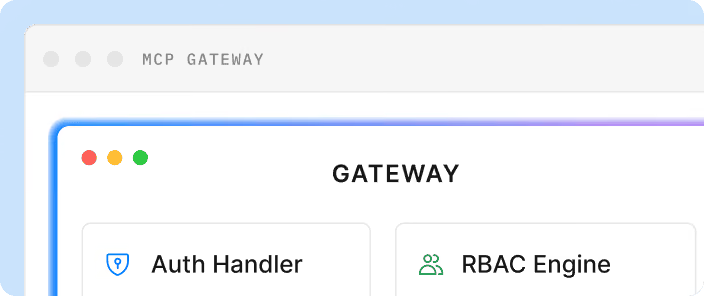
DigitalAPI's MCP Gateway gives platform teams that control point for MCP servers and the tools they expose:
- Connect existing MCP servers: Route your own and third-party remote MCP servers through the gateway, with encrypted connections.
- Turn APIs into tools: Convert any API behind Apigee, Kong, AWS or Azure into MCP tools from its OpenAPI spec, so internal APIs join the same catalog.
- Keep one registry: Track every tool, version and install in a searchable registry, so teams reuse tools instead of rebuilding them.
- Deny by default: Grant access per agent and per tool, and map MCP clients to your existing OAuth 2.1, API key or mTLS setup, with credentials brokered so agents never see secrets.
- Audit in one place: Every MCP call goes through the same audit and metering as your HTTP API traffic.
Teams using DigitalAPI can answer the three questions security asks first: which agents exist, what each one can call and what it did. Our guide to the MCP gateway explains the pattern in more depth.
FAQs
[fs-toc-omit]What are MCP tools?
MCP tools are actions that an MCP server makes available to AI applications through the Model Context Protocol. Each tool has a name, a description and an input schema. The AI model decides when to call a tool, and the server performs the action, such as creating an issue or querying a database.
[fs-toc-omit]What are the most popular MCP tools?
Popular MCP tools in 2026 include the GitHub MCP Server, Playwright MCP, Context7, Supabase MCP, Atlassian's Rovo MCP Server, Linear MCP, Notion MCP, Slack's MCP server, Sentry MCP and Stripe MCP. Most are maintained by the company behind the product, and several are hosted so you connect without installing anything.
[fs-toc-omit]Are MCP tools free?
Most MCP servers are free to install or connect to. You still need an account with the underlying product, such as GitHub or Notion, and normal pricing for that product applies. Enterprise MCP gateways are usually paid.
[fs-toc-omit]Can I use MCP tools with ChatGPT?
Yes. ChatGPT can connect to remote MCP servers through connectors and apps, and OpenAI's agent tools support MCP. Claude, Cursor, VS Code, Microsoft Copilot Studio and many agent frameworks also support MCP tools.
[fs-toc-omit]Is Copilot an MCP client?
Yes. GitHub Copilot in VS Code can use MCP servers in agent mode, and Microsoft Copilot Studio supports MCP for building agents. Availability depends on your plan and your organization's settings.
[fs-toc-omit]What's the difference between an MCP server and an MCP tool?
An MCP server is the program that connects to AI applications. An MCP tool is a single action that server offers. One server usually offers several tools, such as a GitHub server offering tools for issues, pull requests and repositories.
[fs-toc-omit]Are MCP tools safe to use?
MCP tools are as safe as the server behind them and the permissions you give them. Prefer servers from the product's own company, use the narrowest permissions, require approval for actions that change data and check that calls are logged. Treat a tool's own description of its behavior as a hint, not a guarantee.
[fs-toc-omit]How many MCP tools can an agent use?
There's no fixed limit, but every tool description uses space in the model's context. Too many tools, or tools with similar names, make wrong choices more likely. Give each agent only the tools its job needs, and turn off tool groups you don't use.
Final word
The best MCP tools aren't the ones with the most features. They're the ones you can explain: who made them, what they can touch and what they did yesterday.
Start with the servers you already have: list them, mark which ones can write data, and check each one against the seven questions above.
Your agents need your APIs, not only public tools.
See how DigitalAPI governs every MCP server and tool your agents use.
Dhayalan Subramanian is Associate Director, Product Growth at DigitalAPI, where he leads go-to-market and product growth for the company’s multi-gateway API management platform. His work focuses on helping large enterprises and mid-market cloud companies consolidate APIs across AWS, Azure, Apigee, Kong, MuleSoft, and other gateways into a single control plane for governance, discovery, monetization, and agent consumption.
Dhayalan brings 14+ years of experience across product strategy, enterprise architecture, and engineering leadership. Earlier in his career, he held senior roles at Encora (as Associate Architect and Technical Manager), Mindtree (Technology Lead), Tech Mahindra (Technical Lead), and Primus Analytics, where he designed integration frameworks and delivered enterprise-grade digital platforms for global customers.
At DigitalAPI, he works directly with platform, integration, and developer experience leaders at Fortune 500 organizations to operationalize unified API catalogs, developer portals, and MCP-ready APIs. He writes regularly on API developer experience, API governance, and AI agent architectures.

One email a fortnight. Worth opening.
A short digest of what we're writing, what we're learning from customers, and the handful of links you'd actually want from us. No tracking pixels.