





Hardcoded API Keys: Why They're Dangerous and How to Fix Them
A key pasted into source code ends up in git history, builds and backups. This guide shows why hardcoded API keys are dangerous, how to find them and how to fix and rotate them without an outage.


TL;DR:
What is a hardcoded API key, and how do you fix it?
Hardcoded API keys are secret keys written directly into source code, config files or app bundles.
Anyone who can read the code can use the key.
Find them with secret scanning across code and git history. Fix them by revoking the key, issuing a new one and loading it from a secrets manager at runtime.
A developer needs to test a payment call before lunch. They paste the live key into config.py, commit, and push. The test works. Three months later, the repo goes public for an open-source release, and the key is still in the history.
That is how most hardcoded API keys leak. Nobody plans it. The key is convenient, and git never forgets.
The scale is large. GitGuardian's State of Secrets Sprawl 2025 report counted 23.8 million secrets leaked on public GitHub repositories in 2024. That was a 25% rise over the year before. This guide covers why the habit is dangerous and how to find exposed keys. It then shows how to fix and rotate them safely.
What is a hardcoded API key?
A hardcoded API key is a credential stored as a literal value inside code, rather than loaded at runtime from a secure source. It travels with the code to every clone, build and backup. MITRE tracks this weakness as CWE-798: Use of Hard-coded Credentials.
Here is what hardcoded API keys in Python look like, next to the safer pattern:
The second version keeps the secret out of the repo. The runtime supplies it from the environment or a secrets manager. For the basics of what keys do, see our guide to API keys.
Why are hardcoded API keys dangerous?
Hardcoded API keys are dangerous because they copy themselves everywhere the code goes, and they rarely get rotated. A key in code gives the same access to anyone who reads it, whether that is a teammate, a contractor or an attacker. OWASP lists hard-coded credentials under A07:2025 Authentication Failures, the category called Identification and Authentication Failures in the 2021 list.
The five main risks:
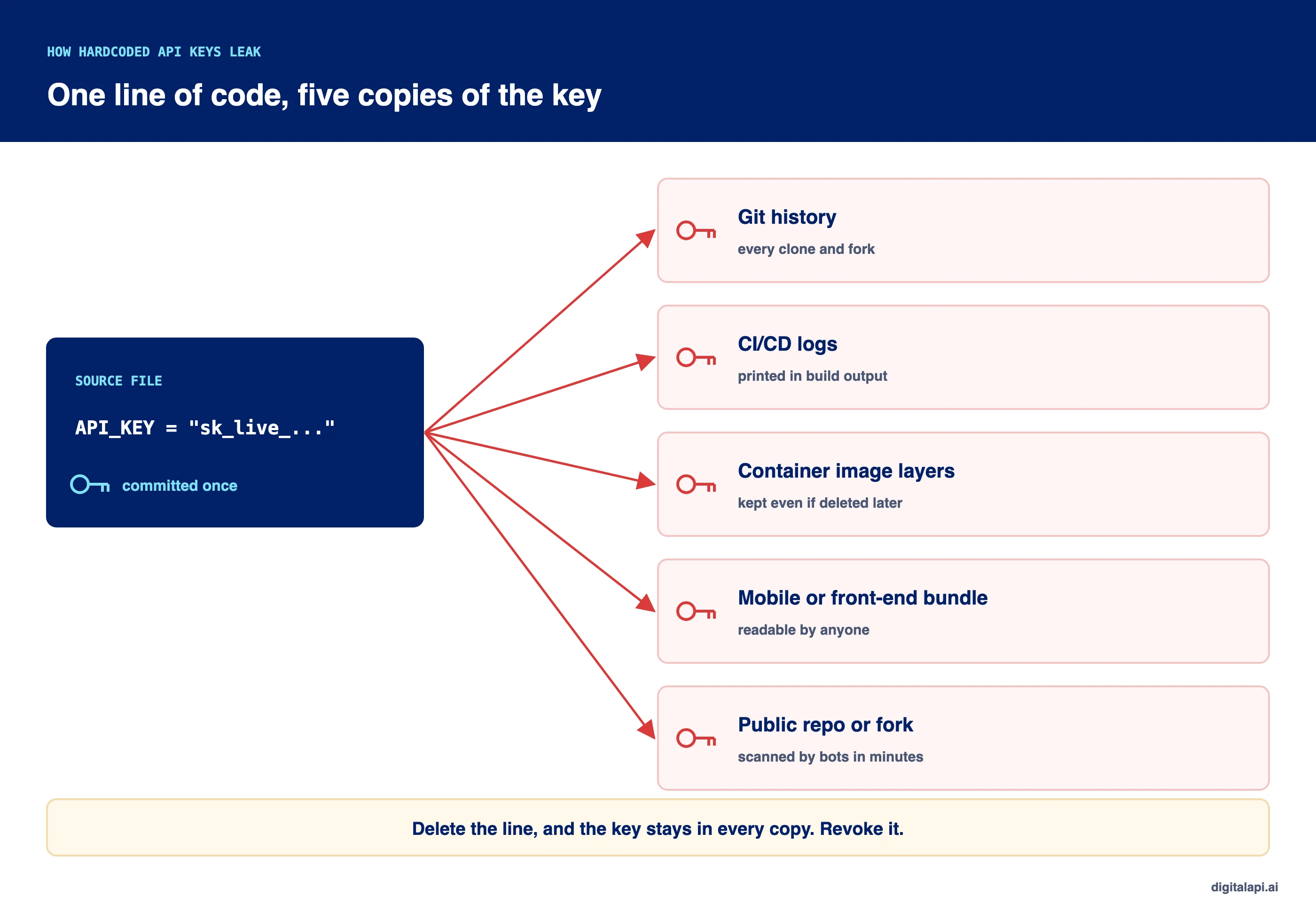
- Leaks through copies. Git history, forks, CI logs, container layers and backups all keep the key after you delete the line.
- Keys stay valid for years. GitGuardian's 2025 report found 70% of secrets leaked in 2022 were still valid. A forgotten key is an open door.
- Rotation breaks things. When a key lives in ten files and three services, changing it means a code release. Teams postpone it, so the key never changes.
- No attribution. A shared key in code cannot tell you which person or app made a call. Audit logs show one identity for everyone.
- AI-generated code repeats the pattern. Coding assistants often suggest a literal key to make a snippet run. GitGuardian research published in 2025 found 6.4% of sampled repos using an AI coding assistant leaked a secret. That is 40% higher than the 4.6% rate across all public repos.
A leaked LLM or cloud key can run up charges in hours. A leaked partner key can expose customer data.
Where do hardcoded API keys usually leak?
Most leaks follow a few repeat patterns: public repos, mobile apps, front-end bundles and shared tooling. Knowing them tells you where to look first.
- Public repos and forks. A private repo goes public, or someone forks it. Search for hardcoded API keys on GitHub and you will see how common this is.
- Mobile apps. Keys compiled into an Android or iOS app can be pulled out by unpacking the app. Obfuscation slows this down. It does not stop it.
- Front-end bundles. Anything shipped to the browser is public. A key in a JavaScript bundle is visible in the browser's developer tools.
- Container images. A key copied in during a build stays in an image layer, even if a later layer deletes the file.
- Chat, tickets and docs. Keys pasted into Slack, Jira or a wiki are hardcoding by another name. Our guide on why you should stop sharing API keys over email covers this habit.
A related problem is hardcoding the API calls themselves. That breaks AI agents when endpoints change. Read about hardcoded API calls in AI agents for that side of the story.
How do you find hardcoded or exposed API keys?
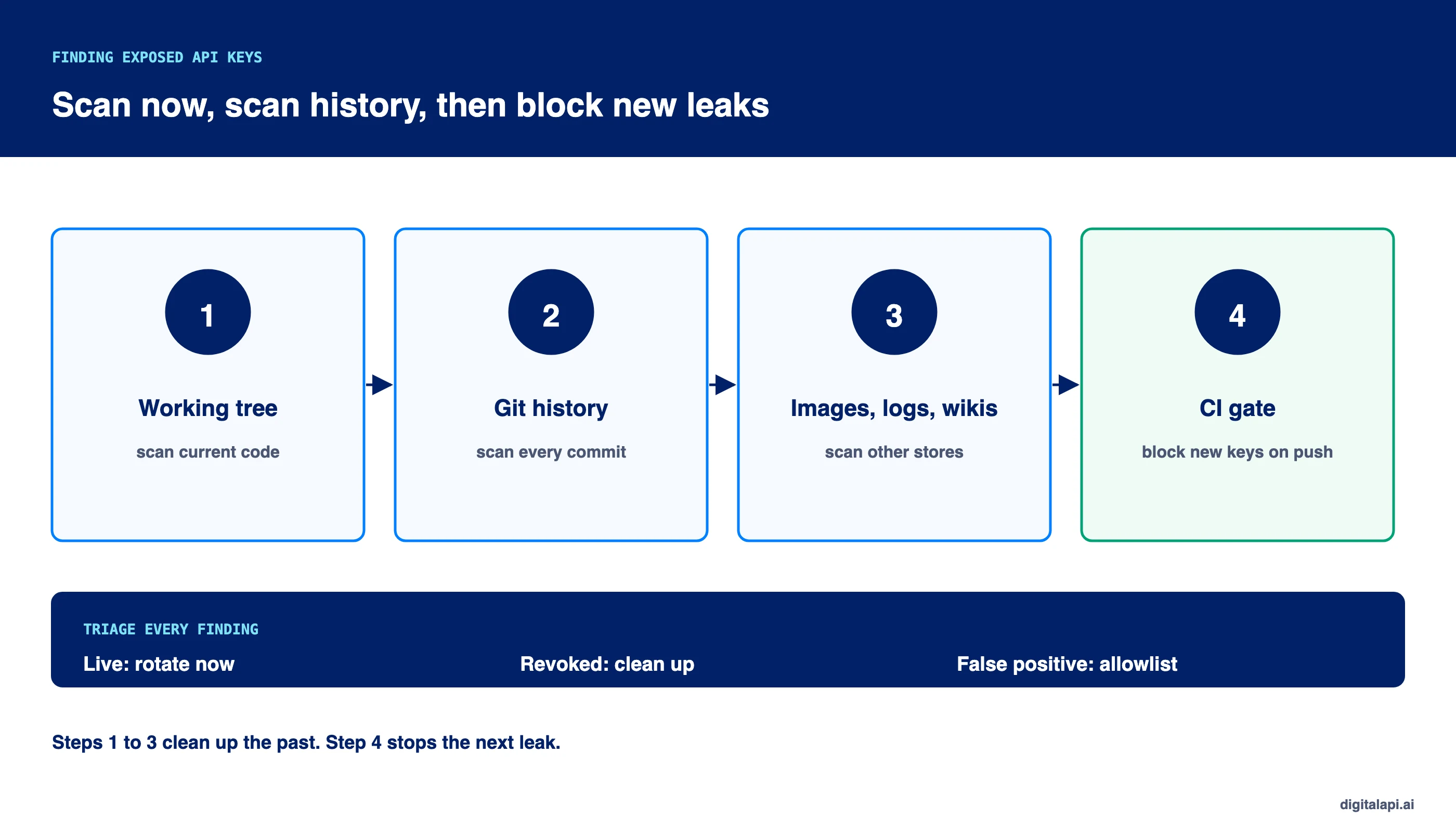
Run secret scanning on your current code, then on your full git history, then add a check in CI so new keys never land. Secret scanning means automated pattern and entropy checks that flag strings that look like keys, tokens or passwords.
If you are asking "how to find my API key in my code," follow these steps:
- Search the working tree. Look for known key prefixes and variable names such as
api_key,secret,tokenandAuthorization. - Scan the git history. A key deleted last year still sits in old commits. Search every revision, not only the latest one.
- Scan other stores. Check container images, CI logs, wikis and chat exports. The OWASP Secrets Management Cheat Sheet lists detection as a core practice.
- Turn on your Git host's secret scanning and push protection. Most major Git hosts can block a push that contains a known key format.
- Triage every hit. Mark each finding as live, revoked or a false positive. Treat any live key found in history as leaked.
A quick manual check with plain git looks like this:
These commands catch obvious cases. A dedicated secret scanner adds entropy checks, provider formats and live-key validation.
How do you fix hardcoded API keys?
Move each key out of code and into a runtime source, then shorten its life. The right source depends on where the code runs. The goal is the same: the repo holds a reference, never the value.
- Use environment variables for simple apps. Load the key from environment variables at startup, as in the Python example above. Keep
.envfiles out of git with.gitignore. - Use a secrets manager for production. A secrets manager stores keys encrypted, controls who can read them and logs every access. Your cloud provider and your CI platform both offer one.
- Inject secrets at deploy time. Let your orchestrator or CI pipeline mount secrets into the runtime. Build artifacts then stay free of keys.
- Prefer short-lived tokens. Where the API allows it, use OAuth or signed tokens that expire in minutes or hours.
- Keep keys off the client. Never ship a secret key to a browser or mobile app. Route calls through your backend or an API gateway that holds the key.
For a wider view of storage, scoping and lifecycle, read our guide to API key management.
How do you rotate a leaked API key safely?
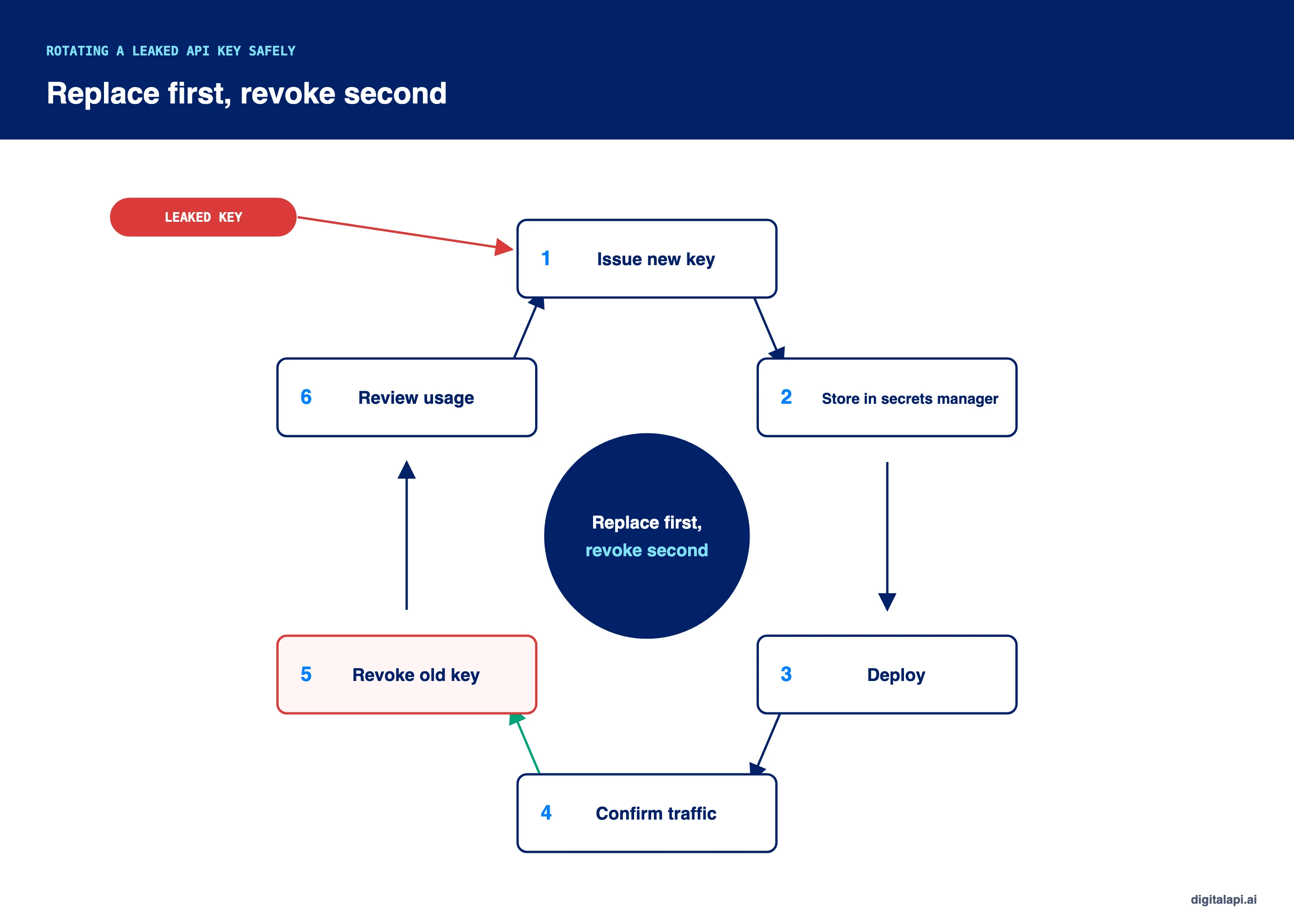
Revoke the leaked key fast, but issue and deploy the replacement first, so you don't cause an outage. Treat any API key exposed in a repo, ticket or log as compromised, even if you deleted it.
- Issue a new key with the narrowest scope the app needs.
- Store it in your secrets manager and update the reference, not the code.
- Deploy and confirm that traffic now uses the new key. Check gateway or provider logs.
- Revoke the old key. Do not wait for the next release.
- Review usage of the old key for the exposure window. Look for unknown IPs, odd hours and unusual endpoints.
- Clean the history if the repo is shared, then tell anyone with a clone to re-clone. Rewriting history does not undo the leak, so never skip revocation.
- Record the incident and add the pattern to your scanner rules.
To make rotation routine instead of an emergency, see how to rotate your API key automatically.
How do you stop hardcoded API keys from coming back?
Block keys before they are committed, check again in CI, and issue keys from one place so nobody needs to paste them. People hardcode keys when getting a key is slow or manual. Remove that friction and the habit fades.
- Pre-commit hooks. Run a secret scanner on every commit on the developer's machine.
- CI policy. Fail any build that adds a likely secret, and require a review to override.
- Push protection. Turn it on at the Git host for every repo, including private ones.
- Rules for AI coding assistants. Tell assistants to read keys from the environment. Review generated code for literal secrets before merge.
- Gateway-issued, scoped keys. Give each app and partner its own key with limited scope, issued through a portal. A leak then affects one consumer, not everyone.
Self-service issuing is the fix that removes the reason to hardcode. With DigitalAPI's API Developer Portal, keys reach a partner's account once access is approved. Nobody emails or pastes them. Partners rotate their own keys on a schedule. Admins can revoke an app at once when a key leaks.
This approach is right for you if:
- Many teams or partners call your APIs and each needs its own key.
- Keys currently travel by email, chat or tickets.
- Rotation needs a code release today.
It is not right for you if:
- You run one internal script with one key, where an environment variable and a secrets manager are enough.
See how DigitalAPI issues, scopes and rotates API keys so nobody has to hardcode them → Book a Demo
Key takeaways
- Hardcoded API keys leak through copies. Git history, forks, images and logs keep the key after you delete the line.
- Old leaks stay dangerous. GitGuardian found 70% of secrets leaked in 2022 were still valid in its 2025 report.
- Scan code and history. Secret scanning on the working tree alone misses most old keys.
- Replace first, revoke second. Issue and deploy a new key, then revoke the leaked one without delay.
- Load keys at runtime. Use environment variables for simple apps and a secrets manager in production.
- Remove the reason to hardcode. Scoped, self-service keys and short-lived tokens make the habit unnecessary.
Frequently asked questions
1. Is it safe to hardcode an API key?
No. Anyone who can read the code, its git history, its builds or its backups can use a hardcoded API key. It is hard to rotate and cannot tell you who used it. OWASP lists hard-coded credentials under A07:2025 Authentication Failures. Load keys from environment variables or a secrets manager at runtime instead.
2. How do I find my API key in my code?
Search the working tree for key prefixes and names such as api_key, secret and token. Then scan the full git history, because deleted keys remain in old commits. A secret scanner automates both steps and checks hundreds of provider formats. Also check CI logs, container images and wikis, and turn on push protection at your Git host.
3. What happens if my API key is exposed on GitHub?
Assume someone already has it. Automated scanners watch public commits and can find a key within minutes. Issue a replacement, deploy it, then revoke the exposed key. Review the old key's usage for the exposure window. Deleting the commit or making the repo private does not make the key safe again.
4. What is secret scanning?
Secret scanning is the automated search for credentials in code, git history and other stores. Scanners match known key formats, measure randomness in strings and can test whether a found key is still live. Teams run it as a pre-commit hook, as a CI check and as push protection at the Git host.
5. Can I hide an API key in a mobile app or front-end code?
No. Anything shipped to a browser or a phone can be extracted. Obfuscation only slows an attacker down. Keep secret keys on your server or behind an API gateway, and have the client call your backend. Use publishable or restricted keys only where the provider designs them for client use.
6. Why does AI-generated code contain hardcoded keys?
Coding assistants learn from public code, and much public code contains literal keys. They also try to produce snippets that run at once. GitGuardian research from 2025 found that repos using an AI coding assistant leaked secrets 40% more often than average. Review generated code for secrets before merging.
Conclusion
Hardcoded API keys are a small shortcut with a long tail. The key spreads to every copy of the code and often stays valid for years.
Start with a scan of your code and git history this week. Rotate every live key you find, replacing first and revoking second. Then add pre-commit and CI checks, and move keys into a secrets manager.
The lasting fix is to make getting a key easier than pasting one. Scoped keys issued per app, with self-service rotation, remove the reason developers hardcode them.
Stop hardcoding API keys: issue, scope and rotate them centrally with DigitalAPI API key management. Issue, scope and rotate keys centrally
Prefer a walkthrough? Book a Demo
Dhayalan Subramanian is Associate Director, Product Growth at DigitalAPI, where he leads go-to-market and product growth for the company’s multi-gateway API management platform. His work focuses on helping large enterprises and mid-market cloud companies consolidate APIs across AWS, Azure, Apigee, Kong, MuleSoft, and other gateways into a single control plane for governance, discovery, monetization, and agent consumption.
Dhayalan brings 14+ years of experience across product strategy, enterprise architecture, and engineering leadership. Earlier in his career, he held senior roles at Encora (as Associate Architect and Technical Manager), Mindtree (Technology Lead), Tech Mahindra (Technical Lead), and Primus Analytics, where he designed integration frameworks and delivered enterprise-grade digital platforms for global customers.
At DigitalAPI, he works directly with platform, integration, and developer experience leaders at Fortune 500 organizations to operationalize unified API catalogs, developer portals, and MCP-ready APIs. He writes regularly on API developer experience, API governance, and AI agent architectures.


One email a fortnight. Worth opening.
A short digest of what we're writing, what we're learning from customers, and the handful of links you'd actually want from us. No tracking pixels.