





Key Management Automation: Automating the API Key and Secret Lifecycle
Manual key handling breaks at scale: keys get emailed, never rotated and never revoked. This guide shows how to automate the full API key and secret lifecycle, from issuing to revoking, and which system owns each step.


TL;DR:
What is key management automation?
Key management automation means using software and policy, not people, to run every stage of a key's life.
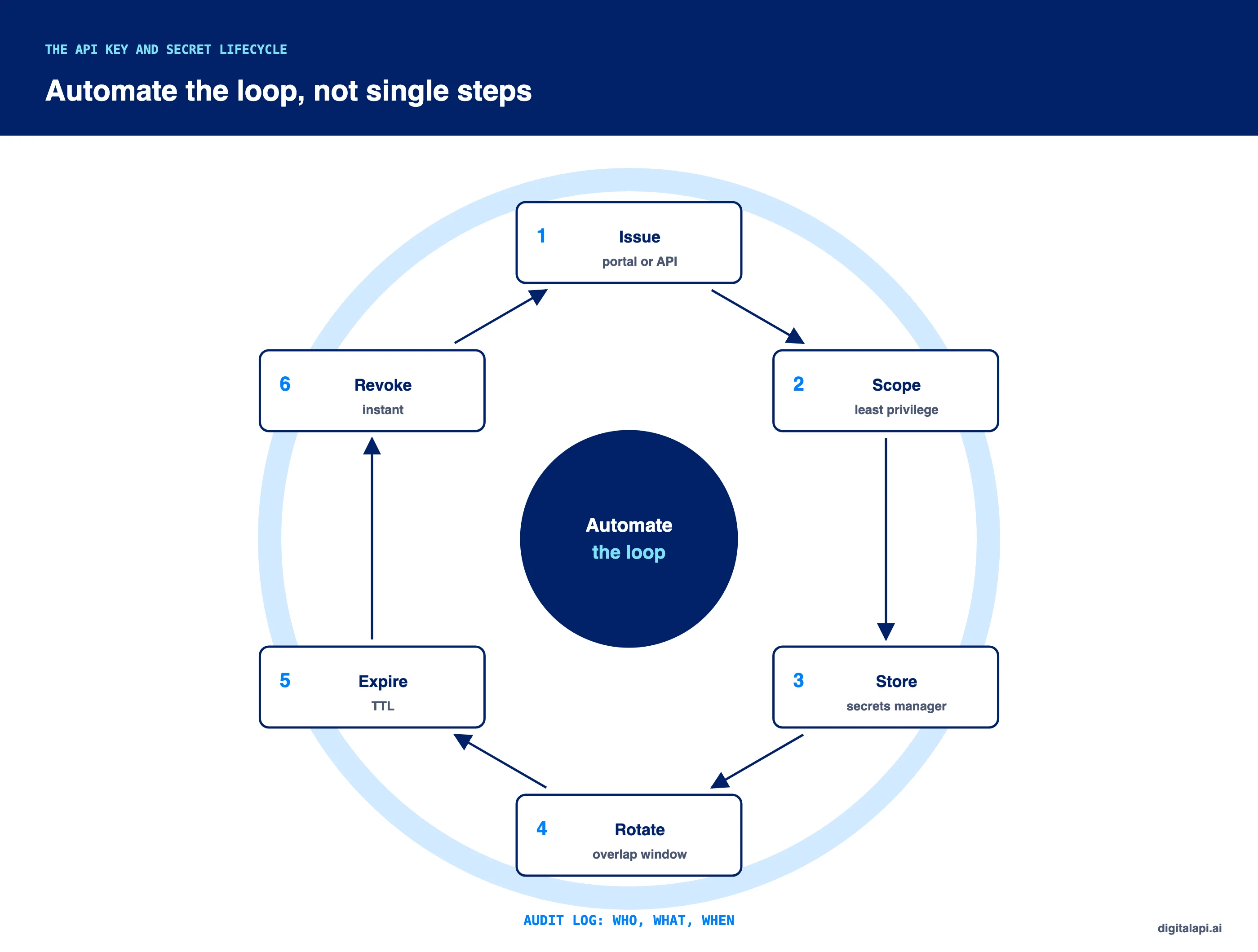
The stages are issue, scope, store, rotate, expire and revoke, with an audit log across all six.
It applies to API keys, secrets such as tokens and passwords, and encryption keys.
A partner asks for production access on a Friday. An engineer creates a key in the gateway, pastes it into an email and moves on. Two years later, the contract has ended, the engineer has left, and the key still works.
Nobody decided to keep that key alive. Nobody owned it. That is the gap key management automation closes.
The risk is real. The Verizon 2025 Data Breach Investigations Report found credential abuse was the leading initial attack vector, at 22% of breaches. This guide covers the key types and the full lifecycle. It then shows what to automate, which system owns each step, and a checklist to start.
What is key management automation?
Key management automation is the practice of handling keys through workflows and policy instead of tickets and copy-paste. A system issues each key, sets its limits, stores it safely, replaces it on schedule and removes it when access ends. Every action is logged.
Manual handling fails in predictable ways. Keys travel by email or chat. Rotation waits for a quiet week that never comes. Offboarding forgets the partner's keys. Automation turns each of these into a rule that runs on its own.
What types of keys need managing?
Three kinds of keys need lifecycle control: API keys, secrets and encryption keys. They differ in who uses them and what they protect, but they share the same lifecycle.
- API keys. Identify and authorize an app, partner or AI agent calling your API. They are issued to consumers, often many of them.
- Secrets. Credentials your own services use, such as database passwords, OAuth client secrets, signing keys and third-party API tokens.
- Encryption keys. Cryptographic keys that encrypt data at rest or in transit. They live in a key management service (KMS) or a hardware security module (HSM).
This post focuses on API keys and secrets, the two types platform teams handle every day. Encryption key management gets one short section below, because it runs on its own tooling.
What are the stages of the key lifecycle?
The key lifecycle has six stages: issue, scope, store, rotate, expire and revoke. Audit runs across all six. Key lifecycle management means owning every stage, not only the first one.
- Issue. Create a key for one consumer and one purpose, through a portal or an API call, never by hand.
- Scope. Limit what the key can do: which APIs, which methods, which environment, what rate limit.
- Store. Keep the key in a secrets manager or the gateway, never in code or chat. See why hardcoded API keys are dangerous for what goes wrong otherwise.
- Rotate. Replace the key on a schedule or after a suspected leak, without breaking the consumer.
- Expire. Give every key a time to live, so forgotten keys die on their own.
- Revoke. Remove access at once when a contract ends, an app is retired or a key leaks.
NIST uses the term cryptoperiod for the time a key stays authorized for use. Its guide, NIST SP 800-57 Part 1, Recommendation for Key Management, covers key states and lifecycle functions for cryptographic keys. The same thinking applies to API keys: every key needs a defined life.
What should you automate, and how?
Automate every step that a person does more than once: issuing, expiry, rotation, revocation and audit. Start with issuing and revocation, because they remove the two worst habits: emailed keys and keys that never die.
Here is how to roll out automated key management in order:
- Inventory every key. List each key, its owner, its consumer, its scope and its last use. Pull the data from gateways, secrets managers and identity providers.
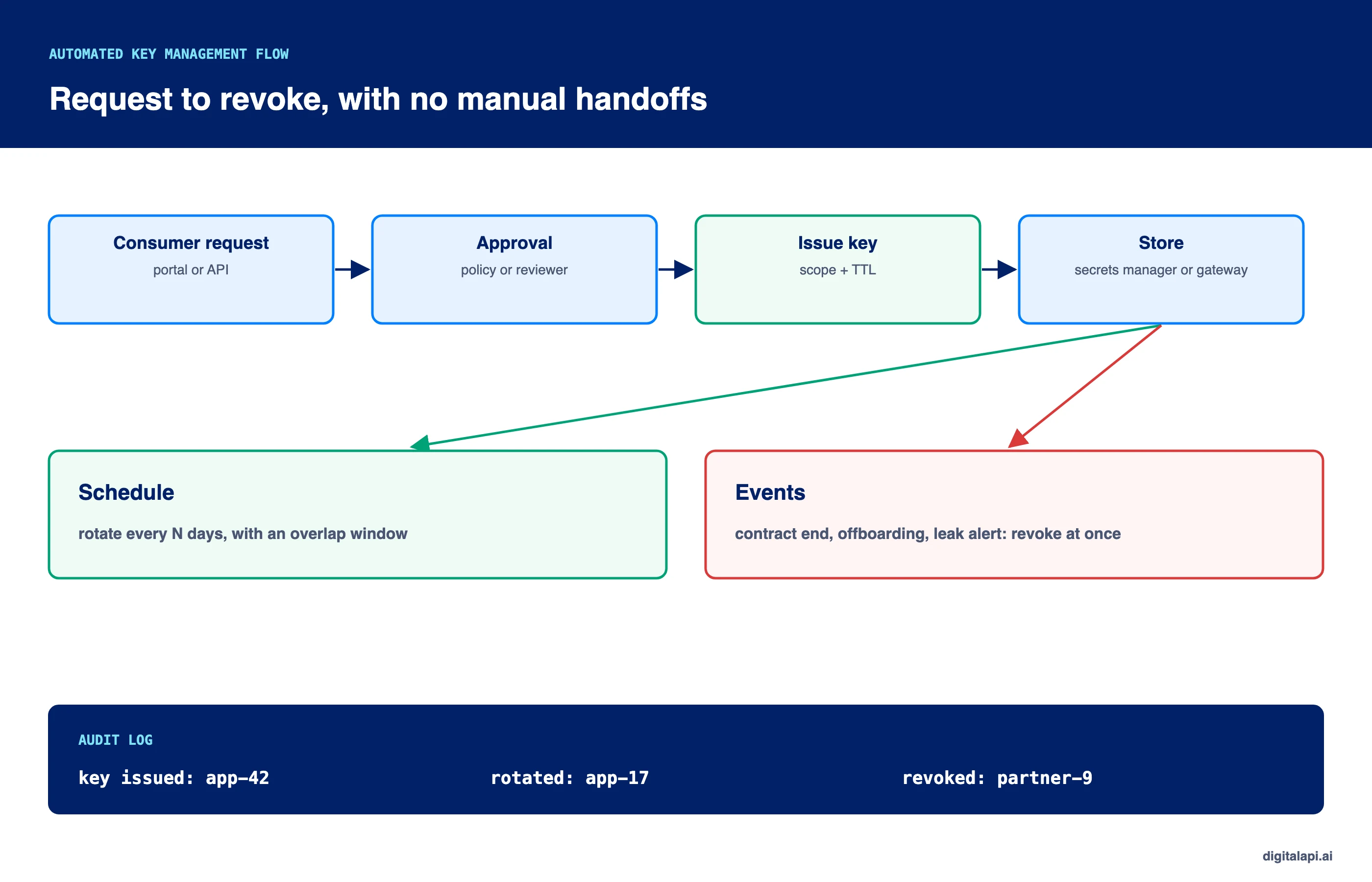
- Make issuing self-service. Consumers request access in a portal. An approver says yes, and the key goes straight to the consumer's account.
- Attach policy at creation. Every key gets a scope, a rate limit and an expiry date when it is issued. No key exists without them.
- Schedule rotation. Set a rotation interval by risk. Our API key management guide suggests every 30 to 90 days, depending on sensitivity.
- Tie revocation to events. Contract end, app deletion, employee offboarding and leak alerts should each trigger revocation without a ticket.
- Flag stale keys. Alert on keys unused for 90 days, then expire them.
- Log every action. Record who issued, rotated or revoked each key, and when. Send events to your SIEM.
The aim is simple. No step in the lifecycle should depend on someone remembering it.
KMS vs secrets manager vs API gateway: who does what?
A KMS manages encryption keys. A secrets manager stores and rotates the secrets your services use. An API gateway, with its developer portal, issues and enforces the API keys your consumers use. Most organizations need all three, and each owns different stages.
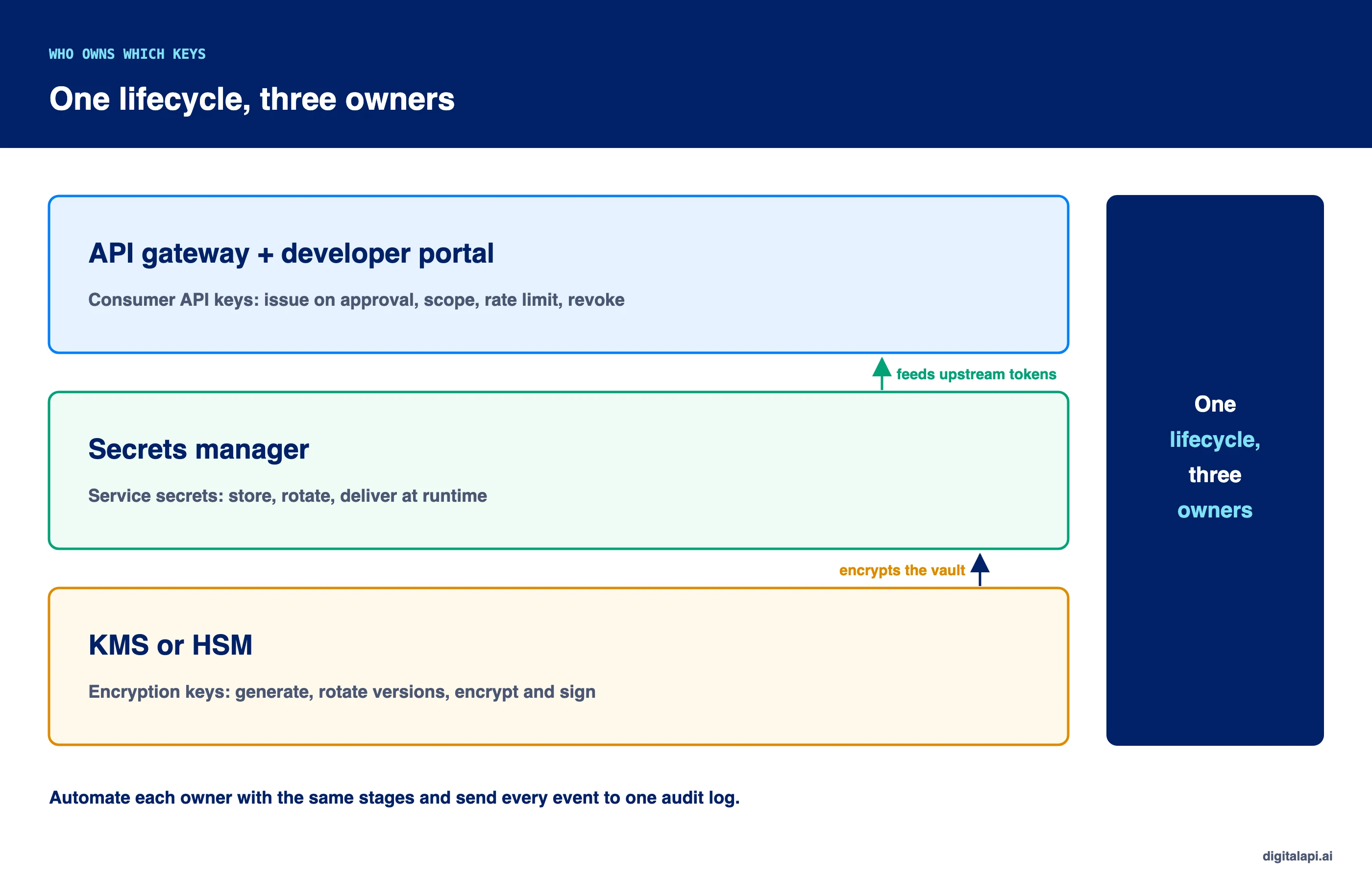
The overlap is small. A KMS often encrypts the vault a secrets manager uses. The secrets manager holds the upstream tokens your gateway needs. The gateway is the only one that sees which consumer called which API with which key.
How do you rotate keys without downtime?
Run the old and new key side by side for a short overlap window, then revoke the old one. The consumer switches during the overlap, so no call fails.
The pattern for secret rotation without an outage:
- Issue the new key while the old one still works.
- Deliver it to the consumer or store it in the secrets manager.
- Watch traffic move to the new key.
- Revoke the old key once usage drops to zero or the window ends.
This applies to secrets rotation for service credentials too. The service reads the secret at runtime, so a new version takes effect on the next read. For the full playbook, including dual-key strategies and grace periods, read how to rotate your API key automatically.
How does automation help audit and compliance?
Automation makes every key action a logged event, so audits become a report instead of an investigation. Auditors ask who has access, since when and why. An automated system can answer in minutes.
Automation helps in three ways:
- Complete inventory. Every key has an owner, a consumer, a scope and an expiry date.
- Proof of rotation. Logs show each key was rotated on schedule, not only that a policy exists.
- Fast offboarding. Revocation on contract end shows access was removed the same day.
Secrets hide in places auditors don't look. GitGuardian's State of Secrets Sprawl 2025 report found 35% of the private repositories it scanned held at least one plaintext secret. Keys issued and stored by a system stay out of those repos.
What tools automate key management?
Key management tools fall into five categories. Most teams combine two or three. Pick by key type, not by brand. For named products, see our ranked list of API key management tools.
A gateway alone validates keys but rarely handles approval and self-service. A secrets manager stores secrets but does not know your API consumers. The portal and gateway pair closes that gap for API keys.
That pairing is where DigitalAPI fits. With the DigitalAPI API Developer Portal, keys reach the partner's account once access is approved, so nobody emails them. The portal creates credentials live in your connected gateways, such as Kong consumers or AWS usage plans. Partners rotate their own keys on a schedule, and admins revoke an app at once when a key leaks.
This approach is right for you if:
- You issue keys to many partners, teams or AI agents across more than one gateway.
- Keys still travel by email, chat or tickets.
- Rotation and offboarding depend on someone remembering to do them.
It is not right for you if:
- You only manage encryption keys for data at rest. A cloud KMS covers that job.
- You run a few internal services with no external consumers. A secrets manager is enough.
See how DigitalAPI issues, scopes and rotates API keys across every gateway → Book a Demo
What should a key management automation checklist include?
A good checklist covers every lifecycle stage plus audit. Use it to score your current setup.
- Every key has a named owner and consumer.
- Keys are issued through a portal or API, never by hand.
- Every key has a scope, a rate limit and an expiry date at creation.
- No keys live in code, chat, tickets or email.
- Rotation runs on a schedule, with an overlap window.
- Contract end, offboarding and leak alerts trigger revocation.
- Keys unused for 90 days are flagged and expired.
- Every issue, rotate and revoke action is logged and exported.
- Encryption keys sit in a KMS with automatic rotation on.
Key takeaways
- Key management automation runs the whole lifecycle: issue, scope, store, rotate, expire and revoke, with audit across all six.
- Start with issuing and revocation. They remove emailed keys and keys that never die.
- Give every key a scope and an expiry at creation. Forgotten keys then expire on their own.
- Use the right system for each key type. KMS for encryption keys, secrets managers for service secrets, gateway and portal for consumer API keys.
- Rotate with an overlap window so no consumer call fails.
- Credentials are a top attack path. Verizon's 2025 DBIR found credential abuse was the initial attack vector in 22% of breaches.
Frequently asked questions
1. What is key management automation?
Key management automation is the use of policies, APIs and workflows to run the key lifecycle without manual steps. A system issues each key, scopes it, stores it, rotates it, expires it and revokes it. Every action is logged. It applies to API keys, service secrets and encryption keys, and it removes habits like emailing keys or never rotating them.
2. What is API key management?
API key management is the practice of controlling the API keys your consumers use to call your APIs. It covers issuing keys, limiting their scope and rate, storing them safely, rotating them, revoking them and auditing their use. It usually runs in an API gateway and developer portal, which can tie each key to an app, a plan and an owner.
3. What is KMS used for?
A key management service (KMS) is used to create, store and control cryptographic keys for encryption and signing. Applications send data to the KMS to encrypt or decrypt it, and the key rarely leaves the service. A KMS also rotates key versions and logs every use. It manages encryption keys, not the API keys your consumers use.
4. What is the difference between a KMS and a secrets manager?
A KMS manages cryptographic keys and performs encryption for you, so the key stays inside the service. A secrets manager stores secrets such as passwords, tokens and client secrets, and hands them to your services at runtime. Many secrets managers use a KMS to encrypt their own storage. Most teams need both.
5. How often should you rotate API keys and secrets?
Set the interval by risk. A common baseline is every 30 to 90 days, with shorter periods for high-privilege keys. Rotate at once after a suspected leak. Use an overlap window so the old and new keys both work during the switch, then revoke the old key. Short-lived tokens reduce the need for frequent manual rotation.
6. What is secret rotation?
Secret rotation is the process of replacing a credential, such as a password, token or API key, with a new value on a schedule or after a suspected leak. Automated rotation issues the new value, updates the systems that use it, confirms traffic has moved and then disables the old value. It limits how long a stolen secret stays useful.
7. Can an API gateway handle key management automation?
Partly. An API gateway validates keys, enforces scope and rate limits, and can revoke a key at once. On its own, it rarely handles approval workflows, self-service issuing or partner-driven rotation. Pair it with a developer portal for the consumer side, and a secrets manager for the secrets your services use.
Conclusion
Key management automation is less about tools and more about ownership. Every key should have an owner, a scope, an expiry date and a logged history from the day it is issued.
Start small. Inventory your keys, make issuing self-service and tie revocation to real events. Then schedule rotation with an overlap window and flag stale keys. Use a KMS for encryption keys, a secrets manager for service secrets, and a gateway and portal for consumer API keys.
Once the lifecycle runs on its own, the Friday-afternoon key in an email stops happening.
Issue, scope, rotate and revoke API keys across every gateway with DigitalAPI, with no keys sent by email. Automate key issuance and rotation across gateways
Prefer a walkthrough? Book a Demo
Dhayalan Subramanian is Associate Director, Product Growth at DigitalAPI, where he leads go-to-market and product growth for the company’s multi-gateway API management platform. His work focuses on helping large enterprises and mid-market cloud companies consolidate APIs across AWS, Azure, Apigee, Kong, MuleSoft, and other gateways into a single control plane for governance, discovery, monetization, and agent consumption.
Dhayalan brings 14+ years of experience across product strategy, enterprise architecture, and engineering leadership. Earlier in his career, he held senior roles at Encora (as Associate Architect and Technical Manager), Mindtree (Technology Lead), Tech Mahindra (Technical Lead), and Primus Analytics, where he designed integration frameworks and delivered enterprise-grade digital platforms for global customers.
At DigitalAPI, he works directly with platform, integration, and developer experience leaders at Fortune 500 organizations to operationalize unified API catalogs, developer portals, and MCP-ready APIs. He writes regularly on API developer experience, API governance, and AI agent architectures.

One email a fortnight. Worth opening.
A short digest of what we're writing, what we're learning from customers, and the handful of links you'd actually want from us. No tracking pixels.