

The API Developer Journey: How to Map Every Stage From Discovery to Production
The API developer journey is every stage a developer goes through, from finding your API to running it in production. Learn the 7 stages, the metric for each and how to map yours.

The API developer journey is every stage a developer goes through with your API, from first finding it to running it in production and staying. It covers seven stages: discover, evaluate, access, first call, build, production, and scale and retain. Mapping it shows where developers stall, and which team can fix each stall.
The need is growing. Postman's 2025 State of the API report found that 82% of organizations have adopted some level of API-first, yet 34% of teams can't find the APIs that already exist.
This guide defines the API developer journey, walks through each stage with the metric to track, shows how internal, partner and AI agent journeys differ, and gives you a step-by-step method and template for building your own developer journey map.
TL;DR
Map the journey in seven stages, not five. Most maps stop at "build", but developers also drop off when they request access and when they move to production.
Give every stage one metric and one owner. Walk the journey yourself every quarter with a stopwatch, and fix the slowest stage first.
What is the API developer journey?
The API developer journey is defined as the path a developer follows from discovering an API to using it in production, including every touchpoint, decision and wait along the way. A developer journey map is the visual version: each stage, what the developer wants, what they see and where they give up.
The idea comes from developer relations, where teams map how outside developers find and adopt a product. For API teams, the journey is narrower and more practical. It follows one developer and one API, from a search result to a live integration.
[fs-toc-omit]How is it different from the customer journey or a developer's career path?
Search for "developer journey" and most results describe a career path: learning to code, getting a first job, becoming senior. That's a different topic.
The API developer journey is also different from a customer journey. A customer journey follows a buyer through a sales process. A developer journey follows the person who has to make the API work. Often they're different people at the same company, and the developer's experience can decide the deal.
| Customer journey | API developer journey | |
|---|---|---|
| Who it follows | The buyer | The developer integrating the API |
| Main question | "Should we buy this?" | "Can I make this work?" |
| Key touchpoints | Sales calls, pricing, contracts | Docs, keys, sandbox, errors, support |
| Success looks like | A signed contract | A working integration in production |
| Typical blocker | Budget or approval | Missing docs, slow access, unclear errors |
[fs-toc-omit]Why does the developer journey matter?
Developers learn your API by reading, not by asking. The Stack Overflow 2025 Developer Survey found technical documentation is the most used learning resource, with nearly 68% of respondents using it in the past year.
When the journey works, developers move from discovery to production without a meeting. When it doesn't, every stall turns into a support ticket, a sales call or a lost integration. Our guide to developer experience best practices covers the principles behind a good journey.
What are the 7 stages of the API developer journey?
The seven stages of the API developer journey are discover, evaluate, access, first call, build, production, and scale and retain. Most published models use five stages and stop at "build". The two extra stages, access and production, are where enterprise APIs lose the most developers.
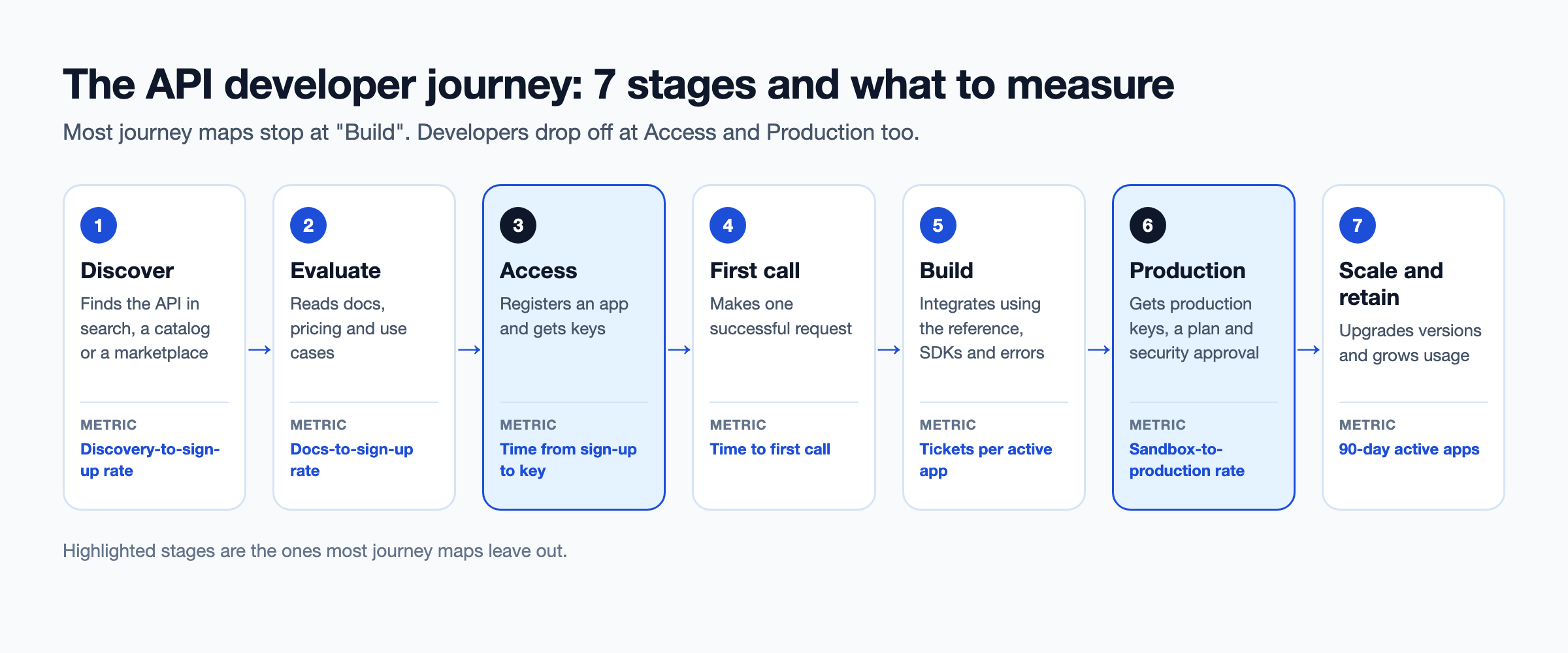
| Stage | Developer's goal | Question they ask | Where they drop off | Metric to track |
|---|---|---|---|---|
| 1. Discover | Find an API that solves the problem | "Does an API for this exist?" | Can't find it, or finds a duplicate | Discovery-to-sign-up rate |
| 2. Evaluate | Decide if it fits | "Will this do what I need?" | Unclear use cases or pricing | Docs-to-sign-up rate |
| 3. Access | Get credentials | "How do I get keys?" | Manual approval, email requests | Time from sign-up to key |
| 4. First call | Make one request work | "Does it respond?" | Auth errors, broken examples | Time to first call |
| 5. Build | Integrate fully | "How do I handle this case?" | Missing reference, vague errors | Tickets per active app |
| 6. Production | Go live | "Can I use this for real?" | Slow security review, unclear plans | Sandbox-to-production rate |
| 7. Scale and retain | Grow usage and stay current | "What changed, and will it break me?" | Breaking changes, no notice | 90-day active apps |
[fs-toc-omit]1. Discover
Discovery is how a developer first learns the API exists. Internal developers look in a catalog, partners get a link and public developers search the web or a marketplace.
- What good looks like: One searchable catalog with clear names, a one-line description per API and the owning team.
- Common failure: APIs spread across several gateways and wikis, so teams rebuild what already exists.
- Metric: Discovery-to-sign-up rate, or for internal catalogs, the share of searches that end on an API page.
[fs-toc-omit]2. Evaluate
Evaluation is the developer deciding whether the API fits their use case. They skim the overview, check what data it returns and look at pricing or usage limits.
- What good looks like: A use-case page per API, a visible list of endpoints, and pricing or plan limits before sign-up.
- Common failure: Docs that list endpoints but never say what problem the API solves.
- Metric: Docs-to-sign-up rate.
[fs-toc-omit]3. Access
Access is everything between "I want to use this" and "I have working credentials": registering an app, choosing a plan, getting approval and receiving keys.
- What good looks like: Self-serve keys for the sandbox in minutes, with approval rules only where risk requires them.
- Common failure: Keys requested by email or ticket, with approvals that wait days for one person.
- Metric: Time from sign-up to first working key.
[fs-toc-omit]4. First call
The first call is the developer's first successful request. It's the moment they know the API works and that they can work with it.
- What good looks like: A quickstart with a copyable request, sandbox data and a clear explanation of authentication.
- Common failure: Examples that don't run, or auth steps hidden three pages deep.
- Metric: Time to first call. Our guide to reducing time to first call covers the tactics.
[fs-toc-omit]5. Build
Build is the full integration: every endpoint the use case needs, error handling, pagination, retries and edge cases.
- What good looks like: A complete API reference with examples for every operation and a fix for every error. Our guide to API reference documentation explains what to include.
- Common failure: Reference docs that describe fields but not behavior, so developers open tickets to ask.
- Metric: Support tickets per active app.
[fs-toc-omit]6. Production
Production is moving from sandbox to live traffic. It usually needs production keys, a paid or approved plan, and sometimes a security or compliance review.
- What good looks like: A documented path to production with clear criteria, plan options and an expected timeline.
- Common failure: A working integration that waits weeks for a review nobody owns.
- Metric: Sandbox-to-production conversion rate, and median days between the two.
[fs-toc-omit]7. Scale and retain
After launch, the developer needs to stay current: new versions, deprecations, usage limits and support when something breaks.
- What good looks like: A changelog, advance notice of breaking changes, usage dashboards and a clear support path.
- Common failure: A breaking change discovered through failed calls in production.
- Metric: Apps still active after 90 days.
How does the journey differ for internal, partner and public developers?
The seven stages stay the same for every audience, but discovery, access and approval work differently for internal, partner and public developers. Most companies serve all three, often through the same APIs.
| Internal developers | Partner developers | Public developers | |
|---|---|---|---|
| How they discover APIs | Internal catalog or portal | Link from an account manager | Search, marketplace, community |
| Access model | Single sign-on, team-based | Invited organization accounts | Self-serve sign-up |
| Approval | Usually automatic | Contract or manual approval | Automatic, with plan limits |
| Documentation needs | Ownership and dependencies | Use cases and SLAs | Quickstarts and pricing |
| Success metric | Reuse instead of rebuild | Time to live integration | Activation and paid conversion |
Internal developers are the most overlooked. Postman's 2025 report found 93% of teams struggle with API collaboration, and 55% struggle with inconsistent documentation. An internal journey that ends in "ask on Slack" costs as much as a public one that ends in a support ticket.
Partner journeys add a commercial layer. Our guide to onboarding external developers covers invitations, organization accounts and approval flows.
What about AI agents as API consumers?
AI agents now follow their own version of the developer journey: they discover tools, read descriptions, get scoped access and call APIs without a human in the loop for each step. The stages map closely, but the "reader" is a model, and it can't ask a question on a call.
Gartner predicts that more than 30% of the increase in demand for APIs will come from AI and tools using large language models by 2026. Yet Postman's 2025 report found only 24% of developers design APIs with AI agents in mind.
| Human developer stage | AI agent equivalent |
|---|---|
| Discover | Finds the tool in an MCP registry or marketplace |
| Evaluate | Reads the tool name and description |
| Access | Gets a scoped identity and credentials |
| First call | Calls the tool with arguments from its input schema |
| Build | Chains several tools to finish a task |
| Production | Runs under policy, with every call logged |
| Scale and retain | Picks up new tool versions without breaking |
Two of these stages need new infrastructure. Discovery needs a catalog agents can query, which our guide to the MCP marketplace covers. Evaluation needs descriptions written for a model, which our guide to API docs for AI agents explains.
How do you build a developer journey map?
You build a developer journey map by choosing one persona and one use case, walking every stage yourself, then marking where time and confidence drop. The eight steps below take about two weeks the first time.
- Pick one persona and one use case: For example, "a partner developer connecting to the orders API to sync shipments". A map for everyone helps no one.
- List every touchpoint per stage: Search results, catalog pages, sign-up forms, approval emails, docs pages, error messages and support channels.
- Walk the journey with a stopwatch: Use a new account and a fresh machine. Record the time and every point where you had to guess.
- Pull funnel data: Get counts for each stage from your portal, gateway and support tools.
- Interview five developers: Ask where they got stuck and what they did instead. Watch for workarounds they no longer notice.
- Mark the friction: Rate each stage red, amber or green on time, clarity and drop-off.
- Assign an owner per stage: One team, one name, one metric.
- Repeat every quarter: APIs, docs and approval rules change. So does the journey.
[fs-toc-omit]Developer journey map template
Copy this table into a doc or spreadsheet and fill in one row per stage.
| Stage | Touchpoints | Developer goal | What they feel | Friction found | Metric and current value | Owner | Fix |
|---|---|---|---|---|---|---|---|
| Discover | |||||||
| Evaluate | |||||||
| Access | |||||||
| First call | |||||||
| Build | |||||||
| Production | |||||||
| Scale and retain |
Our roundup of developer onboarding tools covers tools that help with the access and first call stages.
Which metrics show where developers drop off?
The metrics that show drop-off are stage-to-stage conversion rates plus the time each stage takes. Track one number per stage, then compare stages to find the slowest one.
| Metric | Formula | What it tells you |
|---|---|---|
| Discovery-to-sign-up rate | Sign-ups ÷ unique visitors to API pages | Whether the catalog and overview convince |
| Sign-up-to-key rate | Accounts with a working key ÷ sign-ups | Whether access is blocking developers |
| Time to first call | Time of first successful request minus sign-up time | How fast developers reach the first win |
| First-call success rate | Successful first requests ÷ all first requests | Whether quickstarts and auth docs work |
| Sandbox-to-production rate | Apps with production keys ÷ apps with sandbox keys | Whether the path to production is clear |
| Tickets per active app | Support tickets ÷ active apps | Whether the reference answers questions |
| 90-day active apps | Apps with calls in the last 90 days ÷ apps created | Whether developers stay |
Our guide to API developer experience metrics goes deeper on how to collect each one.
[fs-toc-omit]What's a good time to first call?
There's no reliable industry benchmark. Figures like "under five minutes" appear often, but they rarely come with data behind them.
The most concrete published test comes from Postman, which sells API tooling, so read it as a vendor's own experiment. In its example, a first call took 17 minutes from the docs and 10 minutes with a ready-made collection, about 1.7 times faster, with bigger gains in other cases.
The useful benchmark is your own. Measure your current time to first call, set a target and track it every quarter.
Who should own each stage of the developer journey?
Each stage needs one owning team, because a stage owned by everyone is fixed by no one. Ownership varies by company, but this split is common.
| Stage | Typical owner | Supporting team |
|---|---|---|
| Discover | Platform or API program team | DevRel, marketing |
| Evaluate | API product manager | Docs team |
| Access | Platform team | Security |
| First call | Docs or DevRel | API team |
| Build | API team | Docs team |
| Production | Security and API product manager | Legal, billing |
| Scale and retain | API product manager | Support |
The handoffs between owners are where journeys break most. Name who owns the move from one stage to the next, not only the stages.
Where do developer journeys usually break?
Developer journeys usually break at access, at the move from sandbox to production, and after a breaking change. These three patterns from our customer conversations show how it happens.
- A retail software company: Its customers couldn't use the APIs without a call. The reference listed every field, but not what each value meant in the business. The journey broke at the build stage, and every new customer needed a meeting.
- A connectivity data platform: Its team described the developer portal as "fine". Once they measured time from sign-up to first call, they found the delay sat in access, not in the docs.
- A pattern we see often: Partners request API keys by email. Each request waits for one person, so the access stage takes days while the first call takes minutes.
None of these teams saw the problem until they walked the journey stage by stage. That's the main value of the map: it turns a feeling of "onboarding is slow" into one stage, one owner and one number.
How does a developer portal support every stage?
A developer portal supports the journey by giving every stage a self-serve answer: a catalog to discover, docs to evaluate and build, keys to access, and analytics to retain. Our guide to the API developer portal covers portal features in detail.
| Stage | Portal feature that helps |
|---|---|
| Discover | Searchable catalog across all gateways |
| Evaluate | Use-case pages, plans and pricing |
| Access | Self-serve apps, keys and approval workflows |
| First call | Try-it console and quickstarts |
| Build | Generated API reference with examples |
| Production | Plans, subscriptions and production keys |
| Scale and retain | Changelog, version notices and usage analytics |
For companies with APIs on several gateways, the hardest stage is often discovery. A portal that only shows one gateway's APIs leaves the rest invisible. DigitalAPI's developer portal and API marketplace bring APIs from Apigee, Kong, AWS, Azure and other gateways into one catalog, with self-serve keys, plans and subscription approvals in the same place.
The same catalog can serve AI agents. With DigitalAPI, APIs in the catalog become MCP tools from their OpenAPI specs, so agents follow the same governed journey as human developers. Our guide to what an API marketplace is and our guide to the MCP registry explain both sides.
[fs-toc-omit]Is a developer journey map right for you?
A developer journey map is right for you if:
- New developers or partners take days or weeks to go live
- Support tickets repeat the same questions about access or errors
- Several teams own parts of the journey and nobody owns the whole
It is not a priority if:
- You have one API, a handful of known consumers and direct contact with each
Teams using DigitalAPI see sign-ups, keys, subscriptions and usage for every API in one place, so they can find the stage to fix first.
FAQs
[fs-toc-omit]What is a developer journey?
A developer journey is the full path a developer follows with a product or API, from first discovering it to using it in production and staying. For APIs, it usually covers seven stages: discover, evaluate, access, first call, build, production, and scale and retain.
[fs-toc-omit]What is a developer journey map?
A developer journey map is a visual or tabular view of the developer journey. It lists each stage, the touchpoints in it, what the developer is trying to do, where they get stuck, the metric to track and the team that owns it.
[fs-toc-omit]What are the stages of the developer journey?
Common developer relations models use five stages: discover, evaluate, learn, build and scale. For APIs, a seven-stage model is more useful: discover, evaluate, access, first call, build, production, and scale and retain, because access and production are where many developers stall.
[fs-toc-omit]What is time to first call?
Time to first call is the time between a developer signing up and making their first successful API request. It's one of the clearest measures of onboarding quality, because it captures access, authentication and quickstart docs in one number.
[fs-toc-omit]How do you measure developer experience?
Measure developer experience with stage-by-stage metrics: discovery-to-sign-up rate, time to first call, first-call success rate, sandbox-to-production rate, support tickets per active app and 90-day active apps. Pair the numbers with regular developer interviews.
[fs-toc-omit]What's the difference between developer experience and the developer journey?
Developer experience is how it feels to work with an API overall. The developer journey is the sequence of stages that produces that experience. Mapping the journey is how you find which parts of the developer experience to fix.
[fs-toc-omit]How do AI agents change the developer journey?
AI agents follow a parallel journey: they discover tools in a registry, read tool descriptions, get scoped access, call tools and run under policy. Because an agent can't ask questions, clear descriptions, strict schemas and governed access matter even more than for human developers.
Final word
A developer journey map isn't a diagram for a slide. It's a list of seven places where developers decide to keep going or give up.
Start with the stage you've never timed. For most API teams, that's access or production, not the docs.
Find the stage where your developers stall.
See how DigitalAPI shortens every stage of your developer journey.
Dhayalan Subramanian is Associate Director, Product Growth at DigitalAPI, where he leads go-to-market and product growth for the company’s multi-gateway API management platform. His work focuses on helping large enterprises and mid-market cloud companies consolidate APIs across AWS, Azure, Apigee, Kong, MuleSoft, and other gateways into a single control plane for governance, discovery, monetization, and agent consumption.
Dhayalan brings 14+ years of experience across product strategy, enterprise architecture, and engineering leadership. Earlier in his career, he held senior roles at Encora (as Associate Architect and Technical Manager), Mindtree (Technology Lead), Tech Mahindra (Technical Lead), and Primus Analytics, where he designed integration frameworks and delivered enterprise-grade digital platforms for global customers.
At DigitalAPI, he works directly with platform, integration, and developer experience leaders at Fortune 500 organizations to operationalize unified API catalogs, developer portals, and MCP-ready APIs. He writes regularly on API developer experience, API governance, and AI agent architectures.


One email a fortnight. Worth opening.
A short digest of what we're writing, what we're learning from customers, and the handful of links you'd actually want from us. No tracking pixels.