

Best Document360 Alternatives for API Docs and Developer Portals (2026)
Compare the best Document360 alternatives for API docs and developer portals in 2026, with pricing, key features, pros and cons for each tool.

TL;DR
Document360 is a strong knowledge base, and its API reference works well for reading docs. The best Document360 alternatives for API programs depend on the gap you're filling.
If partners need self-service API keys, a sandbox and access approval, choose an docs plus API developer portal like DigitalAPI. If you only want better API docs, choose ReadMe, Mintlify, Redocly or Fern.
The support team picked Document360 for the help center. A year later, someone added the API reference to the same project, because the tool was already there and it imported OpenAPI files.
Today, partners read your API docs in the help center. Then they email someone to get a key. Nobody planned it this way, and nobody has measured how long that email takes.
This guide compares Document360 alternatives by the job you need done: better API docs, a real developer portal or a simpler knowledge base. It starts with what Document360 does well and where it stops.
What is Document360, and who is it best for?
Document360 is a knowledge base platform for help centers, product guides, internal docs and API documentation. It's built for support teams, technical writers and product managers who publish a lot of articles and need reviews, versions and analytics. It suits teams whose main reader is a customer looking for an answer.
Its strengths are real:
- Editors: Markdown and a visual editor, so writers and support staff can both contribute.
- Workflows: Custom review and approval workflows, revision history and review reminders.
- AI: The Eddy AI assistant for search and writing, plus an MCP server that connects your knowledge base to AI tools.
- Security: SSO and SCIM, with SOC 2 Type II compliance on all plans.
- API reference: Imports OpenAPI 2.0 to 3.2 or Postman Collections from a file, URL or CLI, with a "Try It!" console.
If your API docs are a small part of a large help center, Document360 is a sensible home for them. The question is what happens when the API becomes a program of its own.
Where does Document360 fall short for API programs?
Document360 publishes API docs well, but it doesn't manage who can use your API. It has no way to issue API keys, approve access requests or connect to your gateway. Those steps still happen by email or ticket, outside the docs.
The gaps show up as your API program grows:
- No key issuing: The Try It! console accepts a key a developer already has. It can't create one.
- No access approval: There's no request, review and approve flow for partners or plans.
- No sandbox per developer: Developers test against whatever endpoint and credentials you configure, not their own sandbox.
- One workspace at a time: Each API workspace is separate. There's no catalog across the gateways your APIs run on.
- No API usage data: Analytics show article views and searches, not which developer called which endpoint.
- Dated API docs, per some reviewers: At least one G2 reviewer describes its API documentation as dated.
None of this is a flaw in a knowledge base. It's the line between a knowledge base and an API developer portal.
The line matters more each year. Akamai's 2026 API Security Impact Study puts the median enterprise at more than 5,900 APIs. Postman's 2025 State of the API report found that 65% of organizations generate revenue from their API programs. At that scale, partner access is part of the product, not a support task.
What should you look for in a Document360 alternative?
Look for the capabilities that match the job your API docs now do. If they only inform readers, you need a better docs tool. If they also onboard partners, you need access control as well.
Use this six-point checklist:
- OpenAPI-native reference: Docs generate from your spec and update when it changes.
- Self-service keys and approval: Developers request access, an owner approves it and a key is created in your gateway.
- Sandbox access: New developers can make a first call without waiting for production approval.
- Role-based access and SSO: Each partner sees only the APIs and plans their role allows.
- Multi-gateway catalog: APIs from Apigee, Kong, AWS, Azure or MuleSoft appear in one place.
- AI agent readiness: An
llms.txtfile and MCP support, so AI agents can read and use your API. See our guide to API docs AI agents can use.
Most docs tools cover point 1 and part of point 6. Only developer portals cover points 2 to 5.
What are the best Document360 alternatives at a glance?
The best Document360 alternatives fall into three groups: API developer portals, API docs tools and knowledge bases. Only the first group issues keys and approves access. The table shows where each tool fits.
Prices come from each vendor's pricing page, checked in November 2026. Annual billing unless noted.
What are the 10 best Document360 alternatives?
The 10 best Document360 alternatives are DigitalAPI, ReadMe, Mintlify, Redocly, Fern, GitBook, Confluence, Archbee, Helpjuice and Docusaurus. They're ranked by how well they serve an external API program, not by how well they run a help center. We publish this guide, so weigh our own top spot with that in mind.
1. DigitalAPI
DigitalAPI is an API management platform with a developer portal, API catalog and marketplace that sit on top of the gateways you already run. It doesn't replace your gateway or your help center. It adds the layer between them, where developers find an API, ask for access and get a working key.
Where Document360 stops at the docs, DigitalAPI handles what comes next. Partners sign in, request a plan, get approved and make a first call from the same portal. It suits teams with external developers on more than one gateway, and teams where key requests still arrive by email.
Key features:
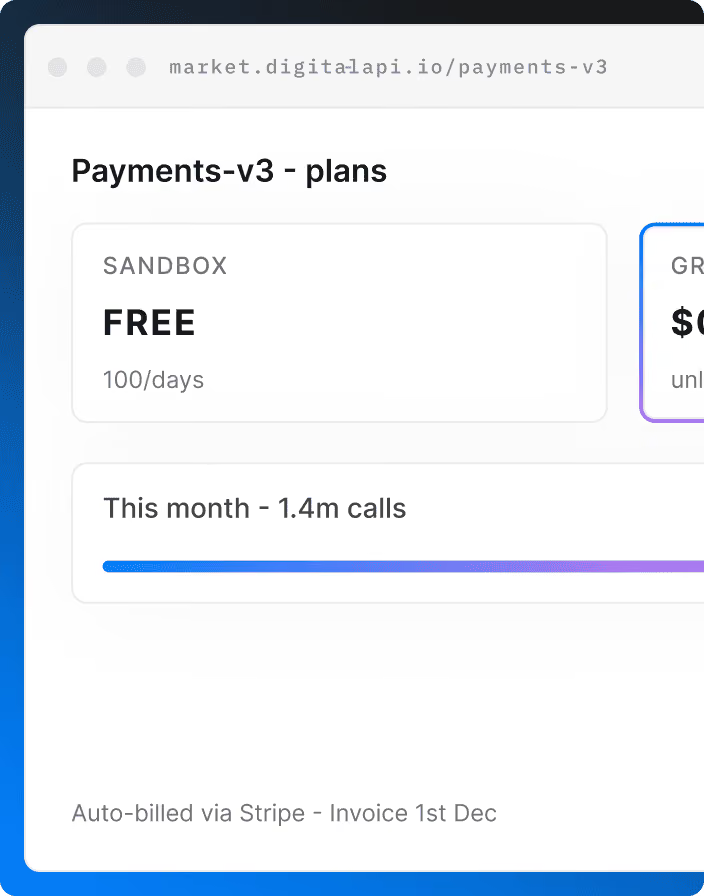
- Self-service keys with approval: Developers subscribe to a plan, the API owner approves in one click, and the key is created in your gateway automatically.
- Sandbox plans that approve themselves: Test access needs no human sign-off, so a new developer can make a first call in minutes instead of days.
- Built-in API console: Developers try endpoints with their own issued credentials, so the first successful call happens inside the portal, not in a support ticket.
- Role-based catalogs: Each partner, team or group sees only the APIs and plans their role allows, which keeps internal and partner APIs apart in one portal.
- Enterprise SSO: Sign-in through SAML 2.0 or OIDC with SCIM provisioning, including Okta, Entra ID and Google Workspace, so access follows your identity provider.
- Multi-gateway catalog: APIs from Apigee, Kong, AWS, Azure, MuleSoft, IBM and Tyk appear in one searchable catalog, instead of one portal per gateway.
- Usage and plan analytics: Metrics per developer, API and endpoint show who calls what, and plans can be set per API product for monetization.
- AI agent access: The portal publishes an
llms.txtindex and turns OpenAPI operations into MCP tools, so AI agents can find and call your APIs.
Pros:
- Moves key requests out of email and into a tracked approval flow
- Covers APIs on several gateways from one portal
- Lets you keep Document360 for the help center and link the two
Cons:
- Pricing is by quote, like Document360
- Not built for long-form help center articles
Who is it for: Teams whose partners need keys, a sandbox and approved access across more than one gateway. See the API developer portal for details.
2. ReadMe
ReadMe is a hosted developer hub built around interactive API reference. It turns an OpenAPI file into reference pages that developers can test in the browser. Compared with Document360, it's API-first rather than knowledge-base-first, so the reference is the center of the site, not one section of it.
Its other strength is usage data. Once you connect its metrics tools, ReadMe shows which developer called which endpoint and what went wrong. That helps support teams answer integration questions, but access itself still comes from your own systems.
Key features:
- Interactive API reference: Generates reference pages from OpenAPI, with a try-it console for every endpoint.
- Bi-directional Git sync: Keeps docs and API specs in step with your repository in both directions.
- Developer dashboard: Shows per-developer API logs once you connect ReadMe's metrics SDK or API.
- AI discoverability: Publishes
llms.txtand an MCP server on every plan, including the free Starter plan. - Ask AI add-on: Adds an AI assistant that answers questions from your docs for $150 a month.
- Reader login: Supports end-user login, with SAML and OAuth options on higher plans.
Pros:
- Strong interactive reference out of the box
- Per-developer API logs help support teams debug integrations
- Free Starter plan to try it
Cons:
- Shows keys your systems issue, but doesn't issue or approve them
- Ask AI costs extra
- SAML SSO is on Enterprise only
Who is it for: Teams whose docs are mostly API reference. Compare more options in our ReadMe alternatives guide.
3. Mintlify
Mintlify is a hosted docs platform known for clean design and AI features. It works from Markdown and OpenAPI files in a Git repository, with a web editor for people who don't use Git. It's a common move for teams that feel Document360's API reference looks dated.
Its focus is how docs look and how AI tools read them. Access to the API is handled somewhere else. Most enterprise controls, such as SSO, role-based permissions and audit logs, sit on the Enterprise plan, so check that tier before you compare prices.
Key features:
- Web editor and Git sync: Writers edit in the browser while engineers work in the same Git repository.
- API playground: Generates interactive reference from OpenAPI, so developers can test endpoints from the docs.
- AI assistant: Answers reader questions from your docs, using credits beyond Pro's 10,000 a month.
- MCP server: Lets AI coding tools read your docs directly, on every plan including Starter.
- Custom domain and themes: Publishes polished docs on your own domain with little design work.
- Enterprise controls: Adds SSO, role-based permissions, audit logs and self-hosting on the Enterprise plan.
Pros:
- Modern design with little setup
- Free Starter plan for up to 5 editors
Cons:
- Pro costs $450/month, and heavy AI use adds credit costs
- No key issuing or access approval
Who is it for: Developer-led teams that want polished public docs. See our Mintlify alternatives guide for the enterprise view.
4. Redocly
Redocly is an OpenAPI documentation platform with a command-line tool and the open-source Redoc renderer. It treats docs like code: they live in Git, change through pull requests and get checked before they publish. Compared with Document360, it's built for engineers rather than support writers.
It's priced per plan, not per person, with unlimited seats on every tier. Higher plans add reader SSO and app registration for Apigee and Gravitee. That gives Redocly a little more access control than most docs tools, though it's limited to those two gateways.
Key features:
- Multi-format reference: Builds reference docs from OpenAPI, GraphQL and AsyncAPI, with in-page requests for testing.
- Pull request previews: Connects to GitHub, GitLab, Bitbucket or Azure DevOps and previews every change.
- Spec linting: Catches errors and style problems in your API descriptions before they reach readers.
- MCP server: Serves your published docs as tools, so AI agents can look things up.
- Reader SSO: Lets readers sign in through Google or Microsoft on the Scale plan and above.
- Flat pricing: Includes unlimited seats, with extra docs projects at $390 a year each.
Pros:
- Unlimited seats on every plan
- Spec linting improves API quality, not only docs
- 30-day free trial
Cons:
- No hosted free plan
- Reader SSO starts on Scale, at $729/month
- App registration works only with Apigee and Gravitee
Who is it for: Engineering teams that keep docs in Git and review them like code.
5. Fern
Fern generates API docs and client SDKs from the same API spec, so both stay in step. When the spec changes, the reference pages and the SDKs change together. Postman acquired Fern in January 2026, and it's now part of Postman's product line.
Compared with Document360, Fern is aimed at API-first companies that ship SDKs to developers. Its free plan is generous for docs, which makes it easy to try. SSO, SCIM, advanced roles and self-hosting sit on Enterprise, so access control needs that tier or another tool.
Key features:
- Docs and SDKs from one spec: Generates reference docs and client libraries from the same OpenAPI file.
- Broad protocol support: Covers REST, webhooks, WebSockets, server-sent events and Protobuf, so event-driven APIs get documented too.
- Guides and changelog: Publishes guides, API reference and a changelog together on one branded docs site.
- Custom domain: Hosts docs on your domain or a subpath, on the free plan too.
- Free plan: Includes 10 team members, 1,000 pages and 250 AI credits a month.
- Enterprise controls: Adds SSO, SCIM, advanced roles and self-hosting on the custom-priced Enterprise plan.
Pros:
- Generous free plan
- SDKs and docs never drift apart
Cons:
- No key issuing
- Check the roadmap after the acquisition before you commit long term
Who is it for: API teams that ship SDKs as well as docs.
6. GitBook
GitBook is a hosted docs platform with a block-based editor and two-way Git sync. It's close to Document360's writing experience, but lighter, with fewer workflow settings to manage. Non-developers can write in the editor while engineers work in Git.
It charges per docs site plus a fee for each team member. That's affordable for one site, but separate public and partner docs need separate plans. Authenticated access for private readers sits on the Ultimate plan.
Key features:
- Block editor: Lets non-developers write and structure docs without Markdown or Git knowledge.
- Two-way Git sync: Keeps the editor and your GitHub or GitLab repository in step.
- Interactive API blocks: Renders OpenAPI operations inside pages, with a test console for readers.
- MCP server: Gives every published site an MCP server, so AI assistants can read your docs.
- AI assistant: Answers reader questions from your docs, with AI credits included on paid plans.
- Authenticated access: Restricts docs to signed-in readers on the Ultimate plan and above.
Pros:
- Easy for non-developers
- Free plan for individuals
Cons:
- Priced per site plus $12 per user
- Authenticated access needs the $249/site Ultimate plan
Who is it for: Writer-led product docs. See our GitBook alternatives guide.
7. Confluence
Confluence is Atlassian's team wiki for plans, specs, meeting notes and internal guides. It's an alternative to Document360 for internal documentation, not for public API docs. Many engineering teams already use it to describe how their APIs are designed and built.
It's strongest when your teams also use Jira. It isn't built to publish a branded, public developer site, and it has no OpenAPI-native reference out of the box. Teams that use it for API docs usually add Marketplace apps.
Key features:
- Pages and spaces: Organizes content by team or project, with templates for common page types.
- Jira integration: Links pages to Jira issues, so specs and work items stay connected.
- Real-time editing: Lets several people write and comment on the same page at once.
- Space permissions: Controls who can view or edit each space and its pages.
- Marketplace apps: Adds extras such as OpenAPI rendering through third-party apps from the Atlassian Marketplace.
Pros:
- Free for up to 10 users
- Fits teams already on Jira
Cons:
- Not designed for public, branded API docs
- No OpenAPI-native reference or try-it console out of the box
Who is it for: Internal engineering knowledge, not external developers.
8. Archbee
Archbee is a hosted documentation platform for product and developer docs written by mixed teams. It sits between a knowledge base and a docs tool, with a block editor for writers and API documentation for developers. It's one of the cheaper ways to keep both in one place.
Its entry plan covers public and private portals with a custom domain. The Scaling plan adds versioning, localization and finer reader access control. There's no free plan, but a 14-day trial lets you test it with your own specs.
Key features:
- Block editor: Gives writers and developers one editor for guides and API pages.
- API documentation: Renders reference docs from your API specs alongside written guides.
- GitHub integration: Syncs docs with a GitHub repository, for teams that keep content alongside their code.
- Public and private portals: Publishes open docs or password-protected portals on a custom domain.
- Reusable content: Adds content variables, versioning and localization on the Scaling plan.
- Reader access control: Restricts content by team or reader on the Scaling plan and above.
Pros:
- Lower starting price, from $80/month
- Unlimited readers on every plan
Cons:
- No free plan, only a 14-day trial
- No key issuing
Who is it for: Small teams that want product and API docs in one place, for less.
9. Helpjuice
Helpjuice is a customer support knowledge base. It's the closest like-for-like swap if you're leaving Document360 for help center reasons, not API reasons. Its plans are priced by number of users, with the price on the page.
It's built for support content: articles, search and analytics on what customers look for. It doesn't offer API reference or a try-it console. If your API docs live in Document360 today, you'd need a separate tool for them.
Key features:
- Customized knowledge base: Designs the help center to match your brand, with customization help included.
- AI search and writing: Adds AI-powered search and content tools on the AI-Knowledge Base tier.
- Step-by-step tutorial builder: Turns internal and customer processes into guided, step-by-step tutorials readers can follow.
- Analytics: Shows what readers search for, which articles they read and what they fail to find.
- User-based plans: Includes 30, 100 or unlimited users, at $249, $449 or $799 a month.
Pros:
- Clear pricing on the page
- 14-day free trial with no card
Cons:
- Not built for API reference
- Higher tiers needed for more users
Who is it for: Support teams replacing a help center.
10. Docusaurus
Docusaurus is a free, open-source static site generator for documentation, maintained by Meta and built on React. You write in Markdown or MDX, build the site and host it wherever you like. There are no license fees and no vendor lock-in.
The cost is engineering time. Search, API reference and any form of access control come from plugins or your own code. It suits teams that want full control over their docs site and have people to maintain it.
Key features:
- Markdown and MDX: Writes docs in Markdown, with React components where you need them.
- Versioning: Keeps separate docs for each release of your product or API.
- Translations: Supports multiple languages through built-in internationalization, so each locale gets its own docs.
- Search plugins: Adds full-text search through plugins such as Algolia DocSearch or local search options.
- OpenAPI plugins: Renders interactive API reference from OpenAPI files through community-maintained plugins, not core features.
- Deploy anywhere: Builds a static site you can host on any server or CDN.
Pros:
- No license cost
- Full control over design and hosting
Cons:
- You pay in engineering time for setup and upkeep
- Access control, keys and analytics are up to you to build
Who is it for: Engineering teams that want full control and have time to maintain it.
For a wider list, see our guides to the best API documentation tools and the best API developer portals.
Document360 vs Confluence: which is better?
Document360 is better for external, customer-facing documentation, and Confluence is better for internal team knowledge. Document360 is built to publish a branded help center with search and analytics. Confluence is built for teams to plan and write together, especially alongside Jira.
Many teams use both: Confluence for how they build the API, and a public site for how others use it. Neither one issues API keys.
How do you choose the right Document360 alternative?
Choose based on the job your API docs need to do next, not on editor features. If readers only read, a docs tool is enough. If readers need access, you need a portal.
Stay on Document360 if:
- Your API docs are a small part of a larger help center
- Few external developers use your APIs
- Key requests are rare enough that email works
Move to an API developer portal if:
- Partners wait days for keys or sandbox access
- Your APIs run on more than one gateway
- You need to know which partner called which API
Move to a docs tool (ReadMe, Mintlify, Redocly or Fern) if:
- You want better-looking API reference or SDKs
- Access is handled elsewhere and works well
You don't have to replace Document360 to fix the access gap. Many teams keep it for support articles and put an API portal beside it, linked from the help center.
How do you migrate from Document360?
Migrating from Document360 takes four steps: export, re-import, redirect and fix access. Most of the work is in the last step, because that's the part Document360 never handled.
- Export your content: Use Document360's export tools to pull your articles, and note any reusable snippets and variables you'll need to rebuild.
- Move your OpenAPI specs: Import the specs, not the rendered pages, into the new tool. Check that security schemes and examples carried over.
- Redirect old URLs: Map every API page to its new address so bookmarks, search results and AI citations still work.
- Move key requests out of email: Set up self-service sign-up, sandbox access and approval, so the new portal does more than the old one.
Run both sites in parallel for a few weeks and watch for broken links before you switch off the old workspace.
FAQ
[fs-toc-omit]What is the best Document360 alternative for API documentation?
The best Document360 alternative for API documentation depends on whether you need access control. If partners need self-service API keys, a sandbox and approval, choose an API developer portal that connects to your gateways. If you only need better reference docs, ReadMe, Mintlify, Redocly and Fern are strong choices.
[fs-toc-omit]How much does Document360 cost?
As of November 2026, Document360 doesn't publish prices. Pricing is by quote through its sales team, and there's no free plan. API documentation is included on all paid plans with one API workspace each, and extra workspaces cost more.
[fs-toc-omit]Is there a free Document360 alternative?
Yes. Docusaurus is free and open source, but you host and maintain it. ReadMe, Mintlify and Fern have free hosted plans, GitBook is free for individuals and Confluence is free for up to 10 users.
[fs-toc-omit]Can Document360 issue API keys?
No. Document360's Try It! console lets developers test endpoints with a key or token they already have, using API key, bearer, OAuth2 or OpenID Connect authentication. It can't create keys, approve access requests or connect to your API gateway.
[fs-toc-omit]Is Document360 better than Confluence?
Document360 is better for customer-facing help centers and product docs, while Confluence is better for internal team wikis. Document360 publishes branded sites with OpenAPI reference. Confluence is built for internal collaboration and works best alongside Jira.
[fs-toc-omit]Does Document360 have an MCP server?
Yes. As of November 2026, Document360 offers an MCP server that connects your knowledge base to AI tools and LLMs. It serves your documentation, so AI assistants can read your articles. It doesn't let AI agents call your API endpoints.
Final word
Document360 does its job well: it publishes a help center that customers can search. It was never built to let developers sign up, get a key and start calling your API.
If your API docs are still mostly reading material, a docs tool will serve you well. If partners are emailing for keys, the gap isn't the docs.
Partners still emailing for API keys?
See how DigitalAPI gives them self-service access across your gateways.
Dhayalan Subramanian is Associate Director, Product Growth at DigitalAPI, where he leads go-to-market and product growth for the company’s multi-gateway API management platform. His work focuses on helping large enterprises and mid-market cloud companies consolidate APIs across AWS, Azure, Apigee, Kong, MuleSoft, and other gateways into a single control plane for governance, discovery, monetization, and agent consumption.
Dhayalan brings 14+ years of experience across product strategy, enterprise architecture, and engineering leadership. Earlier in his career, he held senior roles at Encora (as Associate Architect and Technical Manager), Mindtree (Technology Lead), Tech Mahindra (Technical Lead), and Primus Analytics, where he designed integration frameworks and delivered enterprise-grade digital platforms for global customers.
At DigitalAPI, he works directly with platform, integration, and developer experience leaders at Fortune 500 organizations to operationalize unified API catalogs, developer portals, and MCP-ready APIs. He writes regularly on API developer experience, API governance, and AI agent architectures.


One email a fortnight. Worth opening.
A short digest of what we're writing, what we're learning from customers, and the handful of links you'd actually want from us. No tracking pixels.