











How to catalog AWS APIs with DigitalAPI’s Developer Portal
This blog shows you how to catalog all your AWS APIs in one place using DigitalAPI’s developer portal, and, if you want, bring in APIs from other gateways too.


TL;DR
1. AWS API Gateway ships a sample developer portal (open-source, React-based, deployed to S3 and CloudFront), but it is a starter kit, not a product. Most enterprise teams outgrow it within a year.
2. The default portal is AWS-only, has limited branding, needs engineering to host and maintain, and offers no native governance workflows, AI search, or agent readiness.
3. The 5 capabilities that matter for an AWS API catalog in 2026: native AWS API Gateway integration, multi-gateway coverage for future-proofing, enterprise SSO and RBAC, branded white-label, and agent and MCP readiness.
4. Upgrading from the default portal does not mean ripping out AWS API Gateway. It means keeping AWS as your gateway and layering a real portal on top.
5. DigitalAPI connects natively to AWS API Gateway, imports every API and stage, and delivers a fully self-serve, branded, enterprise-grade, agent-ready developer portal in 3 days.
Get Started With DigitalAPI's Developer Portal Today, Book a Demo!
AWS offers a robust ecosystem for deploying, scaling, and securing APIs, but most enterprises operate far beyond an AWS-only landscape. APIs end up scattered across different gateways, teams, business units, and environments. Documentation falls out of sync, specs live in multiple locations, and developers often don’t know where to find what they need.
This blog walks you through how to consolidate all your AWS APIs into a single, organized catalog using DigitalAPI’s developer portal, and, if you choose, how to pull in APIs from other gateways as well. It’s the quickest path from “our APIs are everywhere” to a unified, searchable, always up-to-date API catalog.
Why cataloging AWS APIs gets hard in real life?
On architecture diagrams, AWS API Gateway looks clean. In reality, your landscape usually looks more like this:
- Multiple API Gateway instances across different AWS regions
- Separate stages for dev, test, QA, UAT, and production
- APIs are split across HTTP APIs, REST APIs, and Lambda-based endpoints
- Documentation scattered between Git repos, Postman collections, and Confluence pages
- Backend services on EC2, ECS, Lambda, EKS, or even non-AWS systems
AWS gives you great building blocks, but when your teams grow, the complexity grows even faster.
.png)
Why is AWS API Gateway alone not enough?
AWS API Gateway excels at:
- Deploying and scaling APIs
- Securing endpoints
- Integrating with Lambda and backend services
- Managing throttling and usage plans
- API Keys, IAM auth, Cognito auth
But here's why its not enough:
1. Your organization isn’t AWS-only
Most enterprises mix AWS APIs with:
- On-premise APIs
- Other gateways like Apigee, MuleSoft, Kong, Azure
- Event-driven APIs from Kafka / Solace
- Legacy SOAP services
AWS can’t unify this for you.
2. Developers hate bouncing between portals
If each business unit or team exposes a separate API Gateway stage or console:
- Developers don’t know where APIs live
- Documentation becomes inconsistent
- API reuse drops sharply
One missing API in a portal = another duplicate built.
3. Keeping specs, docs, and gateway configurations aligned is nearly impossible
Teams store specs in Git, collections in Postman, definitions in SwaggerHub, and code across multiple repos.
Without automation, you end up with:
- Outdated specs
- Orphan endpoints
- Incomplete metadata
- Drift between what’s deployed vs what’s documented
DigitalAPI eliminates all that.
The Better Pattern: AWS for Traffic, DigitalAPI for Catalog & Consumption
Here’s the modern architecture pattern:
AWS API Gateway = Your runtime
It continues to handle routing, scaling, integration, throttling, and security.
DigitalAPI = Your API catalog + developer portal
It unifies:
- All AWS APIs
- APIs from other gateways
- Specs from Git, SwaggerHub, Postman
- Metadata, ownership, documentation
- Governance and scorecards
- AI-powered intent search
With this setup, you:
- Auto-inventory all AWS APIs into DigitalAPI’s API Estate
- Combine gateway data with documentation and metadata
- Expose everything through a single, universal developer portal
- Keep AWS as-is, no migration required
Step-by-Step: How to catalog AWS APIs on DigitalAPI’s developer portal
Let's take a look at how you can catalog your APIs on AWS, other gateways, and API sources using DigitalAPI's developer portal.
1. Add an AWS API Gateway Instance
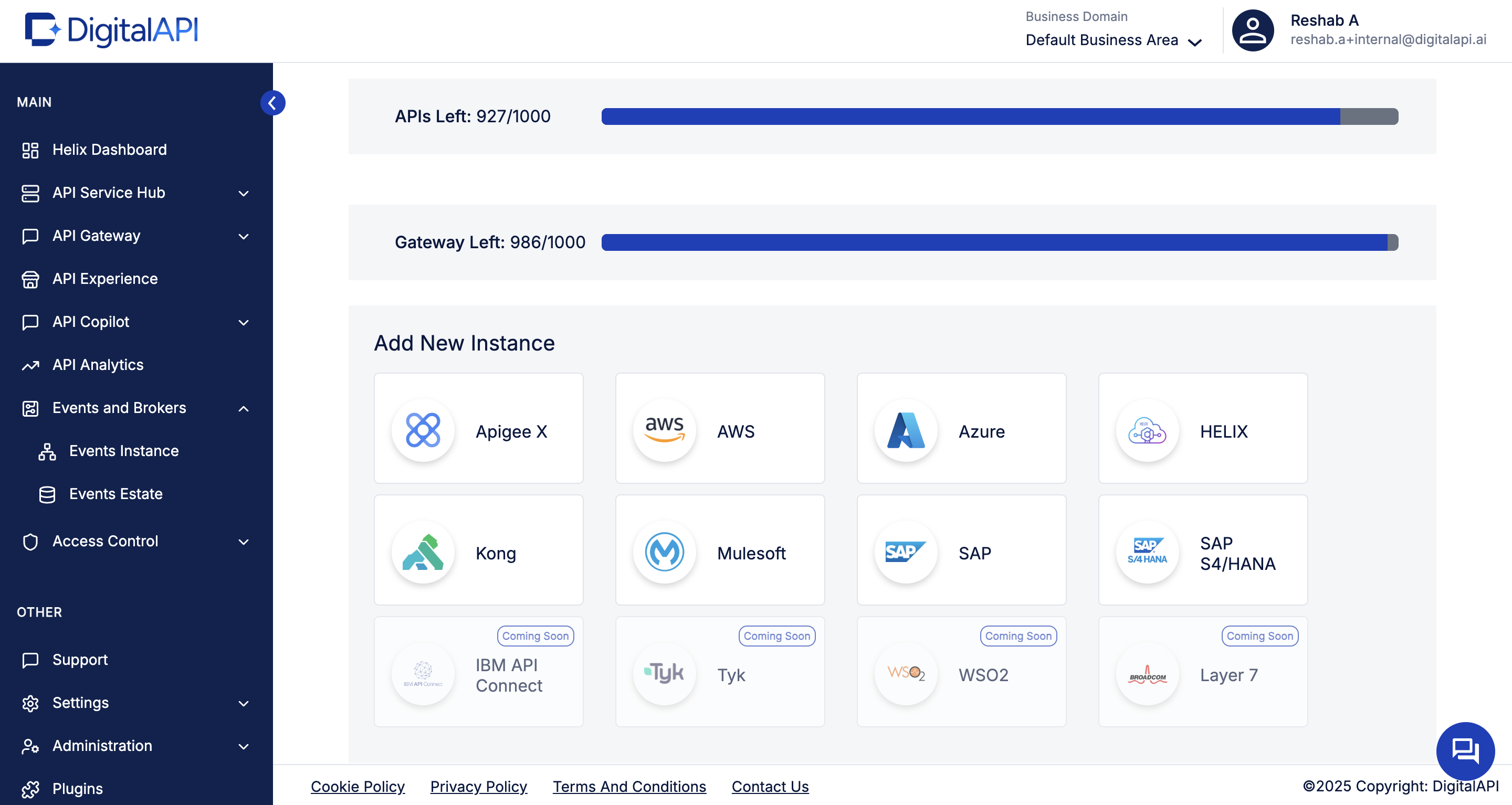
From API Environments, click Add New Instance and select AWS. This connects your AWS account or specific gateway instance to DigitalAPI. It enables automatic API discovery across regions and stages without manual exports or CLI scripts.
2. Configure authentication & Permissions
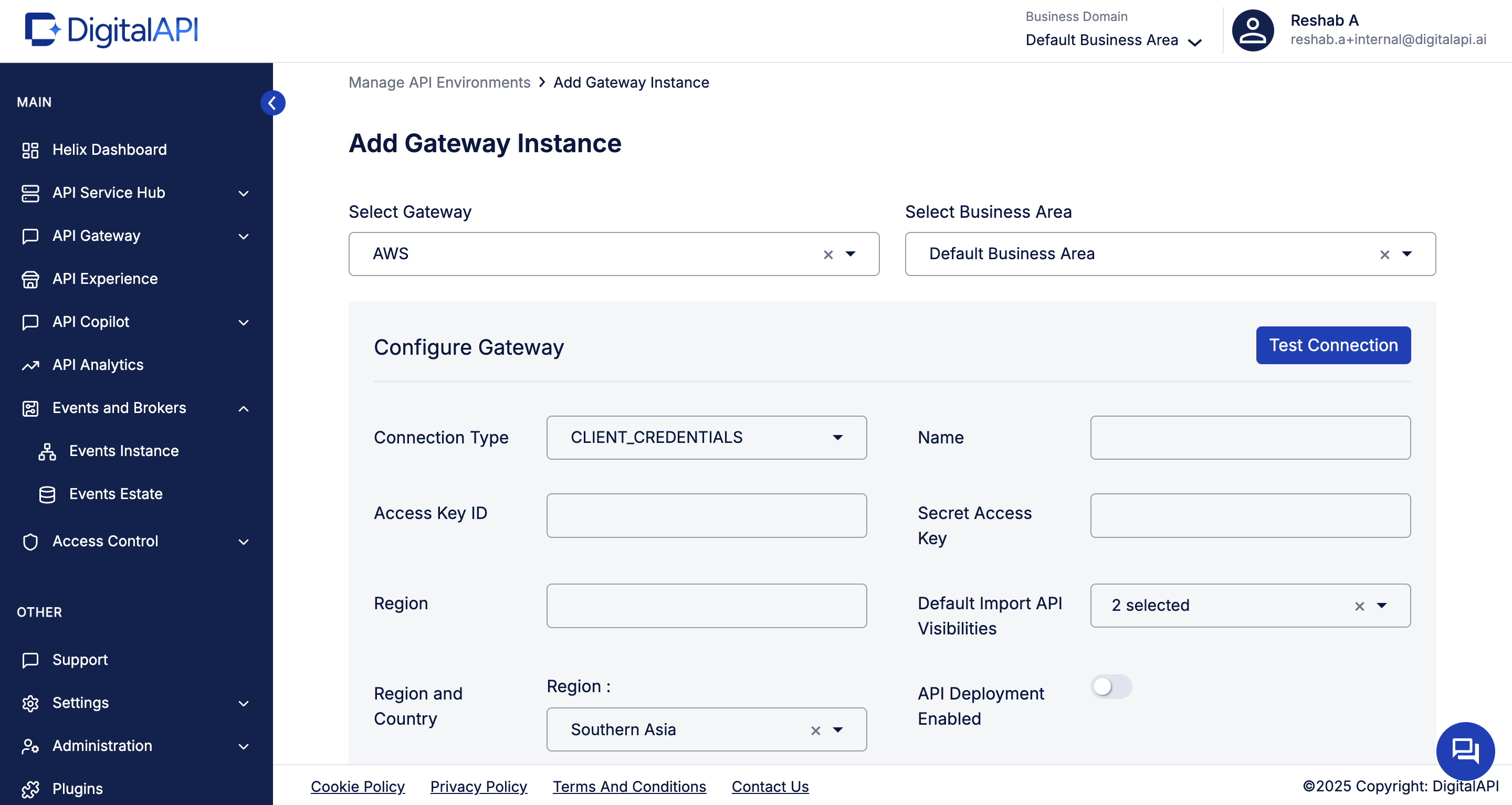
Provide your AWS access details such as access id, secret access key, region and name to connect the API Gateway. DigitalAPI uses these credentials to fetch your API configurations securely. Then hit test connection to validate access before saving the instance.
3. Import AWS APIs
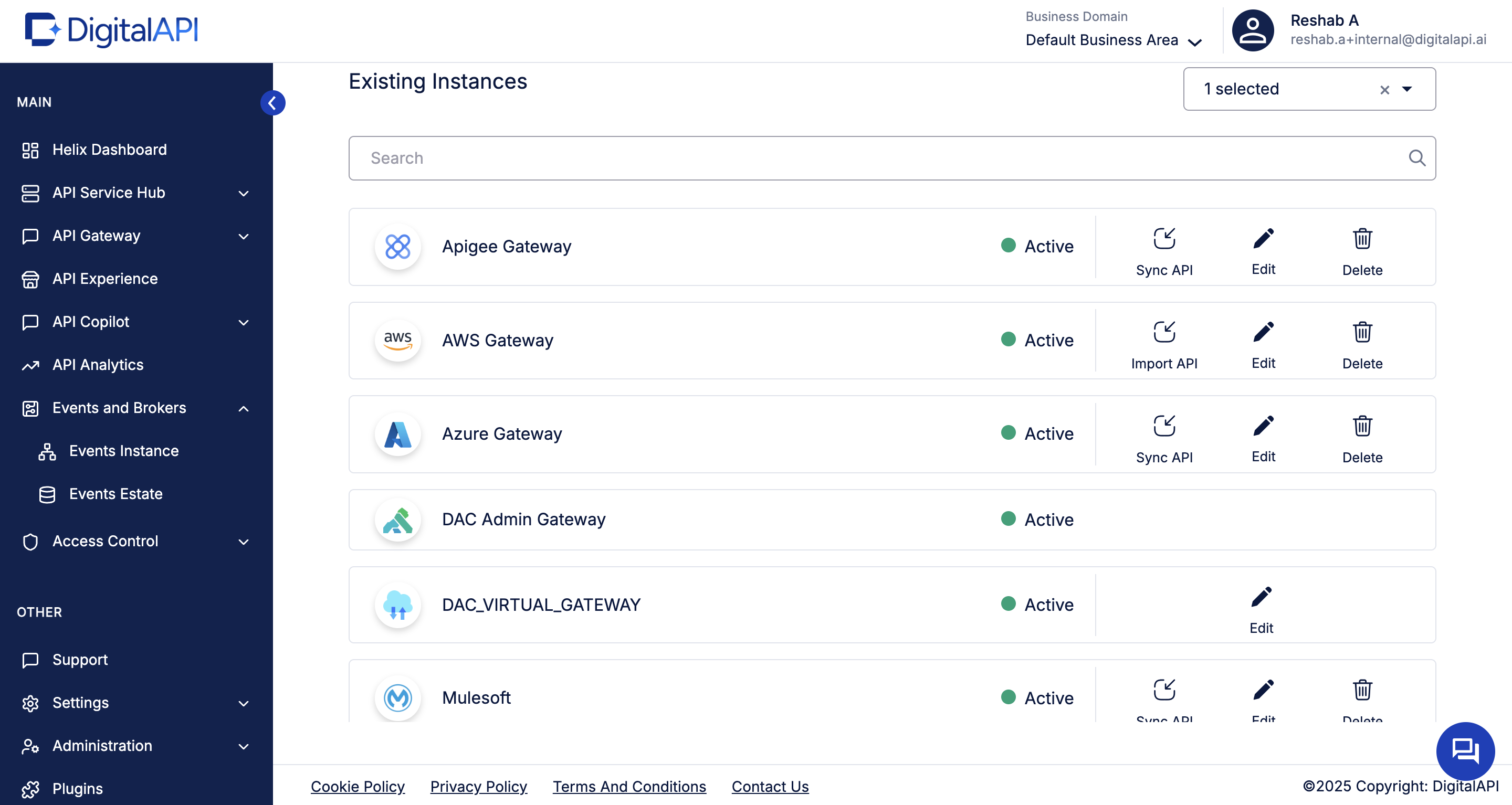
Once connected, click Import APIs. DigitalAPI scans every region and stage associated with your AWS environment, discovers your REST/HTTP APIs, and syncs them into the unified API Estate. This builds your catalog automatically, no YAML, JSON, or console work needed.
4. Explore all AWS APIs in one unified API estate
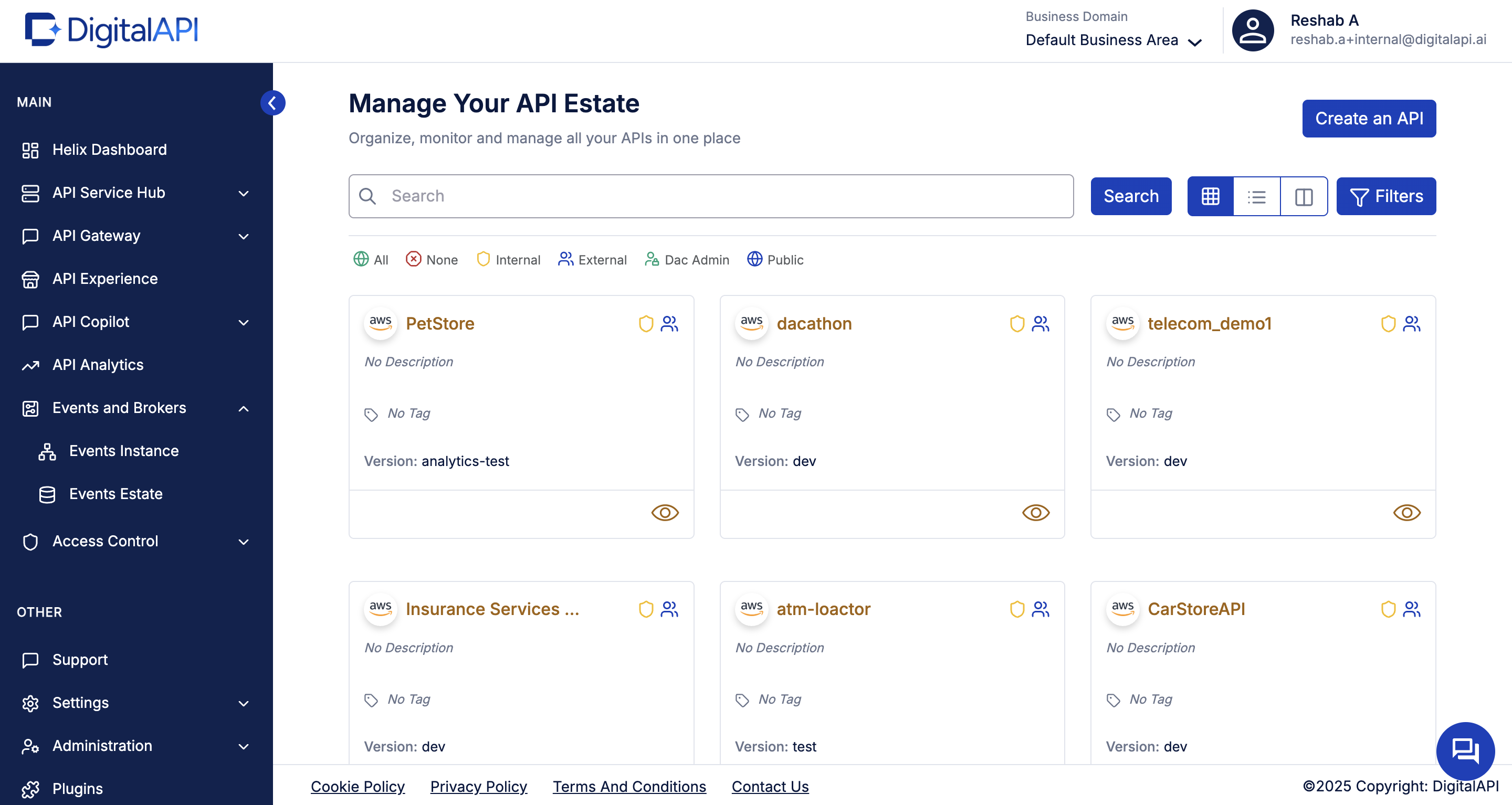
All imported APIs now appear in the API Estate, organized, versioned, and centralized. From here, you can enrich each API with owners, domains, lifecycle states, tags, and descriptions. What used to be AWS config data becomes a clean, human-friendly catalog.
5. Add documentation & specs from other sources
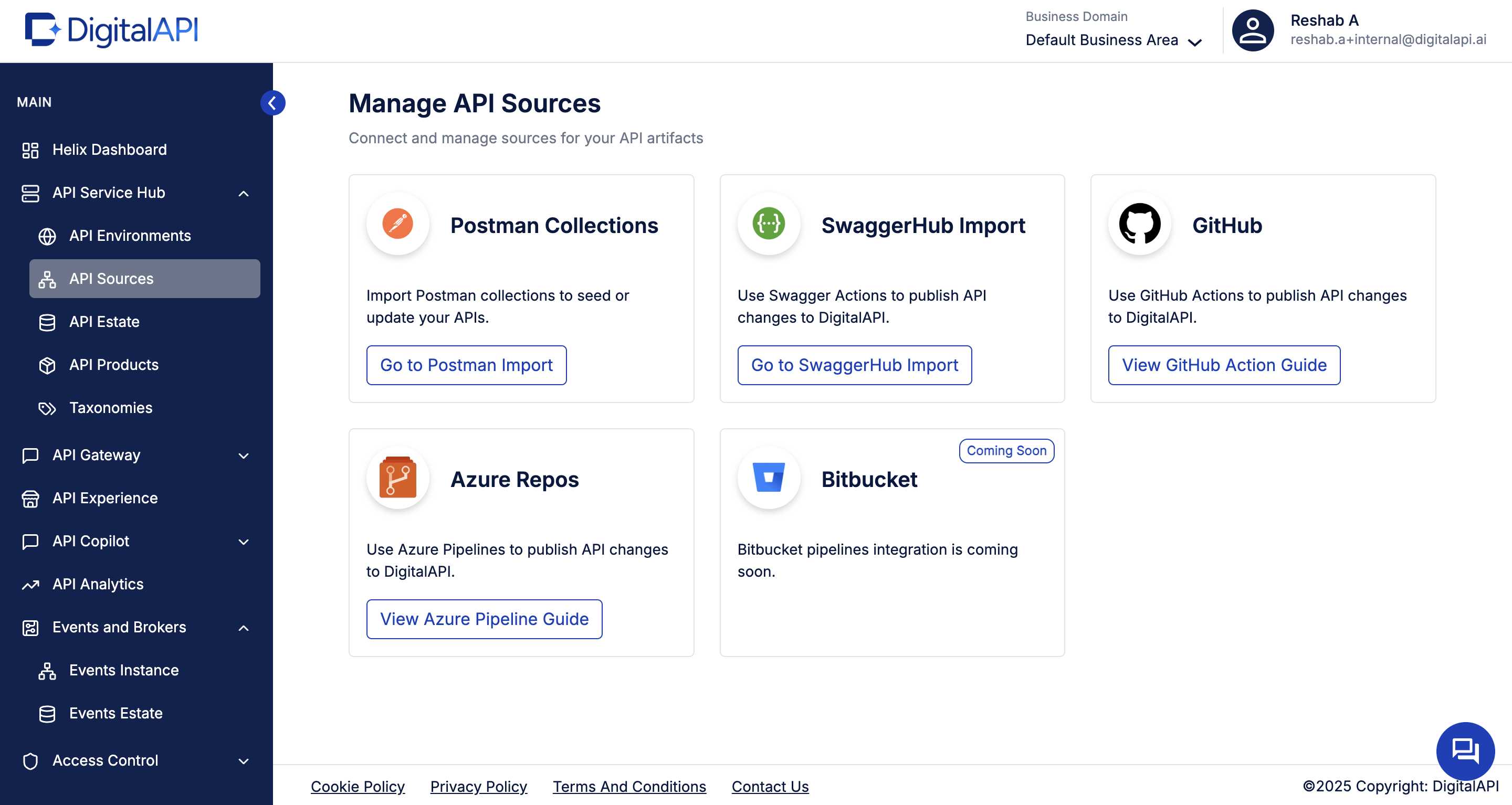
Beyond AWS imports, you can integrate your GitHub repos, Postman collections, and SwaggerHub specs. This ensures every API, whether AWS-native or not, has complete, always-updated documentation inside DigitalAPI.
How to evaluate a portal for your AWS APIs, the 5 criteria that actually matter
Before picking a replacement, score your options against these five. Anything that scores weak on more than one of them becomes a silo, not a portal.
- Native AWS API Gateway integration: The portal should connect directly to AWS API Gateway, pull every API, stage, method, and usage plan automatically, and stay in sync as things change. No manual OpenAPI uploads, no CSV imports.
- Multi-gateway coverage: Even if you are AWS-first today, confirm the portal can also ingest from Apigee, Kong, Azure APIM, and APISIX. Most enterprise estates go multi-gateway within 2 years, and migrating a portal later is painful.
- Enterprise security out of the box: SSO (SAML, OIDC), SCIM for user provisioning, RBAC with custom roles, immutable audit logs, SIEM export, data residency, and 99.9% uptime SLA. These should be included, not gated behind an enterprise tier or a professional-services engagement.
- Governed self-serve access: Structured access requests with justification, API owner approval with SLA targets, role-based access across read/test/production, automated key provisioning, and a full audit trail. Without this, governance still runs on tickets.
- Agent and AI readiness: Can AI agents discover and call your AWS APIs through an MCP tool registry? Is there an API-GPT style layer so developers can search in plain English? These features are the dividing line between a portal built for 2023 and one built for 2026.
What you unlock by cataloging AWS APIs in DigitalAPI
- One catalog for ALL your APIs: Start with AWS, then include Apigee, Azure, Kong, MuleSoft, Git-based specs, events, and more. Your developers see one unified catalog regardless of where APIs are deployed.
- A single front door for developers: No more hunting across AWS regions, stages, consoles, or internal wikis. The DigitalAPI portal becomes your universal API entry point for internal teams, partners, and external developers.
- Self-serve onboarding and subscription management: External developers sign up, accept terms, pick a tier, and get a key. Internal engineers request access and get routed to the API owner. Plan tiers, quotas, key rotation (90 or 120-day, per-user), and audit trails handle the full lifecycle.
- Interactive API explorer and sandboxing: An interactive sandbox inside the portal with pre-filled auth tokens, saved history, and shareable examples. Collapses the gap from "discovered the API" to "made the first call" from days to minutes.
- Comprehensive SDKs: Auto-generated, downloadable code kits in Python, Java, JavaScript, Go, and .NET, distributed via NPM, Maven, and the package managers developers already use. One-click global language switching changes the programming language of every code snippet across the portal, so developers can integrate in their stack of choice.
- Usage analytics and visibility: Consumer dashboards show what's being called, by whom, and how often. Account managers see partner usage and expiry; internal teams see reuse and dependency maps.
- Monetization ready: Native billing for tiered subscriptions, pay-per-use, and overages, with usage data flowing directly into Stripe, NetSuite, or QuickBooks. Revenue recognition is audit-ready out of the box. Turns external APIs from a support cost into a revenue line without standing up a separate billing stack.
- Stronger governance across the entire estate: Detect shadow APIs, missing metadata, broken specs, and compliance gaps across AWS and non-AWS APIs.
- An AI-ready API ecosystem: AI agents, copilots, and automation tools rely on machine-readable, well-structured API catalogs. Cataloging AWS APIs in DigitalAPI future-proofs your org for agentic AI use cases.
FAQs
1. How is DigitalAPI different from AWS API Gateway documentation tools?
AWS Gateway provides excellent deployment and runtime capabilities, but it does not unify APIs across regions, stages, teams, or other gateways. DigitalAPI provides a single, multi-gateway catalog, and developer portal with governance, AI search, and product-style packaging.
2. Do we need to change anything in AWS?
No. You simply grant read permissions to DigitalAPI. AWS continues to handle traffic, routing, and security. DigitalAPI adds cataloging, documentation, governance, analytics, and self-serve access on top.
3. Can we mix AWS APIs with other gateways?
Yes, DigitalAPI is built for multi-gateway estates. You can blend AWS APIs with MuleSoft, Apigee, Kong, Azure, or even raw Git-based specs into one unified catalog.
4. How does this support AI-agent consumption?
AI agents require structured, consistent, machine-readable API catalogs. By cataloging your AWS APIs on DigitalAPI, you create an index that AI tools can reliably interpret for safe, governed automation.
Dhayalan Subramanian is Associate Director, Product Growth at DigitalAPI, where he leads go-to-market and product growth for the company’s multi-gateway API management platform. His work focuses on helping large enterprises and mid-market cloud companies consolidate APIs across AWS, Azure, Apigee, Kong, MuleSoft, and other gateways into a single control plane for governance, discovery, monetization, and agent consumption.
Dhayalan brings 14+ years of experience across product strategy, enterprise architecture, and engineering leadership. Earlier in his career, he held senior roles at Encora (as Associate Architect and Technical Manager), Mindtree (Technology Lead), Tech Mahindra (Technical Lead), and Primus Analytics, where he designed integration frameworks and delivered enterprise-grade digital platforms for global customers.
At DigitalAPI, he works directly with platform, integration, and developer experience leaders at Fortune 500 organizations to operationalize unified API catalogs, developer portals, and MCP-ready APIs. He writes regularly on API developer experience, API governance, and AI agent architectures.

One email a fortnight. Worth opening.
A short digest of what we're writing, what we're learning from customers, and the handful of links you'd actually want from us. No tracking pixels.

.avif)
