











How to catalog Azure APIs with DigitalAPI's developer portal
In this blog, we will see how you can catalog your APIs from Azure and other gateways using DigitalAPI developer portal.

TL;DR
1. Cataloging Azure APIs well means more than publishing them to the Azure APIM default portal. It means a single, searchable, governed catalog every consumer (internal, partner, agent) can actually use.
2. Azure APIM's built-in developer portal is single-gateway, limited in branding, weak on governance workflows, and offers no native AI or MCP readiness.
3. The right catalog for enterprise Azure estates has 5 pillars: automated ingestion from APIM, unified catalog across gateways, self-serve governed access, auto-generated docs, and agent-ready discovery.
4. DigitalAPI's API developer portal integrates natively with Azure API Management, importing all APIs and operations and delivering a fully branded, self-serve portal within one day.
5. Azure teams pick DigitalAPI when they run Azure APIM and want to offer a self-serve developer experience with built in discovery, sandboxing and subscription manahement out of the box, or want their Azure APIs consumable by both human developers and AI agents.
Book a Demo to get started!
Microsoft Azure API Management powers API infrastructure for thousands of enterprises - but most of them run Azure APIM alongside at least one other gateway. According to MuleSoft's State of Integration report, 89% of enterprise IT leaders say integration and APIs are critical to digital transformation, yet fewer than half have a unified view of their full API estate. For Azure teams, the result is familiar: APIs managed in APIM, others running on AWS or Kong,
This guide covers how to move from that state to a single, searchable, governed API catalog - pulling in every Azure APIM API automatically, enriching with metadata, and making it available to developers, partners, and AI agents through one portal. No changes to your Azure gateway configuration required.
What is Azure API Center, and how it differs from APIM's developer portal
Before choosing a cataloging approach, it helps to understand what Microsoft itself provides for this problem - because there are two distinct Azure tools, and they solve different parts of it.
Azure API Management (APIM) and its developer portal handle runtime governance - traffic routing, security enforcement, rate limiting, and the consumer-facing portal for APIs that are actively deployed and managed through APIM. The developer portal shows what is published in a single APIM instance.
Azure API Center is Microsoft's design-time cataloging tool - a centralised inventory for tracking all APIs in an organisation regardless of gateway, lifecycle stage, or deployment location. It supports APIs managed in APIM, APIs on non-Azure gateways, unmanaged APIs, and APIs still in development. It includes governance linting, metadata management, and a limited preview portal.
The distinction Microsoft draws is exact: APIM is runtime API governance; Azure API Center is design-time API governance and centralised discovery.
For enterprises running Azure APIM alongside Kong, Apigee, or AWS API Gateway, neither tool solves the full problem - APIM's portal shows only APIM APIs, and Azure API Center's portal is in preview with limited branding and no subscription management. DigitalAPI fills that gap: a production-grade catalog and developer portal that spans every gateway in your estate, not just the Azure portion.
Why native Azure capabilities only take you so far
Azure APIM's built-in developer portal is a solid starting point for simple, single-gateway scenarios. But as Azure estates grow and teams add other gateways, sources, and consumer types, several limitations become consistent friction points:
1. Limited source visibility:
The APIM developer portal shows only APIs managed within a single APIM instance. APIs on AWS API Gateway, Kong, Apigee, or directly deployed microservices are invisible - leaving a significant portion of most enterprise estates undiscovered.
2. Manual upkeep and metadata drift:
Keeping API descriptions, owners, versions, and lifecycle states current requires manual effort in APIM. Without automated sync, the catalog drifts from the actual deployed state within weeks.
3. Spec vs runtime drift:
OpenAPI specs stored in Git or Postman collections are rarely in sync with what APIM is actually routing. Teams end up with documentation that describes an older version of the API.
4. Silos across tools:
Documentation lives in APIM, specs live in GitHub, policies live in the Azure portal, and access requests go through email. Developers have no single place to start.
5. Weak governance and product-level metadata:
APIM's portal has limited support for API ownership, lifecycle tagging, deprecation workflows, and domain-level governance - features that become critical at scale.
6. Shallow search and discovery:
Filtering by name or tag is the extent of APIM's native discovery. For estates with 50+ APIs, this is insufficient for developers to find what they need without already knowing what to look for.
Running into these limits already?
You do not need to replace Azure APIM. You need a catalog layered on top of it that handles branding, governance, search, and agent-readiness in one place.
See how DigitalAPI does it for Azure-first teams!
What a modern Azure API catalog must deliver
A catalog that genuinely solves the Azure multi-gateway problem must deliver seven things not all of which APIM's built-in portal or Azure API Center currently provide out of the box:
- Centralised visibility across your entire API estate: Every API - regardless of whether it lives in Azure APIM, another gateway, or a Git repo - must appear in one searchable inventory.
- Searchable, filterable catalogue: Developers should be able to find an API in plain English, not by knowing its exact name. AI-powered search dramatically reduces time-to-first-call.
- Self-serve developer experience: Developers should be able to discover, test, and subscribe to APIs all from the developer portal without going back and forth with any team.
- Rich metadata and documentation: Owner, domain, lifecycle stage, version, access tier, SLA all attached to each API and visible to consumers without logging a support ticket.
- Automated import and sync: New APIs should appear in the catalog automatically when deployed to APIM. Specs, routes, and operations should stay in sync without manual intervention.
- Governance and lifecycle controls: The ability to tag APIs as draft, active, or deprecated - and to enforce access approval workflows - is the difference between a catalog and a governed API estate.
- Metrics and insights: Usage per consumer, error rates, and latency visible to API owners and platform teams drive deprecation decisions and onboarding improvements.
Developer self-serve experience: Developers must be able to discover, test, and request access to any API without involving the platform team. This is the measure of a mature catalog.
Comparison table: Azure APIM default portal vs DigitalAPI
How to catalog Azure APIs in your unified portal
Connecting Azure APIM to DigitalAPI requires no changes to your Azure gateway configuration. You only need read access to your APIM management plane DigitalAPI connects as an observer, discovers all your APIs, and imports them into the unified catalog automatically. The five steps below take the average team under 30 minutes from first connection to a fully populated API estate.
1. Define your gateway/environment connection
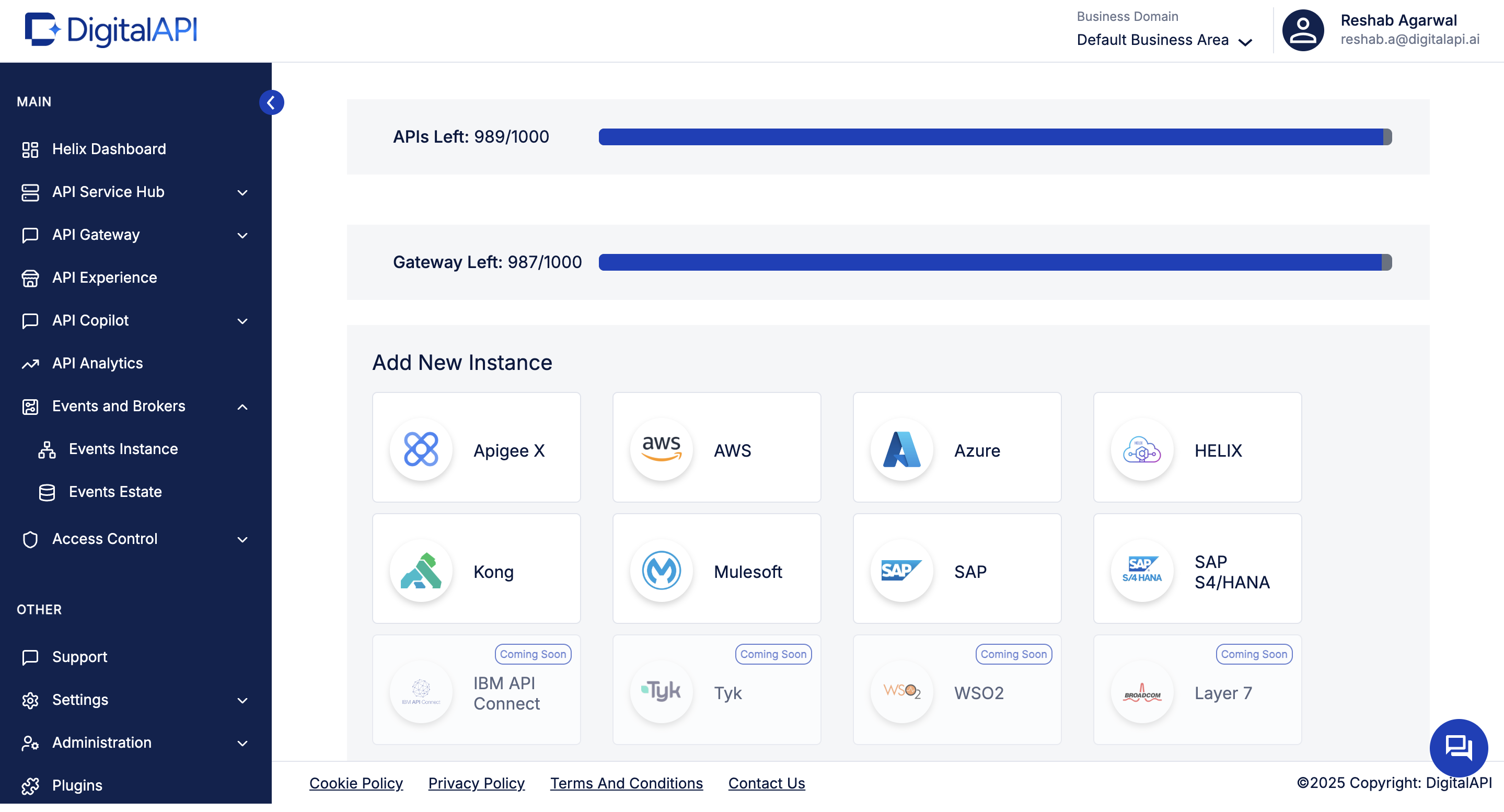
From your DigitalAPI dashboard, navigate to API Environments (or “Gateway Connections”) and select Azure as your gateway type. This tells the portal where to pull from and how to authenticate.
2. Configure the Azure connection
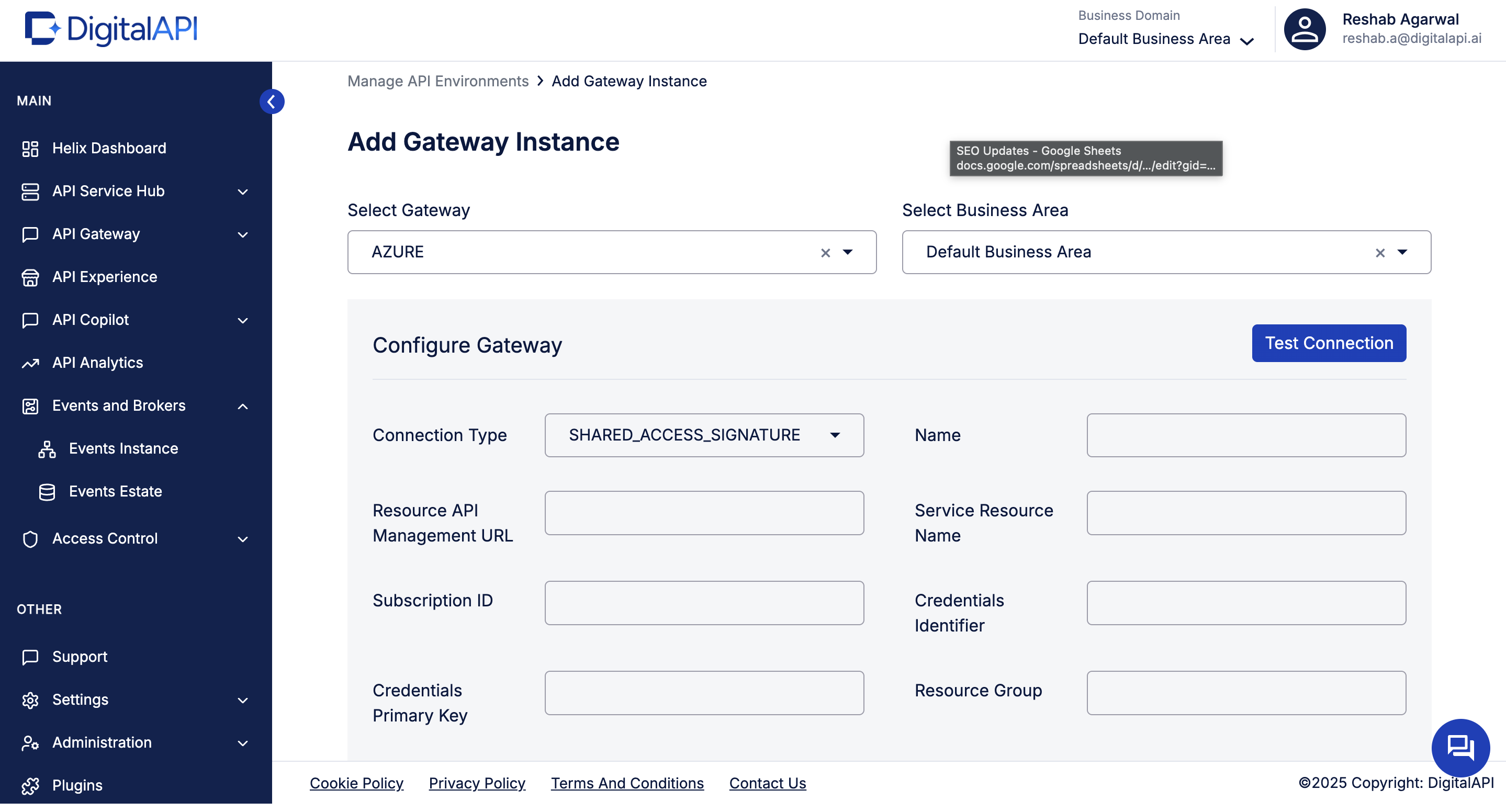
Provide the required credentials: service-principal or managed identity to access APIM, subscription ID, resource group, and region. You may also choose default visibility (internal vs external), default tags, and default domains.
3. Import your APIs from Azure APIM
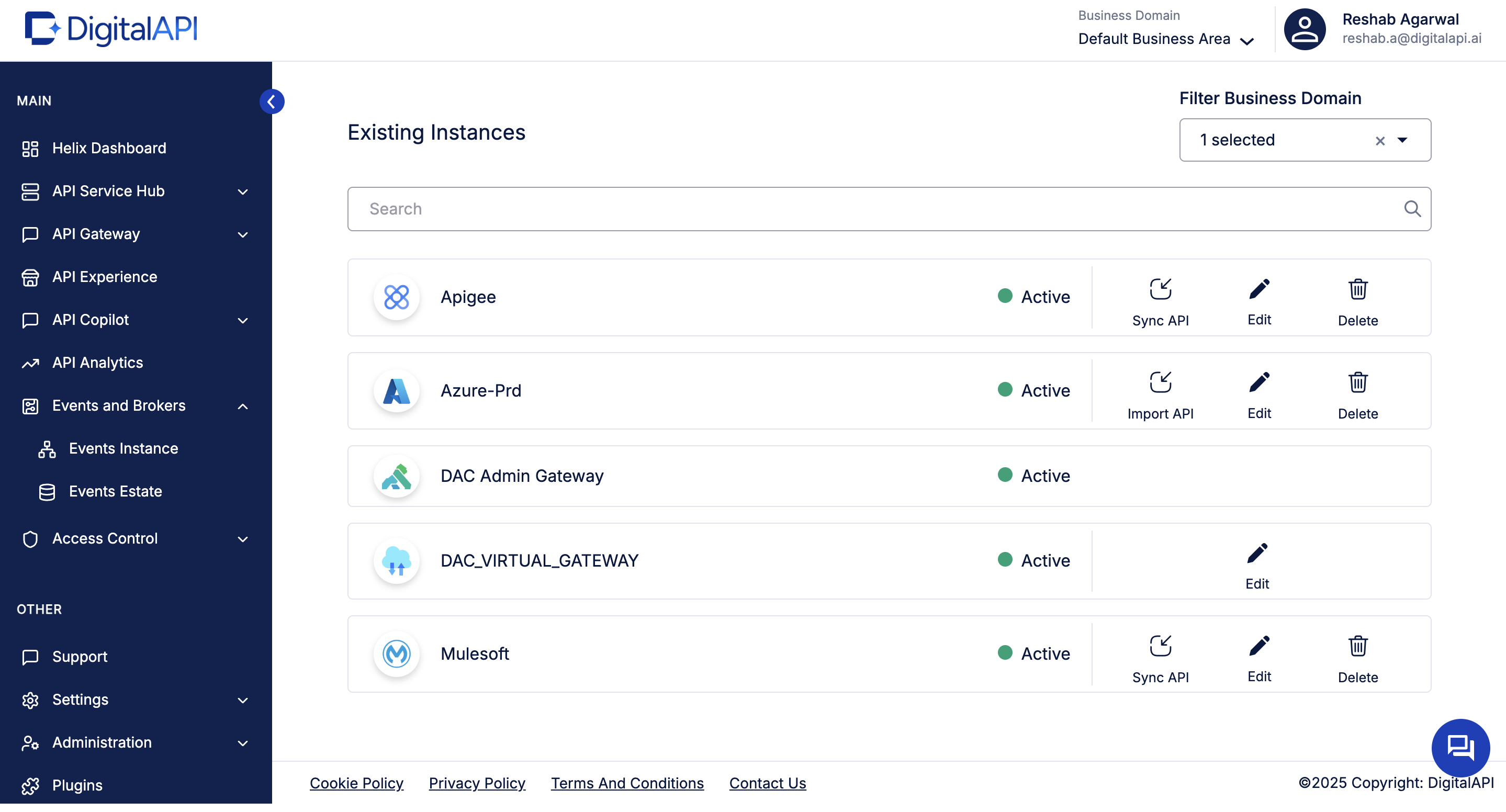
Once connected, click Import API (or equivalent) to pull in all APIs registered in your APIM instance(s). The portal should fetch: API name, version(s), spec (OpenAPI), owner metadata, tags, lifecycle status, and published date.
4. Enrich & unify your API estate
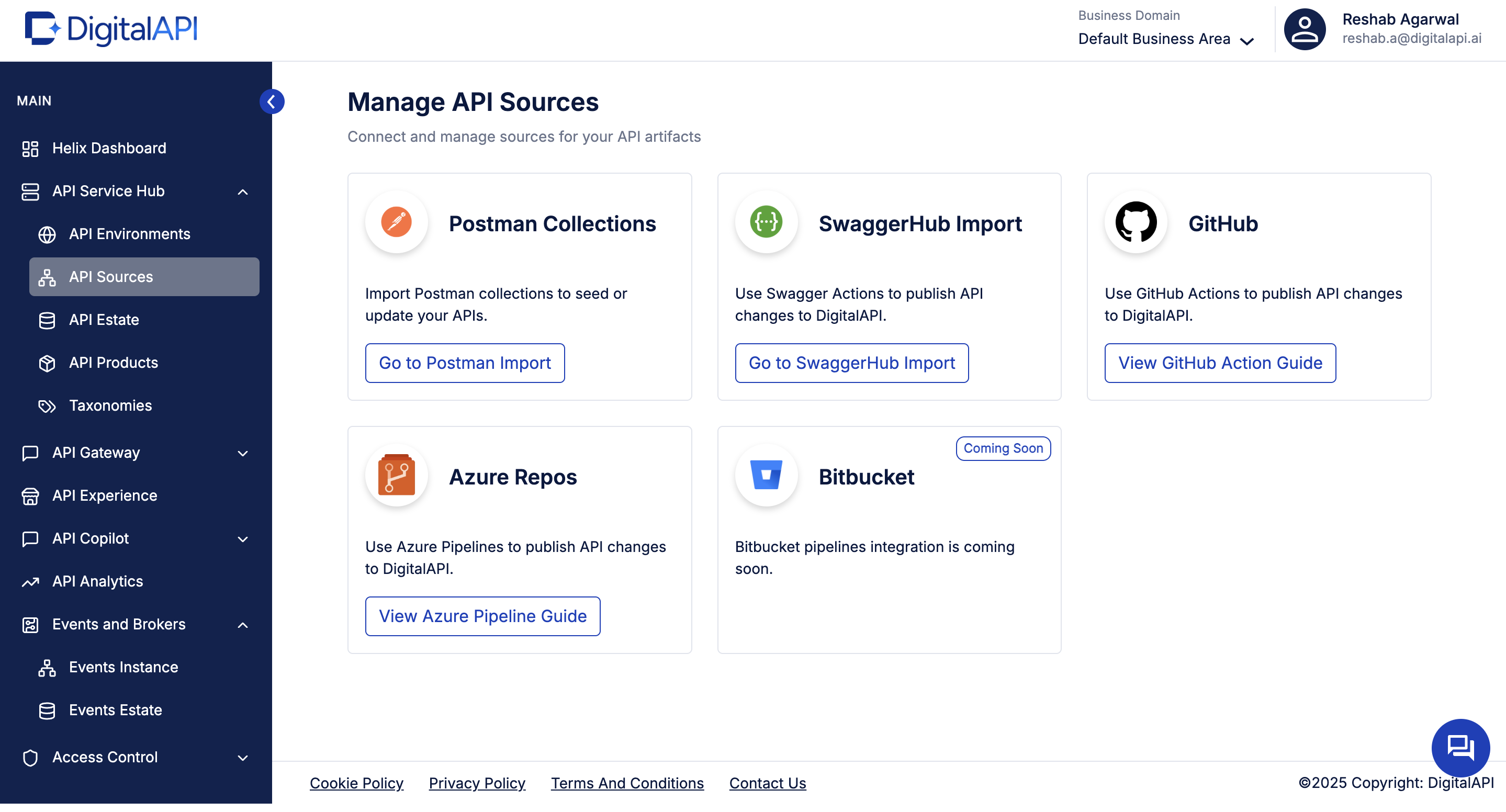
Once Azure APIs are imported, your portal becomes the unified catalog. Because your portal is not limited to Azure, you can also import APIs from non-Azure sources (GitHub specs, Postman collections, other gateways) and present a unified view. This reflects the multi-gateway reality many organisations face.
5. Enable self-service discovery for developers
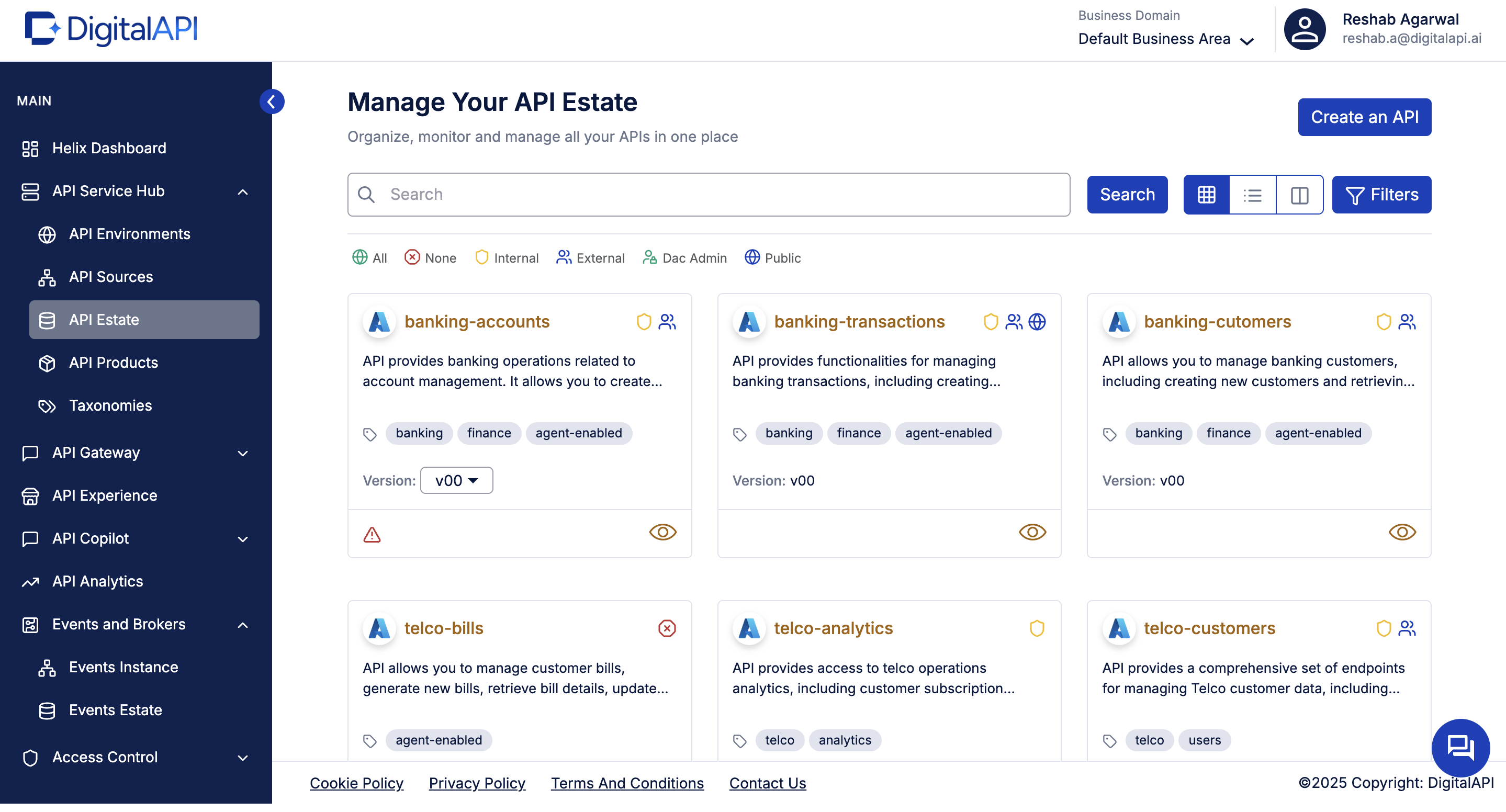
In the catalog view (sometimes called “API Estate” or “Developer Portal”), developers should be able to:
- Search by keyword, filter by domain, tag, owner, lifecycle state
- View API details: Description, version list, examples, sandbox link, documentation
- Request access / subscribe to APIs (for partner/external APIs)
- View status: is the API active, deprecated, or being sunset
Shadow APIs - the Azure cataloging problem nobody talks about
Most Azure estates have two API inventories: the one in APIM, and the one that nobody documented. Shadow APIs - services running in production that were deployed directly to Azure Functions, App Services, or container endpoints without going through APIM - are invisible to the APIM developer portal and, by default, to Azure API Center unless explicitly registered.
For platform teams, shadow APIs represent both a governance gap and a security risk. An undocumented endpoint with no owner, no access policy, and no rate limiting is the kind of surface that API security audits consistently flag.
DigitalAPI surfaces shadow APIs from non-APIM Azure sources by connecting to every registered gateway and pulling in any API that is not already cataloged. When an Azure Function is connected via its OpenAPI spec or a Postman collection, it appears in the same estate view as the formally managed APIM APIs - tagged, owned, and governed from the moment of import.
The result is an API estate that reflects your actual Azure landscape, not just the portion that went through the standard onboarding process.
Making Azure APIs consumable by AI agents MCP and agentic readiness
As AI coding assistants and autonomous agents become part of the development workflow, the API catalog is no longer just for human developers. AI agents - including those powered by GitHub Copilot, Cursor, and custom LLM workflows - need a machine-readable, well-structured catalog to discover, evaluate, and call APIs reliably
Microsoft has begun addressing this: Azure API Center now includes GitHub Copilot integration for API design, and Azure APIM's developer portal is adding support for AI-assisted discovery. But neither provides a native MCP (Model Context Protocol) tool registry that exposes cataloged APIs as governed, callable tools for autonomous agents
DigitalAPI's catalog is agent-ready by design. Every API imported from Azure APIM is automatically available as an MCP tool with its spec, metadata, access policy, and authentication method exposed in a format that AI agents can discover and execute without human intervention. For enterprises experimenting with agentic API workflows, this turns the Azure catalog from a documentation store into an active runtime surface for AI-driven automation.
Why DigitalAPI is the right platform for your Azure API catalog?
DigitalAPI's API Developer Portal is a self-serve, fully customizable branded developer portal built to offer a great developer experience for both internal teams, external developers, customers, partners, and AI agents.
It is a purpose-built solution for any organization (using any gateway - Azure, Apigee, Kong and more) that exposes APIs to developers, partners, or AI agents and has outgrown documentation-only tools, spreadsheets, or homegrown portals and might also have APIs scattered across multiple gateways. Let's take a look at all this capabilities.
- Unified API catalog and search: A single searchable registry of all APIs across gateways, teams, and environments with role-based visibility.
- AI-powered search and API-GPT: Natural-language API discovery that serves both human developers and AI agents.
- Interactive API explorer and sandboxing: In-portal sandbox with pre-filled auth, saved history, and shareable examples to make first calls in minutes.
- Self-serve onboarding and subscription management: Full lifecycle signup, tiered access, key rotation, and audit trails for external and internal users.
- Usage analytics and visibility: Dashboards showing who's calling what, partner usage, and internal reuse or dependency maps.
- Monetization ready: Native billing for subscriptions, pay-per-use, and overages with direct sync to Stripe, NetSuite, or QuickBooks.
- Comprehensive SDKs: Auto-generated SDKs in Python, Java, JavaScript, Go, and .NET with one-click language switching across the portal.
- Governance and RBAC: Unified role-based access, IP allowlisting, scoped credentials, and SIEM-exportable audit logs across all audiences.
- Community and support: Integrated changelogs, FAQs, chatbot, Salesforce ticketing, and a CMS for non-developer publishing.
- Automated, high-quality documentation and key management: Docs auto-generated from OpenAPI specs with policy-based key provisioning, rotation, and expiry alerts.
- White-label branding without engineering: Custom domain, theming, and CMS that let non-engineers spin up branded tenant portals in minutes.
- Agent and MCP ready: Auto-generated MCP tool definitions per API with OAuth M2M, scoped access, and per-agent rate limits under one governance model.
Frequently asked questions
1. Can this work if we don't use Azure API Management exclusively?
Yes. DigitalAPI is designed for multi-gateway estates - not Azure-only. You can import APIs from Azure APIM alongside AWS API Gateway, Kong, Apigee, and Kubernetes-deployed services. APIs from on-premises systems, OpenAPI spec files, and Postman collections can also be added directly. Every source lands in the same catalog, with the same governance model and the same developer portal experience regardless of where the API runs.
2. How automatic is the cataloging process?
Once the Azure APIM connection is configured, DigitalAPI automatically discovers new APIs, imports their specs, versions, operations, and metadata on a scheduled sync cycle. Any API added to APIM appears in the catalog without manual intervention. Updates to existing APIs - new versions, deprecated operations, spec changes - are reflected in the catalog automatically, keeping documentation in sync with what is actually deployed.
3. What if some APIs don't live in APIM but are still Azure-based?
No problem. DigitalAPI supports importing APIs from any source - Azure Functions, Azure App Services, Kubernetes endpoints, GitHub-hosted OpenAPI specs, and Postman collections - alongside your formal APIM APIs. Every imported API is treated as a first-class catalog entry with the same metadata model, governance controls, and portal visibility. Developers and partners see one complete catalog, not a split between managed and unmanaged APIs.
4. What is the benefit to developers, not just platform teams?
For developers: discovery takes seconds instead of days - search by capability in plain English, find the spec, generate a test call, and request access without raising a ticket. For platform and architecture teams: every API has a documented owner, a lifecycle status, and a governance trail. Reuse rates improve, duplicate builds reduce, and API sprawl becomes visible and manageable for the first time.
Rajanish GJ is Chief Technology Officer at DigitalAPI, the multi-gateway API management platform that helps large enterprises consolidate API discovery, governance, monetization, and AI agent enablement across heterogeneous gateway environments, including Apigee, AWS API Gateway, Azure API Management, Kong, and MuleSoft.
Rajanish brings 20+ years of engineering leadership to the role. He spent formative years at Apigee, the API management platform now part of Google Cloud and widely regarded as the category’s foundational product, and at Google itself, where he worked on developer-facing infrastructure at scale. That operator background informs DigitalAPI’s architectural bets around gateway abstraction, MCP-ready APIs, and agent-native developer experience.
He writes regularly on API architecture, developer infrastructure, and AI-native API management, with particular focus on how engineering teams can future-proof their API platforms for the agent era.

One email a fortnight. Worth opening.
A short digest of what we're writing, what we're learning from customers, and the handful of links you'd actually want from us. No tracking pixels.

.avif)
