




Azure APIM Policies Explained: All 67, With Examples (2026)
APIM policies are XML rules your Azure gateway runs on every API call. See all 67 policies in detail.

TL;DR:
What are APIM policies?
APIM policies are rules that Azure API Management runs on every API request and response. You write them in XML, and they can check identity, limit traffic, change data or reroute calls without touching your backend code.
Each policy sits in one of 4 sections (inbound, backend, outbound, on-error) and at one of 5 scopes (global, workspace, product, API, operation).
As of September 2026, Microsoft documents 67 built-in policies. Most teams use about 12 of them.
In June 2026, a developer on Microsoft Q&A set a rate limit of 30 calls a minute on an Azure API Management product. Their load test sailed straight past it. The policy was correct. The problem was how APIM policies work: product-scope policies don't run on calls that lack a product subscription key. In this blog, we will learn how Azure APIM Policies work and understand what each one does.
What are APIM policies?
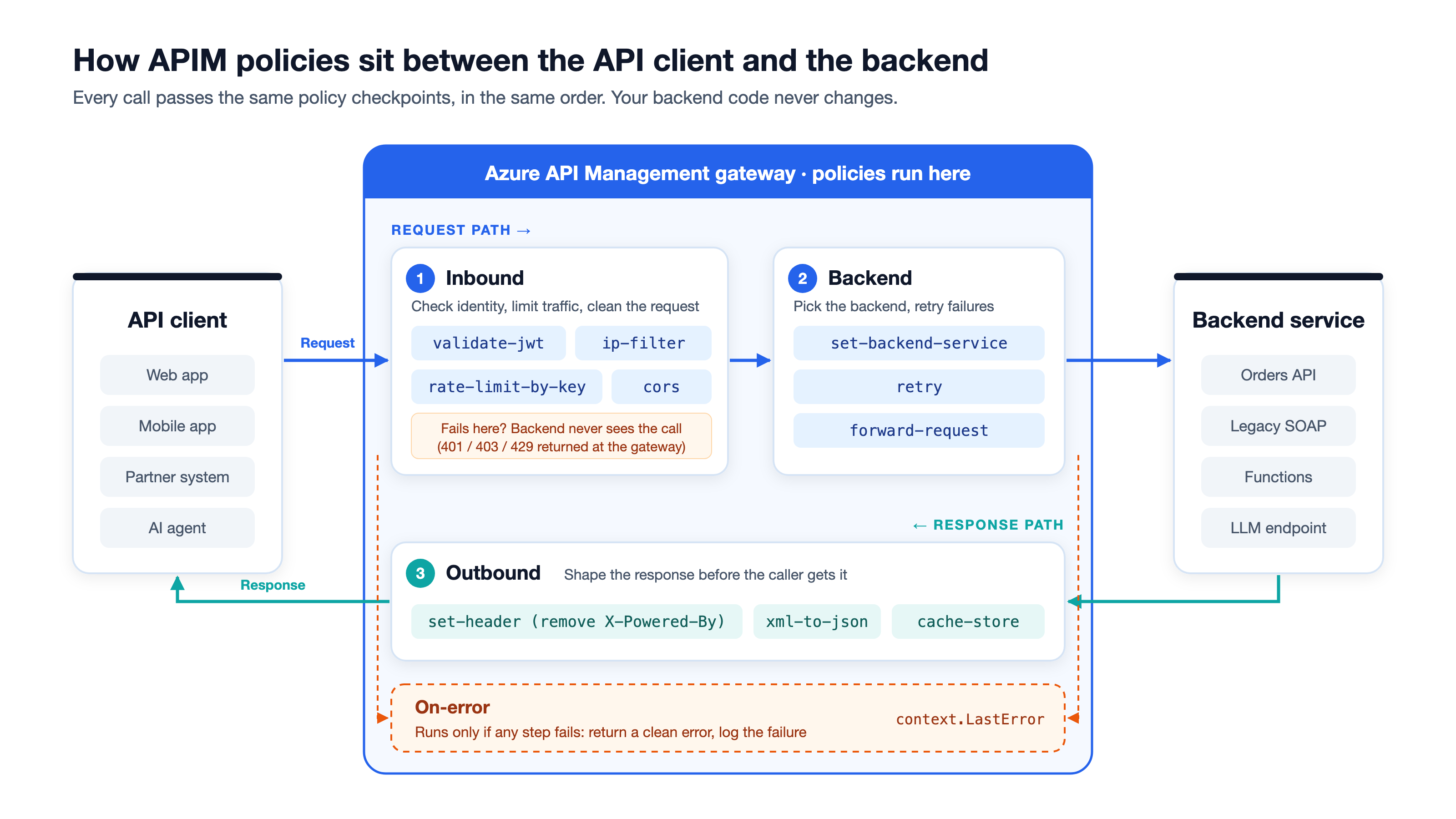
APIM policies are defined as XML statements that the Azure API Management gateway runs, in order, on each API call. They let you secure, limit, transform and route traffic at the gateway. Your backend code stays the same.
Think of the gateway as airport security. Every passenger (request) passes the same checkpoints in the same order. One checks ID. One checks bag size. One sends the passenger to the right gate.
APIM policies are those checkpoints. You decide which checkpoints exist, what order they run in and which passengers they apply to.
Microsoft draws one useful line here. APIM policies are runtime rules inside the gateway. Azure Policy is a different service that audits how your Azure resources are configured. The names are similar. The jobs are not.
What does an APIM policy look like?
Here is the smallest useful policy. It blocks every caller outside one IP range:
<policies>
  <inbound>
    <base />
    <ip-filter action="allow">
      <address-range from="10.100.7.0" to="10.100.127.0" />
    </ip-filter>
  </inbound>
  <backend><base /></backend>
  <outbound><base /></outbound>
  <on-error><base /></on-error>
</policies>
Read it line by line:
<policies>wraps everything.<inbound>holds rules that run on the incoming request.<base />says "run the rules from the level above first." The scopes section below covers this.<ip-filter>is the policy itself: allow only this address range.- The other three sections only inherit from the level above.
How do Azure API Management policies work?
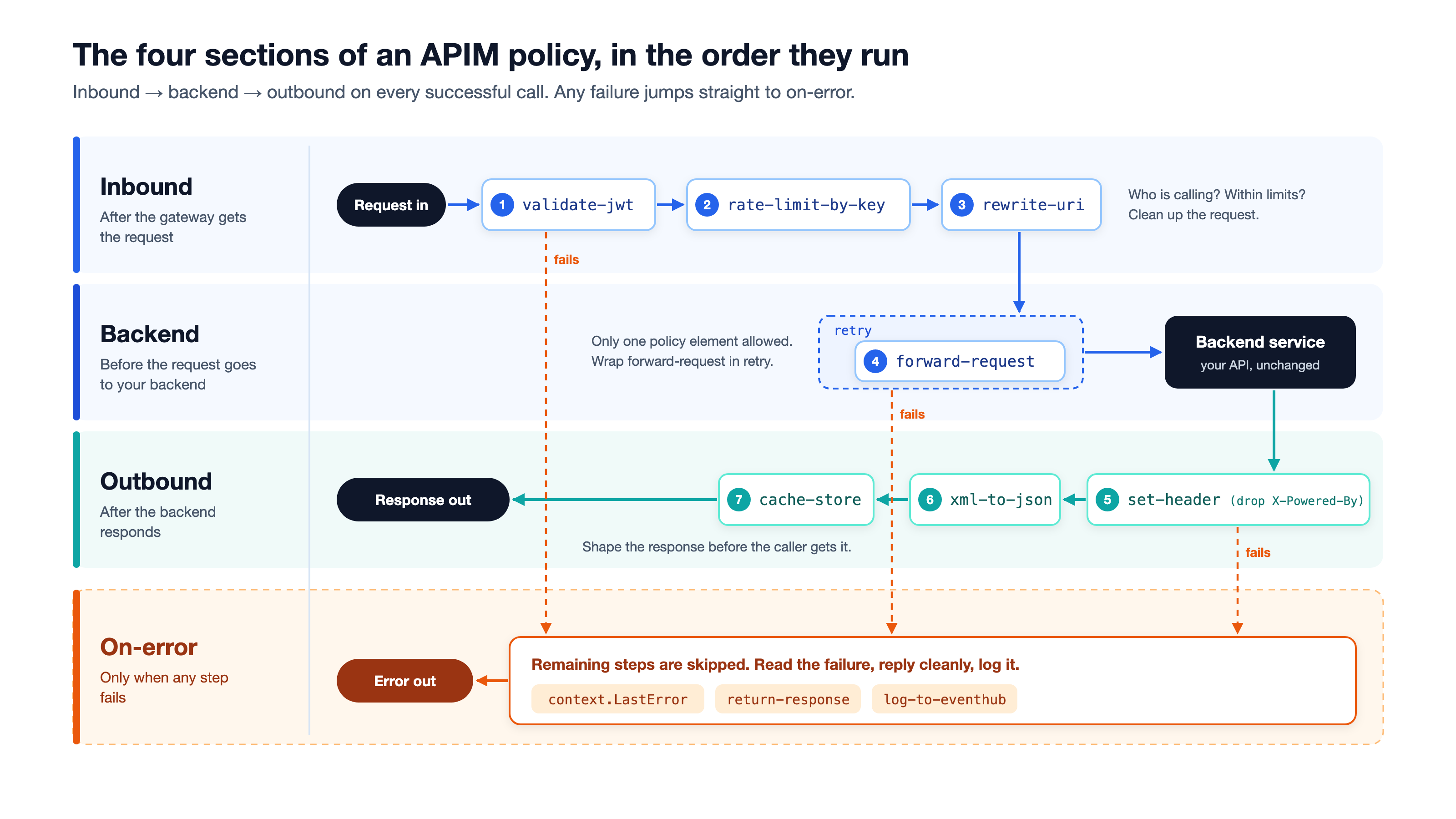
Azure API Management policies run in 4 sections, in a fixed order: inbound, backend, outbound and on-error. The first three run on every successful call. The on-error section runs only when something fails.
What happens in the inbound section?
Inbound is where most work happens. You confirm who the caller is, check they are within their limits and clean up the request. If a check fails here, the backend never sees the call. That saves backend compute and blocks bad traffic early.
What happens in the backend section?
The backend section decides how the request reaches your service. Microsoft notes that this section can contain only one policy element. By default, that element is forward-request at the global scope. You wrap it in retry when you want automatic retries.
What happens in the outbound section?
Outbound shapes the response before your caller gets it. A common job is removing headers that leak internal details, such as X-Powered-By. Another is converting an old XML backend's response into JSON.
What happens in the on-error section?
When any step fails, APIM skips the remaining steps and jumps to on-error. There you can read the error through context.LastError and send a consistent error response. Without it, callers see raw gateway errors.
Where can you apply policies, and how does inheritance work?
You can apply APIM policies at 5 scopes. From broadest to narrowest, they are global, workspace, product, API and operation. A call can collect policies from several scopes at once. The <base /> element decides how they combine.
What does <base /> do?
<base /> pulls in the policies from the next broader scope, in the same section. Its position sets the order. Put it first, and the parent's rules run before yours. Put it last, and yours run first.
Delete it, and the parent's rules for that section don't run at all. Microsoft calls including <base /> at the start of every section a best practice. It even ships a built-in Azure Policy definition to audit it.
In what order do APIM policies run across scopes?
With <base /> first in every section, the order is global → workspace → product → API → operation. For example, say you set a rate limit at the product and a header at the API. The rate limit runs first. If it rejects the call, the header policy never runs.
To check what runs, select Calculate effective policy in the portal's policy editor. It shows the merged result for any scope.
Why didn't my product policy run?
This is the trap from the opening story. Product-scope policies run only when the caller sends a subscription key tied to that product. Microsoft states that API-scoped, all-APIs and built-in all-access subscriptions skip product-scope policies. If your API doesn't require a subscription, product policies never fire.
What are all 67 APIM policies? (Complete list, 2026)
As of September 2026, Microsoft's policy reference lists 67 built-in APIM policies across 11 categories. Most teams use about 12 of them, marked ⭐ below. The rest solve specific problems, such as GraphQL, Dapr or LLM traffic.
You may see "more than 75 policies" on Microsoft's overview page. The reference list is the current count. Older Azure OpenAI-specific policy pages, such as azure-openai-token-limit, now redirect to the general LLM policies.
Five of these policies form Microsoft's AI gateway group: llm-token-limit, llm-emit-token-metric, llm-semantic-cache-lookup, llm-semantic-cache-store and llm-content-safety. They matter more each year. Gartner's 2025 Market Guide for AI Gateways predicts that 70% of software engineering teams building multimodel applications will use AI gateways by 2028, up from 25% in 2025.
Do all APIM policies work in every tier?
No. Tier support varies:
The gaps follow a pattern:
- The 3 Dapr policies run only on the self-hosted gateway.
- The Service Bus policy is a preview in the Classic tiers only.
- Consumption can't run
rate-limit-by-key,quota-by-keyorllm-token-limit.
Check the "Not available in" column below before you design around a policy.
Rate limiting and quotas (6 policies)
Rate limit or quota? A rate limit stops bursts over seconds. A quota caps volume over days or months. Microsoft also warns that rate limiting is "never completely accurate" because counters are distributed. If callers hit limits too early or too late, see our guide to API rate limit exceeded errors.
Authentication and authorization (9 policies)
The first six policies check callers. The last three sign APIM in to your backend. For key-based access, see our explainer on API keys and when to use them.
Content validation (7 policies)
Routing (3 policies)
Caching (7 policies)
Transformation (14 policies)
Cross-domain (3 policies)
Integration and external communication (7 policies)
Logging (3 policies)
GraphQL resolvers (4 policies)
GraphQL resolver policies work differently from the rest. You attach them to one field in a GraphQL schema, not to a scope, and they don't inherit from other scopes.
Policy control and flow (4 policies)
How do you write and test your first APIM policy?
You write an APIM policy in the Azure portal's policy editor, save it and test it with request tracing. The steps below add a per-IP-address rate limit and remove an internal header.
- Open your API: In the Azure portal, go to your API Management instance, select APIs, then pick an API.
- Choose the scope: On the Design tab, select All operations to cover the whole API.
- Open the editor: In Inbound processing, select + Add policy for the form editor, or the </> icon for XML.
- Add the policy: Paste the XML below into the code editor.
- Save: Changes reach the gateway right away.
- Trace a test call: Use the Test tab and enable tracing. Microsoft retired the old
Ocp-Apim-Traceheader. Tracing now uses a time-limited token that lasts up to 1 hour. - Read the trace: Confirm each policy ran in the order you expect, and check the counter key value.
Here is the full policy from step 4:
<policies>
  <inbound>
    <base />
    <rate-limit-by-key calls="100" renewal-period="60"
      counter-key="@(context.Request.IpAddress)" />
  </inbound>
  <backend><base /></backend>
  <outbound>
    <base />
    <set-header name="X-Powered-By" exists-action="delete" />
  </outbound>
  <on-error><base /></on-error>
</policies>
What are policy expressions?
Policy expressions are small pieces of C# code inside a policy, used when a fixed value isn't enough. In the example above, @(context.Request.IpAddress) reads the caller's IP address at runtime.
@( ... )holds one C# expression.@{ ... }holds several statements and must end withreturn.contextgives you the request, response, user, subscription and variables.
Expressions use C# 7 and an allowed list of .NET types. They get only limited checks when you save. Most mistakes appear at runtime as errors, so trace every change.
What are named values and policy fragments?
Named values are reusable settings, such as a backend URL or an API secret. You reference one in a policy as {{BackendUrl}}. Store secrets in Azure Key Vault, not in plain XML. APIM picks up a changed Key Vault secret within four hours.
Policy fragments are reusable blocks of policy XML. You write one once and insert it anywhere with include-fragment. Fragments can't nest inside each other, can't include <base /> and are capped at 512 KB. One edit updates every policy that uses the fragment.
Why do APIM policies get messy at scale, and how do you fix it?
APIM policies get messy because the logic is spread across 5 scopes, written in XML with embedded C#, and often edited by hand in the portal. One API is easy to reason about. Fifty APIs across three teams are not.
We reviewed G2 reviews, Reddit threads and about 200 Microsoft Q&A questions about Azure APIM from 2024 to 2026. Policy authoring ranked 5th of 14 challenge areas, with 21 separate sources. One Reddit thread title sums up the beginner experience: "Can someone please explain APIM policies in a simple manner?"
What goes wrong most often?
These five problems came up again and again in the Q&A threads:
- Product policies that never run. A June 2026 thread showed
rate-limit-by-keyworking at API scope but ignored at product scope. The calls had no product subscription key. - Rate limits that don't add up across gateways. Each self-hosted gateway keeps its own counters. Limits don't sync with other gateways or with the managed gateway in the cloud.
- Saves that warn but still work. A 2024 thread showed
set-bodyflagging a formatting error on valid JSON. The fix was to wrap the body in a proper@( ... )expression. - Missing
<base />. One deleted tag silently drops every company-wide rule for that section. - Tier surprises. A policy that works in Standard v2 may not exist in Consumption. See the tier table above.
How do you keep APIM policies under control?
- Keep
<base />first in every section. Enable Microsoft's built-in Azure Policy audit for it. - Move policies into Git. Microsoft's APIOps approach treats APIM configuration as code, with pull-request reviews before anything reaches production.
- Use fragments for repeated logic. Write your auth or logging block once.
- Check the effective policy. Run Calculate effective policy before you debug anything else.
- Name your rate-limit keys clearly. Trace the counter key value when limits behave oddly.
How do you govern policies across more than one gateway?
The hardest version of this problem starts when APIM isn't your only gateway. Postman's 2025 State of the API report found that 31% of organizations run more than one API gateway, and 11% run three or more. Each gateway has its own policy language, so the same rule gets rewritten and drifts.
Teams using DigitalAPI connect Azure APIM, Apigee, Kong and AWS with read-only credentials and apply one set of API governance rules across all of them. Each team stops recreating and reconciling the same policy in every gateway. You also get one audit trail and a list of ungoverned APIs that no one knew existed.
This approach is right for you if:
• You run Azure APIM next to another gateway, or plan to.
• Several teams write policies, and rules have started to drift.
• You need one audit trail for security and compliance reviews.
This approach is not right for you if:
• You run one APIM instance with a handful of APIs and one owning team.
• Your policies are stable, stored in Git and reviewed already.
Not sure how much your policies have drifted? Get an assessment of your API landscape → Talk to our experts
FAQ
How many policies does Azure API Management have?
As of September 2026, Azure API Management has 67 built-in policies in 11 categories, according to Microsoft's policy reference. Transformation is the largest category, with 14 policies. Five policies form the AI gateway group for LLM traffic. Microsoft's overview page still says "more than 75", but the policy reference is the current, itemized list.
What is the difference between rate-limit and quota in APIM?
In Azure APIM, rate-limit stops short bursts of traffic, such as 100 calls per 60 seconds, and returns a 429 error when exceeded. quota caps total calls or bandwidth over a longer period, such as a month, and returns a 403 error. Both have "by-key" versions that count per user, IP address or header instead of per subscription.
What does <base /> do in an APIM policy?
The <base /> element in an APIM policy pulls in the policies from the next broader scope for the same section. Where you place it sets the order: first means parent rules run before yours. If you delete <base />, parent rules for that section don't run. Microsoft recommends placing it at the start of every section.
Can I use C# in Azure APIM policies?
Yes. Azure APIM policies support policy expressions written in C# 7. Use @( ... ) for a single expression and @{ ... } for multiple statements that end in return. Expressions can read the request, response, user and variables through the context object. Only an allowed list of .NET types is available, and most errors appear at runtime, not when you save.
Do all APIM policies work in the Consumption tier?
No. As of September 2026, the Azure APIM Consumption tier supports 57 of 67 policies. It can't run rate-limit-by-key, quota-by-key, llm-token-limit, llm-emit-token-metric, the Azure SQL and Cosmos DB GraphQL resolvers, the Service Bus policy or the 3 Dapr policies. Classic tiers support 64, and V2 tiers support 63.
How do I debug an APIM policy that isn't working?
To debug an Azure APIM policy, first select Calculate effective policy to see the merged policy from every scope. Then trace a test call in the portal's Test tab. Tracing now uses a time-limited token of up to 1 hour, replacing the old Ocp-Apim-Trace header. Check that each policy ran, in the order you expect, with the values you expect.
Are APIM policies the same as Azure Policy?
No. APIM policies are runtime rules inside the API Management gateway that change, check or route API calls. Azure Policy is a separate Azure governance service that audits how resources, including APIM instances, are configured. One example links the two: a built-in Azure Policy definition can audit whether your APIM policies include <base />.
Final word
- APIM policies are XML rules that run in 4 sections and at 5 scopes, joined by
<base />. - There are 67 of them, but about 12 cover most real-world needs.
- Most bugs come from scope, not syntax: missing
<base />, product policies without subscription keys, or tier gaps.
Start with the 12 starred policies. Keep <base /> first. Trace every change. When your policies span several teams or gateways, a single governance layer saves you from rewriting the same rule in every gateway.
Want to know where your API policies have drifted? Get an assessment of your API landscape from DigitalAPI → Talk to our experts
Dhayalan Subramanian is Associate Director, Product Growth at DigitalAPI, where he leads go-to-market and product growth for the company’s multi-gateway API management platform. His work focuses on helping large enterprises and mid-market cloud companies consolidate APIs across AWS, Azure, Apigee, Kong, MuleSoft, and other gateways into a single control plane for governance, discovery, monetization, and agent consumption.
Dhayalan brings 14+ years of experience across product strategy, enterprise architecture, and engineering leadership. Earlier in his career, he held senior roles at Encora (as Associate Architect and Technical Manager), Mindtree (Technology Lead), Tech Mahindra (Technical Lead), and Primus Analytics, where he designed integration frameworks and delivered enterprise-grade digital platforms for global customers.
At DigitalAPI, he works directly with platform, integration, and developer experience leaders at Fortune 500 organizations to operationalize unified API catalogs, developer portals, and MCP-ready APIs. He writes regularly on API developer experience, API governance, and AI agent architectures.

One email a fortnight. Worth opening.
A short digest of what we're writing, what we're learning from customers, and the handful of links you'd actually want from us. No tracking pixels.

.avif)