


Docs-as-Code for APIs: Workflow, Tools and Best Practices (2026)
What docs as code is, how a docs-as-code workflow for APIs works step by step, the tools for each stage and the best practices that keep API docs accurate.

TL;DR
Docs as code means writing, reviewing and publishing documentation with the same tools you use for software: plain-text files, Git, pull requests and CI/CD.
For APIs, the OpenAPI spec is the source of truth. Reference docs are built from it on every merge, so the docs change in the same release as the API.
Guides live in Markdown next to the spec and go through the same review.
Your API changes in a pull request. Your API docs change when someone remembers.
Most teams know this. Few have checked how far their published docs have drifted from what the API does today. Docs as code closes that gap by putting docs on the same path as the code.
This guide explains what docs as code is, how a docs-as-code workflow for APIs works step by step, which tools you need and the best practices that keep it running.
What is docs as code?
Docs as code is defined as an approach to documentation that uses the same tools and processes as software development. Docs are written in plain-text formats like Markdown, stored in version control, reviewed in pull requests, tested automatically and published by a CI/CD pipeline. The goal is docs that ship with the product, not after it.
In practice, that means four things:
- Plain text: Docs live as Markdown, MDX, reStructuredText or AsciiDoc files, not in a proprietary editor.
- Version control: Every change is a Git commit with an author, a date and a reason.
- Review: Docs changes go through pull requests, the same way code changes do.
- Automation: A pipeline lints, builds and publishes the docs when changes merge.
Where did docs as code come from?
The term grew out of the Write the Docs community in the mid-2010s. Anne Gentle's 2017 book Docs Like Code made the case for treating docs with the same tools as software. Since then, engineering teams such as GitLab's have run their product docs this way, with docs stored and reviewed alongside the code they describe.
Is docs as code the same as documentation as code?
Yes. Docs as code, documentation as code and "docs like code" all describe the same approach. You'll also see it shortened to DaC. This guide uses "docs as code" throughout.
Why does docs as code matter for APIs?
Docs as code matters for APIs because API docs go out of date the moment the API changes. When docs live in a separate tool with a separate process, nobody updates them in the same sprint. Partners and AI agents then build against docs that describe last quarter's API.
Documentation is already a large share of API work. Postman's 2025 State of the API report found that 58% of respondents said their distributed API teams spend time documenting, which Postman defines as creating and updating API specifications. The same report found 41% rely on AI to generate API documentation, which speeds up writing but doesn't keep docs in step with releases on its own.
Scale makes the problem worse. Akamai's 2026 API Security Impact Study puts the median enterprise at more than 5,900 APIs. Nobody can keep that many docs current by hand.
What happens when API docs drift from the code?
Docs drift is when published docs no longer match the API's real behavior. It shows up in predictable ways:
- Wrong parameters: A field was renamed, and the docs still show the old name.
- Missing error codes: New 4xx responses exist, but nobody documented them.
- Zombie endpoints: Deprecated endpoints stay in the docs long after they stop working.
- Broken examples: Sample requests fail, so developers stop trusting every example.
- Wrong agent calls: AI agents read the spec as the truth, so a stale spec means wrong calls. See our guide to API docs AI agents can use.
We see one pattern often in enterprise API programs: a partner portal that hasn't changed in years, while the APIs behind it have changed many times. The docs are still online. They're no longer true.
What are the core principles of docs as code?
Docs as code rests on six principles: plain text, version control, peer review, automated testing, automated publishing and shared ownership. Each one borrows a practice that already works for code. Together, they make docs part of the release, not a task after it.
- Plain-text formats: Docs are files any editor can open, so they diff, merge and move between tools.
- Version control: Git keeps the full history, so you can see who changed what and roll back.
- Review in pull requests: Docs changes get the same review as code, ideally in the same pull request.
- Automated testing: Linters check the spec, style, spelling and links on every change.
- Automated publishing: A merge triggers a build and deploy. Nobody copies files by hand.
- Shared ownership: The team that changes the API updates the docs, with writers reviewing for clarity.
How does a docs-as-code workflow for APIs work?
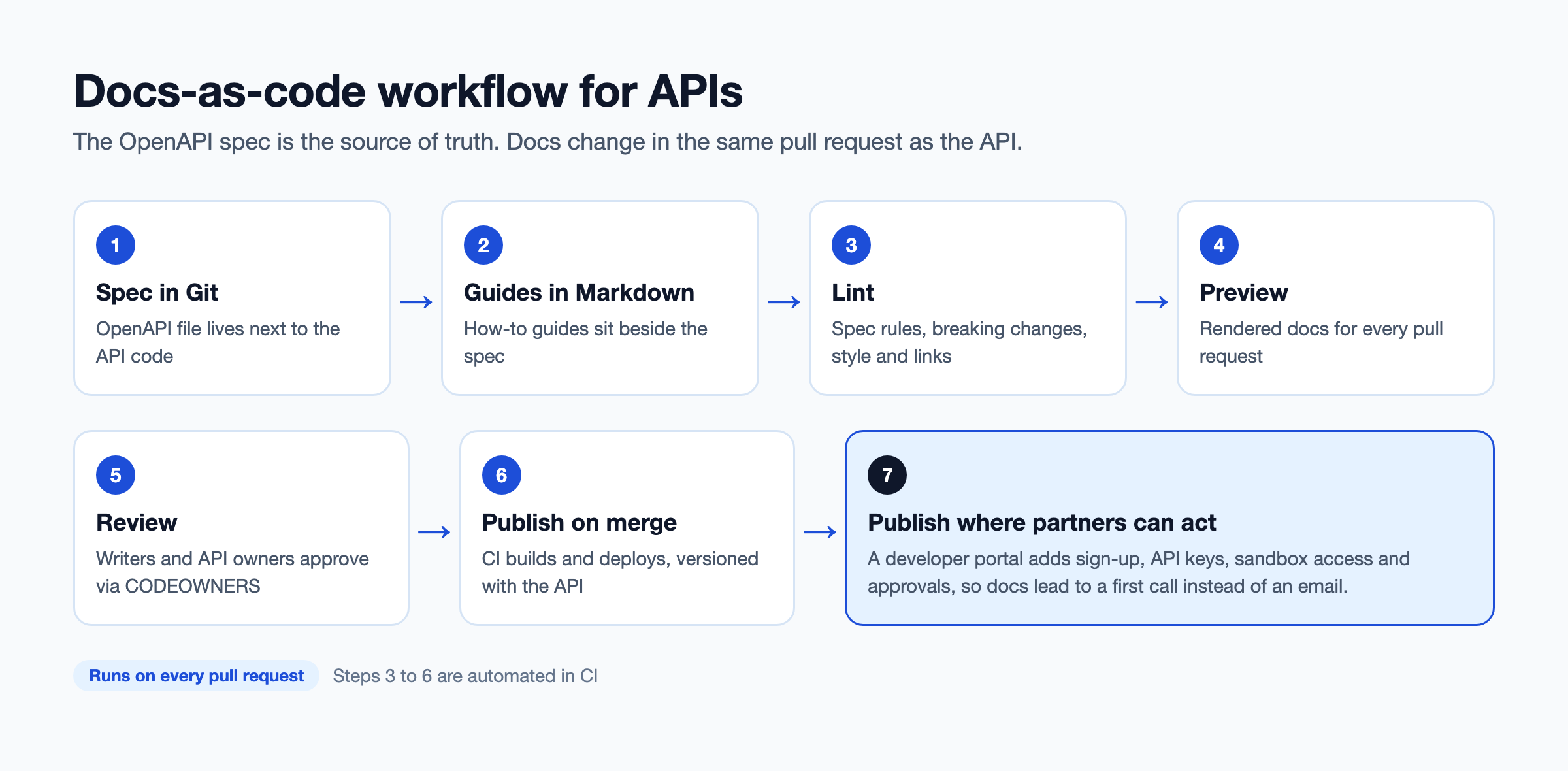
A docs-as-code workflow for APIs has seven steps: write the spec, write guides, lint, preview, review, publish and put the docs where partners can act on them. The OpenAPI spec sits at the center. Reference docs are generated from it, and guides are written by hand next to it.
Step 1: Write the OpenAPI spec in Git
The OpenAPI spec is a machine-readable description of every endpoint, parameter, schema and error. Store it in the same repository as the API code, or in a dedicated spec repository that the API repo references. Teams that write the spec before the code ("design-first") get docs for free. Teams that generate it from code ("code-first") need a build step that exports it. New to the format? Start with our OpenAPI specification guide.
Step 2: Write guides in Markdown or MDX
Reference docs tell developers what each endpoint does. Guides tell them how to get something done: authenticate, make a first call, handle webhooks. Write guides in Markdown or MDX in a docs/ folder next to the spec, so a pull request can change both together.
Step 3: Lint the spec and the prose
Linting is automated checking against rules. For APIs, you need three kinds:
- Spec linting: Spectral or Redocly CLI checks the OpenAPI file for missing descriptions, bad operationIds and broken references.
- Breaking-change checks: oasdiff compares the new spec with the last release and flags removed fields or endpoints.
- Prose linting: Vale enforces your style guide, and a link checker such as lychee catches dead links.
Step 4: Preview every pull request
A preview deploy builds the docs for each pull request and posts a link. Reviewers see rendered pages, not raw Markdown. Most static hosting platforms, and GitHub Actions or GitLab CI with a deploy step, can do this.
Step 5: Review docs with the code change
Add your docs folder and spec to a CODEOWNERS file, so a technical writer or API owner is asked to review any change. The rule is simple: if a pull request changes the API's behavior, it changes the spec and the docs in the same pull request.
Step 6: Publish on merge
When the pull request merges to main, CI builds the docs and deploys them. Tag releases so each API version has a matching docs version. Here's a minimal GitHub Actions workflow that lints the spec and prose on every pull request and deploys on merge:
Swap the build and deploy commands for your docs tool and host. The pattern stays the same: fail the build on errors, preview on pull requests, publish on merge.
Step 7: Publish where partners can act on the docs
Most docs-as-code pipelines end at a static docs site. That's fine for reading. It doesn't let a partner sign up, get a key or try the API in a sandbox, so those steps fall back to email. The last step is to publish the same spec into a developer portal that handles access. DigitalAPI syncs specs from GitHub and your gateways into one portal, with self-service keys, sandbox plans and approvals attached.
What tools do you need for docs as code?
You need a tool for each stage of the pipeline: version control, a spec format, linters, a site generator, an API reference renderer, hosting and a portal for access. Many are open source. The table maps each stage to common options.
Most teams don't need every tool on day one. Start with Git, a spec linter and one site generator, then add the rest. If you're weighing site generators, our guide to Docusaurus alternatives compares the common options.
Docs as code vs traditional documentation tools: what's the difference?
Docs as code keeps docs in Git and publishes them through CI, while traditional tools keep docs in a separate editor or CMS. Docs as code is better at staying in sync with the API. Traditional tools are easier for non-technical writers. The right choice depends on who writes your docs and how often the API changes.
Is docs as code the same as Markdown?
No. Markdown is a file format. Docs as code is a workflow. You can write Markdown in a CMS without any review or automation, and you can run docs as code with formats like AsciiDoc or reStructuredText. Markdown is popular in docs as code because it's plain text, easy to diff and supported by most site generators.
What are the best practices for docs as code with APIs?
The best docs-as-code practices for APIs make the spec the source of truth, automate every check you can and treat docs as part of "done". The ten below come from the failure modes above. Each one prevents a specific kind of drift.
- Make the spec the single source of truth: Generate reference docs from the OpenAPI file. Never hand-edit generated pages.
- Generate reference, hand-write guides: Machines are good at listing endpoints. People are better at explaining workflows.
- Fail the build on breaking changes: Run a breaking-change check against the last release, and require an explicit version bump to pass.
- Version docs with the API: Tag docs releases to match API versions, so developers on v1 still see v1 docs.
- Keep examples testable: Store request and response examples in the spec, and validate them against the schema in CI.
- Write a style guide and lint it: Turn your style rules into Vale rules, so reviews focus on meaning, not commas.
- Add docs to the definition of done: A feature isn't done until its spec and guide changes merge.
- Write descriptions for every operation: One or two sentences on what it does and when to use it. Agents and developers both rely on them.
- Publish for AI agents too: Add an
llms.txtfile and keep the spec public or reachable, so AI tools can read your API correctly. - Measure docs by usage: Track which pages lead to successful first calls, not how many pages you have. Our guide to measuring API docs quality covers the metrics.
What are the challenges of docs as code, and how do you solve them?
The main challenges of docs as code are Git friction for non-technical writers, review bottlenecks, tool sprawl and static sites that can't control access. None of them is a reason to give up on the approach. Each has a known fix.
- Git friction for writers: Technical writers who are new to Git often find branches and merge conflicts slow. Fix it with a web editor on top of Git, GitHub's in-browser editing and preview links, so writers rarely touch the command line.
- Review bottlenecks: If one writer reviews every docs change, they become the queue. Fix it with CODEOWNERS by folder, and let linters handle style so reviewers only check accuracy.
- Tool sprawl: Five open-source tools can mean five things to maintain. Fix it by standardizing on one linter config and one site generator across teams, kept in a shared template repository.
- Static sites can't control access: A static docs site can't issue keys, gate partner-only APIs or show usage. Fix it by publishing the same spec into a developer portal for anything beyond reading.
How do non-technical writers contribute to docs as code?
Non-technical writers contribute through tools that hide Git. Options include GitHub's web editor, a headless CMS that commits to the repo, or a hosted docs platform with Git sync. They edit in a browser, open a pull request with one click and review the rendered preview. Engineers still see every change in Git.
How do you get started with docs as code?
Start small: move one API's docs into Git, add one linter and automate one publish step, then expand. A 30-day rollout is realistic for a single API. Trying to migrate every API at once is the most common reason docs-as-code projects stall.
- Week 1, pick one API: Choose an external API with active partners and a spec you can export.
- Week 2, move it to Git: Put the spec and guides in a repository, and add CODEOWNERS.
- Week 3, automate checks: Add spec linting, a breaking-change check and a preview deploy on pull requests.
- Week 4, publish on merge: Turn on automated publishing, retire the old copy and redirect its URLs.
Docs as code is right for you if:
- Your API changes every sprint and docs lag behind
- Engineers already work in Git and review pull requests
- You publish API docs to partners, customers or AI agents
Docs as code is not right for you if:
- Your docs are mostly support articles written by non-technical teams
- The API rarely changes and one person keeps the docs current
- You need a help center more than a developer site
How does DigitalAPI fit into a docs-as-code workflow?
Keep your docs-as-code pipeline, and add a portal at the end that turns published docs into working access. Your spec stays in Git, and your linters and reviews stay as they are. The portal picks up the spec on every change and puts it where partners can act on it.
Teams using DigitalAPI connect it to the last step of the pipeline:
- GitHub spec sync: Specs sync from your repository, so the portal updates when a pull request merges.
- Checks on every publish: Spectral rules run on publish, and drift detection flags breaking changes before they reach partners.
- One catalog for every gateway: OpenAPI 3.1 and AsyncAPI specs from Apigee, Kong, AWS, Azure, MuleSoft, IBM and Tyk appear in one place.
- Access built in: Partners sign up, get keys through your gateway, try a sandbox and wait for approval only where you require it.
That removes the email step that usually follows a docs-as-code pipeline. Partner onboarding that takes weeks by hand becomes self-service. See how it works on the API developer portal page.
FAQ
What is docs as code?
Docs as code is an approach to documentation that uses software development tools and processes. Docs are written in plain text such as Markdown, stored in Git, reviewed in pull requests, checked by automated linters and published by a CI/CD pipeline. It keeps documentation in step with the product it describes.
What is an example of docs as code?
A common example is an API team that keeps its OpenAPI spec and Markdown guides in the same Git repository as the API code. Every pull request that changes an endpoint also updates the spec. CI lints the spec, builds a preview and publishes the docs when the change merges. GitLab runs its product docs this way.
What tools are used for docs as code?
Docs as code uses Git for version control, Markdown or MDX for guides and OpenAPI for API specs. Linters include Spectral and Redocly CLI for specs, Vale for prose and lychee for links. Site generators include Docusaurus, MkDocs, Hugo and Astro Starlight. GitHub Actions or GitLab CI build and publish the docs.
Is docs as code the same as Markdown?
No. Markdown is a plain-text file format, while docs as code is a workflow built on version control, review and automation. Markdown is the most common format in docs as code because it's easy to diff and widely supported, but teams also use AsciiDoc and reStructuredText.
Can non-developers use docs as code?
Yes. Non-developers can contribute through web editors, GitHub's in-browser editing or hosted docs platforms that sync with Git. They edit in a browser and open pull requests without using the command line. Preview links let them review rendered pages before changes go live.
How do you version API docs with docs as code?
Version API docs by tagging docs releases to match API versions and keeping each major version's spec in Git. Site generators like Docusaurus and MkDocs can publish several versions side by side. A breaking-change check in CI makes sure a new major version is created when the API changes in a way that breaks consumers.
Is docs as code good for API documentation?
Yes. Docs as code suits API documentation well because the OpenAPI spec is already code. Reference docs are generated from the spec on every merge, so they stay accurate. Guides live next to the spec and change in the same pull request as the API.
Final word
Docs as code doesn't make anyone write better docs. It makes the docs ship when the API ships, with the same review and the same history.
Start with one API, one linter and one automated publish step. Then look at where your pipeline ends. If it ends at a static page and partners still email for access, the docs are done but the workflow isn't.
Your docs pipeline ends at a static site. Partners still email for keys.
See how DigitalAPI turns published API docs into self-service access.
Dhayalan Subramanian is Associate Director, Product Growth at DigitalAPI, where he leads go-to-market and product growth for the company’s multi-gateway API management platform. His work focuses on helping large enterprises and mid-market cloud companies consolidate APIs across AWS, Azure, Apigee, Kong, MuleSoft, and other gateways into a single control plane for governance, discovery, monetization, and agent consumption.
Dhayalan brings 14+ years of experience across product strategy, enterprise architecture, and engineering leadership. Earlier in his career, he held senior roles at Encora (as Associate Architect and Technical Manager), Mindtree (Technology Lead), Tech Mahindra (Technical Lead), and Primus Analytics, where he designed integration frameworks and delivered enterprise-grade digital platforms for global customers.
At DigitalAPI, he works directly with platform, integration, and developer experience leaders at Fortune 500 organizations to operationalize unified API catalogs, developer portals, and MCP-ready APIs. He writes regularly on API developer experience, API governance, and AI agent architectures.

One email a fortnight. Worth opening.
A short digest of what we're writing, what we're learning from customers, and the handful of links you'd actually want from us. No tracking pixels.