



API Versioning: Strategies, Deprecation and Migration at Scale
API versioning gets harder as your APIs, gateways and consumers multiply. This guide shows API architects, developers and product managers how to pick a versioning strategy, catch breaking changes, run multiple versions side by side, and deprecate and migrate old ones without breaking legacy consumers.

API versioning is the practice of managing changes to an API so updates don't break the applications already using it.
Breaking changes ship under a new version identifier, such as /v2/ in the URI or a version header, while older versions keep working until a published retirement date.
To manage multiple versions at scale, version only for breaking changes and route versions at the gateway.
Then track which consumers call each version and move them over with a clear deprecation, migration and communication plan.
Every large API program hits the same wall. The API you launched five years ago now serves a mobile app that can't force updates, a smart TV app on a two-year release cycle, three partner integrations and a batch job nobody owns. You want to ship v3. None of them can move on your schedule.
That's why API versioning stays an evergreen API management problem, and why it gets harder as you modernize. New gateways, new portals and new consumers like AI agents arrive while the old consumers keep calling. This guide gives API architects, developers and API product managers a clear API versioning strategy and a practical way to retire what came before.
Key takeaways
- Version only for breaking changes. Additive changes ship in the current version.
- Use URI versioning for visibility, and header versioning for stable URLs and SDK-first APIs.
- Supporting many versions is an operations problem: route at the gateway, cap active majors and track every consumer.
- Deprecate in the API itself with Deprecation and Sunset headers, then retire with 410 Gone.
- Migrations succeed when consumers get a diff, a sandbox, a timeline and a person to call.
What Is API Versioning?
API versioning is the practice of managing changes to an API so updates don't break existing client applications. Each incompatible release of the API contract gets its own identifier, such as v2 or 2026-03-10. Old and new versions run side by side while consumers upgrade on their own schedule.
Definition: API versioning
API versioning is a way to evolve an API contract by publishing incompatible changes as a new, separately addressable version, while every earlier version keeps its promised behavior until it is formally retired.
- API contract: everything a client relies on, including endpoints, fields, types, error codes, auth scopes and behavior.
- Breaking change: a change that makes a correctly written client fail or behave differently.
- Backward compatibility: a release still accepts every request and returns every field the previous release did.
- Deprecation: notice that a version still works but will be retired on a set date.
- Sunset: the date a version stops responding, also called retirement.
Why Do APIs Need Versions?
APIs need versions because their consumers can't all change at the same time. Versioning lets you fix, improve and redesign the contract while every existing integration keeps working until it's ready to move.
- Consumers you don't control: partner systems, mobile apps, smart TV apps and embedded devices update on their own release cycles, sometimes years apart.
- Room to improve the design: without versions, every early mistake in the contract becomes permanent.
- Controlled change: a published transition period replaces surprise breakage.
- Clear communication: each version gets its own docs, changelog and support window.
- Security: old versions can be retired on purpose instead of lingering. OWASP's 2023 API Security Top 10 ranks Improper Inventory Management as API9. It warns that attackers "usually get unauthorized access through old API versions or endpoints left running unpatched."
The pressure keeps rising. Cloudflare's 2024 API Security and Management Report found 30.7% more API endpoints through machine-learning discovery than organizations had reported. A forgotten /v1 route is a classic shadow API.
Gartner predicted that more than 30% of the increase in API demand would come from AI and tools using LLMs by 2026. AI agents are now one more consumer on every version you run.
URI vs Header Versioning: Which Should You Use?
Use URI versioning (/v2/orders) when visibility matters most, as in public and partner APIs with rare breaking changes. Use header versioning (Api-Version: 2026-03-01) when URLs must stay stable and clients use SDKs, especially if you ship breaking changes on a schedule. Query parameters and media types are the two other methods.
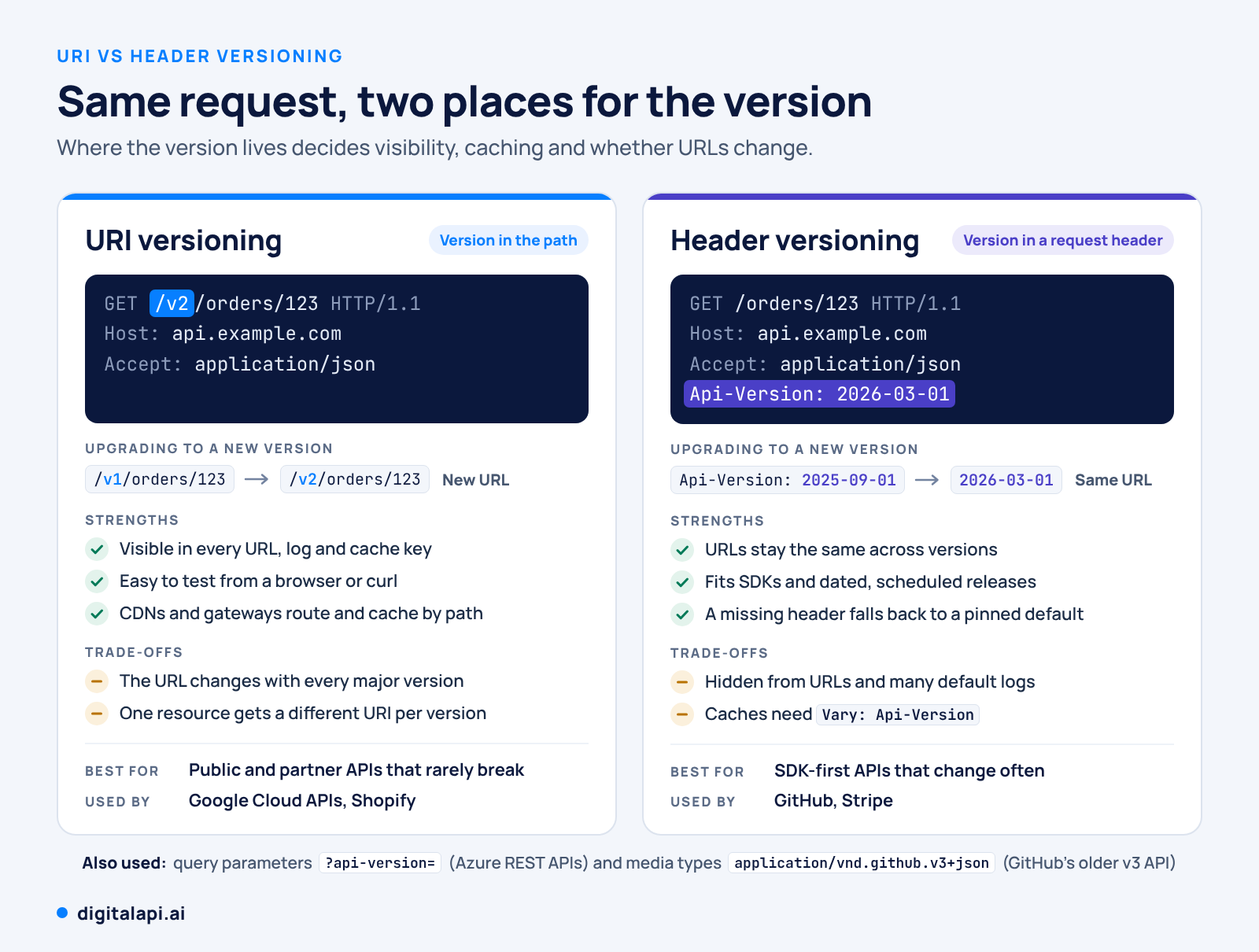
# URI versioning
GET /v2/orders/123 HTTP/1.1
Host: api.example.com

# Header versioning
GET /orders/123 HTTP/1.1
Host: api.example.com
Api-Version: 2026-03-01
URI versioning is right for you if:
- External developers call your API from scripts, browsers or generic API clients
- You ship a breaking change less than once a year
- Your CDN and gateway route and cache by URL
Header versioning is right for you if:
- Most consumers use SDKs you control, so sending a header costs them nothing
- You ship breaking changes several times a year, on a schedule
- URLs must stay identical across versions, for example links stored in customer systems
The naming scheme is a separate choice. Expose major numbers (v1, v2) or calendar dates (2026-03-10), and keep semantic versions such as 2.4.1 for your changelog.
Some APIs also pin a default version per consumer. Stripe sets an account's default on its first API call and lets the Stripe-Version header override it (Stripe docs). GitHub reads dated versions from the X-GitHub-Api-Version header and supports each one for at least 24 months after its successor ships (GitHub docs).
For REST specifics, see our guide to REST API versioning.
What Is the Difference Between Breaking and Non-Breaking Changes?
A breaking change makes a correctly written client fail or behave differently, so it needs a new version. A non-breaking (additive) change, such as a new endpoint or optional field, ships inside the current version because existing clients keep working.
"With a sufficient number of users of an API, it does not matter what you promise in the contract: all observable behaviors of your system will be depended on by somebody."
Hyrum Wright, Hyrum's Law
That's why the line between safe and breaking needs written rules, not judgment calls:
Change the implementation freely, and change the contract deliberately. Enforce the difference in CI.
Diff each pull request's OpenAPI spec against the published one with a tool such as oasdiff. Fail the build on any breaking change that doesn't come with a new major version. Add contract tests for every supported version.
# Fail the pull request if openapi.yaml breaks the published contract
oasdiff breaking published/openapi.yaml openapi.yaml --fail-on ERR
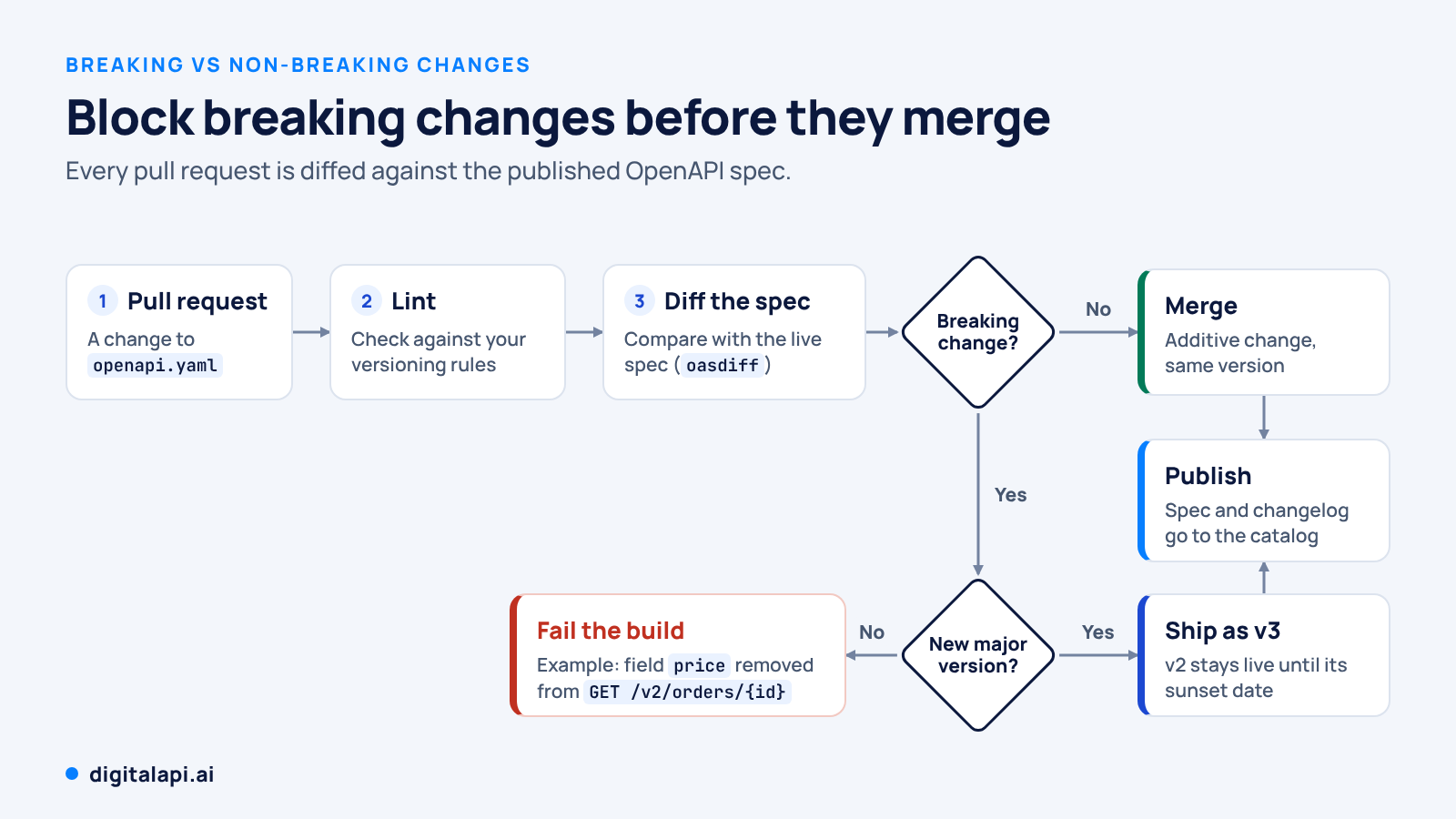
Write these rules into your API versioning guidelines, next to the strategy you chose above.
How Do You Support Multiple API Versions at the Same Time?
Route versions at the gateway, keep old versions as thin adapters over the newest implementation, cap how many major versions run at once, and track every version's owner and consumers in one catalog. Supporting multiple versions is an operations problem more than a code problem.
- Route at the gateway, not in application code. The gateway maps /v1, /v2 or a version header to the right backend, adds deprecation headers, applies per-version rate limits and canaries new builds (how gateways route requests).
- Use adapters, not branches. Run v1 as a translation layer over the v2 backend instead of scattering version checks through business logic.
- Cap active majors. For external APIs, two generally available majors, current and previous, plus an optional preview, is a sensible ceiling.
- Keep one catalog across gateways. Large enterprises run Apigee in one unit, Kong in another and AWS or Azure gateways elsewhere. Put every version in one API catalog with an owner, lifecycle state, spec and consumer list.
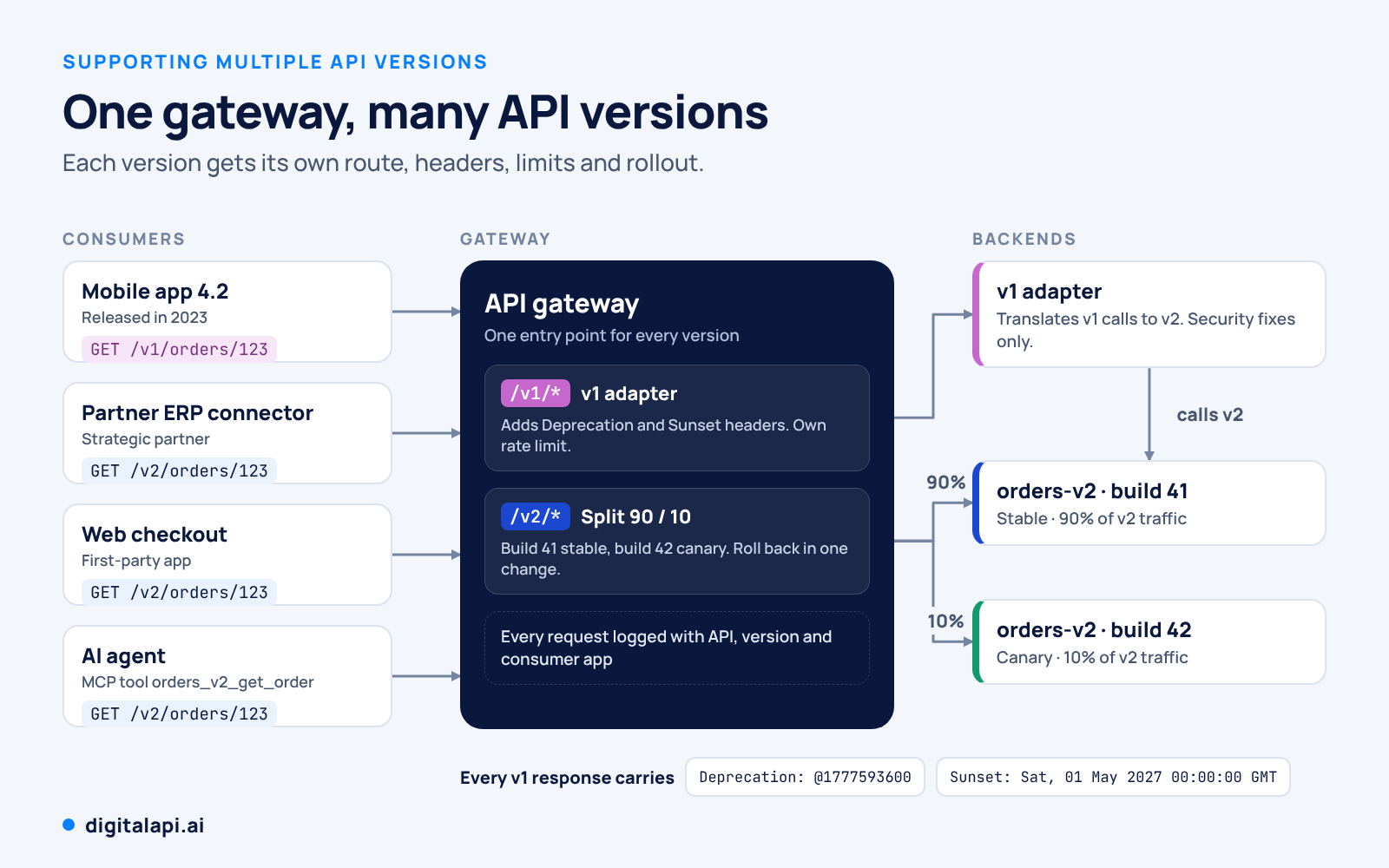
A version inventory turns API version management into something you can plan against:
Watch the cost of version proliferation. Three versions on four gateways in three environments means 36 deployments to patch per vulnerability, before you count microservices.
How Should You Deprecate an API Version?
Announce a retirement date, freeze the old version to security fixes, and signal the change in every response with the Deprecation and Sunset HTTP headers. Then retire it on schedule: brownouts first, 410 Gone at the end.
RFC 9745, published in March 2025, standardizes the Deprecation header. The Sunset header comes from RFC 8594, and its date can't be earlier than the deprecation date. Unlike an email, these headers land in client logs, SDK warnings and agent traces.
HTTP/1.1 200 OK
Content-Type: application/json
Deprecation: @1777593600
Sunset: Sat, 01 May 2027 00:00:00 GMT
Link: <https://developer.example.com/orders/v1-to-v2>; rel="deprecation"; type="text/html"
@1777593600 is the Unix timestamp for 1 May 2026, 00:00 UTC, so this example gives consumers 12 months between deprecation and sunset.
- How long: public and partner APIs usually get 12 to 24 months from a successor's release to retirement, and GitHub commits to at least 24. Internal APIs whose consumers you can name can move in 3 to 6 months.
- Brownouts: before the sunset date, fail v1 calls for an hour, then a day, announced in advance, to flush out hidden dependencies.
- Retirement: return 410 Gone with a migration link, then remove v1's routes, v1-only keys and docs from every host. OWASP's API9 scenario involves a beta host running the same API without its rate limiting, so check staging and beta too.
HTTP/1.1 410 Gone
Content-Type: application/problem+json

{
  "title": "API version retired",
  "status": 410,
  "detail": "Orders API v1 was retired on 2027-05-01. Use v2.",
  "migration_guide": "https://developer.example.com/orders/v1-to-v2"
}
For partner-facing notices, see our guide to API deprecation best practices.
Which Migration Strategies Move Consumers to a New Version?
The best migration strategy asks the least of your consumers. Run versions in parallel, put compatibility in an adapter layer, move consumers in planned waves and give each one a migration guide with the exact diff between versions.
- Parallel run: keep v1 and v2 live side by side, so consumers can switch app by app or endpoint by endpoint.
- Adapter layer: serve v1 through a translation layer over the v2 backend, so you maintain one implementation during the overlap.
- Wave migration: move internal apps first, then friendly partners, then the long tail, using usage data to order the waves.
- Default-version upgrades: make new keys and new SDK releases default to v2, while existing integrations stay pinned until they choose to move.
- Gateway traffic shifting: for changes that keep the contract the same, shift 10%, then 50%, then 100% of traffic to the new build, with instant rollback. Breaking changes can't move silently; consumers must opt in.
- Strangler routing for redesigns: move endpoints one at a time to the new implementation behind the same gateway.
A good migration guide includes a field-by-field diff, before-and-after requests, SDK snippets, a sandbox for testing against v2, and the timeline. Then track progress per consumer, not only per version:
-- Who still calls Orders v1? (last 30 days)
SELECT consumer_app, owner_email, COUNT(*) AS calls, MAX(ts) AS last_call
FROM gateway_access_logs
WHERE api = 'orders' AND version = 'v1'
  AND ts >= now() - INTERVAL '30 days'
GROUP BY consumer_app, owner_email
ORDER BY calls DESC;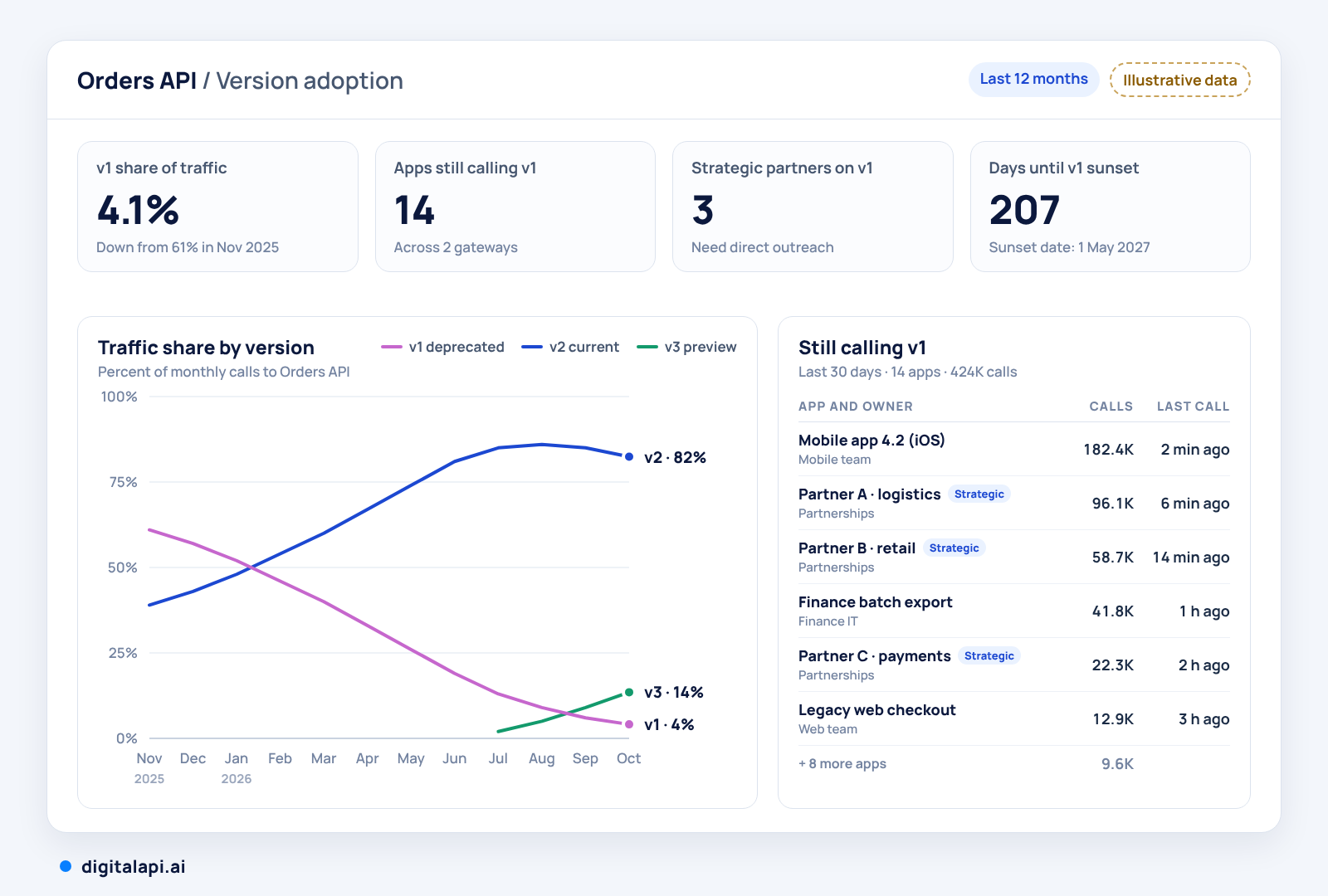
Some legacy consumers can't move in time: embedded devices, smart TV apps, regulated partner systems. Give them a time-boxed extended-support agreement with its own end date, rather than keeping the old version open for everyone.
How Should You Communicate API Changes to Consumers?
Tell consumers early, tell them in more than one place and tell them in the API itself. Publish a changelog and migration guide, notify every app owner directly, show notices in your developer portal, and send Deprecation and Sunset headers so code and AI agents see the change too.
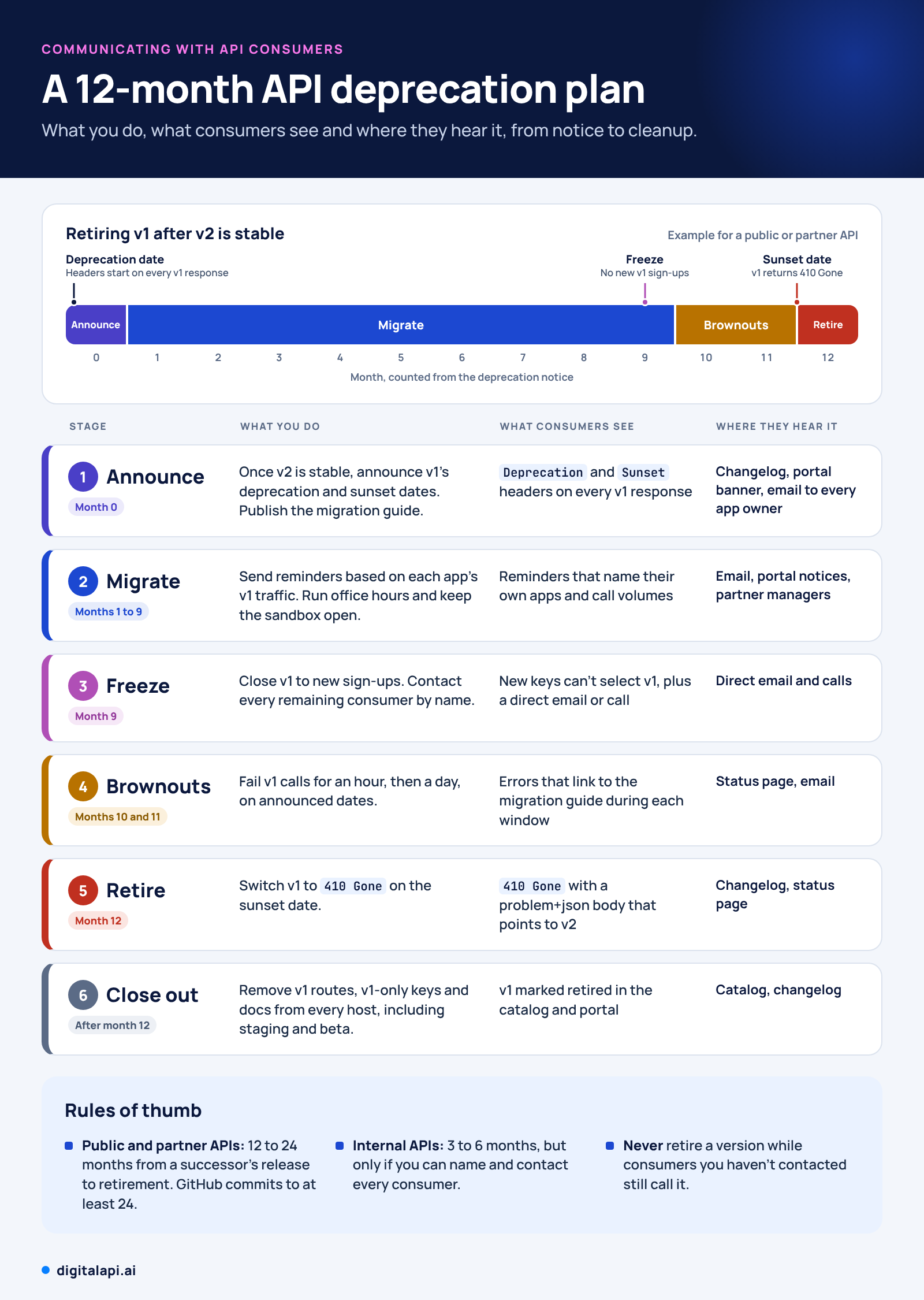
For every version, publish its status, release date, deprecation date, sunset date, breaking-change list, migration guide and replacement version in one place, ideally your API developer portal. GitHub describes the goal of its dated versions as giving integrators "plenty of time and clear guidance for upgrading" (GitHub changelog, March 2026).
Two channels get forgotten. Subscription data tells you who owns each app, so notices reach accountable people instead of a shared inbox.
And AI agents don't read email. They learn about change from machine-readable headers and versioned tool names, such as orders_v2_get_order in an MCP server generated from your OpenAPI spec.
Is Upgrading Your API Platform the Same as Versioning Your APIs?
No. API versioning changes the contract your consumers call. A platform upgrade, such as moving your API marketplace or developer portal to a new major release, changes the tooling around those contracts. Done well, a platform upgrade leaves every API version, URL and credential working exactly as before.
The two still meet. A platform modernization is the best moment to fix version sprawl, because you're touching the catalog anyway:
- Inventory every API version before the move, so retired versions don't migrate with you.
- Keep base URLs, keys and API versions unchanged, so consumers notice only the new portal.
- Carry each version's docs, changelog and deprecation notices across intact.
- Announce the platform change separately from any API version change, so developers know which one needs action.
- After the move, use the new platform's lifecycle and usage data to retire versions past their support window.
How Does DigitalAPI Help Enterprises Manage API Versions?
Version sprawl and legacy consumers are mostly a visibility problem: versions live on different gateways, and no single system knows who calls them. DigitalAPI's API management platform connects to Apigee, Kong, AWS API Gateway, Azure API Management, MuleSoft and in-house gateways without touching the runtime. Every version gets one owner, one lifecycle state and one usage view.
- One catalog across gateways: every API version is discovered, owner-tagged and tracked through Beta, Live and Deprecated states.
- Guidelines enforced at merge: Spectral-based rulepacks gate pull requests, with OWASP API Top 10 scanning.
- Deprecation impact before you commit: per-consumer and per-agent traffic shows who still calls a version, and deprecation notices reach consumers automatically on 30, 60 or 90-day windows.
- A version-aware runtime: the API Gateway versions and deprecates APIs and exposes MCP-ready endpoints, with separate rate limits for agent traffic.
- One place for consumers: the API Marketplace gives developers and partners a searchable hub for every version across gateways, with docs and subscriptions.
A leading global bank used DigitalAPI to bring 29,000+ internal APIs and 19,500 external developers into one catalog and portal across 60+ countries (read the story).
See every API version across your gateways: book a demo →
Conclusion: Where Should Your Team Start?
Start with visibility. List every live version with its gateways, owner and active consumers before you debate URI versus header. That inventory shows which versions you can retire this quarter, which consumers need a migration plan and which rules your guidelines should lock in.
Then work through the rest in order: write the rules, gate breaking changes in CI, route at the gateway, and deprecate with headers, brownouts and direct outreach. Done this way, API versioning stops being a fire drill and becomes a routine part of API lifecycle management.
See every API version, owner and consumer across your gateways in one place.
DigitalAPI connects to the gateways you already run, so you can plan deprecations and migrations with real usage data instead of guesses.
Book a demo → (CTA button)
Frequently Asked Questions About API Versioning
What is API versioning in simple terms?
API versioning means giving each incompatible release of an API its own label, such as v1 or v2, so old and new clients both keep working. Clients call the version they were built for, and the provider retires old versions on a published schedule.
What is v1 and v2 in a REST API?
In a REST API, v1 and v2 are major versions of the same API, usually shown in the URL path, such as /v1/users and /v2/users. v2 holds breaking changes v1 clients can't handle, so both run until v1 is retired.
What are the best practices for API versioning?
The core API versioning best practices are: version only for breaking changes, use one strategy across all APIs, block breaking changes in CI, route versions at the gateway, track usage per consumer, and retire versions with Deprecation and Sunset headers after advance notice.
How do you handle different API versions?
Run supported versions side by side behind an API gateway that routes each request by URI or header. Keep older versions as thin adapters over the newest implementation, cap how many majors are live, and track which consumers call each version so you can retire it safely.
Should the API version go in the URI or a header?
Put it in the URI for public and partner APIs, because the version shows in every URL, log and cache key. Use a header for SDK-first APIs that change often, because URLs never change. Consistency across your APIs matters more than the choice.
How long should you support an old API version?
Public and partner APIs usually get 12 to 24 months after a successor ships, and GitHub commits to at least 24. Internal APIs can retire versions in 3 to 6 months when every consumer is known and reachable.
How do you tell API consumers about a new version?
Publish a changelog and migration guide, email every app owner, show notices in the developer portal and send Deprecation and Sunset headers on the old version's responses. Repeat reminders based on who is still calling it.
Is a platform upgrade the same as API versioning?
No. A platform upgrade changes the portal, catalog or tooling around your APIs, while API versioning changes the contract clients call. A well-run platform upgrade keeps every API version, URL and key unchanged for consumers.
Dhayalan Subramanian is Associate Director, Product Growth at DigitalAPI, where he leads go-to-market and product growth for the company’s multi-gateway API management platform. His work focuses on helping large enterprises and mid-market cloud companies consolidate APIs across AWS, Azure, Apigee, Kong, MuleSoft, and other gateways into a single control plane for governance, discovery, monetization, and agent consumption.
Dhayalan brings 14+ years of experience across product strategy, enterprise architecture, and engineering leadership. Earlier in his career, he held senior roles at Encora (as Associate Architect and Technical Manager), Mindtree (Technology Lead), Tech Mahindra (Technical Lead), and Primus Analytics, where he designed integration frameworks and delivered enterprise-grade digital platforms for global customers.
At DigitalAPI, he works directly with platform, integration, and developer experience leaders at Fortune 500 organizations to operationalize unified API catalogs, developer portals, and MCP-ready APIs. He writes regularly on API developer experience, API governance, and AI agent architectures.

One email a fortnight. Worth opening.
A short digest of what we're writing, what we're learning from customers, and the handful of links you'd actually want from us. No tracking pixels.

.avif)