



JWT Authentication: How It Works and How to Implement It
Most JWT tutorials stop at sign() and verify(). This guide covers the full JWT authentication lifecycle with tested code: issuing tokens, the nine checks to run on every request, refresh token rotation, 401 vs 403, gateway enforcement and the mistakes behind real breaches.

TL;DR:
What is JWT authentication?
JWT authentication is a stateless way for an API to identify the caller. An authorization server signs a JSON Web Token (JWT) after the client logs in or proves its identity.
The client sends that token in theAuthorization: Bearerheader on every request. The API verifies the signature with a public key, checks the claims (iss,aud,exp, scope), and grants or denies access.
No session store is needed.
Most JWT authentication tutorials stop at jwt.sign() and jwt.verify(). That's the easy 20%. The breaches come from the other 80%: accepting a token meant for a different API, trusting the algorithm the token names, handing out tokens that live for a month, or storing them where any script can read them.
This guide covers the full lifecycle with code we ran and tested. You'll see how to issue a token, verify it on every request, refresh it safely, and move the checks to your API gateway so every service enforces the same rules.
What is JWT authentication?
JWT authentication means the API decides who is calling by verifying a signed token instead of looking up a session. The token carries the caller's identity and permissions as claims. Because the issuer signs it, the API can trust those claims after one cryptographic check, with no database call.
Three parties take part:
- The issuer (authorization server or identity provider) checks credentials and signs the token. Examples: Okta, Auth0, Keycloak, Microsoft Entra ID, or your own auth service.
- The client (web app, mobile app, partner backend or AI agent) holds the token and sends it with each call.
- The API (or the API gateway in front of it) verifies the token and enforces access.
If you're new to the token itself, start with what a JWT is and how its header, payload and signature fit together. This post focuses on using it.
Is JWT authentication the same as OAuth?
No. OAuth 2.0 is the protocol for getting a token; JWT is a format the token can take. Most production setups use both: an OAuth 2.0 or OpenID Connect server issues the access token, and that access token is a JWT. RFC 9068 standardises this as the "JWT profile for OAuth 2.0 access tokens". For the full comparison, read OAuth 2.0 vs JWT.
JWT authentication vs session authentication
Session authentication stores state on the server; JWT based authentication puts the state inside the signed token. That one difference drives every trade-off below.
How does JWT authentication work?
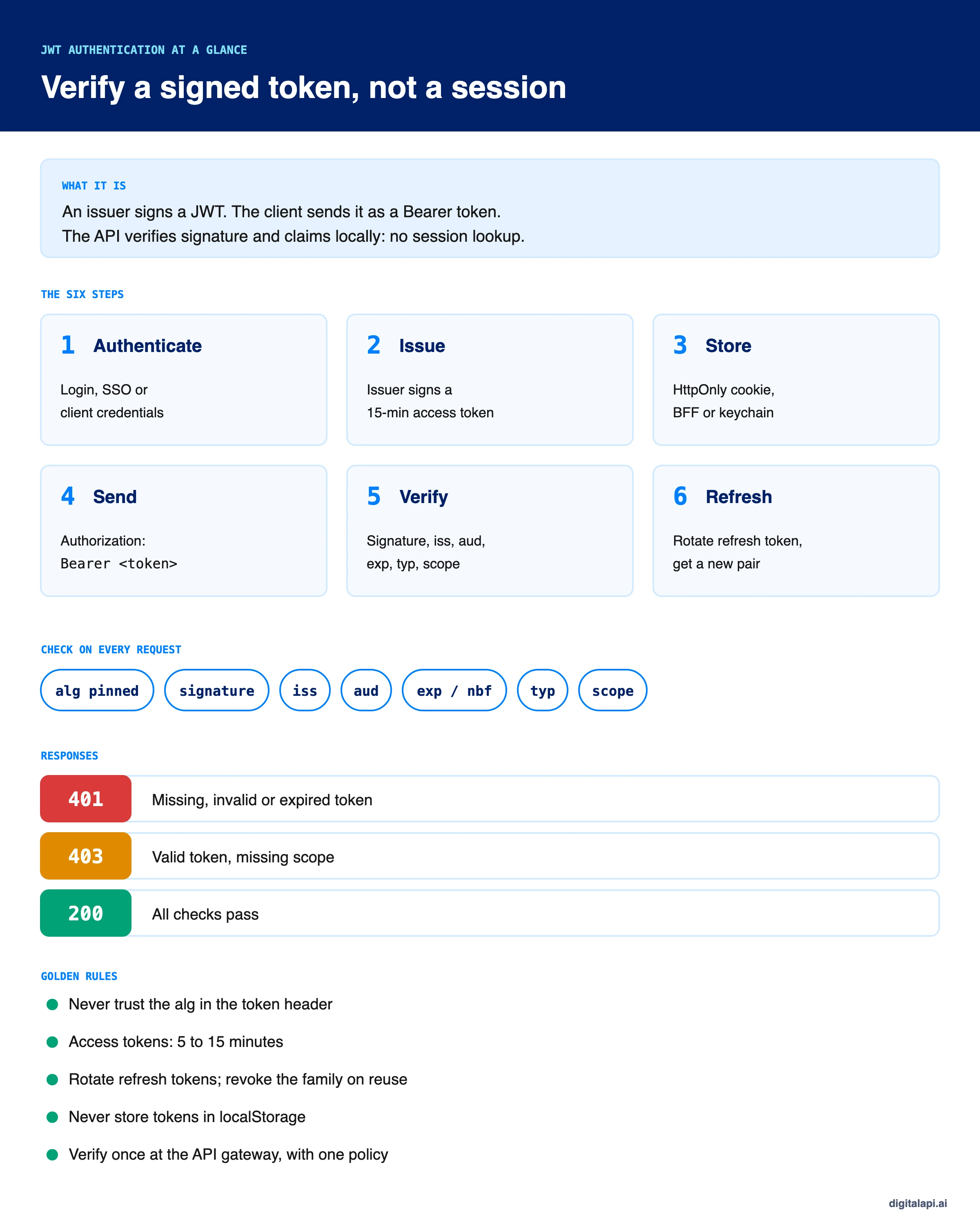
JWT authentication works in six steps: authenticate, issue, store, send, verify, refresh. The issuer and the API never need to talk to each other during a request. The API only needs the issuer's public keys, which it fetches once and caches.
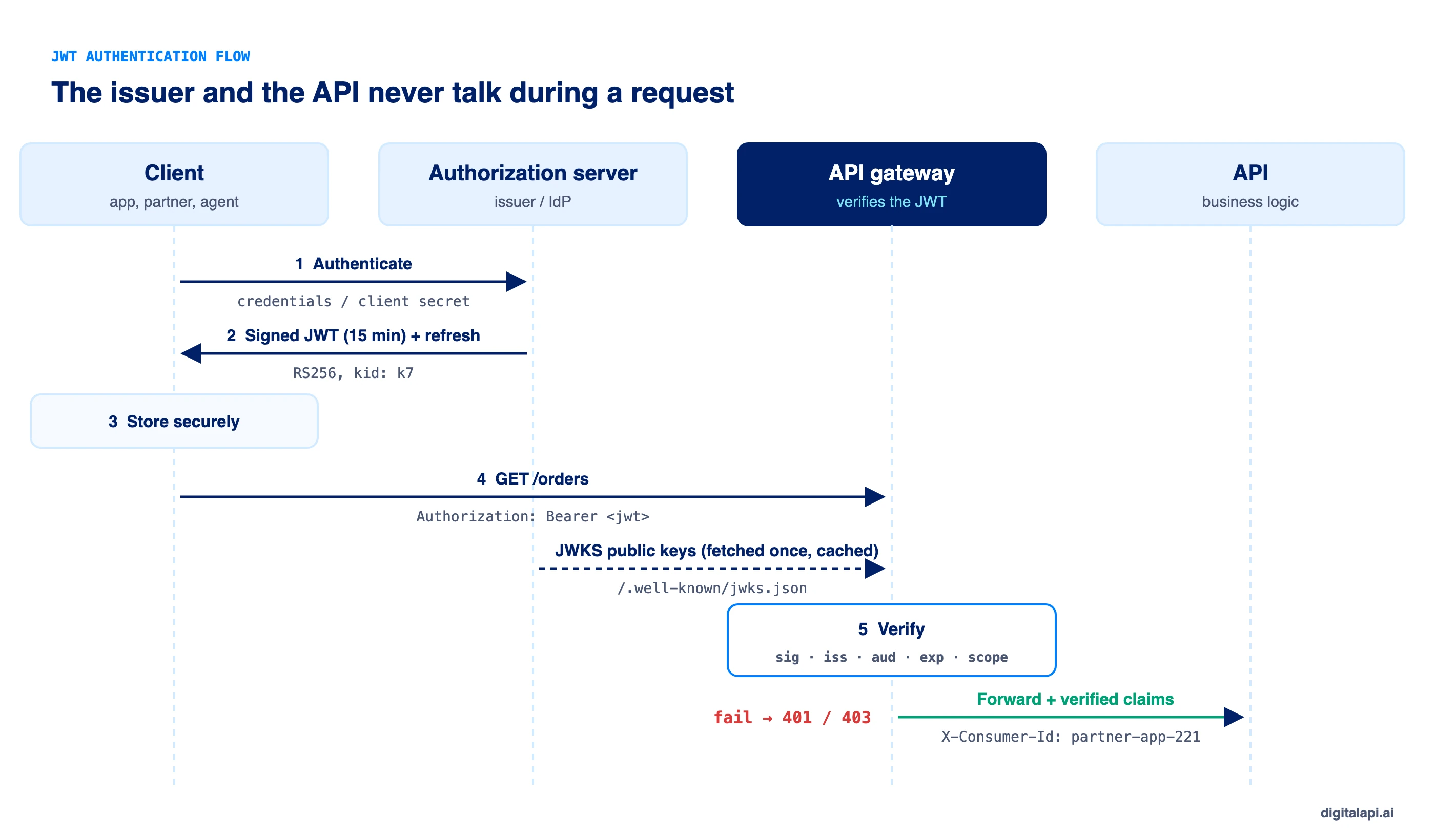
- Authenticate. The client proves who it is. A user logs in with a password, passkey or SSO. A backend or partner app uses the OAuth 2.0 client credentials grant (client ID plus secret, or a signed assertion).
- Issue. The authorization server signs a short-lived access token with its private key. It often adds a refresh token for user sessions.
- Store. The client keeps the token somewhere scripts can't read (more on this below).
- Send. The client attaches the token to every API call:
Authorization: Bearer <token>. - Verify. The API or gateway checks the signature with the issuer's public key from its JWKS endpoint. Then it checks
iss,aud,expand the scopes. A pass means access; a fail means401or403. - Refresh. When the access token expires, the client trades its refresh token for a new pair, with no new login.
Here's how JWT authentication looks on the wire. The request:
How do you issue a JWT for authentication?
Issue a JWT only after the caller has authenticated, sign it with a private key, and keep it short-lived and narrow. In most companies you don't write this code. Your identity provider issues the tokens. If you run your own auth service, here is a minimal issuer in Node.js using the jose library.
Each line is a decision:
alg: RS256with a private key. Asymmetric signing means only the issuer can create tokens, while any API can verify them with the public key. ES256 and EdDSA work too and give smaller signatures.kid: k7names the key, so verifiers can pick the right public key from the JWKS and you can rotate keys without downtime.typ: at+jwtmarks this as an access token (RFC 9068). APIs can then reject ID tokens that are passed off as access tokens.aud: orders-apilimits the token to one API. A token fororders-apimust fail atbilling-api.expof 15 minutes caps the damage if the token leaks.jtigives each token a unique ID, which you need for logging and for denylisting.
What should go in a JWT, and what should stay out?
Put in only what the API needs to make an access decision. Leave out anything you wouldn't print in a log. Anyone holding a JWT can decode the payload. It's signed, not encrypted.
How do you manage the signing keys?
Keep the private key in a KMS or HSM, publish only public keys at a JWKS endpoint, and rotate on a schedule. The JWKS (JSON Web Key Set) is a URL such as https://auth.example.com/.well-known/jwks.json that lists the active public keys by kid. To rotate: publish the new key, wait for caches to refresh, start signing with it, then remove the old key after the longest token lifetime has passed.
How do you verify a JWT on every request?
Verify the signature with a pinned algorithm, then check every claim the API depends on, before any business logic runs. JWT validation is where most implementations go wrong. Calling decode() instead of verify(), or verifying the signature but skipping aud, both look like working auth until someone attacks it.
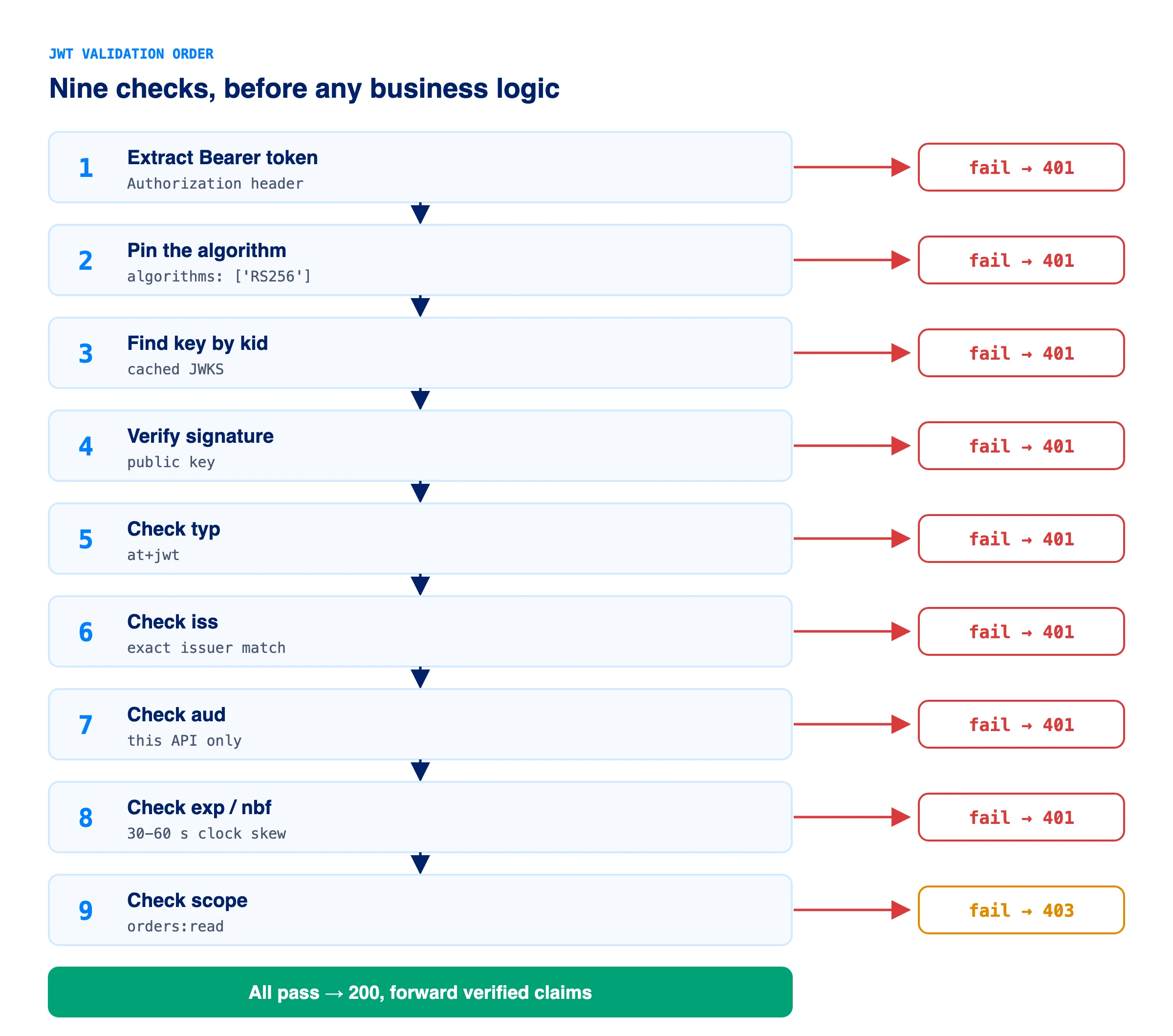
Run these checks in this order. RFC 8725, the JWT Best Current Practices, is the source for most of them.
- Extract the token from
Authorization: Bearer. Reject if missing (401). - Pin the algorithm. Accept only the algorithm you expect, such as
RS256. Never use thealgthe token names. - Find the key by
kidin your cached JWKS. Unknownkid: refetch once, then reject. - Verify the signature. Fail means
401. - Check
typisat+jwtif your issuer sets it, so ID tokens can't be used as access tokens. - Check
issexactly matches your trusted issuer. - Check
audincludes this API. - Check
expandnbfwith a small clock-skew allowance (30 to 60 seconds). - Check scope or roles for this endpoint. Missing scope means
403, not401.
JWT verification in Node.js (Express middleware)
This middleware does all nine checks. createRemoteJWKSet fetches and caches the issuer's public keys and refetches on an unknown kid.
We tested this against six tokens. A valid token returned 200. A token with the wrong scope returned 403. An alg: none token, a token for another audience, an expired token and a missing token all returned 401.
JWT verification in Python (PyJWT)
The same checks in Python. PyJWKClient picks the signing key from the JWKS by kid.
jwt.decode() raises jwt.InvalidTokenError (or a subclass such as ExpiredSignatureError) on any failure. Map it to a 401.
Should a failed JWT return 401 or 403?
Return 401 when the token is missing or invalid, and 403 when the token is valid but lacks permission. RFC 6750 defines the matching WWW-Authenticate errors.
Keep the response body generic. Telling an attacker "audience mismatch" helps them; log the detail on the server instead.
How do JWT expiry and refresh tokens work?
Keep access tokens short-lived and use a refresh token to get new ones without a fresh login. A stateless JWT can't be recalled once issued, so its lifetime is your main control. The refresh token is what lets you keep that lifetime short without logging users out every 15 minutes.
How long should a JWT be valid?
There's no single standard. These ranges are common in production:
For machine-to-machine access with the client credentials grant, skip refresh tokens. RFC 6749 says a refresh token should not be issued for that grant; the client just asks for a new access token.
How does refresh token rotation work?
Every time a refresh token is used, the server issues a new one and invalidates the old one. If an old one ever comes back, the server revokes the whole chain. That reuse signal is how you detect a stolen refresh token. RFC 9700, the OAuth 2.0 Security Best Current Practice (January 2025), requires refresh tokens for public clients such as browser and mobile apps to be either sender-constrained or rotated.
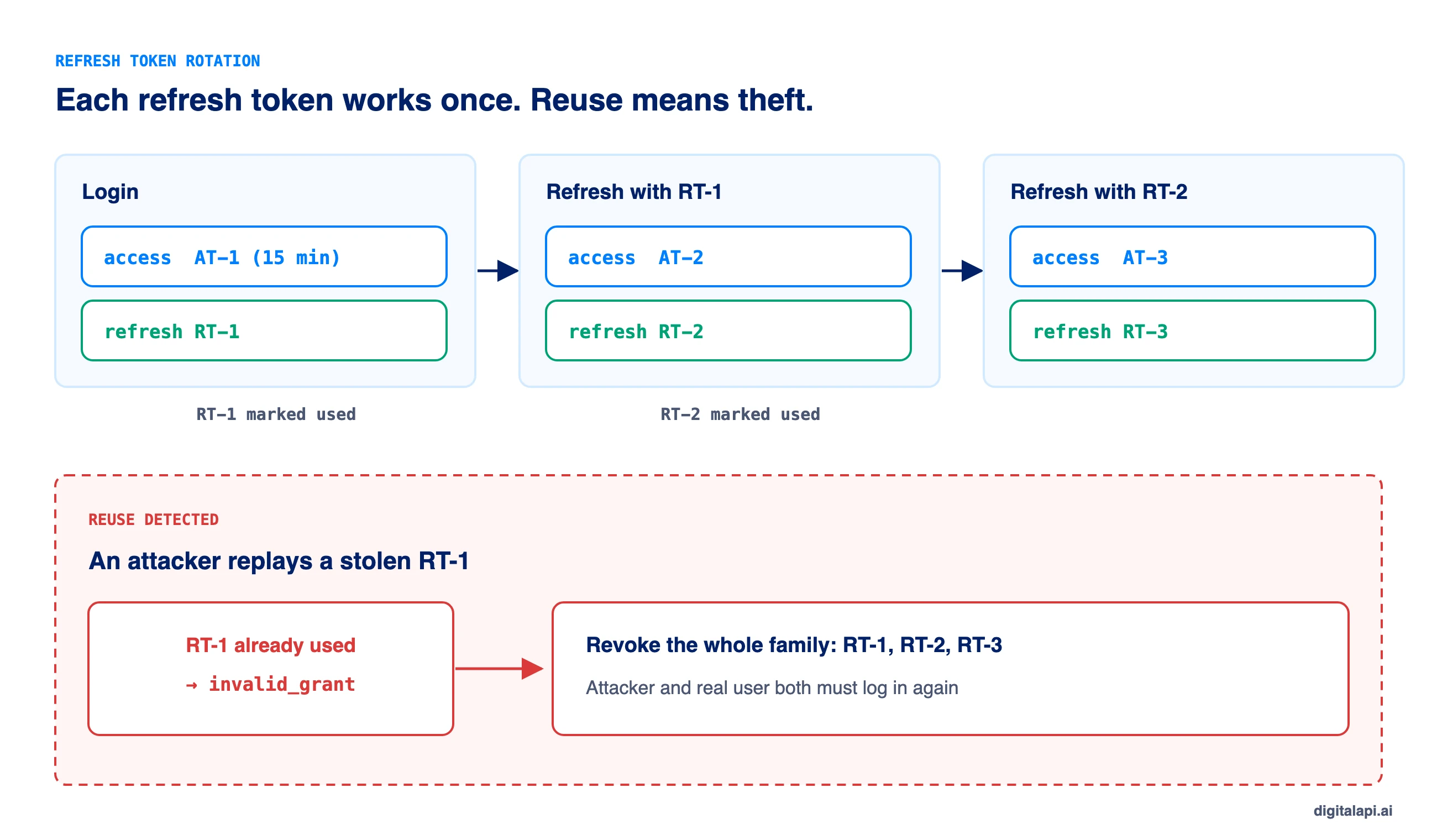
Here is a minimal rotation endpoint. Note that the refresh token is an opaque random string, stored hashed, not a JWT. The server must be able to revoke it, so there is no benefit in making it self-contained.
In our test, a first refresh returned a new pair. Replaying the old refresh token failed, and it also killed the new refresh token from the same family, which forces a fresh login.
How do you revoke a JWT or log a user out?
You can't delete a JWT, but you can stop accepting it. Pick the cheapest option that meets your risk:
- Wait for expiry. With 5 to 15 minute tokens, this is often enough.
- Revoke the refresh token. Logout deletes the refresh token, so no new access tokens are issued.
- Denylist the
jti. Store revoked token IDs until theirexppasses. The API checks a fast cache on each request. It adds state, so keep it for high-risk cases. - Use introspection for sensitive APIs. RFC 7662 lets an API ask the issuer whether a token is still active. You lose statelessness but gain instant revocation.
Where should the client store the JWT?
Store tokens where JavaScript can't reach them. Storage depends on the client type:
- Browser apps: the safest pattern is a backend-for-frontend (BFF). The server keeps the tokens and the browser holds only an
HttpOnly,Secure,SameSitesession cookie. If the browser must hold the token, use anHttpOnlycookie, notlocalStorage, which any injected script can read. Cookies bring CSRF risk, so useSameSite=LaxorStrictand CSRF tokens for state-changing requests. - Mobile apps: iOS Keychain or Android Keystore.
- Backends, partners and AI agents: in memory, with the client secret in a secrets manager. Never in source code or logs.
How does JWT authentication work at the API gateway?
At the gateway, JWT authentication runs once at the edge for every API behind it, so each service stops writing its own verification code. The gateway runs the nine checks above, rejects bad tokens before they reach your services, and forwards trusted identity to the backend.
That fixes the most common real-world gap: inconsistency. One team pins the algorithm, another forgets aud, a third has a library two years out of date. With gateway-level JWT token authentication, one policy applies everywhere and one place gets patched.
A solid gateway setup does five things:
- Validates the JWT against the issuer's JWKS with a pinned algorithm, exact
issand per-APIaud. - Enforces scopes per route, such as
orders:readonGET /ordersandorders:writeonPOST /orders. - Forwards verified claims to the backend (for example as
X-Consumer-IdandX-Scopesheaders) and strips any client-supplied copies of those headers. - Rate-limits per consumer, using
client_idorsubfrom the token rather than the IP address. - Logs every decision with the
jtiandclient_id, so you can trace a leaked token.
Should services still verify the token if the gateway already did? For zero-trust networks, yes. A cheap second check stops anything that bypasses the gateway. At minimum, lock the services so they only accept traffic from the gateway.
The problem grows when you run more than one gateway: one per cloud, a legacy gateway, a new one for AI traffic. The DigitalAPI API Gateway applies the same JWT validation policy across OAuth, OIDC, Keycloak and Okta issuers, so a token rule changes in one place instead of four. Teams using the DigitalAPI API Developer Portal also let partners request access and get scoped, short-lived credentials on their own, instead of waiting days for keys sent by email.
See how DigitalAPI enforces the same JWT policy across every gateway you run → Book a Demo
How does JWT authentication work for AI agents and MCP servers?
AI agents use the same OAuth and JWT flow, but they need tighter limits because they act fast and unattended. The MCP authorization specification requires MCP servers to validate that tokens were issued for them (the audience check) and forbids passing a client's token straight through to upstream APIs. Give each agent its own client identity, scopes for only the tools it needs, and minutes-long tokens. For the full setup, see securing MCP endpoints.
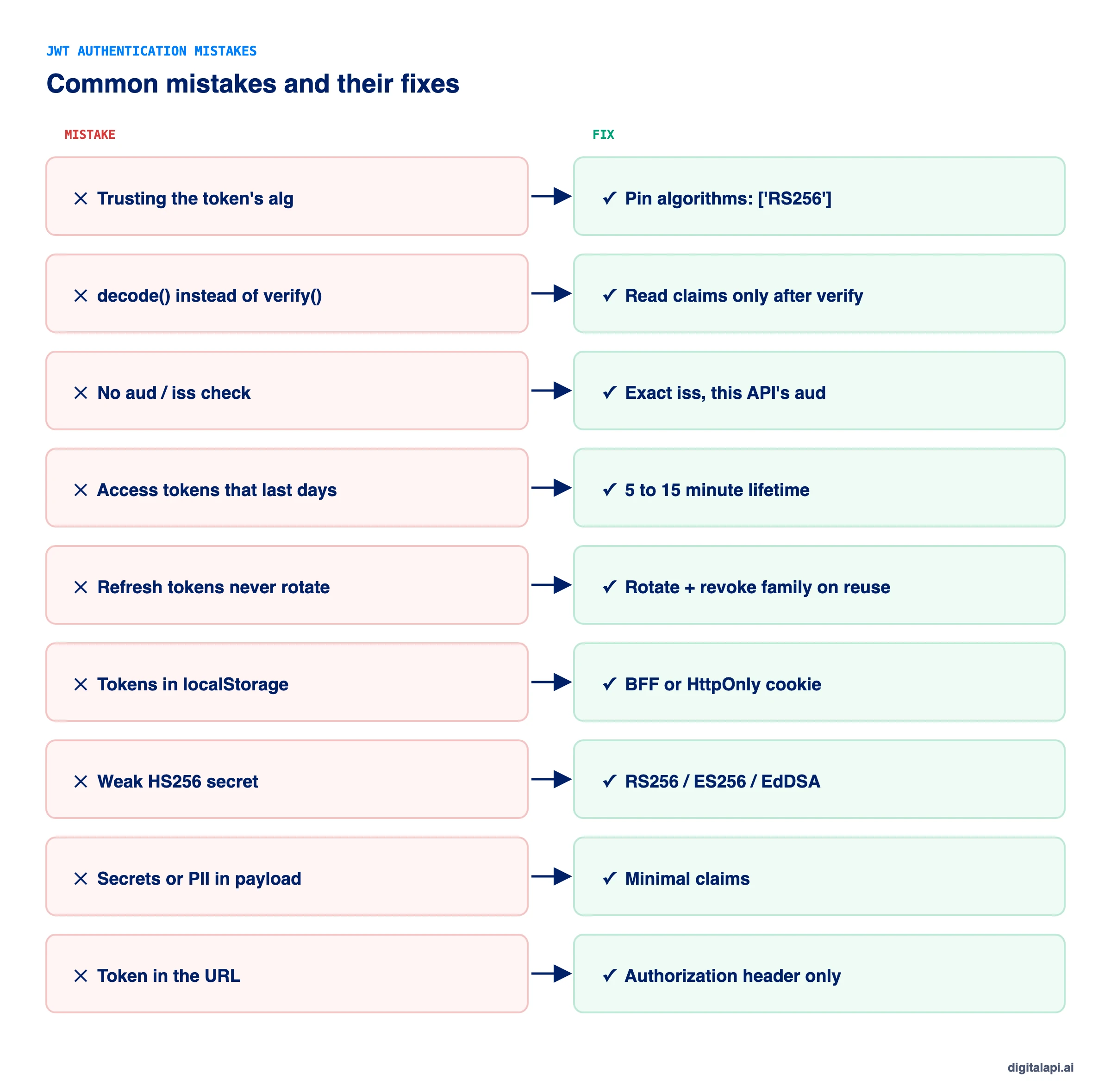
What are the most common JWT authentication mistakes?
Nearly every JWT authentication breach comes from configuration, not from the JWT standard. OWASP lists accepting unsigned or weakly signed tokens and skipping expiry checks under API2:2023 Broken Authentication, the second most critical API risk.
The cost of getting it wrong is real. The Verizon 2025 Data Breach Investigations Report found credential abuse was the top way attackers got in, at 22% of breaches. Salt Security's 2025 State of API Security report found that 95% of API attacks came from authenticated sources: callers holding a valid token.
What is the JWT authentication implementation checklist?
Use this checklist before you ship JWT auth to production. Each item maps to a section above.
- Tokens come from a trusted issuer (OAuth 2.0 or OIDC), not hand-rolled login code, where possible.
- Tokens are signed with RS256, ES256 or EdDSA; private keys live in a KMS or HSM.
- Verifiers pin the algorithm and fetch keys from the JWKS by
kid. - Every API checks
iss,aud,exp,nbfandtyp, with 30 to 60 seconds of clock skew. - Scopes are checked per endpoint; missing scope returns
403. - Access tokens last 5 to 15 minutes for users and under an hour for machines.
- Refresh tokens are opaque, stored hashed, rotated on use, with reuse detection.
- Browser tokens use a BFF or
HttpOnlycookies, neverlocalStorage. - Payloads hold no secrets or unnecessary personal data.
- Verification runs at the gateway with one policy, and failures are logged with
jtiandclient_id.
Key takeaways
- JWT authentication is stateless: the API verifies a signed token locally instead of looking up a session.
- Verification is where security lives. Pin the algorithm, then check
iss,aud,exp,typand scope on every request. - Short access tokens plus rotating refresh tokens solve the revocation problem without constant logins.
- Store tokens out of JavaScript's reach: BFF or
HttpOnlycookies in browsers, secure storage on mobile. - Run verification at the API gateway so every API enforces one consistent policy.
Frequently asked questions
1. Is JWT authentication secure?
JWT authentication is secure when the API verifies every token properly: pinned algorithm, valid signature, exact iss and aud, unexpired exp, and the right scope. Most JWT breaches come from skipping one of those checks or from long-lived tokens, not from the JWT standard itself. Use HTTPS, short lifetimes and a maintained library.
2. How does JWT authentication work step by step?
The client authenticates with an authorization server, which signs and returns a JWT. The client sends the JWT in the Authorization: Bearer header on each API call. The API verifies the signature with the issuer's public key, checks the claims, and allows or denies the request. When the token expires, the client uses a refresh token to get a new one.
3. How long should a JWT access token last?
Most teams set access tokens to 5 to 15 minutes for user-facing apps and up to 60 minutes for machine-to-machine clients. Shorter lifetimes limit the damage if a token leaks. Pair short access tokens with rotating refresh tokens so users don't have to log in again.
4. Where should I store a JWT in the browser?
Don't store it in localStorage or sessionStorage, because any injected script can read them. The safest option is a backend-for-frontend that keeps tokens on the server and gives the browser an HttpOnly, Secure, SameSite cookie. If the browser must hold the token, use an HttpOnly cookie with CSRF protection.
5. Can you revoke a JWT?
Not directly, because the API doesn't look anything up. You can stop accepting it: keep access tokens short, revoke the refresh token at logout, denylist the token's jti until it expires, or use token introspection (RFC 7662) for APIs that need instant revocation.
6. What is the difference between JWT decode and JWT verify?
Decode only Base64URL-decodes the header and payload so you can read them. Verify also checks the signature and claims. Never make an access decision from a decoded token: anyone can edit an unverified payload.
7. Should I use HS256 or RS256 for JWT authentication?
Use RS256, ES256 or EdDSA when more than one service verifies tokens. Only the issuer holds the private key, and every API verifies with a public key. HS256 uses one shared secret for signing and verifying, so every verifier could also forge tokens. It suits a single service with a strong random secret.
8. Do I need refresh tokens for machine-to-machine APIs?
Usually not. With the OAuth 2.0 client credentials grant, the client can request a new access token whenever the old one expires, and RFC 6749 says a refresh token should not be issued for that grant. Refresh tokens matter for user sessions, where you don't want to ask for credentials again.
9. Is JWT authentication better than session authentication?
Neither is better everywhere. Sessions are simpler and revoke instantly, which suits a single web app on one domain. JWT authentication scales across many services, gateways, mobile apps and partners because any service can verify the token locally. Many systems use both: sessions in the browser, JWTs between the backend and APIs.
10. Should JWT authentication happen at the API gateway or in each service?
Do it at the API gateway so every API enforces the same policy, and add a light check in each service for zero-trust networks. Gateway validation removes duplicate code, keeps algorithm and audience rules consistent, and gives you one place to log and patch.
Conclusion
JWT authentication is simple to start and easy to get subtly wrong. The token format is sound. The risk lives in verification and lifecycle: an unpinned algorithm, a missing audience check, a token that lives for a month, a refresh token that never rotates.
Get those right and JWTs give you fast, stateless access control that scales from one API to hundreds. Run the checks at the gateway, keep tokens short and narrow, and treat every refresh as a chance to catch theft.
How safely do you grant API access to partners and AI agents? Get your free readiness score: Check Your API Access Readiness
Prefer a walkthrough? Book a Demo
Dhayalan Subramanian is Associate Director, Product Growth at DigitalAPI, where he leads go-to-market and product growth for the company’s multi-gateway API management platform. His work focuses on helping large enterprises and mid-market cloud companies consolidate APIs across AWS, Azure, Apigee, Kong, MuleSoft, and other gateways into a single control plane for governance, discovery, monetization, and agent consumption.
Dhayalan brings 14+ years of experience across product strategy, enterprise architecture, and engineering leadership. Earlier in his career, he held senior roles at Encora (as Associate Architect and Technical Manager), Mindtree (Technology Lead), Tech Mahindra (Technical Lead), and Primus Analytics, where he designed integration frameworks and delivered enterprise-grade digital platforms for global customers.
At DigitalAPI, he works directly with platform, integration, and developer experience leaders at Fortune 500 organizations to operationalize unified API catalogs, developer portals, and MCP-ready APIs. He writes regularly on API developer experience, API governance, and AI agent architectures.

One email a fortnight. Worth opening.
A short digest of what we're writing, what we're learning from customers, and the handful of links you'd actually want from us. No tracking pixels.