











How to catalog Kong APIs with DigitalAPI's developer portal
This blog shows you how to catalog your Kong APIs in one place using DigitalAPI’s developer portal, and, if you want, bring in APIs from other gateways and sources too.

TL;DR
1. Enterprises do not live in a Kong-only world: APIs end up spread across multiple Kong runtimes, other gateways (Azure, Apigee, MuleSoft, AWS), and source artefacts in Git, Postman, and wikis. Any single-gateway catalog leaves half your estate invisible.
2. Kong's own Service Catalog and Dev Portal are strong inside the Kong ecosystem, but not built to be the single pane of glass for everything else: Lack of self-serve onboarding experience, multi-gateway reality, multi-portal fatigue, and duplicate maintenance are where teams usually feel the pain.
3. The pattern that works is layered, not rip-and-replace: Keep Kong as your runtime, policy, and traffic layer. Put DigitalAPI on top as the unified catalog and developer portal across Kong and every other source.
4. Setup is straightforward, not a platform project: Add a Kong instance, authenticate against the control plane, hit import, and the full set of Kong services, routes, and specs lands in one API Estate. Other gateways and sources plug in the same way.
5. You get one catalog, one portal, one search bar for every consumer: Internal developers, partners, and external consumers stop guessing which portal to log into. Producers stop duplicating specs across tools.
6. It is also the foundation for AI-driven API use cases: A clean, machine-readable, well-tagged catalog is what makes Kong APIs safely consumable by AI agents and MCP-style tools, not just human developers.
Get Started with DigitalAPI's Developer Portal and catalog all your APIs from Kong and any other gateway. Book a Demo!
Kong powers more than 60% of enterprise API gateway deployments, yet most organisations run two or more gateway platforms simultaneously. APIs end up distributed across Kong runtimes, Azure API Management, Apigee, and MuleSoft and documentation stays scattered across Git, Postman, and wikis. Developers lack visibility into the full API landscape, specs drift from actual deployments, and the same service gets rebuilt by different teams because nobody could find the existing one. This guide shows how to consolidate all Kong APIs and every other source into a single catalog using DigitalAPI's developer portal, without touching Kong's gateway configuration.
What is Kong's native Service Catalog and Dev Portal?
Kong Konnect's Service Catalog is a centralised inventory of all services running in a Kong organisation. It auto-discovers services from Gateway Manager and Mesh Manager, aggregates metadata from third-party tools like GitHub, PagerDuty, and Datadog, and uses Scorecards to measure compliance against security and operational standards. Kong's Dev Portal (v3, GA June 2025) is a customisable portal that lets developers browse OpenAPI and AsyncAPI specs, test endpoints, register applications, and manage credentials. It supports three deployment modes - internal, partner, and public - with SSO, RBAC, and dynamic client registration built in. Both tools are strong inside the Kong ecosystem. The limitation starts when your API estate extends beyond Kong - which, for most enterprises, it already has.
Shadow APIs and the governance gap Kong's catalog doesn't solve
Shadow APIs are the services running in production that are not in any catalog, not documented, and not governed. They accumulate when teams connect microservices directly, deploy to cloud functions without a gateway record, or migrate between gateway versions without cleaning up old routes.
Kong's Service Catalog auto-discovers services from its own Gateway Manager which means any API not running through a Kong runtime is invisible to it. For most enterprise estates, that is a significant blind spot.
DigitalAPI surfaces shadow APIs from non-Kong sources by pulling from every connected gateway simultaneously. An API running on Azure API Management that was never cataloged in Kong becomes visible the moment Azure is connected. The same applies to APIs documented in SwaggerHub, Postman collections, and GitHub repos - all imported into the same estate view.
The result is a shadow API discovery layer that works across your entire gateway mix, not just the Kong portion of it.
Why cataloging Kong APIs gets hard in real life
On slides, an API gateway looks like a neat single entry point. In production, your Kong landscape usually looks more like this:
- Multiple Kong runtimes / Konnect control planes for different business units or regions
- Separate workspaces per team or environment (dev, test, prod)
- APIs documented in a mix of OpenAPI files in Git, Postman collections, wikis, and Notion pages
- Some services are still hitting legacy gateways or direct backends
- Lack of a self-serve developer experience with in-built sandboxing, key lifecycle management,
Kong has invested in a Service Catalog and Dev Portal that help you centralize services and publish documentation to API consumers. But as soon as you
- Run more than one gateway (Kong + Azure + Apigee + API Gateway, etc.)
- Need a single catalog for internal, partner, and external consumers
- Want cross-gateway governance and reporting
You end up with yet another island of API information instead of a true, unified catalog. That’s the gap DigitalAPI is designed to fill.
Why Kong's native catalog and dev portal is not enough
Kong Konnect's Service Catalog delivers a centralised inventory of services and APIs, auto-discovering services from Gateway Manager and Mesh Manager with governance scorecards for compliance evaluation. The Dev Portal (v3, generally available since June 2025) is a customisable portal supporting OpenAPI and AsyncAPI specs, developer self-registration, SSO, RBAC, and dynamic client registration. Kong also recently launched an MCP Registry in tech preview, enabling AI agents to discover MCP servers registered within the Konnect organisation
Where teams usually feel the pain is when
1. Your world is not only Kong
You may also have Azure API Management, Apigee, MuleSoft, AWS API Gateway, or direct APIs exposed from containers and functions. Kong’s catalog is excellent for the Kong universe, but not meant to be the single pane of glass for everything.
2. Developers don’t want to hop portals
If each gateway (or each BU) exposes its own Dev Portal, developers must guess where an API lives and log into multiple portals. That kills discoverability and reuse.
3. API producers don’t want to duplicate work
They’re already maintaining specs in Git, collections in Postman, and policies in Kong. Manually keeping a separate portal and catalog aligned is error-prone and time-consuming. Industry guidance is clear: a good API catalog should be automated and integrated across tools, not managed by hand.
The pattern that works better for large organisations is to use Kong as your runtime and policy engine. Use DigitalAPI as your multi-gateway, AI-ready catalog, and developer portal.
.png)
Kong native catalog vs DigitalAPI
| Capability | Kong Service Catalog + Dev Portal | DigitalAPI |
|---|---|---|
| API source coverage | Kong runtimes only | Kong, Apigee, Azure, MuleSoft, AWS, Git, Postman, SwaggerHub |
| Shadow API discovery | Kong-connected services only | Cross-gateway, including non-Kong sources |
| Developer portal | One portal per Konnect org | One portal across all gateways and sources |
| Governance scorecards | Kong-native services | Cross-gateway, per API, per domain |
| Multi-gateway federation | Partial (third-party federation in preview) | Native - built for multi-gateway from day one |
| AI agent readiness | MCP Registry (tech preview, Kong-connected only) | MCP tool registry across all cataloged APIs |
| Setup time | Included in Konnect | 3 days to live catalog |
| Best for | Teams running Kong-only or Kong-primary estates | Enterprises running 2+ gateway platforms |
The better pattern: Kong for traffic, DigitalAPI for catalog and consumption
Here’s the model:
- Kong remains your gateway layer, routing traffic, enforcing policies, handling auth, security, and performance.
- DigitalAPI becomes your central API catalog and developer portal, unifying APIs across Kong and other runtimes, attaching rich metadata, and providing self-serve discovery for humans (developers) and AI agents.
With this setup, you:
- Auto-inventory Kong APIs into DigitalAPI’s API Estate
- Attach owners, domains, lifecycle, and governance in one place
- Expose everything via a single DigitalAPI developer portal, even when the APIs run on different gateways
- Keep Kong as is, no need to rip and replace; you’re simply adding a smarter catalog on top
Step-by-step: how to catalog Kong APIs in DigitalAPI's developer portal
The setup requires no changes to your Kong gateway configuration. You only need read access to the Kong control plane DigitalAPI connects as an observer, not as a management layer. The entire process from adding a Kong instance to viewing your full API estate takes under 15 minutes. Here is the exact sequence.
1. Add a Kong gateway instance
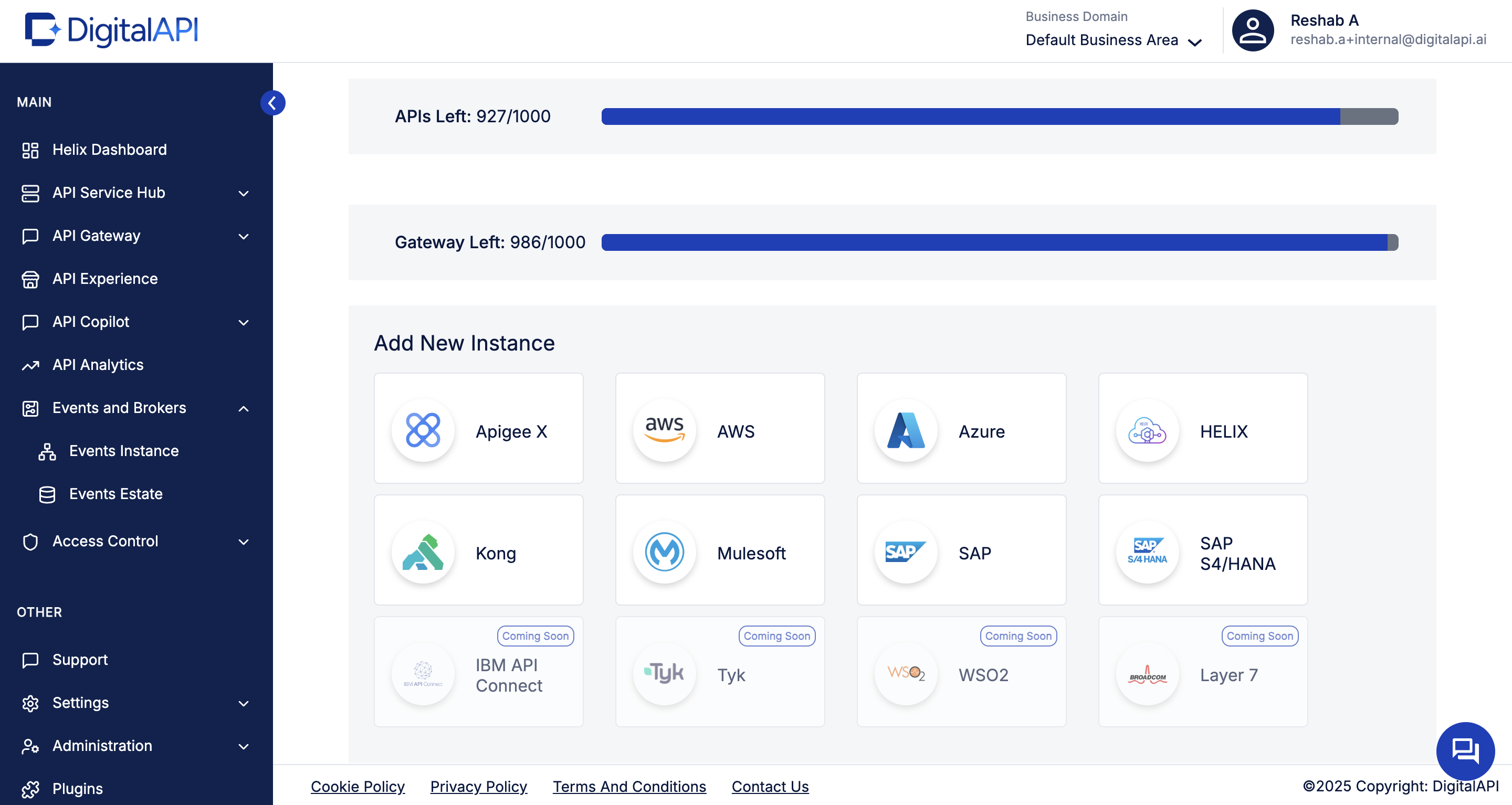
Start by navigating to API Environements and selecting Add New Instance. This screen lets you onboard any gateway into DigitalAPI, including Apigee, Azure, AWS, MuleSoft, and in this case, Kong. Simply click the Kong tile to begin the setup. This establishes the connection that allows DigitalAPI to automatically discover and catalog all your Kong-managed APIs.
2. Configure and authenticate your Kong gateway
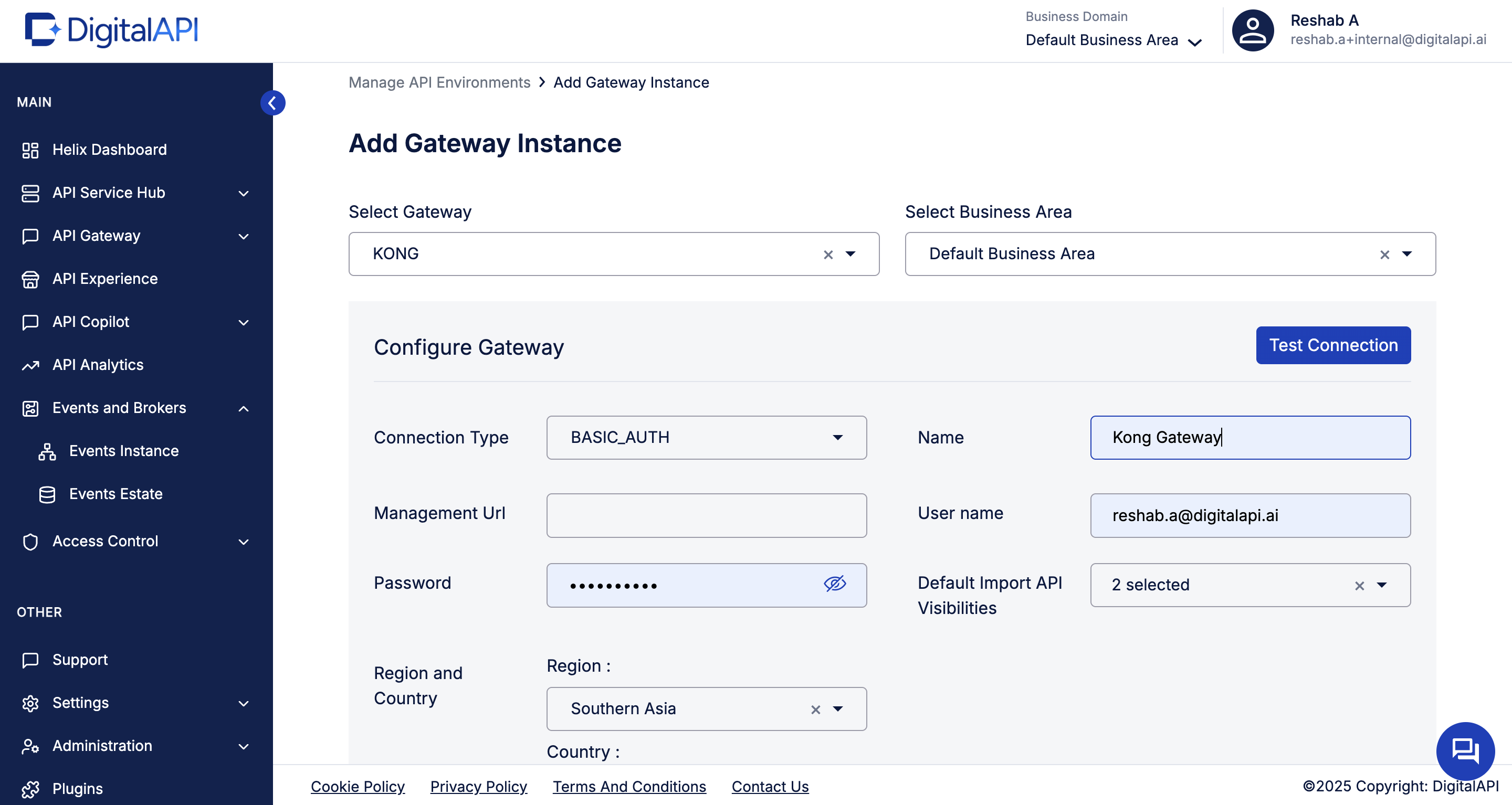
After selecting Kong, enter the details needed for DigitalAPI to connect securely to your control plane. Provide the connection type, management URL, and credentials, then assign a name and business area for easy identification. Once filled in, click Test Connection to validate access. This step ensures DigitalAPI can safely read your Kong services and routes before cataloging them.
3. Import APIs from your Kong gateway instance
Once your Kong instance is connected, DigitalAPI lets you import all available services and routes with a single click. Simply open the added Kong environment and hit Import APIs. Arelio automatically scans your Kong gateway, discovers every API, and brings them into the unified API Estate. This removes all manual effort and ensures your catalog reflects the real, deployed state of your Kong APIs.
4. View all imported Kong APIs in the API estate
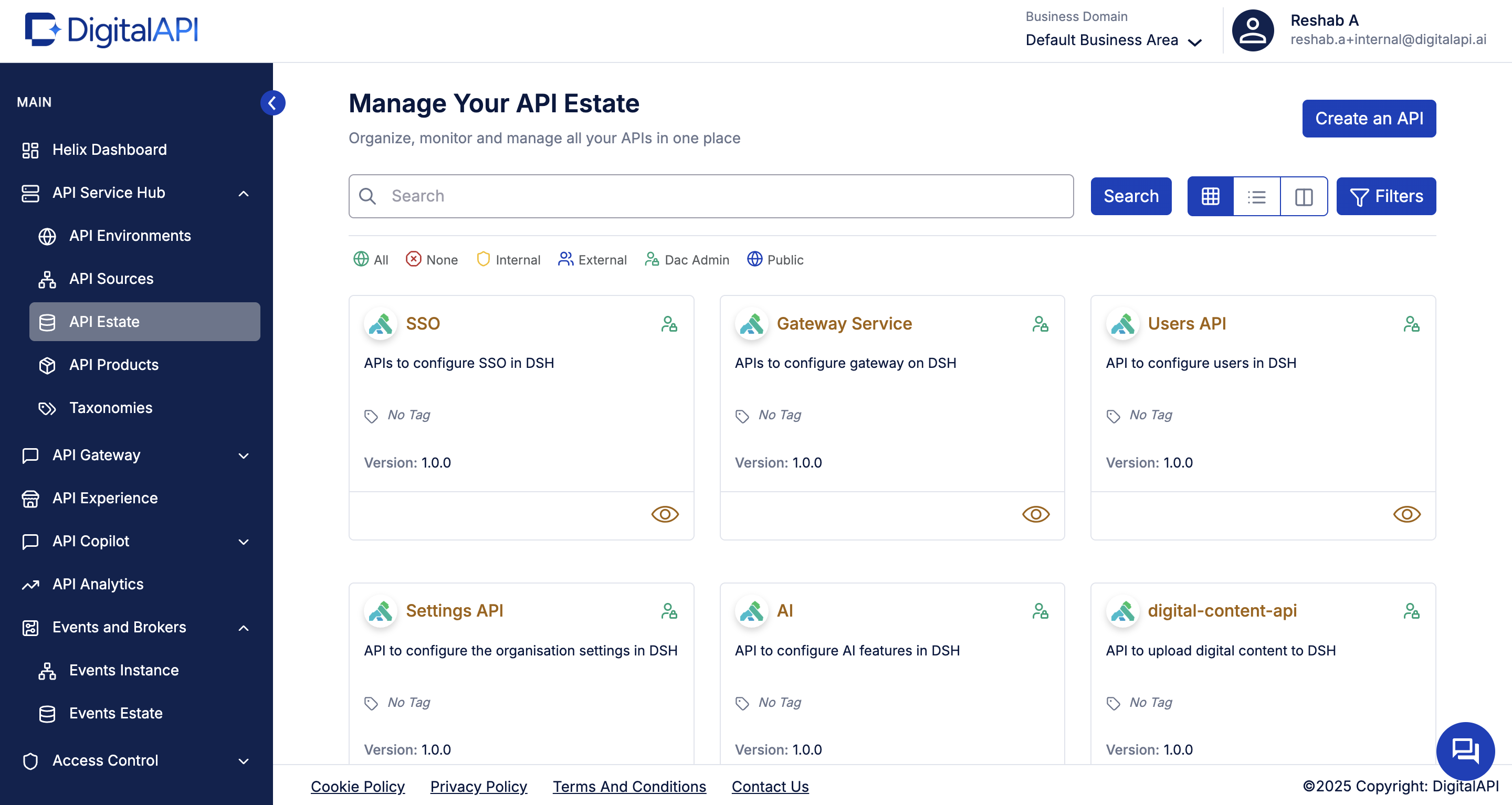
After the import completes, every API discovered from your Kong gateway appears inside the API Estate. This is your unified inventory, showing names, versions, visibility, and metadata in a clean, searchable layout. From here, you can enrich each Kong API with tags, domains, owners, and documentation. This transforms raw gateway services into a structured, human-friendly catalog ready for consumption across teams.
5. Bring in APIs from other sources
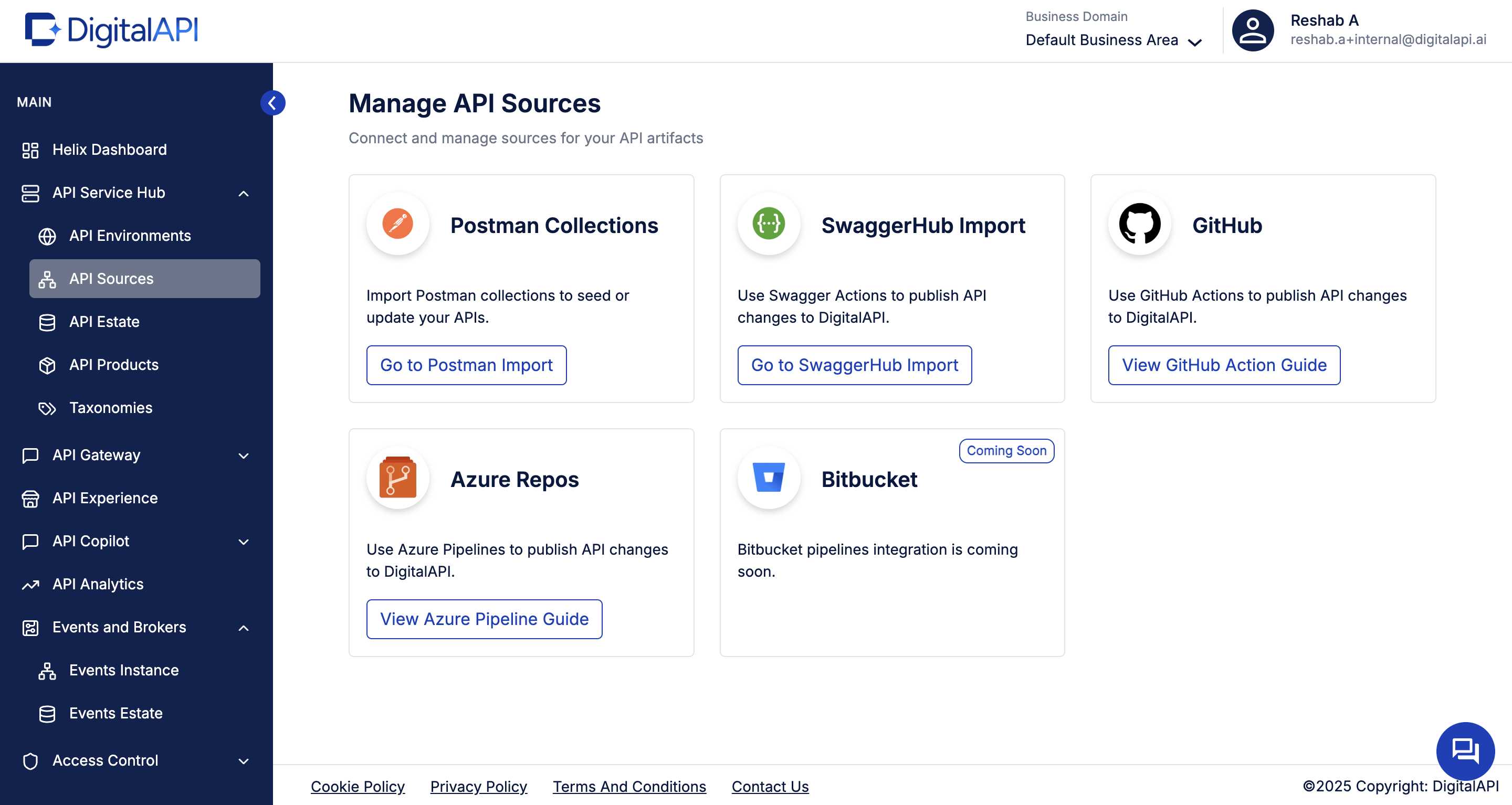
Beyond your Kong gateway, DigitalAPI lets you enrich your catalog with assets from Postman, SwaggerHub, GitHub, Azure Repos, and more. This means you can sync specs, collections, and documentation directly from the tools your teams already use. By combining gateway imports with source integrations, you create a complete, always-up-to-date catalog, no matter where your API artifacts live.
What you unlock by cataloging Kong APIs in DigitalAPI?
Once your Kong APIs are cataloged in DigitalAPI’s developer portal, you get a self-serve, fully customizable branded developer portal built to offer a great developer experience for both internal teams, external developers, customers, partners, and AI agents.
Instead of forcing teams to stitch together a docs tool, a key-management spreadsheet, a sandbox, a ticket queue, and a finance handoff, the portal connects discovery, testing, access, subscriptions, and analytics in one place.
DigitalAPI's Developer Portal handles the entire developer journey out of the box and can be up and running in 3 days. It's built agent-ready from day one, so AI agents consume your APIs through the same governance and audit trail as human developers.
Key features of DigitalAPI's Developer Portal
- Unified API catalog and search: Get a searchable registry of all available APIs in your organization in one searchable catalog, spread across multiple gateways, teams, repositories, and environments, with role-based visibility per audience.
- AI-powered search and API-GPT: Developers and AI agents find the right API by use case, name, data type, or plain English query. The same natural-language layer serves human developers and AI agents, which matters as agent traffic grows.
- Interactive API explorer and sandboxing: An interactive sandbox inside the portal with pre-filled auth tokens, saved history, and shareable examples. Collapses the gap from "discovered the API" to "made the first call" from days to minutes.
- Self-serve onboarding and subscription management: External developers sign up, accept terms, pick a tier, and get a key. Internal engineers request access and get routed to the API owner. Plan tiers, quotas, key rotation (90 or 120-day, per-user), and audit trails handle the full lifecycle.
- Usage analytics and visibility: Consumer dashboards show what's being called, by whom, and how often. Account managers see partner usage and expiry; internal teams see reuse and dependency maps.
- Monetization ready: Native billing for tiered subscriptions, pay-per-use, and overages, with usage data flowing directly into Stripe, NetSuite, or QuickBooks. Revenue recognition is audit-ready out of the box. Turns external APIs from a support cost into a revenue line without standing up a separate billing stack.
- Comprehensive SDKs: Auto-generated, downloadable code kits in Python, Java, JavaScript, Go, and .NET, distributed via NPM, Maven, and the package managers developers already use. One-click global language switching changes the programming language of every code snippet across the portal, so developers can integrate in their stack of choice.
- Governance and RBAC: Role-based access control with custom roles for internal engineers, external partners, and AI agents under one access model. IP allowlisting, scoped credentials, and immutable audit logs export to your SIEM, so every audience operates under the same compliant policies.
- Community and support: Integrated changelogs, FAQ sections, an embedded chatbot, and Salesforce-routed support ticketing keep developers informed and engaged. A built-in CMS lets a non-developer team publish guides, tutorials, and announcements without engineering.
- Automated, high-quality documentation and key management: Docs generate from your OpenAPI specs and stay current as APIs change. Keys provision on approval, rotate on policy, notify before expiry. Ends the cycle of stale docs and surprise key expirations.
- White-label branding without engineering: Custom domain, your colors, typography, and logos. A drag-and-drop theme editor and built-in CMS let a product or partner team publish updates without an engineering ticket. New tenant portals are provisioned in minutes.
- Agent and MCP ready: Every API auto-generates an MCP tool definition from its OpenAPI spec. Agents authenticate via OAuth M2M with scoped access and per-agent rate limits. One catalog, one governance model, one audit trail across human developers, partners, and AI agents.
FAQs
1. How is DigitalAPI different from Kong’s own Service Catalog and Dev Portal?
Kong’s Service Catalog and Dev Portal are excellent within the Kong ecosystem; they document and expose services running on Kong runtimes and integrated sources. DigitalAPI sits above the runtime layer: it unifies Kong APIs with APIs from other gateways and sources, provides a single portal for all consumers, and adds cross-gateway governance, AI-powered discovery, and product-style packaging.
2. Do we need to change anything in our Kong gateway configuration?
You’ll give DigitalAPI read access to your Kong control plane so it can discover services and routes. Kong still handles all traffic, routing, and enforcement. DigitalAPI focuses on catalog, documentation, governance, and self-serve access. In other words, Kong continues to handle the heavy lifting in production; DigitalAPI adds a unified, human-friendly, and AI-friendly layer on top.
3. Can we mix Kong APIs with other gateways in the same catalog?
Yes. DigitalAPI is designed for multi-gateway estates from day one. You can import Kong APIs alongside Azure API Management, Apigee, MuleSoft, AWS API Gateway, and specs from Git or SwaggerHub all appearing in the same API estate. Developers and partners see one consistent catalog and portal without needing to know which gateway any individual API runs on.
4. How does this help with AI agents and future API use cases?
AI agents need a structured, machine-readable catalog to discover and call APIs reliably. By cataloging Kong APIs in DigitalAPI with clean metadata, specs, and domain tags, you build the foundation for MCP-compatible, governed agent-to-API workflows. Kong's MCP Registry covers Kong-connected services only DigitalAPI extends agent-accessible APIs to every gateway in your estate.
5. What is shadow API discovery, and why does it matter for Kong users?
Shadow APIs are services running in production that are not documented, not owned, and not visible in any catalog. For Kong users, shadow APIs typically come from non-Kong gateways, legacy backends, or services deployed without going through the gateway. DigitalAPI surfaces them by scanning every connected gateway and source simultaneously, making invisible APIs visible before they become a security liability.
6. Do I need to replace Kong to use DigitalAPI?
No. DigitalAPI sits above the gateway layer Kong continues handling traffic, routing, policy enforcement, and security. DigitalAPI connects via read-only control plane access and adds a unified catalog, developer portal, and governance layer on top. You keep everything Kong does well and gain a cross-gateway view that Kong's native catalog was not designed to provide.
Rajanish GJ is Chief Technology Officer at DigitalAPI, the multi-gateway API management platform that helps large enterprises consolidate API discovery, governance, monetization, and AI agent enablement across heterogeneous gateway environments, including Apigee, AWS API Gateway, Azure API Management, Kong, and MuleSoft.
Rajanish brings 20+ years of engineering leadership to the role. He spent formative years at Apigee, the API management platform now part of Google Cloud and widely regarded as the category’s foundational product, and at Google itself, where he worked on developer-facing infrastructure at scale. That operator background informs DigitalAPI’s architectural bets around gateway abstraction, MCP-ready APIs, and agent-native developer experience.
He writes regularly on API architecture, developer infrastructure, and AI-native API management, with particular focus on how engineering teams can future-proof their API platforms for the agent era.

One email a fortnight. Worth opening.
A short digest of what we're writing, what we're learning from customers, and the handful of links you'd actually want from us. No tracking pixels.

.avif)
