











API developer portal: definition, features, and examples (2026)
An API developer portal centralises everything developers need to consume your APIs. Explore the definition, 4 portal types, 8 core features, real-world examples, and how to choose the right platform.

API developer portal help developers discover, integrate, and work with APIs faster by centralising documentation, authentication keys, testing sandboxes, and support resources in one place.
TLDR;
1. An API developer portal is a self-serve hub where developers discover, test, and connect to your APIs without emailing your team.
2. Without one, API adoption stalls. With one, time-to-first-call drops from days to minutes.
3. There are four portal types: internal, external, partner, and hybrid. Each serves a different audience.
4. Ten features separate a working portal from a broken one: catalogue, interactive docs, sandbox, self-serve keys, RBAC, analytics, versioning, white-label branding, developer onboarding guides, and AI and MCP readiness.
5. Build from scratch: 6 to 18 months. Open source: 4 to 8 weeks. Managed platform: 3 days.
See DigitalAPI's API developer portal in action [Explore the product]
Your API is built. So why aren't developers using it?
Here is what actually happens at most API-first companies.
The engineering team builds a solid API. The gateway is configured. The documentation exists somewhere in Confluence, or a shared Google Doc, or a Notion page that three people have edit access to. A partner emails asking how to get started. Someone on your team manually creates a sandbox key, sends it over Slack, and forwards a PDF of the docs.
Two weeks later, the partner emails again. A different endpoint. A different person responds. Another key. Another email chain.
That is not an API programme. That is a support queue with an API attached to it.
The API management market is valued at $6.89 billion - not because building APIs is hard, but because getting developers to successfully use those APIs is hard. The organisations winning on developer adoption have one thing others don't: a self-serve portal that removes every manual step between a developer arriving and a developer integrating.
That is what this guide covers. What an API developer portal actually is, how it works, what it must include, and how to choose the right one for your organisation.
What is an API developer portal?
An API developer portal is a centralised, web-based platform that gives developers self-serve access to everything they need to discover, test, and integrate your APIs without contacting your engineering or product team. It serves as a single source of truth for API documentation, sandbox environments, authentication credentials, usage analytics, and onboarding guides, enabling both internal developers and external partners to integrate independently and at scale.
Note: An API developer portal is not the same as API documentation. Documentation is one component of a portal. A full developer portal also includes a sandbox environment, self-serve key management, usage analytics, and access controls, all in a single self-serve interface.
Unlike a basic documentation site, a developer portal is an active product experience. It automates the onboarding journey, enforces access controls, and gives your API programme the visibility and governance it needs to scale across teams and business units. Documentation is a product brochure. A developer portal is the actual shop.
What does an API developer portal do?
A developer portal does four things for your API programme: it makes APIs discoverable, understandable, testable, and consumable, all without engineering intervention.
Without a portal, every developer integration requires manual onboarding: documentation sent over email, sandbox credentials shared via Slack, API keys created by an engineer, and usage tracked in a spreadsheet. A developer portal automates each of these steps into a self-serve experience that scales as your API programme grows.
Teams that deploy developer portals typically report:
- Faster developer onboarding from days to hours for a first successful API call
- Reduced support load through self-serve documentation that deflects 40 to 60 per cent of integration queries
- Higher API adoption because developers who test before committing are more likely to reach production
- Greater API governance because a centralised portal surfaces usage data, flags undocumented APIs, and identifies deprecated endpoints across all teams
API developer portal vs API gateway: what's the difference?
People confuse these constantly. Here is the one-line version: gateway = infrastructure. Portal = experience.
Your API gateway sits at the infrastructure layer. It handles traffic routing, rate limiting, authentication enforcement, and security policy between your backend services and the outside world. Developers do not interact with it directly.
Your API developer portal sits at the experience layer. It is what developers actually see, use, and judge your API programme by. It surfaces documentation, provides sandbox access, manages subscriptions, and tracks usage.
Important: An API gateway portal (the developer interface built into a single gateway like Kong Konnect or Azure APIM) only surfaces APIs running on that specific gateway. If your organisation runs APIs across more than one gateway, a gateway-native portal leaves most of your API estate invisible to developers.
For a full breakdown of API gateway capabilities, see our API gateway guide.
Types of API developer portals
Not every portal serves the same audience. The type you deploy depends on who needs access to your APIs and what level of exposure is appropriate.
Internal developer portal
An internal dev portal serves your own engineering teams. The problem it solves is API sprawl: when APIs exist across multiple teams and gateways, but no one outside the team that built them knows they exist. Developers rebuild integrations that already exist. Platform teams spend hours answering which version is current.
An internal portal gives every engineer in your organisation a single, searchable catalogue of every API available: what it does, which version is live, who owns it, and how to call it.
For a deeper guide to internal portals, see internal API developer portals.
External developer portal
An external developer portal serves third-party developers, partners, customers, and ISVs who need to consume your APIs to build their own products. This is the front door of your API programme and the type with the most direct impact on API adoption metrics.
Most teams get this wrong. They treat it as a documentation problem. It is not. It is an onboarding conversion problem. A developer who lands on your external portal is deciding whether your API is worth integrating. Everything about the first ten minutes determines whether they continue or leave.
Tip: The benchmark for your external portal is time-to-first-call: the time between a developer registering and making their first successful API call. Stripe has this down to under four minutes. That is the bar.
Partner developer portal
A partner portal is a restricted version of an external portal, gated by commercial agreements. Partners at different tiers see different API products, pricing structures, and documentation depth. Common in fintech, insurance, and enterprise SaaS where API access is commercially segmented.
For a deeper guide to partner API programmes, see partner APIs and building your API ecosystem.
Hybrid developer portal
A hybrid portal serves all three audiences in a single platform with role-based access control segmentation. Internal engineers see the full catalogue. External developers see the public API surface. Partners see their specific tier. Most enterprise API programmes with three or more years of growth end up here.
The 10 features every API developer portal must have
The features that define a high-performing developer portal map closely to the DX Core 4 framework, the industry standard for measuring developer experience quality. A portal built on these principles reduces cognitive load, improves time-to-first-call, and supports the DORA metrics that engineering leaders track. Below are the ten core capabilities every portal must include.
1. Unified API catalogue
A searchable index of every API your organisation publishes across all teams and gateways. Without a catalogue, discovery depends on word-of-mouth. In organisations running 20 or more APIs, developers regularly build integrations that already exist because there is no single place to look.
2. Interactive documentation
Static documentation that cannot be tested is a conversion killer. Interactive documentation lets developers make live API calls directly in the browser, using their own credentials against a sandbox environment. Documentation generated automatically from your OpenAPI specification stays accurate when the API changes. Documentation written manually always drifts, and drifted docs are the leading cause of developer support tickets.
For a complete guide to structuring API documentation, see how to document an API.
3. Sandbox environment
A sandbox lets developers test authentication flows, endpoint responses, and error handling with synthetic data before touching production.
Important: Your sandbox should use real API behaviour with synthetic data, not hardcoded mock responses. The OWASP API Security Top 10 specifically flags inadequate sandbox isolation as a security risk in partner-facing API programmes. Developers who test against mocks frequently encounter unexpected behaviour in production.
4. Self-serve API key management
Developers request access, generate credentials, set quotas, and rotate keys without contacting your platform team. This is the feature that converts a developer who has read your documentation into a developer who has started building.
For a full breakdown of key management patterns at scale, see our guide to API key management.
5. Authentication and RBAC controls
Enterprise portals need OAuth 2.0 and OpenID Connect for token-based authentication, role-based access control for permission management, SSO integration with your organisation's identity provider, and SCIM provisioning for automated user lifecycle management.
Important: SSO, SCIM, and RBAC are not optional for regulated industries. Banking, insurance, and healthcare require these as baseline procurement requirements. If your portal platform does not include them natively, you are building them yourself.
For a deeper look at RBAC in developer portals, see API developer portal for better RBAC.
6. Developer-facing usage analytics
Not just admin dashboards. Developers themselves should see their own call volume, latency, error rates, and quota consumption. DORA research shows developer teams with real-time API usage feedback ship integrations three times faster than teams working from static documentation alone.
7. Versioning and changelog management
Every breaking API change is a potential disruption for every developer who has already built against it. Versioning features surface deprecation timelines, migration guides, and changelog entries directly in the portal, not buried in a release notes page no one visits.
For a detailed guide on versioning strategy and lifecycle management, see API lifecycle and versioning for external consumers.
8. White-label branding
Your external portal should look and feel like your product, not like a third-party tool. White-label capability means full control over domain, design, typography, and navigation. No vendor branding visible to your developers or partners anywhere.
For enterprise-grade portal requirements, see enterprise API developer portal requirements and best practices.
9. Developer onboarding and getting started guides
Interactive documentation tells developers what your API does. Onboarding guides tell them how to use it on day one.
A well-built portal includes a dedicated getting started path a short, linear sequence that takes a developer from registration to first successful API call in under ten minutes. This means a language-specific quick-start guide, inline code samples in at least three languages, and a clear sequence: authenticate, make a call, read the response.
Portals that separate onboarding from reference documentation consistently outperform those that treat them as the same thing. Developers who complete a structured getting started flow convert to active integration at significantly higher rates than those who land directly on an API reference.
10. AI and MCP readiness
In 2026, your API portal serves two audiences: human developers and AI agents. LLMs, copilots, and CI/CD bots now crawl API documentation directly to generate integration code, answer technical questions, and build workflows without a human in the loop.
A portal built for this environment requires three things. Your OpenAPI specification must be available as a machine-readable artifact at a stable, public URL. An llms.txt file at your portal root gives AI tools a structured summary of your API surface. And Model Context Protocol (MCP) server registration lets AI coding agents discover and invoke your APIs as native tools, not just text references.
Portals that do not account for agent-based consumption are already losing a growing share of API discovery traffic to competitors that do.
How an API developer portal works: architecture overview
A developer portal has two layers. Most procurement conversations only talk about one.
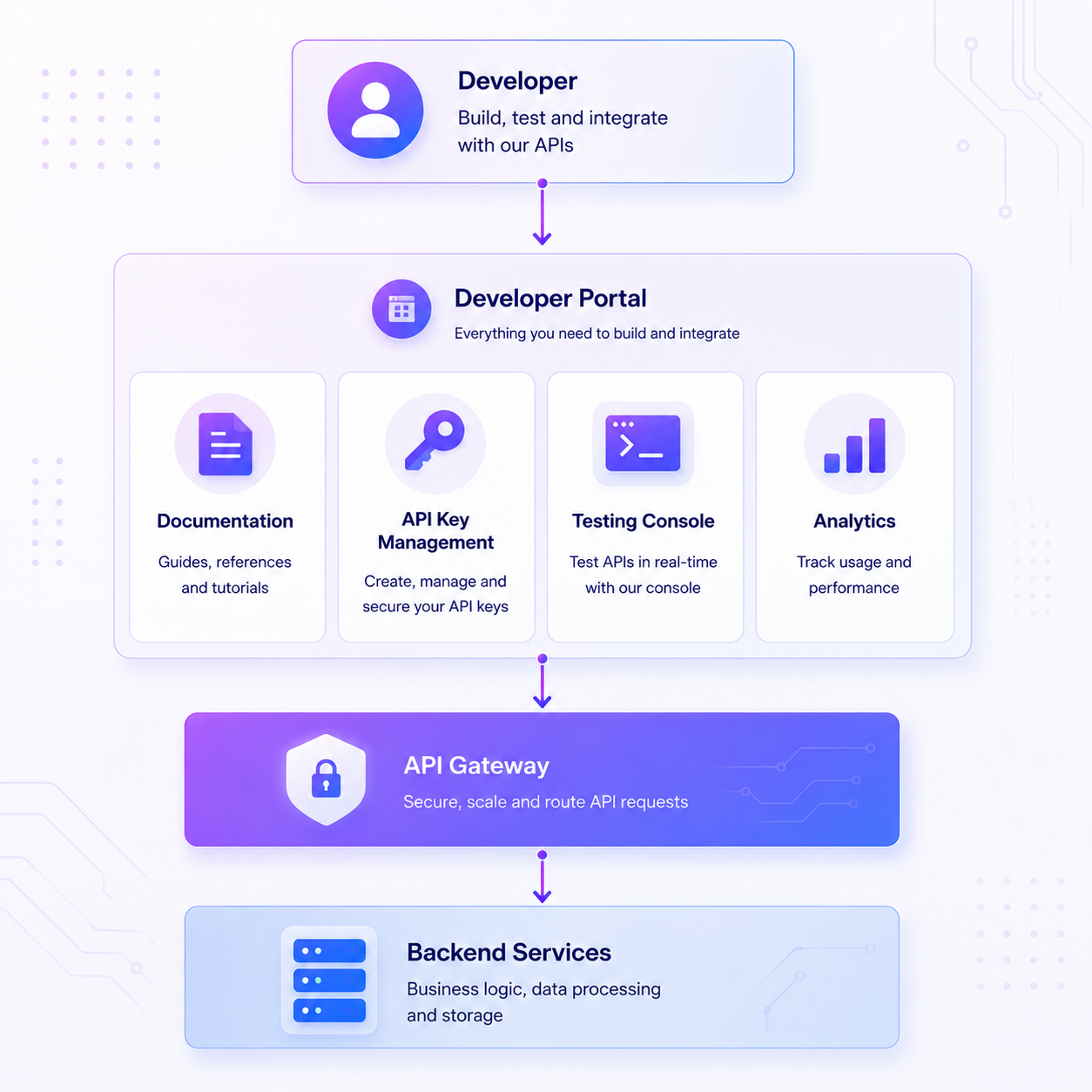
Experience layer: what developers see
- API catalogue interface: searchable, filterable by product, team, or business function
- Documentation renderer: renders OpenAPI specs, markdown, and code samples interactively
- Test console: live API calls against sandbox or production endpoints, in the browser
- Subscription and key management UI: self-serve access request, credential generation, quota management
- Analytics dashboard: developer-facing view of call volumes, error rates, and latency
Data layer: what powers it
- Gateway integrations: connections to Kong, Apigee, AWS, Azure, APISIX that sync API metadata automatically
- API specifications: OpenAPI, AsyncAPI, or GraphQL schemas defining each API's structure
- Identity and access data: SSO configurations, RBAC roles, SCIM-provisioned groups
- Usage and analytics data: call logs, error events, quota consumption
Note: Gateway-native portals have a fundamental limitation. If your organisation runs APIs on multiple gateways, a gateway-native portal cannot aggregate them into a unified catalogue. A standalone API developer portal sits above the data layer of all gateways simultaneously.
How to build an API developer portal: three approaches
Building a developer portal is not a single decision it is a choice between three fundamentally different approaches, each with a different timeline, cost profile, and maintenance commitment.
Build from scratch
A custom-built portal gives your team complete control over every design, integration, and workflow decision. It is the right choice when your requirements are genuinely unique for example, a deeply regulated industry with custom authentication flows that no off-the-shelf platform supports.
The realistic timeline is six to eighteen months from first sprint to production launch. You will need a dedicated frontend engineering team, ongoing DevOps resource to maintain the portal infrastructure, and a separate effort to build and maintain gateway integrations for every API source. Total cost of ownership is high and rises over time as API volumes grow and gateway configurations change.
Choose this path only if your platform engineering team has the capacity to own the portal as a permanent product not a one-time project.
Open-source framework (Backstage)
Backstage, maintained by Spotify and the CNCF, is the most widely adopted open-source internal developer portal framework. It ships with a plugin ecosystem that covers basic API cataloguing, service ownership, and documentation.
The tradeoff is significant. Getting Backstage to a usable state takes four to eight weeks for a team with Kubernetes experience. Keeping it production-ready requires continuous plugin maintenance, version upgrades, and custom integration work for every gateway in your stack. Organisations running Backstage at scale typically employ one to two full-time platform engineers dedicated to portal maintenance.
Backstage suits teams with strong platform engineering capacity who need maximum flexibility and are comfortable with the ongoing maintenance commitment.
Managed SaaS platform
A managed SaaS portal platform handles infrastructure, gateway integrations, documentation rendering, key management, and analytics out of the box. Your team configures and customises rather than builds and maintains.
The timeline to production drops to three to fourteen days. Gateway integrations with Kong, Apigee, AWS, Azure, MuleSoft, and APISIX are available without custom code. Security compliance SOC 2, GDPR, SAML/SSO ships as a standard capability rather than an implementation project.
This is the correct path for organisations that need a production-ready, fully branded portal quickly, without diverting engineering resource away from the APIs themselves.
Want the full step-by-step build guide?
We have covered every approach in detail architecture decisions, tooling choices, common mistakes, and a six-step implementation checklist.
Read the complete guide to building an API developer portal →
How to choose the best API developer portal
Three questions eliminate eighty per cent of platforms before you spend time on demos.
Question 1: How many API gateways are you running?
If your organisation runs APIs across more than one gateway, you need a portal that can aggregate from all of them. Gateway-native portals cannot do this without custom integration work. Standalone platforms aggregate across all gateways out of the box. Most enterprise organisations discover this constraint after they have already deployed a gateway-native portal.
Question 2: Do you need to monetise API access?
Not every portal platform supports subscription management, access tiers, and usage-based billing. If API monetisation is or will become a revenue stream, verify this capability before signing a contract. For a full guide to API monetisation strategy, see API monetisation best practices.
Question 3: Build, open source, or buy?
- Build: 6 to 18 months, 4 to 6 engineers, 20 to 30 per cent annual maintenance overhead. Right for fewer than 5 per cent of API programmes.
- Open source (Backstage, Gravitee): 4 to 8 weeks to usable, 3 to 6 months to enterprise-grade. Right for organisations with strong platform engineering teams.
- Managed SaaS: 3 to 14 days to production-ready. Right if time-to-value matters, multi-gateway support is required, or regulated compliance is a procurement requirement.
For a full build vs buy comparison, see build vs buy: API developer portals.
Which type of API developer portal platform is right for your team?
Managed platforms such as DigitalAPI suit organisations that need production-ready portal without a dedicated engineering team. Documentation-first tools such as Redocly and Mintlify suit teams prioritising visual polish over self-serve infrastructure. Open-source frameworks such as Backstage suit platform engineering teams who need maximum flexibility and can absorb the maintenance overhead.
For a detailed side-by-side breakdown including pricing, see our best API developer portal platforms guide. For a specific comparison with Backstage, see DigitalAPI vs Backstage.
What great API developer portals look like in practice
The best way to understand what a developer portal should do is to see how market-leading organisations have built theirs. Each example below highlights one specific design decision and the outcome it was built to achieve.
Stripe: Every friction point between registration and first API call has been removed. Instant test keys, no approval needed. Interactive code samples in eight languages. A test console that works without an account. Developers go from the homepage to a working payment in under four minutes.
The lesson: time-to-first-call is the only metric that matters. Everything else is secondary.
Twilio: Built around developer intent, not internal product taxonomy. A developer who arrives to send a text message reaches the right API, quickstart, and working code example in one step.
The lesson: design portal navigation around what users want to accomplish, not how your APIs are organised internally.
HSBC open banking: Operates under PSD2 compliance, TPP registration, mTLS, and mandatory sandbox isolation. The quality benchmark here is security confidence: a developer completing onboarding knows exactly how to authenticate and test realistically before going near production.
The lesson: for regulated industries, compliance documentation is first-class content, not a footnote.
Portals in 2026: what AI agents changed
Your developer portal now serves two audiences: human developers and AI coding agents. Claude, Copilot, Cursor, and autonomous LLM workflows parse your API documentation directly, not in a browser, but programmatically. If your portal cannot serve machine-readable specifications, it is already failing a growing share of your developer audience.
Five-point AI readiness check
- OpenAPI 3.1 spec at a stable public URL (/openapi.json)
- llms.txt in the root directory describing your APIs in plain language
- Markdown or plain-text export for all documentation pages
- MCP-compatible endpoints configured or on your roadmap
- Audit logging that separates agent traffic from human sessions
For a full guide to MCP architecture and how to expose your APIs to AI agents, see MCP gateway: the missing layer for agent-ready APIs.
Best practices to follow after your portal goes live
Launching your portal is the starting point, not the finish line. These four practices separate portals that grow from portals that stagnate.
Tip: Treat your developer portal as a product with its own roadmap, not a project with a launch date. Portals with the highest developer adoption rates are updated on a continuous sprint cycle, not maintained reactively when something breaks.
1. Measure time-to-first-successful-call every month
Set a baseline: how long does it take a new developer to arrive at your portal and make their first successful API call? For well-designed portals with strong documentation and a live test console, this should be under ten minutes. Track it monthly. Any increase signals that documentation has drifted, onboarding has added friction, or a gateway change broke the sandbox.
2. Sync documentation automatically with every API change
The most common reason developers lose trust in a portal is finding documentation that does not match the API's actual behaviour. Configure automatic sync between your gateway's API specification and your portal's documentation layer. Any schema change should trigger a documentation review, not a missed update discovered by a developer months later.
3. Audit your API catalogue for duplication every quarter
API sprawl compounds over time. Review your catalogue quarterly using portal analytics to identify APIs with overlapping functionality, low usage, or no documentation. Consolidating duplicate APIs reduces maintenance overhead and lowers governance risk. For governance frameworks, see API governance best practices.
4. Use support ticket volume as a documentation quality signal
Every developer support ticket about an API is evidence of a documentation gap. Map your top ten support ticket categories monthly to documentation pages. Fix the documentation, not just the ticket. Portals that do this systematically achieve 40 to 60 per cent support ticket deflection within six months of launch.
For more on driving ongoing portal adoption, see how to build a developer portal that drives real adoption and how to reduce API onboarding time.
Frequently asked questions
1. What is an API developer portal?
An API developer portal is a centralised, self-serve platform that gives developers everything they need to discover, test, and integrate your APIs without contacting your engineering team. It combines a searchable API catalogue, interactive documentation, sandbox testing, self-serve credential management, and usage analytics in a single interface. It is the front door of your API programme.
2. What is the difference between an API gateway and a developer portal?
An API gateway handles infrastructure: traffic routing, rate limiting, and authentication enforcement between your backend and the outside world. A developer portal handles experience: what developers see, browse, test against, and use to generate credentials. The gateway enforces the rules. The portal builds the relationship. Both are needed in enterprise API programmes.
3. Is an API portal the same as a developer portal?
Yes. API portal, dev portal, and API developer portal all refer to the same thing: a self-serve platform where developers access your APIs. The meaningful distinction is between a full developer portal (catalogue, sandbox, keys, analytics) and a documentation-only tool, which solves only part of the developer journey and leaves the rest as manual overhead.
4. What should an API developer portal include?
Eight features are non-negotiable: a unified API catalogue, interactive documentation generated from your OpenAPI specification, a sandbox environment with production-like behaviour, self-serve API key management, OAuth 2.0 and RBAC authentication controls, developer-facing usage analytics, versioning and changelog management, and white-label branding. A portal missing any one of these fills the gap with manual engineering processes.
5. Do I need a developer portal for internal APIs?
Yes. Internal portals eliminate tribal knowledge, prevent duplicate development, and give engineers a single searchable catalogue of every API available across all teams and gateways. In organisations running more than twenty APIs, developers regularly rebuild integrations that already exist because no central catalogue exists. An internal developer portal fixes that at the source.
6. How long does it take to build an API developer portal?
Building from scratch takes six to eighteen months with a dedicated engineering team, plus twenty to thirty per cent of that cost annually in maintenance. Open source frameworks take four to eight weeks to a usable state and three to six months to enterprise-grade. Managed platforms deploy in three to fourteen days without ongoing infrastructure overhead.
7. What is the best API developer portal platform?
The right platform depends on three factors: whether you run more than one API gateway, whether you need white-label branding, and whether your industry requires SSO, SCIM, and RBAC compliance. Documentation-first tools suit smaller teams prioritising visual polish over self-serve infrastructure. Managed platforms suit organisations needing gateway aggregation, self-serve keys, and enterprise security without a custom engineering build.
8. Can a developer portal work across multiple API gateways?
Yes, but only if the portal sits above the gateway layer rather than inside a single gateway. Gateway-native portals are limited to APIs running on their own infrastructure. Standalone portals aggregate APIs from Kong, Apigee, AWS, Azure, and APISIX simultaneously, giving developers a single searchable catalogue regardless of which gateway each API runs on.
Dhayalan Subramanian is Associate Director, Product Growth at DigitalAPI, where he leads go-to-market and product growth for the company’s multi-gateway API management platform. His work focuses on helping large enterprises and mid-market cloud companies consolidate APIs across AWS, Azure, Apigee, Kong, MuleSoft, and other gateways into a single control plane for governance, discovery, monetization, and agent consumption.
Dhayalan brings 14+ years of experience across product strategy, enterprise architecture, and engineering leadership. Earlier in his career, he held senior roles at Encora (as Associate Architect and Technical Manager), Mindtree (Technology Lead), Tech Mahindra (Technical Lead), and Primus Analytics, where he designed integration frameworks and delivered enterprise-grade digital platforms for global customers.
At DigitalAPI, he works directly with platform, integration, and developer experience leaders at Fortune 500 organizations to operationalize unified API catalogs, developer portals, and MCP-ready APIs. He writes regularly on API developer experience, API governance, and AI agent architectures.

One email a fortnight. Worth opening.
A short digest of what we're writing, what we're learning from customers, and the handful of links you'd actually want from us. No tracking pixels.

.avif)
